
Introduction: This article introduces two general methods for Zyxel firmware decryption and shares details that need to be recorded during the decryption process.
0x00 Preface
This article will introduce two general methods for Zyxel firmware decryption and record test insights.
0x01 Overview
This article will cover the following content:
Basic Knowledge
Decrypting ZIP Files via Known Plaintext Attack
Obtaining ZIP Encryption Passwords by Tracking Process Parameters
0x02 Basic Knowledge
1. Firmware Download
Firmware download address: https://portal.myzyxel.com/my/firmwares
An account registration is required to download the specified version of the firmware.
2. Common Firmware Types
ATP
USG FLEX
VPN
ZyWALL/USG
Here we take VPN50 5.36(ABHL.0) as an example; after downloading, save it as VPN50_V5.36(ABHL.0).zip
Next, we introduce two methods for firmware decryption
0x03 Decrypting zip files via known-plaintext attack
References: https://attackerkb.com/topics/N3i8dxpFKS/cve-2023-28771/rapid7-analysis
The file contents in VPN50_V5.36(ABHL.0).zip are as follows:
536ABHL0C0.bin
536ABHL0C0.conf
536ABHL0C0.db
536ABHL0C0.pdf
536ABHL0C0.ri
VPN50_V5.36(ABHL.0)C0-foss.pdf
Among these, 536ABHL0C0.bin and 536ABHL0C0.db are encrypted and need to be decrypted
Decryption Conditions:
1. The complete plaintext file and zip file are known
2. The plaintext file needs to be compressed using the same compression algorithm
3. The encryption algorithm is ZipCrypto Store
For VPN50_V5.36(ABHL.0).zip, the 536ABHL0C0.conf file is consistent with the db/etc/zyxel/ftp/conf/system-default.conf file in 536ABHL0C0.bin and the etc/zyxel/ftp/conf/system-default.conf file in 536ABHL0C0.db, which satisfies Condition 1
Regarding Condition 2, it is necessary to determine the compression algorithms of 536ABHL0C0.bin and 536ABHL0C0.db. The reference materials do not cover this part either, so the analysis process is detailed here
Check the compression information of db/etc/zyxel/ftp/conf/system-default.conf in 536ABHL0C0.bin: zipdetails -v 536ABHL0C0.bin
Return Result:
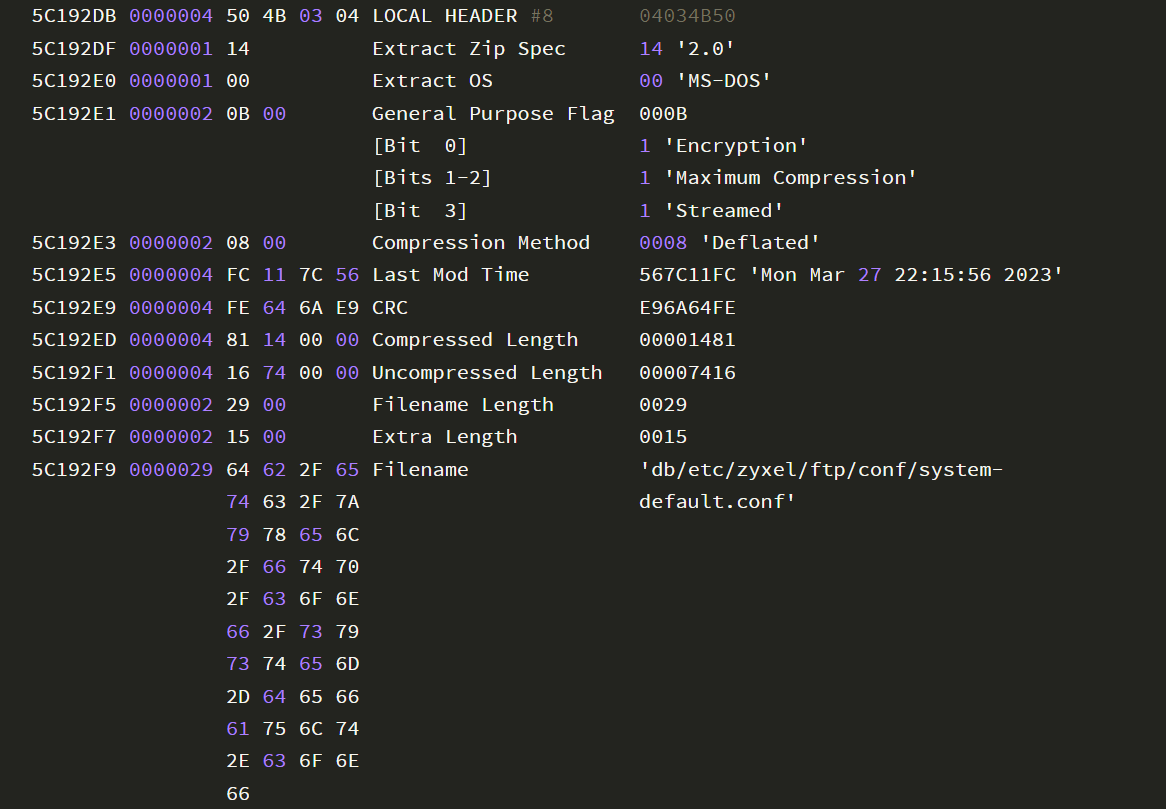
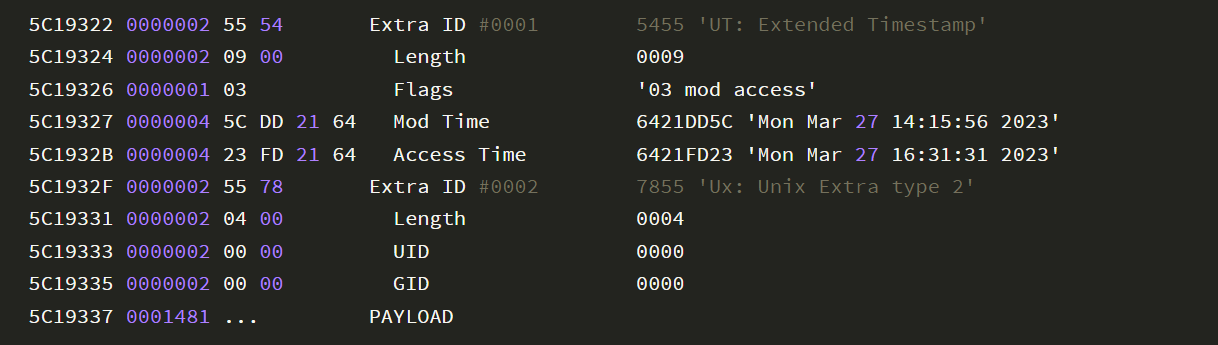 The compression algorithm obtained is as follows:

Therefore, when compressing 536ABHL0C0.conf, the parameter -9 needs to be added to set it to 'compress better', i.e., Maximum Compression
The complete decryption commands are as follows:
(1) Install pkcrack

(2) Decrypt 536ABHL0C0.bin

(3) Decrypt 536ABHL0C0.db

Note that the absolute paths of system-default.conf in 536ABHL0C0.bin and 536ABHL0C0.db are different
0x04 Obtaining zip encryption password by tracking process parameters
Reference: https://security.humanativaspa.it/zyxel-firmware-extraction-and-password-analysis/
Decryption principle: zld_fsextract can be extracted from .ri files, and zld_fsextract can calculate the decompression password based on the file content to decrypt the .bin file
After testing, using zld_fsextract can also unlock .bin files of other firmwares
1. Extract zld_fsextract

Check file type: file zld_fsextract
Return result: zld_fsextract: ELF 32-bit MSB executable, MIPS, N32 MIPS64 rel2 version 1 (SYSV), statically linked, stripped
It indicates that zld_fsextract is of MIPS architecture, so a MIPS environment needs to be set up to run it
2. Set up MIPS environment

3. Monitor process startup

Note:
Need to add parameter -f to track child processes generated by fork calls, add parameter -s 199 to specify the length of the output string per line in the trace result; if parameter -s is not set, the complete decryption password cannot be recorded
Return result example:

Obtain the decryption password GfmirkjRUJla2evWFLtqJoI5a6vfOmDgR/OIl7lFSWrXBm3S7yJTmdaMlV19HGr from it
Note:
This decryption password does not apply to 536ABHL0C0.db
0x05 Summary
This article introduces two general methods for decrypting Zyxel firmware and shares the details that need to be recorded during the decryption process.


