
0x00 Preface
---
This article will further expand the functionality of the open-source code Zimbra_SOAP_API_Manage to implement email export and folder sharing, and share development details.
0x01 Introduction
---
This article will cover the following topics:
- Email Export
- Folder Sharing
- Open-Source Code
0x02 Email Export
---
Zimbra supports exporting all emails from the current mailbox. The operation method through the web interface is as follows:
After logging into the mailbox, navigate to Preferences->Import/Export, as shown in the figure below
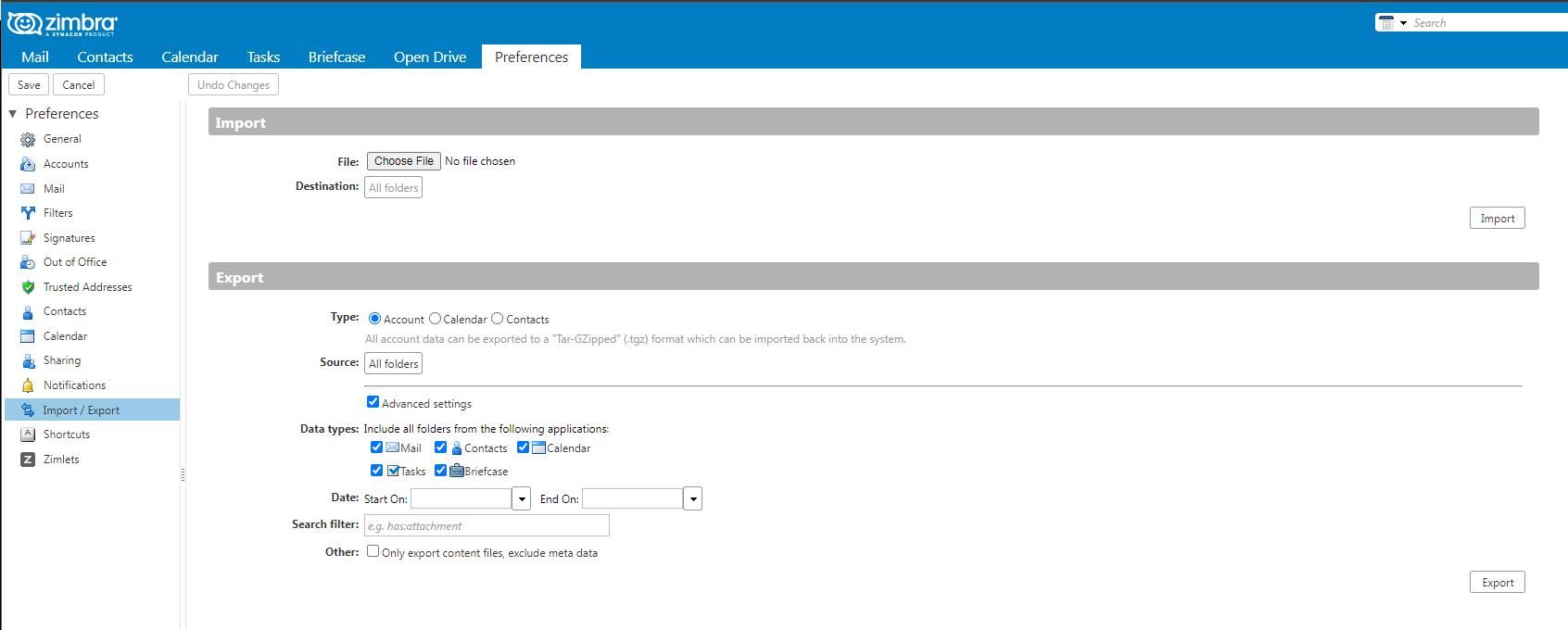
Next, analyze the implementation process through packet capture, then use a program to implement this functionality.
1. Export emails with default configuration
Under default configuration, all emails will be exported and saved as a compressed archive.
Example access URL:
https://192.168.1.1/home/admin%40test.com/?fmt=tgz&filename=All-2022-07-27-181056&emptyname=No+Data+to+Export&charset=UTF-8&callback=ZmImportExportController.exportErrorCallback__export1 |
Parameter analysis:
- admin%40test.com is the mailbox user, which can be replaced with ~
- filename=All-2022-07-27-181056 is the filename saved when records exist. 2022-07-27-181056 corresponds to the time format year-month-day-hourminutesecond. The time includes timezone and requires time difference calculation.
- emptyname=No+Data+to+Export is the filename saved when records are empty.
In program implementation, the format must be consistent with web operations. Code details:
(1) Construct the saved filename
from time import localtime, strftime |
(2) Save file
Use binary write when saving the file
with open(path, 'wb+') as file_object: |
Code example:
def exportmailall_request(uri,token,mailbox): |
2. Add filter conditions to export emails
Under advanced options, you can add filter conditions to export specific emails
Example access URL:
https://192.168.1.1/home/admin%40test.com/?fmt=tgz&start=1658818800000&end=1658991600000&query=content%3Apassword&filename=All-2022-07-27-193148&emptyname=No+Data+to+Export&charset=UTF-8&callback=ZmImportExportController.exportErrorCallback__export1 |
Parameter analysis, the following parameters have been added:
- start=1658818800000 is the start time for filtering, in Unix timestamp format, with no additional time difference calculation
- end=1658991600000 is the end time for filtering, in Unix timestamp format, with no additional time difference calculation
- query=content%3Apassword is the keyword for filtering, used to query emails with the keyword 'password' in the body
For the syntax of filter conditions, refer to: https://wiki.zimbra.com/wiki/Zimbra_Web_Client_Search_Tips
Code implementation details:
(1) Example code for time format conversion
Convert time to seconds:
import datetime, time |
Convert seconds to time:
from datetime import datetime |
Implementation code example:
def exportmail_request(uri,token,mailbox): |
0x03 Folder Sharing
---
1. Process Analysis
Zimbra supports sharing the current mailbox's folders with other users. The operation method through the web interface is as follows:
After logging into the mailbox, select Preferences->Sharing in sequence, as shown in the figure below
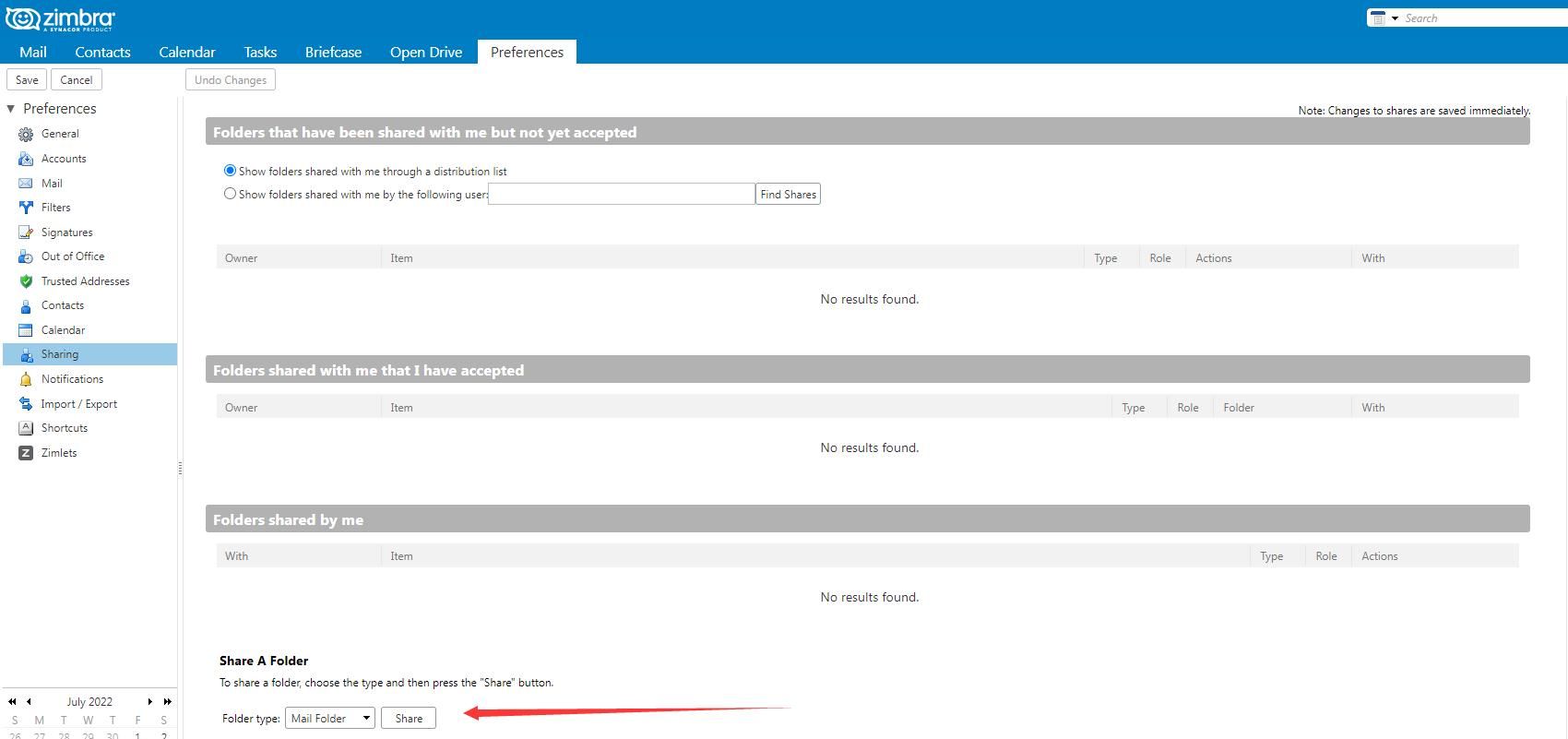
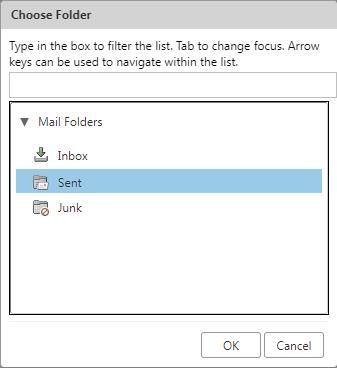
The following three folders can be selected for sharing:
- Inbox
- Sent
- Junk
As shown in the figure below
Set sharing properties as shown in the figure below
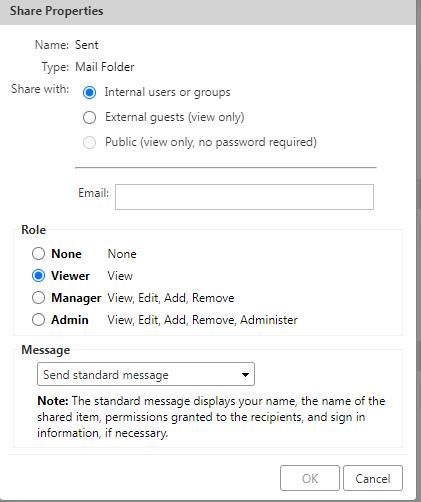
The following settings need to be distinguished:
(1) Role
- Viewer can only view emails
- Manager can modify emails
(2) Message
- Send standard message: After configuration, a confirmation email will be sent to the destination mailbox
- Do not send mail about this share: No confirmation email will be sent
Here, packet capture can be used to analyze the specific values corresponding to each setting
Example packet 1:
Format Analysis:
(1)
id="2" indicates Inbox
Sent corresponds to id="5"
Junk corresponds to id="4"
Through testing, Drafts can also be specified, corresponding to id="6"
(2)
d="[email protected]" indicates the mailbox that can access the shared folder
perm="r" indicates read permission, corresponding to Viewer
Manager corresponds to the configuration perm="rwidx", indicating read, write, insert, and delete permissions
If Send standard message is set, a confirmation email will be sent to the target mailbox (e.g., [email protected]) after configuration. Example data packet format:
Mailbox [email protected] will receive an email to confirm whether to accept folder sharing
2. Code Implementation
(1) Add File Sharing
Need to specify the target mailbox and shared folder
The successful response for adding file sharing returns the zid corresponding to the shared folder
Implementation code example:
def addshare_request(uri,token): |
(2) Send file sharing request
Requires specifying the target mailbox
Code implementation example:
def sendsharenotification_request(uri,token): |
Note: Only after adding a file share can sending a file share request successfully return 200; otherwise, it returns 500 with the message 'invalid request: no matching grant'.
(3) Delete file share
Requires specifying the zid and shared folder corresponding to the target email. The zid can be obtained from the successful response of adding a file share.
Example implementation code:
def removeshare_request(uri,token): |
0x04 Open Source Code
---
New code has been uploaded to GitHub at the following address:
An open-source project
Add the following five features:
- AddShare: Add folder sharing with default permissions rwidx
- ExportMail: Export emails with search criteria, allowing specification of date and keywords
- ExportMailAll: Export all emails
- RemoveShare: Remove folder sharing for the current mailbox
- SendShareNotification: After adding folder sharing, send a confirmation email to the target mailbox
0x05 Summary
---
This article expands the invocation methods of the Zimbra SOAP API, adding five practical features. The implementation methods and ideas can also be tested on XSS vulnerabilities.


