
0x00 Preface
---
The Zimbra SOAP API enables access and modification of Zimbra mail server resources. Zimbra has open-sourced the Python-Zimbra library, implemented in Python, as a reference.
To better understand the development details of the Zimbra SOAP API, I decided not to rely on the Python-Zimbra library. Instead, I referred to the data format in the API documentation and attempted to manually construct data packets to achieve calls to the Zimbra SOAP API.
0x01 Introduction
---
This article will cover the following topics:
- Introduction to the Zimbra SOAP API
- Simple testing with Python-Zimbra
- Development approach for the Zimbra SOAP API framework
- Open-source code
0x02 Introduction to the Zimbra SOAP API
---
The Zimbra SOAP API includes the following namespaces:
- zimbraAccount
- zimbraAdmin
- zimbraAdminExt
- zimbraMail
- zimbraRepl
- zimbraSync
- zimbraVoice
Each namespace corresponds to different operation commands, with the following three commonly used namespaces:
- zimbraAdmin, the management interface for Zimbra mail servers, requiring administrator privileges
- zimbraAccount, operations related to Zimbra users
- zimbraMail, operations related to Zimbra mail
The default open ports for Zimbra mail servers include the following three types:
1. Accessing mail
Default ports are 80 or 443
Corresponding address: uri + "/service/soap"
2. Management Panel
Default port is 7071
Corresponding address: uri+":7071/service/admin/soap"
3. Management Panel -> Access Email
All user emails can be read from the management panel
Default port is 8443
Corresponding address: uri+":8443/mail?adminPreAuth=1"
0x03 Python-Zimbra Simple Test
---
Reference URLs:
https://github.com/Zimbra-Community/python-zimbra
http://zimbra-community.github.io/python-zimbra/docs/
For your own test environment, SSL certificate verification needs to be ignored. Use the following code:
import ssl |
Example code for logging in with username and password:
token = auth.authenticate( |
Example code for logging in with preauth-key:
token = auth.authenticate( |
1. Regular user login
The corresponding address is: uri+"/service/soap"
Example code for obtaining the number of emails in the outbox is as follows:
import pythonzimbra.communication |
The running result is shown in the following figure

2. Administrator Login
The corresponding address is: uri+":7071/service/admin/soap"
The sample code to obtain all email user information is as follows:
import pythonzimbra.communication |
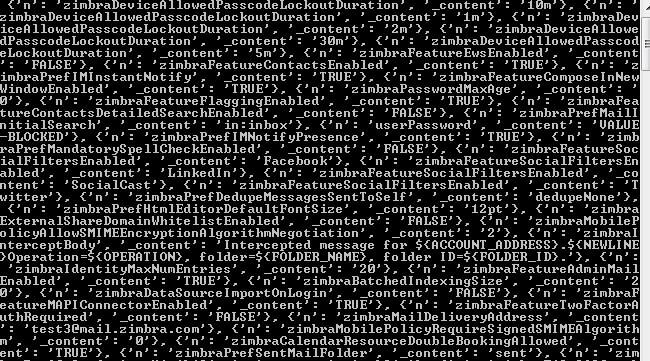
The running result is shown in the figure below
0x04 Implementation of Zimbra SOAP API Framework
---
Reference documentation for Zimbra SOAP API:
https://wiki.zimbra.com/wiki/SOAP_API_Reference_Material_Beginning_with_ZCS_8
https://files.zimbra.com/docs/soap_api/8.8.15/api-reference/index.html
The overall implementation approach is as follows:
- Simulate user login to obtain token
- Use token as credentials for subsequent operations
1. Token Acquisition
(1) Regular user token
Documentation: https://files.zimbra.com/docs/soap_api/8.8.15/api-reference/zimbraAccount/Auth.html
The corresponding namespace is zimbraAccount
The request address is: uri + "/service/soap"
According to the SOAP format in the documentation, it can be implemented with the following Python code:
def auth_request_low(uri, username, password): |
(2) Administrator token
Documentation: https://files.zimbra.com/docs/soap_api/8.8.15/api-reference/zimbraAdmin/Auth.html
The corresponding namespace is zimbraAdmin
The request address is: uri+":7071/service/admin/soap"
According to the SOAP format in the documentation, it can be implemented with the following Python code:
def auth_request_admin(uri,username,password): |
Note: (3) Regular user token -> Administrator token
Vulnerability ID: CVE-2019-9621
By exploiting the flaw in the whitelist check of the ProxyServlet.doProxy() function, requests with uri+"/service/soap" can be proxied to uri+":7071/service/admin/soap", thereby obtaining an administrator token.
Python implementation code is as follows:
def lowtoken_to_admintoken_by_SSRF(uri,username,password): |
2. Command Implementation
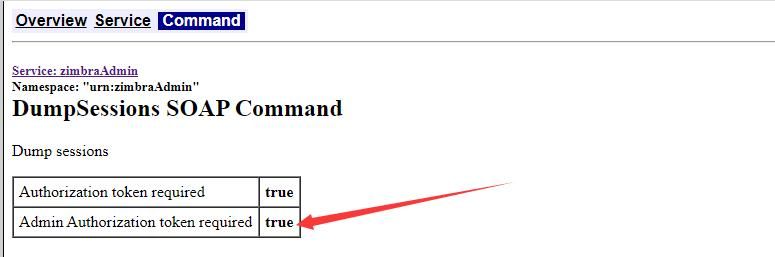
If administrator token is required, the 'Admin Authorization token required' field for each command in the documentation will be marked, as shown in the figure below
Here we select several representative commands for introduction
(1) GetFolder
Documentation: https://files.zimbra.com/docs/soap_api/8.8.15/api-reference/zimbraMail/GetFolder.html
Used to obtain folder attributes
Requires regular user token
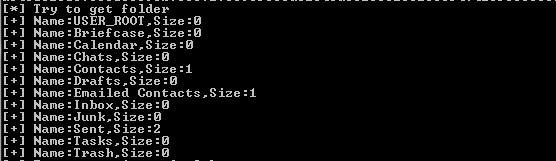
Python code to enumerate email counts under all folders is as follows:
def getfolder_request(uri,token): |
The test results are shown in the figure below
(2)GetMsg
Documentation: https://files.zimbra.com/docs/soap_api/8.8.15/api-reference/zimbraMail/GetMsg.html
Used to read email information
Requires regular user token
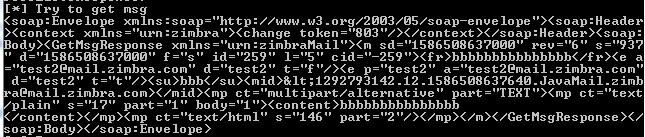
The Python code for viewing a specified email is as follows:
def getmsg_request(uri,token,id): |
These require specifying the Message ID of the email to view, test results as shown in the figure below
(3)GetContacts
Documentation: https://files.zimbra.com/docs/soap_api/8.8.15/api-reference/zimbraMail/GetContacts.html
Used to read contact list
Requires regular user token
Python implementation code is as follows:
def getcontacts_request(uri,token,email): |
Test results are shown in the figure below

(4)GetAllAccounts
Documentation: https://files.zimbra.com/docs/soap_api/8.8.15/api-reference/zimbraAdmin/GetAllAccounts.html
Used to obtain information of all users
Requires administrator token
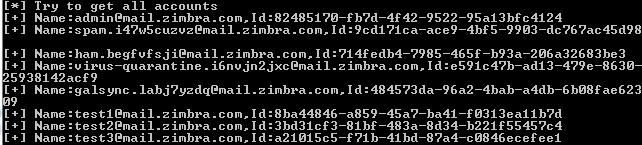
Python implementation code to obtain all user lists and output usernames with corresponding IDs is as follows:
def getallaccounts_request(uri,token): |
Test results are shown in the figure below
(5)GetLDAPEntries
Documentation: https://files.zimbra.com/docs/soap_api/8.8.15/api-reference/zimbraAdmin/GetLDAPEntries.html
Used to retrieve LDAP search results
Requires administrator token
Python code for implementing LDAP query is as follows:
def getldapentries_request(uri,token,query,ldapSearchBase): |
Here we need to first understand the usage of Zimbra OpenLDAP to clarify the format of the parameters query and ldapSearchBase
Test the following commands on the Zimbra server:
1. Obtain the username and password for connecting to the LDAP server:
su zimbra |
As shown in the figure below

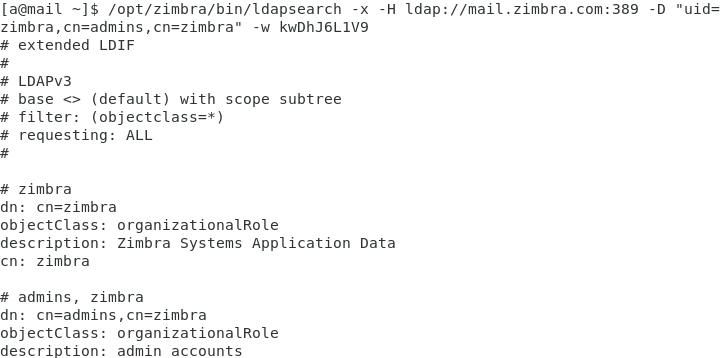
2. Connect to the LDAP server using the obtained username and password, output all results:
/opt/zimbra/bin/ldapsearch -x -H ldap://mail.zimbra.com:389 -D "uid=zimbra,cn=admins,cn=zimbra" -w kwDhJ6L1V9 |
As shown below
3. Add filter conditions to display only the user list:
/opt/zimbra/bin/ldapsearch -x -H ldap://mail.zimbra.com:389 -D "uid=zimbra,cn=admins,cn=zimbra" -w kwDhJ6L1V9 "(&(objectClass=zimbraAccount))" |
Or
/opt/zimbra/bin/ldapsearch -x -H ldap://mail.zimbra.com:389 -D "uid=zimbra,cn=admins,cn=zimbra" -w kwDhJ6L1V9 -b "ou=people,dc=zimbra,dc=com" |
As shown below
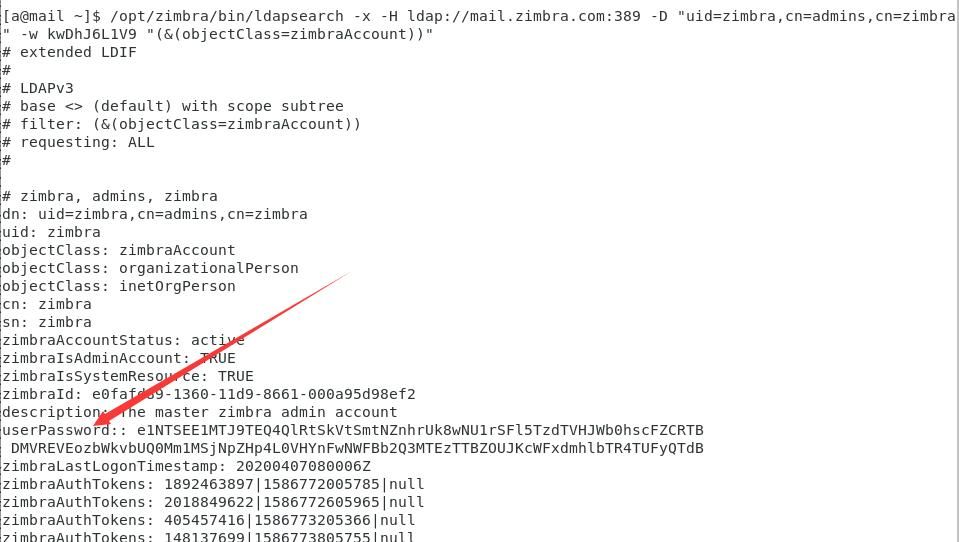
Note that the userPassword field contains the hash of the user's password
4. Add further filter conditions to display only usernames and corresponding hashes:
/opt/zimbra/bin/ldapsearch -x -H ldap://mail.zimbra.com:389 -D "uid=zimbra,cn=admins,cn=zimbra" -w kwDhJ6L1V9 "(&(objectClass=zimbraAccount))" mail userPassword |
As shown below
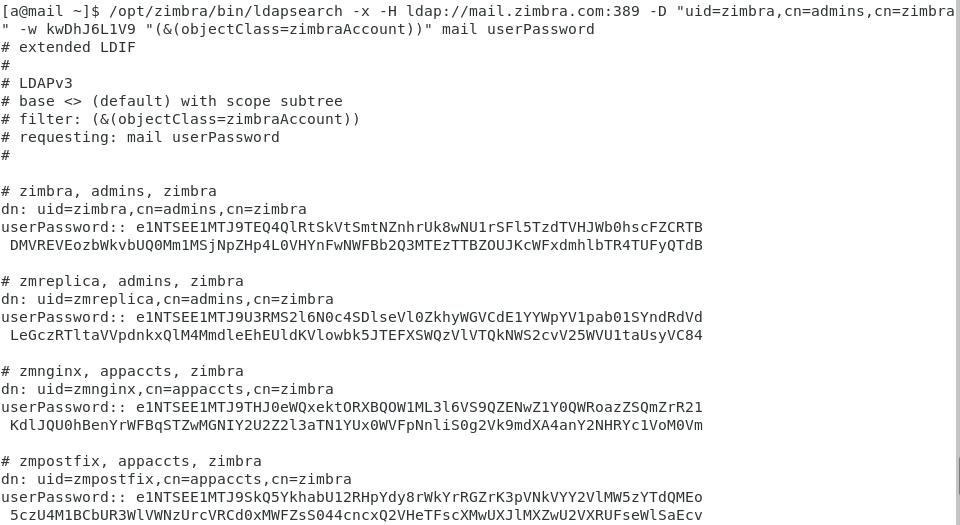
The first 12 bytes of the exported hash are the fixed characters e1NTSEE1MTJ9, which after base64 decoding reveal the content {SSHA512}, followed by the SHA-512 encrypted characters, corresponding to Hash-Mode 1700 in hashcat
Supplement 1: Other ldap commands
Query zimbra configuration information:
/opt/zimbra/bin/ldapsearch -x -H ldap://mail.zimbra.com:389 -D "uid=zimbra,cn=admins,cn=zimbra" -w kwDhJ6L1V9 -b "cn=config,cn=zimbra" |
Query zimbra server configuration information:
/opt/zimbra/bin/ldapsearch -x -H ldap://mail.zimbra.com:389 -D "uid=zimbra,cn=admins,cn=zimbra" -w kwDhJ6L1V9 -b `"cn=servers,cn=zimbra"` |
Including the following content:
- zimbraSshPublicKey
- zimbraMemcachedClientServerList
- zimbraSSLCertificate
- zimbraSSLPrivateKey
Supplement 2: Operations for connecting to the MySQL database
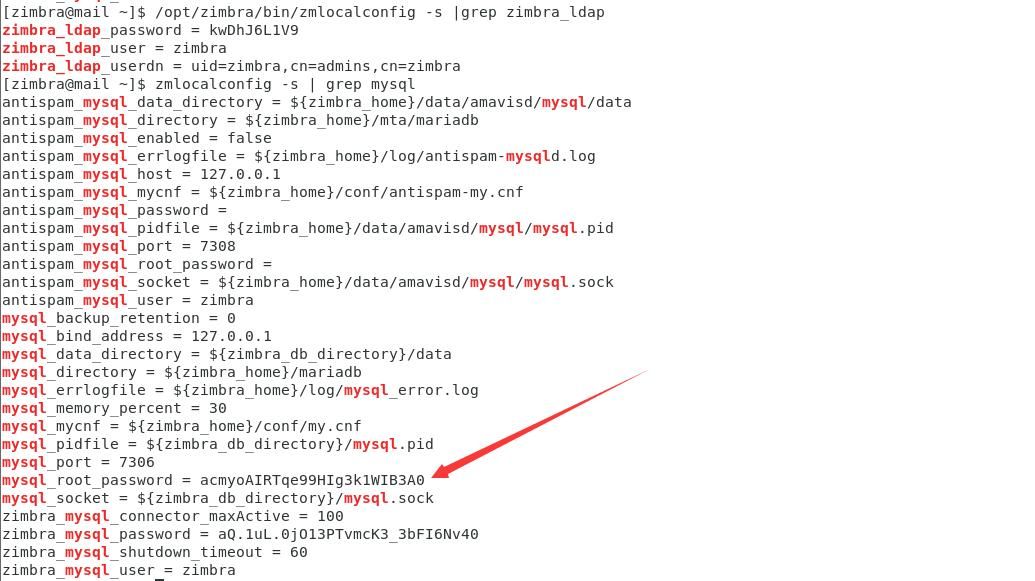
1. Obtain the username and password for connecting to the MySQL database:
su zimbra |
as shown in the figure below
2. Connect to MySQL database:
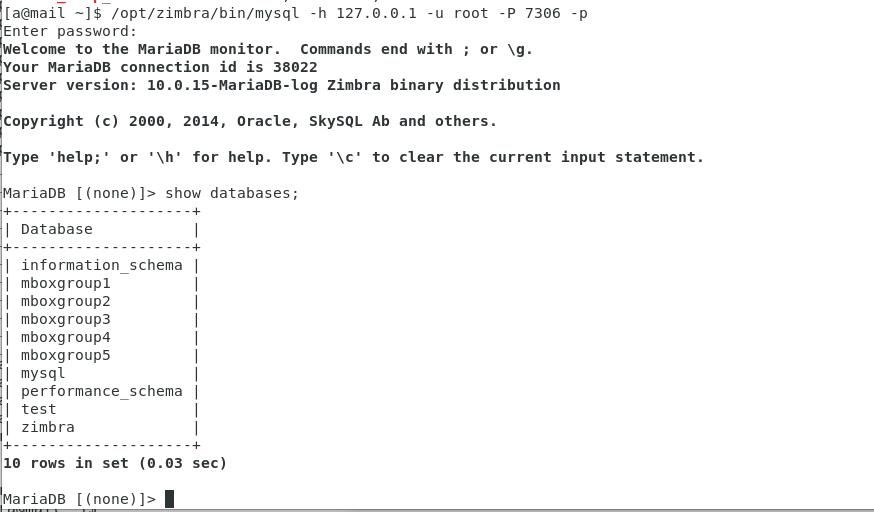
/opt/zimbra/bin/mysql -h 127.0.0.1 -u root -P 7306 -p |
3. View all databases:
show databases; |
as shown in the figure below
In summary, to query all user information, the query value can be set to "cn=*", and the ldapSearchBase value can be set to "ou=people,dc=zimbra,dc=com"
Note:
The ldapSearchBase value varies across different environments and is typically consistent with the domain name
Python code to obtain user names and corresponding hashes via LDAP query is as follows:
def getalluserhash(uri,token,query,ldapSearchBase): |
The test results are shown in the following figure
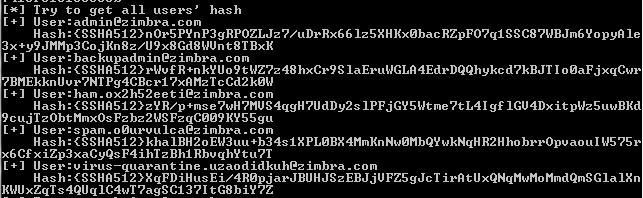
The exported hash corresponds to Hash-Mode 1711 in hashcat
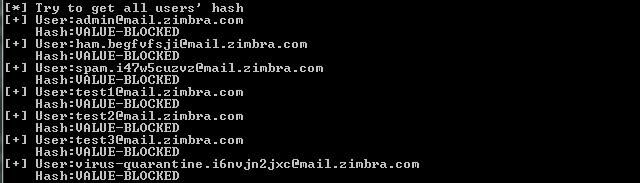
Note:
Newer versions of Zimbra cannot read the hash, displaying VALUE-BLOCKED, as shown in the figure below
0x05 Open Source Code
---
The code has been open-sourced at the following address:
An open-source project
The code supports three connection methods:
- Regular user token
- Administrator token
- SSRF (CVE-2019-9621)
Supported commands will be displayed after successful connection
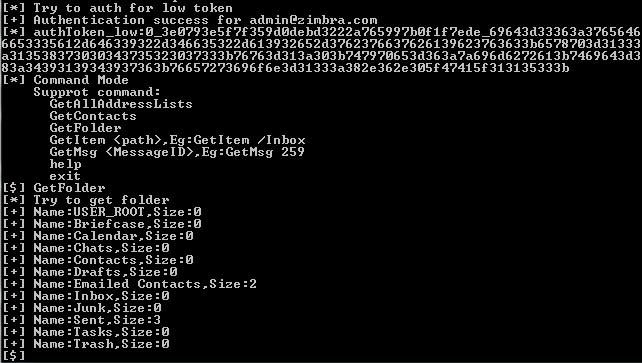
Commands supported by regular user token are as follows:
GetAllAddressLists |
Partial test results are shown in the figure below
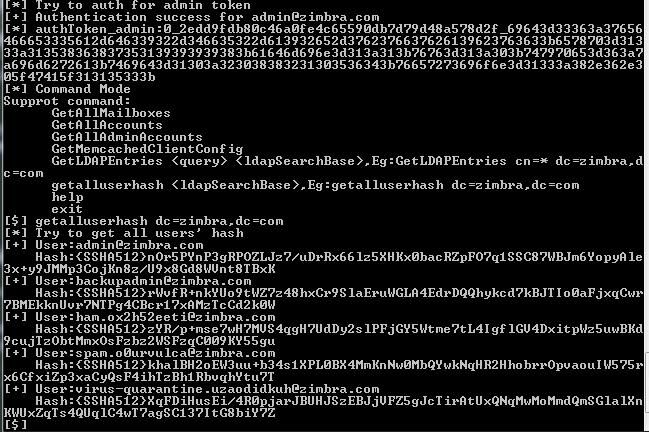
Commands supported by administrator token are as follows:
GetAllDomains |
Partial test results are shown in the figure below
0x06 Log Detection
---
The login log location is /opt/zimbra/log/mailbox.log
For other types of mail logs, refer to https://wiki.zimbra.com/wiki/Log_Files
0x07 Summary
---
This article briefly tested the Python-Zimbra library, manually constructed data packets according to the API documentation's data format, achieved calls to the Zimbra SOAP API, open-sourced the code Zimbra_SOAP_API_Manage, shared details of script development to facilitate subsequent secondary development


