
0x00 Preface
---
The fifth article in the Windows Single Log Entry Deletion series introduces the third method for deleting a single log entry from the current system: enumerate all processes in the current system, obtain the handle to the specified log file, duplicate the handle via DuplicateHandle to gain permissions, and use this handle to modify the log file.
0x01 Introduction
---
This article will cover the following:
- Exploitation Approach
- Program Implementation
- Enumerating all processes to obtain the specified file handle
- Duplicating the handle via DuplicateHandle
- Open-source implementation code
0x02 Exploitation Analysis
---
The previous article, 'Windows XML Event Log (EVTX) Single Log Entry Deletion (Part 4) – Deleting a Single Log Entry from the Current System by Obtaining Log File Handle via Injection' mentioned that under certain conditions, higher versions of Windows do not allow injection into the protected process svchost.exe. So, what should we do if we do not want to stop the logging service?
In a previous article titled 'Penetration Techniques - File Recovery and Deletion in Windows Systems', I covered a solution that involves using DuplicateHandle to copy handles, converting 'pseudo-handles' into real handles to gain operational permissions for log files.
0x03 Enumerate all processes to obtain specified file handles
---
The approach is as follows:
- Use the kernel API NtQuerySystemInformation to query SystemHandleInformation and obtain handles from all processes
- Filter out handles of the file type
- If the process corresponding to a handle cannot be opened, set a flag and avoid repeatedly opening that process
- Filter out handles that may cause hangs, using the API WaitForSingleObject for judgment
- Use NtDuplicateObject to retrieve the name and specific numerical information of handles, filtering out the specified ones
Code reference location:
An open-source project).cpp.cpp)
The code is applicable to Windows 7 and later operating systems and provides the option to close handles
Alternatively, you can first enumerate service information to locate the process corresponding to the log service, narrowing the search scope, and then obtain the handles for log files. The approach is as follows:
- Enumerate service information to find the process corresponding to the log service
- Use the kernel API NtQuerySystemInformation to query SystemHandleInformation and obtain handles from all processes
- Filter out handles from the corresponding log service process
- Obtain handle names and specific numerical information via NtDuplicateObject, then filter for specified handles
More efficient, avoids potentially hanging handles
Code reference location:
An open-source project).cpp
The code automatically retrieves the log service process, narrows the search scope, and obtains handles to log files
0x04 Duplicate Handle via DuplicateHandle
---
After obtaining the log file handle by enumerating processes, it was discovered to be a 'pseudo-handle' for the following reasons:
Retrieving specific handle contents requires calling NtDuplicateObject
DuplicateObject function prototype:
BOOL WINAPI DuplicateHandle( |
Official documentation:
https://msdn.microsoft.com/en-us/library/ms724251(VS.85).aspx
The 7th parameter dwOptions can take two values:
- DUPLICATE_CLOSE_SOURCE,0x00000001,Closes the source handle. This occurs regardless of any error status returned.
- DUPLICATE_SAME_ACCESS,0x00000002,Ignores the dwDesiredAccess parameter. The duplicate handle has the same access as the source handle.
Another reference document:
https://docs.microsoft.com/en-us/windows-hardware/drivers/ddi/content/ntifs/nf-ntifs-zwduplicateobject
Reference information obtained:
DUPLICATE_SAME_ATTRIBUTES Instead of using the HandleAttributes parameter, copy the attributes from the source handle to the target handle.
The reference material does not mention the value of DUPLICATE_SAME_ATTRIBUTES; it is speculated to be 0 here
Note:
If readers have better answers or explanations, I hope you can inform me
To ensure that calling NtDuplicateObject to traverse handles does not affect other system handles, first set dwOptions to DUPLICATE_SAME_ATTRIBUTES (i.e., 0), obtaining only the handle's attributes
Parameters are as follows:
NtDuplicateObject(processHandle, (HANDLE)handle.Handle, GetCurrentProcess(), &dupHandle, 0, 0, 0) |
After locating the specified log file handle, the next step is to operate on the log file. Here, dwOptions needs to be set to DUPLICATE_SAME_ACCESS, representing a full duplication
Usage is as follows:
NtDuplicateObject(processHandle, (HANDLE)handle.Handle, GetCurrentProcess(), &dupHandle, 0, 0, DUPLICATE_SAME_ACCESS) |
dupHandle has the same permissions as the source handle. When operating on the log file, pass dupHandle to CreateFileMapping
CreateFileMapping(dupHandle, NULL, PAGE_READWRITE, 0, 0, NULL); |
The remaining log deletion operations can refer to previous series articles
The complete code has been open-sourced, including two methods for deleting logs:
1. Parse the format yourself to implement log deletion
Address is as follows:
`An open-source project
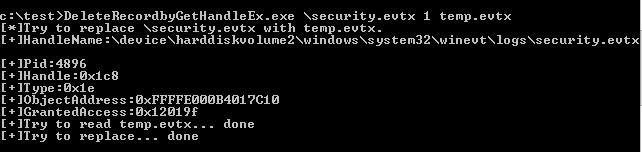
The code implements obtaining a handle to the specified log file, through which operational permissions for the log file are acquired, enabling the deletion of individual log entries from a specified evtx file.
Test as shown in the figure below
2. Using WinAPI EvtExportLog to filter out the content to be deleted
`An open-source project
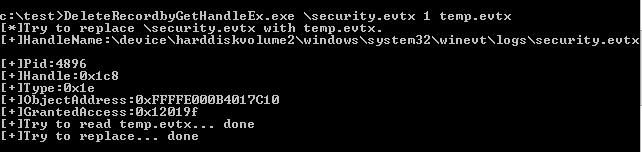
The code implements reading the content of log files at a specified path to overwrite system logs
Test as shown in the figure below
The common approach is to first suspend the logging thread, preventing the system from continuing to collect logs. The code address is as follows:
`An open-source project
Then read the system log content, delete the specified logs, and save the new logs. The code is as follows:
`An open-source project
Finally, use DeleteRecordbyGetHandleEx to read the new logs and overwrite the system logs, achieving log deletion
Note:
For the above two methods, deleting setup.evtx is not problematic, but deleting system.evtx and security.evtx may fail due to race conditions.
0x05 Summary
---
This article introduces the third method for deleting a single log record from the current system: enumerate all processes in the current system, obtain the handle to the specified log file, duplicate the handle using DuplicateHandle to gain permissions, and utilize this handle to modify the log file.
The advantage is that it does not require injecting into the process svchost.exe, thus eliminating the need to consider bypassing protections for process injection, and it does not require inter-process communication, resulting in higher efficiency.


