
0x00 Preface
---
Shellcode is a piece of machine code, commonly used as the payload in vulnerability exploitation.
In penetration testing, the simplest and most efficient method is to generate shellcode via Metasploit. However, in certain environments, custom development of one's own shellcode is required, necessitating further research into shellcode development.
0x01 Introduction
---
There are three basic approaches to writing Shellcode:
- Directly writing hexadecimal opcodes.
- Using high-level languages like C or Delphi to write a program, compiling it, and then disassembling it to obtain hexadecimal opcodes.
- Writing an assembly program, assembling it, and extracting hexadecimal opcodes from the binary.
This article will explain how to generate shellcode by writing C code in Visual Studio, specifically covering the following three parts:
- Using the DEBUG mode of VC6.0 to obtain shellcode.
- Testing the Shellcode automatic generation tool - ShellcodeCompiler.
- Writing in C++ (without using inline assembly) to dynamically obtain API addresses and call them, and disassembling it to extract shellcode.
0x02 Using VC6.0 DEBUG mode to obtain shellcode
---
Note:
This section references the appendix of '挖0day' by 爱无言
Test system:
Windows XP
1. Write a pop-up test program and extract assembly code
Code is as follows:
#include "stdafx.h" |
Set a breakpoint at MessageBoxA(NULL,NULL,NULL,0); by pressing F9
In debug mode, press F5 to start debugging and jump to the breakpoint
Press Alt+8 to convert the current C code to assembly code, as shown in the figure

00401028 mov esi,esp |
call is an indirect memory call instruction, requiring an actual memory address for practical use
Press Alt+6 to open the Memory window for viewing memory data, jump to address 0x0042528c, as shown in the figure

0042528C EA 07 D5 77 00 00 00 ..誻... |
Take the first 4 bytes and reverse their order (data is stored in reverse in memory):
77D507EA
The actual address of the call command is 0x77D507EA
The MessageBoxA function is located in user32.dll and requires loading user32.dll in advance when called
2. Write inline assembly program and extract machine code
Create a new project and use inline assembly to load the above code:
#include "stdafx.h" |
Compile and execute, successfully pops up a dialog box
Set a breakpoint at push 0 by pressing F9, then press F5 to enter debug mode and jump to the breakpoint
Press Alt+8 to convert the current VC code to assembly code, as shown in the figure
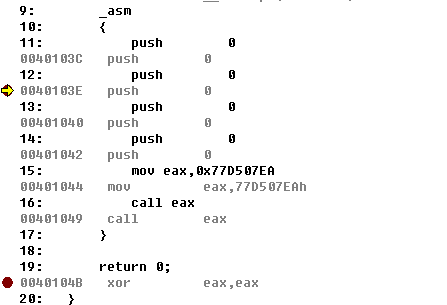
12: push 0 |
Next, extract the data of the above code in memory, as shown in the figure

The range is 0040103C - 0040104A
Note:
The address of call eax is 00401049, indicating the starting address; the full code length needs +1
Press Alt+6 to open the Memory window to view memory data
Jump to 0x0040103C, the content is as follows:
0040103C 6A 00 6A 00 6A 00 6A 00 B8 EA 07 D5 77 FF D0 j.j.j.j.戈.誻..
The content from 0040103C - 0040104A is as follows:
6A 00 6A 00 6A 00 6A 00 B8 EA 07 D5 77 FF D0
This machine code is the shellcode to be used next.
3. Write a test program to load the shellcode
#include "stdafx.h" |
Shellcode executed successfully
Note:
Due to the introduction of the ASLR mechanism in Windows 7, we cannot use fixed memory addresses in shellcode, making the above method not universally applicable under Windows 7.
0x03 Shellcode Automatic Generation Tool—ShellcodeCompiler
---
Download Link:
https://github.com/NytroRST/ShellcodeCompiler
Features:
- Developed in C++
- Open-source tool
- Utilizes NASM
- Can encapsulate APIs and convert them into shellcode in bin format and ASM assembly code
Actual Test:
The content of Source.txt is as follows:
function MessageBoxA("user32.dll"); |
Run in cmd:
ShellcodeCompiler.exe -r Source.txt -o Shellcode.bin -a Assembly.asm
Note:
Place ShellcodeCompiler.exe and the NASM folder in the same directory
After execution, the shellcode is saved in the Shellcode.bin file
To facilitate testing of the generated shellcode, add the -t parameter during generation to execute the shellcode once
I referenced the code of ShellcodeCompiler to extract its shellcode execution functionality, implementing reading a file and loading the shellcode from it. The complete code is as follows:
#include |
0x04 Written in C++ (without using inline assembly), implements dynamic retrieval of API addresses and calls, from which shellcode can be extracted by disassembly.
---
For ShellcodeCompiler, the biggest drawback is the use of inline assembly; VC does not support inline assembly by default in 64-bit, so this method cannot generate 64-bit shellcode.
Note:
Delphi supports inline assembly in 64-bit.
Although VC cannot directly use inline assembly in 64-bit, program segments can be placed entirely in an asm file for compilation.
For methods to restore the VS keyword __asm on X64, refer to:
http://bbs.pediy.com/showthread.php?p=1260419
Therefore, the most direct way to develop a 64-bit shellcode is to avoid inline assembly, write purely in C++, implement dynamic retrieval of API addresses and calls, and then disassemble it to obtain shellcode.
The benefits are as follows:
Facilitates debugging, greatly enhancing the readability of the source code.
However, I did not find ready-made code online, so I attempted to implement it myself based on the principles.
Note:
1. Writing shellcode requires implementing the following steps:
- Retrieve the base address of kernel32.dll.
- Locate the address of the GetProcAddress function
- Use GetProcAddress to determine the address of the LoadLibrary function
- Use LoadLibrary to load a DLL file
- Use GetProcAddress to find the address of a specific function (e.g., MessageBox)
- Specify function parameters
- Call the function
2. Another reference material:
http://bbs.pediy.com/showthread.php?t=203140
The reference material implements loading a third-party DLL using C++
Modify based on this reference to achieve our desired functionality:
Implement dynamic retrieval of API addresses and calls
The complete code has been uploaded to GitHub:
An open-source project
Features:
- Supports x86 and x64
- Pure C++ implementation, dynamically obtaining the addresses of GetProcAddress and LoadLibrary functions.
Before compilation, configure Visual Studio as follows:
1. Use Release mode. Recent compilers' Debug mode may produce reversed functions and insert many position-dependent calls.
2. Disable optimization. The compiler optimizes unused functions by default, which may be exactly what we need.
3. Disable stack buffer security checks (/Gs). The stack check functions called at the beginning and end of functions exist at specific locations in the binary file, causing the output functions to be non-relocatable, which is meaningless for shellcode.
Then open the generated exe in IDA to obtain the machine code.
0.05 Supplement
---
Next research topics:
- After restoring the VS keyword __asm on X64, how to obtain 64-bit shellcode.


