0x00 Preface

---

Previously, in "Windows Shellcode Study Notes - Generating Shellcode via VisualStudio", we introduced a method using C++ (without inline assembly) to dynamically obtain API addresses and make calls, disassemble to extract shellcode, and open-sourced the test code.

During the subsequent process of extracting shellcode, some bugs were discovered in the previously open-sourced code. Therefore, this article focuses on fixing these bugs in the test code and discusses considerations for developing shellcode using C++.

Download link for the test code containing bugs:

An open-source project

0x01 Introduction

---

Simple shellcode extraction process:

  • Develop code using C++
  • Modify VisualStudio compilation configuration
  • Generate exe
  • Open the generated exe in IDA to obtain machine code

Since API addresses are obtained and called dynamically, to ensure shellcode compatibility, fixed addresses must not appear in the code, and the use of global variables should be minimized. If the code contains sub-functions, depending on the calling method, attention must also be paid to the arrangement order between functions (the entry function should be placed first).

0x02 Bug Fix

---

Configure three compilation options: release, disable optimization, disable /GS

Compile the code, then use IDA to extract machine code as shellcode

During actual debugging, bugs were found in the code:

1. Global variables should be properly handled in the code

Using global variables in the code

FARPROC(WINAPI* GetProcAddressAPI)(HMODULE, LPCSTR);
HMODULE(WINAPI* LoadLibraryWAPI)(LPCWSTR);

After compilation, these become fixed addresses, making the shellcode incompatible across different environments

The simplest and most direct approach is to avoid global variables in shellcode whenever possible

2. Function declaration method needs modification

After modifying global variables, the following code needs to be changed:

MESSAGEBOXA_INITIALIZE MeassageboxA_MyOwn = reinterpret_cast(GetProcAddressAPI(LoadLibraryWAPI(struser32), MeassageboxA_api));
MeassageboxA_MyOwn(NULL, NULL, NULL, 0);

Need to completely replace with typedef function declaration style

3. Function call order

If using the following method to load shellcode:

(*(int(*)()) sc)();

The definition of the entry function should be at the very beginning of this shellcode (independent of the order of function declarations)

Note:

If the shellcode contains sub-functions, ensure each function is placed in a contiguous address range, with the entry function positioned at the very front. This way, after extracting the machine code, you can directly load the entry function to execute the shellcode.

In summary, provide the new complete code:

#include
#include
#pragma optimize( "", off )
void shell_code();
HANDLE GetKernel32Handle();
BOOL __ISUPPER__(__in CHAR c);
CHAR __TOLOWER__(__in CHAR c);
UINT __STRLEN__(__in LPSTR lpStr1);
UINT __STRLENW__(__in LPWSTR lpStr1);
LPWSTR __STRSTRIW__(__in LPWSTR lpStr1, __in LPWSTR lpStr2);
INT __STRCMPI__(__in LPSTR lpStr1, __in LPSTR lpStr2);
INT __STRNCMPIW__(__in LPWSTR lpStr1, __in LPWSTR lpStr2, __in DWORD dwLen);
LPVOID __MEMCPY__(__in LPVOID lpDst, __in LPVOID lpSrc, __in DWORD dwCount);

typedef FARPROC(WINAPI* GetProcAddressAPI)(HMODULE, LPCSTR);
typedef HMODULE(WINAPI* LoadLibraryWAPI)(LPCWSTR);
typedef ULONG (WINAPI *MESSAGEBOXAPI)(HWND, LPWSTR, LPWSTR, ULONG);


void shell_code() {

LoadLibraryWAPI loadlibrarywapi = 0;
GetProcAddressAPI getprocaddressapi=0;
MESSAGEBOXAPI messageboxapi=0;

wchar_t struser32[] = { L'u', L's', L'e', L'r', L'3',L'2', L'.', L'd', L'l', L'l', 0 };
char MeassageboxA_api[] = { 'M', 'e', 's', 's', 'a', 'g', 'e', 'B', 'o', 'x', 'A', 0 };

HANDLE hKernel32 = GetKernel32Handle();
if (hKernel32 == INVALID_HANDLE_VALUE) {
return;
}
LPBYTE lpBaseAddr = (LPBYTE)hKernel32;
PIMAGE_DOS_HEADER lpDosHdr = (PIMAGE_DOS_HEADER)lpBaseAddr;
PIMAGE_NT_HEADERS pNtHdrs = (PIMAGE_NT_HEADERS)(lpBaseAddr + lpDosHdr->e_lfanew);
PIMAGE_EXPORT_DIRECTORY pExportDir = (PIMAGE_EXPORT_DIRECTORY)(lpBaseAddr + pNtHdrs->OptionalHeader.DataDirectory[IMAGE_DIRECTORY_ENTRY_EXPORT].VirtualAddress);

LPDWORD pNameArray = (LPDWORD)(lpBaseAddr + pExportDir->AddressOfNames);
LPDWORD pAddrArray = (LPDWORD)(lpBaseAddr + pExportDir->AddressOfFunctions);
LPWORD pOrdArray = (LPWORD)(lpBaseAddr + pExportDir->AddressOfNameOrdinals);
CHAR strLoadLibraryA[] = { 'L', 'o', 'a', 'd', 'L', 'i', 'b', 'r', 'a', 'r', 'y', 'W', 0x0 };
CHAR strGetProcAddress[] = { 'G', 'e', 't', 'P', 'r', 'o', 'c', 'A', 'd', 'd', 'r', 'e', 's', 's', 0x0 };

for (UINT i = 0; i < pExportDir->NumberOfNames; i++) {
LPSTR pFuncName = (LPSTR)(lpBaseAddr + pNameArray[i]);
if (!__STRCMPI__(pFuncName, strGetProcAddress)) {
getprocaddressapi=(GetProcAddressAPI)(lpBaseAddr + pAddrArray[pOrdArray[i]]);
}
else if (!__STRCMPI__(pFuncName, strLoadLibraryA)) {
loadlibrarywapi=(LoadLibraryWAPI) (lpBaseAddr + pAddrArray[pOrdArray[i]]);
}
if (getprocaddressapi != nullptr && loadlibrarywapi != nullptr) {
messageboxapi=(MESSAGEBOXAPI)getprocaddressapi(loadlibrarywapi(struser32), MeassageboxA_api);
messageboxapi(NULL, NULL, NULL, 0);
return;
}
}
}

inline BOOL __ISUPPER__(__in CHAR c) {
return ('A' <= c) && (c <= 'Z');
};
inline CHAR __TOLOWER__(__in CHAR c) {
return __ISUPPER__(c) ? c - 'A' + 'a' : c;
};

UINT __STRLEN__(__in LPSTR lpStr1)
{
UINT i = 0;
while (lpStr1[i] != 0x0)
i++;
return i;
}

UINT __STRLENW__(__in LPWSTR lpStr1)
{
UINT i = 0;
while (lpStr1[i] != L'\0')
i++;
return i;
}

LPWSTR __STRSTRIW__(__in LPWSTR lpStr1, __in LPWSTR lpStr2)
{
CHAR c = __TOLOWER__(((PCHAR)(lpStr2++))[0]);
if (!c)
return lpStr1;
UINT dwLen = __STRLENW__(lpStr2);
do
{
CHAR sc;
do
{
sc = __TOLOWER__(((PCHAR)(lpStr1)++)[0]);
if (!sc)
return NULL;
} while (sc != c);
} while (__STRNCMPIW__(lpStr1, lpStr2, dwLen) != 0);
return (lpStr1 - 1); // FIXME -2 ?
}

INT __STRCMPI__(
__in LPSTR lpStr1,
__in LPSTR lpStr2)
{
int v;
CHAR c1, c2;
do
{
c1 = *lpStr1++;
c2 = *lpStr2++;
// The casts are necessary when pStr1 is shorter & char is signed
v = (UINT)__TOLOWER__(c1) - (UINT)__TOLOWER__(c2);
} while ((v == 0) && (c1 != '\0') && (c2 != '\0'));
return v;
}

INT __STRNCMPIW__(
__in LPWSTR lpStr1,
__in LPWSTR lpStr2,
__in DWORD dwLen)
{
int v;
CHAR c1, c2;
do {
dwLen--;
c1 = ((PCHAR)lpStr1++)[0];
c2 = ((PCHAR)lpStr2++)[0];
/* The casts are necessary when pStr1 is shorter & char is signed */
v = (UINT)__TOLOWER__(c1) - (UINT)__TOLOWER__(c2);
} while ((v == 0) && (c1 != 0x0) && (c2 != 0x0) && dwLen > 0);
return v;
}

LPSTR __STRCAT__(
__in LPSTR strDest,
__in LPSTR strSource)
{
LPSTR d = strDest;
LPSTR s = strSource;
while (*d) d++;
do { *d++ = *s++; } while (*s);
*d = 0x0;
return strDest;
}

LPVOID __MEMCPY__(
__in LPVOID lpDst,
__in LPVOID lpSrc,
__in DWORD dwCount)
{
LPBYTE s = (LPBYTE)lpSrc;
LPBYTE d = (LPBYTE)lpDst;
while (dwCount--)
*d++ = *s++;
return lpDst;
}

HANDLE GetKernel32Handle() {
HANDLE hKernel32 = INVALID_HANDLE_VALUE;
#ifdef _WIN64
PPEB lpPeb = (PPEB)__readgsqword(0x60);
#else
PPEB lpPeb = (PPEB)__readfsdword(0x30);
#endif
PLIST_ENTRY pListHead = &lpPeb->Ldr->InMemoryOrderModuleList;
PLIST_ENTRY pListEntry = pListHead->Flink;
WCHAR strDllName[MAX_PATH];
WCHAR strKernel32[] = { 'k', 'e', 'r', 'n', 'e', 'l', '3', '2', '.', 'd', 'l', 'l', L'\0' };

while (pListEntry != pListHead) {
PLDR_DATA_TABLE_ENTRY pModEntry = CONTAINING_RECORD(pListEntry, LDR_DATA_TABLE_ENTRY, InMemoryOrderLinks);
if (pModEntry->FullDllName.Length) {
DWORD dwLen = pModEntry->FullDllName.Length;
__MEMCPY__(strDllName, pModEntry->FullDllName.Buffer, dwLen);
strDllName[dwLen / sizeof(WCHAR)] = L'\0';
if (__STRSTRIW__(strDllName, strKernel32)) {
hKernel32 = pModEntry->DllBase;
break;
}
}
pListEntry = pListEntry->Flink;
}
return hKernel32;
}

int main()
{
printf("1");
shell_code();
printf("2");
return 0;
}

0x03 Shellcode Extraction

---

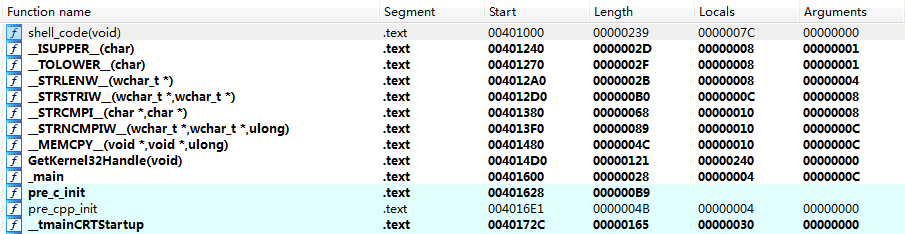
After compiling the above code into an exe and opening it with IDA, check the Function Window to find the starting addresses of each subfunction

As shown in the figure
Alt text

It can be seen that each function is stored in a continuous address range, and the shellcode starting function is located at the very beginning

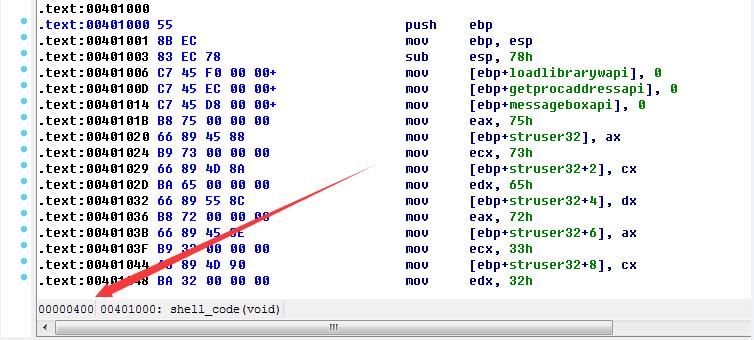
Double-click the first function shell_code(void) to enter the IDA text view, where you can see that the specific location of the shell_code(void) function in the exe file is 00000400

As shown in the figure
Alt text

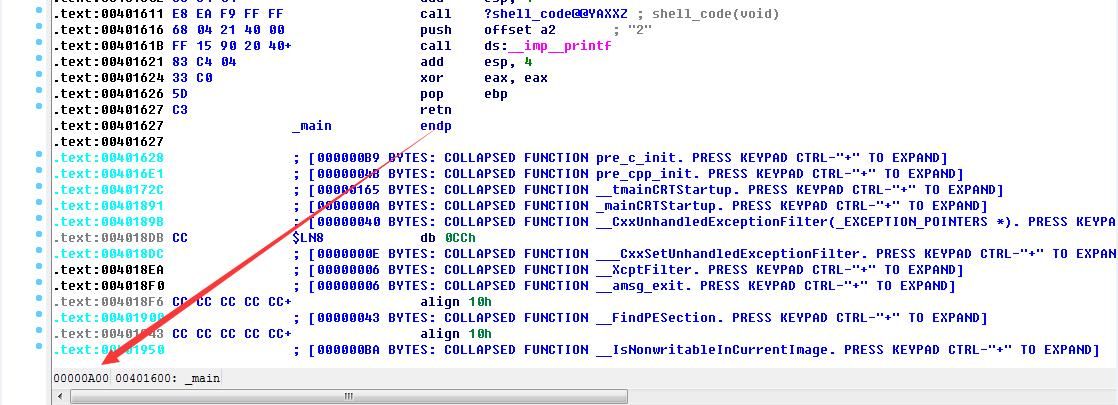
Check the location of the main function in the exe file, which is 00000A00

As shown in the figure
Alt text

Based on the structure of the C code, it can be inferred that the offset range 00000400-00000A00 in the exe file is the machine code we need

Use a hex editor to extract the machine code and save it to a file; the content in the file is the shellcode we need.

Of course, the function of manually extracting machine code and saving it to a file can be automated by a program. The complete code is as follows:

#include
#include
#include
#pragma optimize( "", off )
void shell_code();
HANDLE GetKernel32Handle();
BOOL __ISUPPER__(__in CHAR c);
CHAR __TOLOWER__(__in CHAR c);
UINT __STRLEN__(__in LPSTR lpStr1);
UINT __STRLENW__(__in LPWSTR lpStr1);
LPWSTR __STRSTRIW__(__in LPWSTR lpStr1, __in LPWSTR lpStr2);
INT __STRCMPI__(__in LPSTR lpStr1, __in LPSTR lpStr2);
INT __STRNCMPIW__(__in LPWSTR lpStr1, __in LPWSTR lpStr2, __in DWORD dwLen);
LPVOID __MEMCPY__(__in LPVOID lpDst, __in LPVOID lpSrc, __in DWORD dwCount);

typedef FARPROC(WINAPI* GetProcAddressAPI)(HMODULE, LPCSTR);
typedef HMODULE(WINAPI* LoadLibraryWAPI)(LPCWSTR);
typedef ULONG (WINAPI *MESSAGEBOXAPI)(HWND, LPWSTR, LPWSTR, ULONG);


void shell_code() {

LoadLibraryWAPI loadlibrarywapi = 0;
GetProcAddressAPI getprocaddressapi=0;
MESSAGEBOXAPI messageboxapi=0;

wchar_t struser32[] = { L'u', L's', L'e', L'r', L'3',L'2', L'.', L'd', L'l', L'l', 0 };
char MeassageboxA_api[] = { 'M', 'e', 's', 's', 'a', 'g', 'e', 'B', 'o', 'x', 'A', 0 };

HANDLE hKernel32 = GetKernel32Handle();
if (hKernel32 == INVALID_HANDLE_VALUE) {
return;
}
LPBYTE lpBaseAddr = (LPBYTE)hKernel32;
PIMAGE_DOS_HEADER lpDosHdr = (PIMAGE_DOS_HEADER)lpBaseAddr;
PIMAGE_NT_HEADERS pNtHdrs = (PIMAGE_NT_HEADERS)(lpBaseAddr + lpDosHdr->e_lfanew);
PIMAGE_EXPORT_DIRECTORY pExportDir = (PIMAGE_EXPORT_DIRECTORY)(lpBaseAddr + pNtHdrs->OptionalHeader.DataDirectory[IMAGE_DIRECTORY_ENTRY_EXPORT].VirtualAddress);

LPDWORD pNameArray = (LPDWORD)(lpBaseAddr + pExportDir->AddressOfNames);
LPDWORD pAddrArray = (LPDWORD)(lpBaseAddr + pExportDir->AddressOfFunctions);
LPWORD pOrdArray = (LPWORD)(lpBaseAddr + pExportDir->AddressOfNameOrdinals);
CHAR strLoadLibraryA[] = { 'L', 'o', 'a', 'd', 'L', 'i', 'b', 'r', 'a', 'r', 'y', 'W', 0x0 };
CHAR strGetProcAddress[] = { 'G', 'e', 't', 'P', 'r', 'o', 'c', 'A', 'd', 'd', 'r', 'e', 's', 's', 0x0 };

for (UINT i = 0; i < pExportDir->NumberOfNames; i++) {
LPSTR pFuncName = (LPSTR)(lpBaseAddr + pNameArray[i]);
if (!__STRCMPI__(pFuncName, strGetProcAddress)) {
getprocaddressapi=(GetProcAddressAPI)(lpBaseAddr + pAddrArray[pOrdArray[i]]);
}
else if (!__STRCMPI__(pFuncName, strLoadLibraryA)) {
loadlibrarywapi=(LoadLibraryWAPI) (lpBaseAddr + pAddrArray[pOrdArray[i]]);
}
if (getprocaddressapi != nullptr && loadlibrarywapi != nullptr) {
messageboxapi=(MESSAGEBOXAPI)getprocaddressapi(loadlibrarywapi(struser32), MeassageboxA_api);
messageboxapi(NULL, NULL, NULL, 0);
return;
}
}
}

inline BOOL __ISUPPER__(__in CHAR c) {
return ('A' <= c) && (c <= 'Z');
};
inline CHAR __TOLOWER__(__in CHAR c) {
return __ISUPPER__(c) ? c - 'A' + 'a' : c;
};

UINT __STRLEN__(__in LPSTR lpStr1)
{
UINT i = 0;
while (lpStr1[i] != 0x0)
i++;
return i;
}

UINT __STRLENW__(__in LPWSTR lpStr1)
{
UINT i = 0;
while (lpStr1[i] != L'\0')
i++;
return i;
}

LPWSTR __STRSTRIW__(__in LPWSTR lpStr1, __in LPWSTR lpStr2)
{
CHAR c = __TOLOWER__(((PCHAR)(lpStr2++))[0]);
if (!c)
return lpStr1;
UINT dwLen = __STRLENW__(lpStr2);
do
{
CHAR sc;
do
{
sc = __TOLOWER__(((PCHAR)(lpStr1)++)[0]);
if (!sc)
return NULL;
} while (sc != c);
} while (__STRNCMPIW__(lpStr1, lpStr2, dwLen) != 0);
return (lpStr1 - 1); // FIXME -2 ?
}

INT __STRCMPI__(
__in LPSTR lpStr1,
__in LPSTR lpStr2)
{
int v;
CHAR c1, c2;
do
{
c1 = *lpStr1++;
c2 = *lpStr2++;
// The casts are necessary when pStr1 is shorter & char is signed
v = (UINT)__TOLOWER__(c1) - (UINT)__TOLOWER__(c2);
} while ((v == 0) && (c1 != '\0') && (c2 != '\0'));
return v;
}

INT __STRNCMPIW__(
__in LPWSTR lpStr1,
__in LPWSTR lpStr2,
__in DWORD dwLen)
{
int v;
CHAR c1, c2;
do {
dwLen--;
c1 = ((PCHAR)lpStr1++)[0];
c2 = ((PCHAR)lpStr2++)[0];
/* The casts are necessary when pStr1 is shorter & char is signed */
v = (UINT)__TOLOWER__(c1) - (UINT)__TOLOWER__(c2);
} while ((v == 0) && (c1 != 0x0) && (c2 != 0x0) && dwLen > 0);
return v;
}

LPSTR __STRCAT__(
__in LPSTR strDest,
__in LPSTR strSource)
{
LPSTR d = strDest;
LPSTR s = strSource;
while (*d) d++;
do { *d++ = *s++; } while (*s);
*d = 0x0;
return strDest;
}

LPVOID __MEMCPY__(
__in LPVOID lpDst,
__in LPVOID lpSrc,
__in DWORD dwCount)
{
LPBYTE s = (LPBYTE)lpSrc;
LPBYTE d = (LPBYTE)lpDst;
while (dwCount--)
*d++ = *s++;
return lpDst;
}

HANDLE GetKernel32Handle() {
HANDLE hKernel32 = INVALID_HANDLE_VALUE;
#ifdef _WIN64
PPEB lpPeb = (PPEB)__readgsqword(0x60);
#else
PPEB lpPeb = (PPEB)__readfsdword(0x30);
#endif
PLIST_ENTRY pListHead = &lpPeb->Ldr->InMemoryOrderModuleList;
PLIST_ENTRY pListEntry = pListHead->Flink;
WCHAR strDllName[MAX_PATH];
WCHAR strKernel32[] = { 'k', 'e', 'r', 'n', 'e', 'l', '3', '2', '.', 'd', 'l', 'l', L'\0' };

while (pListEntry != pListHead) {
PLDR_DATA_TABLE_ENTRY pModEntry = CONTAINING_RECORD(pListEntry, LDR_DATA_TABLE_ENTRY, InMemoryOrderLinks);
if (pModEntry->FullDllName.Length) {
DWORD dwLen = pModEntry->FullDllName.Length;
__MEMCPY__(strDllName, pModEntry->FullDllName.Buffer, dwLen);
strDllName[dwLen / sizeof(WCHAR)] = L'\0';
if (__STRSTRIW__(strDllName, strKernel32)) {
hKernel32 = pModEntry->DllBase;
break;
}
}
pListEntry = pListEntry->Flink;
}
return hKernel32;
}
void __declspec(naked) END_SHELLCODE(void) {}
int main()
{
shell_code();

FILE *output_file;
fopen_s(&output_file,"shellcode.bin", "wb");
fwrite(shell_code, (int)END_SHELLCODE - (int)shell_code, 1, output_file);
fclose(output_file);
return 0;
}

Note:

Open the file in "wb" mode to write binary data

If using "w" mode, the 0A character will be replaced with 0D0A during writing, causing issues with the shellcode

0x04 Shellcode Testing

---

Use the following code to read the shellcode saved in the file, load it, and test its functionality:

#include
size_t GetSize(char * szFilePath)
{
size_t size;
FILE* f = fopen(szFilePath, "rb");
fseek(f, 0, SEEK_END);
size = ftell(f);
rewind(f);
fclose(f);
return size;
}
unsigned char* ReadBinaryFile(char *szFilePath, size_t *size)
{
unsigned char *p = NULL;
FILE* f = NULL;
size_t res = 0;
*size = GetSize(szFilePath);
if (*size == 0) return NULL;
f = fopen(szFilePath, "rb");
if (f == NULL)
{
printf("Binary file does not exists!\n");
return 0;
}
p = new unsigned char[*size];
rewind(f);
res = fread(p, sizeof(unsigned char), *size, f);
fclose(f);
if (res == 0)
{
delete[] p;
return NULL;
}
return p;
}
int main(int argc, char* argv[])
{
char *szFilePath="c:\\test\\shellcode.bin";
unsigned char *BinData = NULL;
size_t size = 0;
BinData = ReadBinaryFile(szFilePath, &size);
void *sc = VirtualAlloc(0, size, MEM_RESERVE | MEM_COMMIT, PAGE_EXECUTE_READWRITE);
if (sc == NULL)
return 0;
memcpy(sc, BinData, size);
(*(int(*)()) sc)();
return 0;
}
