
0x00 Preface
---
Juicy Potato is a local privilege escalation tool for Windows systems, extending the RottenPotatoNG tool with broader applicability conditions.
The prerequisite for exploitation is obtaining SeImpersonate or SeAssignPrimaryToken privileges, typically used in webshell environments.
So, what are the usage methods of Juicy Potato, and what are its limitations? This article will conduct tests and analyze the constraints based on its principles.
Download link for Juicy Potato:
https://github.com/ohpe/juicy-potato
0x01 Introduction
---
This article will cover the following topics:
- Implementation principles
- Extensions to RottenPotatoNG
- Methods for enumerating available COM objects
- Usage methods
- Constraints
- Defense Ideas
0x02 Implementation Principle
---
References:
https://foxglovesecurity.com/2016/09/26/rotten-potato-privilege-escalation-from-service-accounts-to-system/
Introduction to the implementation principle based on personal understanding
Several key concepts to understand:
- When using DCOM, if connecting remotely as a service, the permissions are System, for example, the BITS service
- Using DCOM allows connecting via TCP to a local port, initiating NTLM authentication, which can be replayed
- The LocalService user has SeImpersonate and SeAssignPrimaryToken permissions by default
- With SeImpersonate permission enabled, it is possible to pass a new Token when calling CreateProcessWithToken to create a new process
- With SeAssignPrimaryToken permission enabled, it is possible to pass a new Token when calling CreateProcessAsUser to create a new process
The implementation flow of Juicy Potato is as follows:
1. Load COM, send a request, with System permissions
Attempt to load a COM object at the specified IP and port
The COM object used by RottenPotatoNG is BITS, with CLSID {4991d34b-80a1-4291-83b6-3328366b9097}
The available COM objects are not unique; Juicy Potato provides multiple options. For a detailed list, refer to the following address:
https://github.com/ohpe/juicy-potato/blob/master/CLSID/README.md
2. Respond to the request in step 1 and initiate NTLM authentication
Normally, due to insufficient permissions, the current privilege is not System, so authentication cannot succeed
3. For the local port, also initiate NTLM authentication with the current user's privileges
Since the privilege is the current user, the NTLM authentication can be successfully completed
RottenPotatoNG uses port 135
Juicy Potato supports specifying any local port, but RPC typically defaults to port 135, which is rarely modified
4. Intercept the data packets of both NTLM authentications separately, replace the data, and use NTLM relay to allow the NTLM authentication in step 1 (with System privileges) to succeed, obtaining a System-privileged Token
During relay, note that the NTLM Server Challenge in NTLM authentication differs and needs to be corrected
5. Use the System-privileged Token to create a new process
If SeImpersonate privilege is enabled, call CreateProcessWithToken, pass the System-privileged Token, and the created process will have System privileges
Or
If the SeAssignPrimaryToken privilege is enabled, calling CreateProcessAsUser with a System-privileged Token creates a process with System privileges.
Note:
For detailed explanation, refer to the previous article 'Penetration Techniques – Exploitation of Nine Windows Privileges'.
Key to exploitation:
The current user supports SeImpersonate or SeAssignPrimaryToken privileges.
Users with this privilege include:
- Members of the local Administrators group and local service accounts.
- Services started by the Service Control Manager.
- COM servers started by the Component Object Model (COM) infrastructure and configured to run under a specific account.
For privilege escalation, the third category is mainly targeted, commonly LocalService users, such as IIS or SQL Server users.
0x03 Methods for Enumerating Available COM Objects
---
Juicy Potato provides methods for enumerating available COM objects, with steps as follows:
1. Obtain a list of available CLSIDs.
Use GetCLSID.ps1, available at:
https://github.com/ohpe/juicy-potato/blob/master/CLSID/GetCLSID.ps1
Note:
The supporting file .\utils\Join-Object.ps1 must be present in the same directory during use.
After successful execution, files CLSID.list and CLSID.csv will be generated.
2. Use batch processing to call juicypotato.exe to test CLSIDs one by one
The batch file address is as follows:
https://github.com/ohpe/juicy-potato/blob/master/Test/test_clsid.bat
The parameters for juicypotato.exe are as follows:
juicypotato.exe -z -l !port! -c %%i >> result.log |
-z indicates test mode, only verifying the Token without using it to create a process
-l is the port, starting at 1000 and incrementing by 1 each loop
-c is the CLSID obtained from the file CLSID.list
Juicy Potato has been tested on the following Windows systems:
- Windows 7 Enterprise
- Windows 8.1 Enterprise
- Windows 10 Enterprise
- Windows 10 Professional
- Windows Server 2008 R2 Enterprise
- Windows Server 2012 Datacenter
- Windows Server 2016 Standard
During my testing, an error occurred when executing GetCLSID.ps1 under Server 2012, as shown in the figure below
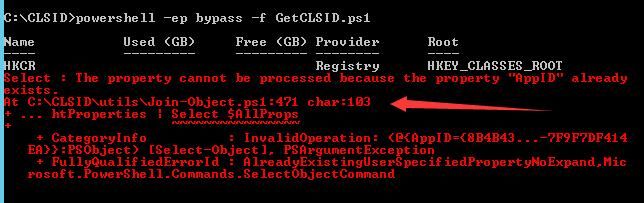
The error location is at .\utils\Join-Object.ps1
Here is one modification method:
1. Enumerate all CLSIDs that meet the conditions
The PowerShell code is as follows:
New-PSDrive -Name HKCR -PSProvider Registry -Root HKEY_CLASSES_ROOT | Out-Null |
You can choose to save the results as CLSID.list
2. Use batch processing to call juicypotato.exe for verification one by one
The address is as follows:
https://github.com/ohpe/juicy-potato/blob/master/Test/test_clsid.bat
No modifications are needed for the bat script
0x04 Usage Method
---
1. Check the current user privileges to see if they meet the requirements
whoami /priv |
If the SeImpersonate privilege is enabled, the parameter for juicypotato can be -t t
If the SeAssignPrimaryToken privilege is enabled, the parameter for juicypotato can be -t u
If both are enabled, you can choose -t *
If neither is enabled, then privilege escalation is not possible
2. Check if the default RPC port is 135
If modified (e.g., to 111), the juicypotato parameter can use -n 111
If RPC is disabled on the system, privilege escalation is not necessarily impossible; the following conditions must be met:
Find another system that allows remote RPC login with the current user's permissions. In this case, the juicypotato parameter can use -k
For example, in Win7 and Win8 systems, under default configurations, allowing inbound rules for port 135 enables remote RPC login
The command to add a firewall rule allowing inbound traffic on port 135 is as follows:
netsh advfirewall firewall add rule name="135" protocol=TCP dir=in localport=135 action=allow |
Alternatively, you can choose to disable the firewall. Refer to the code for bypassing UAC to disable the firewall:
An open-source project
3. Select an available CLSID based on the operating system
Reference list
https://github.com/ohpe/juicy-potato/blob/master/CLSID/README.md
For example, for the test system Server2012, select CLSID {8BC3F05E-D86B-11D0-A075-00C04FB68820}
4. Choose a port not occupied by the system as the listening port
For example, the final parameters are as follows:
JuicyPotato.exe -t t -p c:\windows\system32\cmd.exe -l 1111 -c {8BC3F05E-D86B-11D0-A075-00C04FB68820} |
Indicates creating a process with SeImpersonate privilege enabled, listening on port 1111, using CLSID {8BC3F05E-D86B-11D0-A075-00C04FB68820}
0x05 Constraints
---
Based on the above analysis, the constraints of Juicy Potato are as follows:
- Requires support for SeImpersonate or SeAssignPrimaryToken privileges
- Enable DCOM
- Local support for RPC or remote server support for RPC with successful login
- Able to find available COM objects
0x06 Defense Strategy
---
From a defensive perspective, disabling DCOM, disabling RPC, or configuring properties for each COM object on the server is impractical
The key to defending against Juicy Potato lies in permission control, preventing attackers from obtaining SeImpersonate or SeAssignPrimaryToken privileges
0x07 Supplement
---
More learning materials:
https://bugs.chromium.org/p/project-zero/issues/detail?id=325&redir=1
0x08 Summary
---
This article tests Juicy Potato, summarizes usage methods, compares it with RottenPotatoNG, analyzes principles, and identifies limitations and defense strategies


