
0x00 Preface
---
The first article in the series on Windows Event Viewer Log (EVT) single log deletion, focusing on introducing the basics of evt log files and the implementation approach and examples for deleting single logs
Windows Event Viewer Log (EVT) is applicable to the following Windows systems:
- Windows NT 4
- Windows 2000
- Windows XP
- Windows 2003
Note:
Previously introduced Windows XML Event Log (EVTX) is applicable to Windows 7 and later systems
0x01 Introduction
---
This article will cover the following topics:
- evt file format
- Approach to deleting a single log entry
- Example of deleting a single log entry
0x02 Basic Knowledge
---
The evt file format refers to files used to store system log information before Windows Vista, most commonly found in XP and Server 2003 systems
Default log file storage location: %systemroot%\system32\config
Common log files:
- Application log: AppEvent.Evt
- Security log: SecEvent.Evt
- System log: SysEvent.Evt
Methods for viewing logs
(1) Via interface
cmd -> eventvwr
(2) Via command line
Query system logs and output detailed information:
cscript c:\windows\system32\eventquery.vbs /l system /v |
Query system logs within the specified time range (2017.12.05,01:00:00AM to 2018.01.02,10:00:00AM):
cscript c:\windows\system32\eventquery.vbs /l system /fi "Datetime eq 12/05/2017,01:00:00AM-01/02/2018,10:00:00AM" |
Official parameter description:
https://docs.microsoft.com/en-us/previous-versions/windows/it-pro/windows-xp/bb490900(v=technet.10)
EVT file format
Reference materials:
https://github.com/libyal/libevt/blob/master/documentation/Windows%20Event%20Log%20(EVT)%20format.asciidoc
The EVT file structure consists of three parts:
- file header
- event records
- end of file record
- trailing empty values
Note:
The file header stores basic information of the EVTX file. Notably, it includes the End of file record offset, Last (newest) record number, and Maximum file size.
Event records correspond to the content of each log entry, notably the Record number
End of file record has a fixed structure, notably the End of file record offset and Last (newest) record number
Trailing empty values are used to pad the file length, with arbitrary content that does not affect the validity of the evtx file
(1) File header
Format reference:
https://github.com/libyal/libevt/blob/master/documentation/Windows%20Event%20Log%20(EVT)%20format.asciidoc#2-file-header
First 48 bits, no checksum flag
The following five items must be correctly configured:
- First (oldest) record offset
- End of file record offset
- Last (newest) record number
- First (oldest) record number
- Maximum file size
(2) Event records
Format reference:
https://github.com/libyal/libevt/blob/master/documentation/Windows%20Event%20Log%20(EVT)%20format.asciidoc#3-event-record
Modifying the Record number (even if duplicated) does not affect normal log file recognition
(3) end of file record
Format reference:
https://github.com/libyal/libevt/blob/master/documentation/Windows%20Event%20Log%20(EVT)%20format.asciidoc#4-end-of-file-record
Similar to file header, the following four items must be correctly configured:
- First (oldest) record offset
- End of file record offset
- Last (newest) record number
- First (oldest) record number
0x03 Deletion approach
---
Since EVT files lack checksums, we can use the following process when deleting individual log entries:
- Directly delete the content of a specific log entry
- Update Record numbers for subsequent logs (decrement by 1)
- Update five items in the file header
- Synchronously update four items in the end of file record
0x04 Delete instance
---
View logs:
cmd -> eventvwr
Obtain a total of 9 logs under the System category, as shown in the figure below
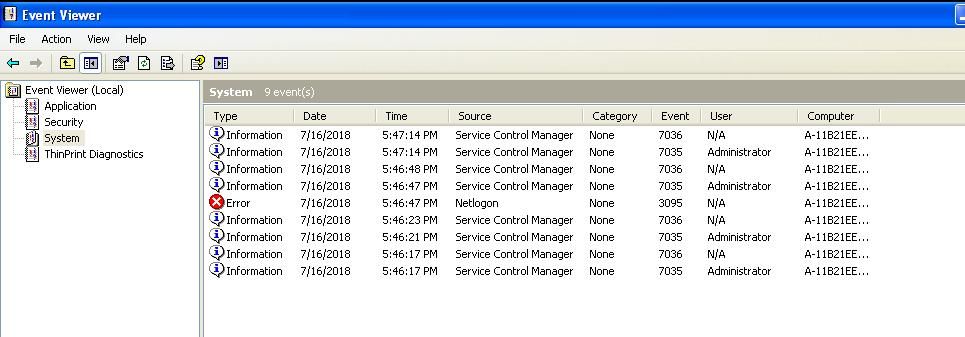
Select System, right-click, choose Save Log File As..., and save the log file as sys1.evt
Note:
Copying the file SysEvent.Evt from %systemroot%\system32\config results in a log file that cannot be opened normally
Reason:
The file header of the evt file in %systemroot%\system32\config was not synchronously updated, causing a format error when opening the evt file
After repairing the file header, the file can be opened normally
sys1.evt has been uploaded, download link:
`An open-source project
Open this log in eventvwr, select System as Log Type, successfully opened
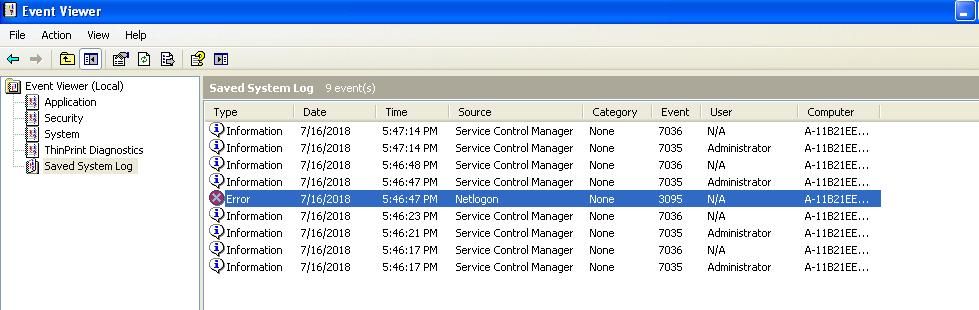
The file contains 9 logs, now attempt to delete the 5th log, as shown below
1. Locate the 5th log
Search for 4c664c6505000000
4c664c65 is ELF_LOG_SIGNATURE, a fixed structure
05000000 is the Record number
2. Delete the 5th log
Starting position is the 4 bytes before 4c664c6505000000
Delete length is the 4 bytes before 4c664c6505000000
As shown below
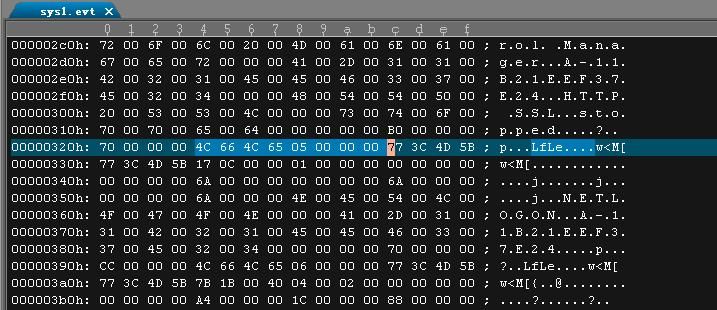
Starting position is 0x320h
Delete length is 0x00000070h (i.e., 112)
Supplement:
Operations performed via UltraEdit:
Select the starting position at 0x320h, right-click, choose Hex Insert/Delete
Select Delete, enter the number of bytes to delete: 112
3. Update the Record number for subsequent logs (decrease by 1)
Specifically, the Record numbers for the 6th, 7th, 8th, and 9th logs
4. Update three items in the file header
(1) End of file record offset
Located at offset 20 in the File header, 4 bytes
Stores the starting address of the end of file record
Two calculation methods:
- Original offset address - length of the 5th log (112)
- Locate the end of file record directly to obtain it
The new End of file record offset is 0x00000640h
(2) Last (newest) record number
4 bytes at offset 24 in the File header
Decrement the value by 1, changing from 0x0000000A to 0x00000009
(3) Maximum file size
4 bytes at offset 32 in the File header
The new Maximum file size is 0x00000668h
5. Synchronously update two items in the end of file record
- End of file record offset
- Last (newest) record number
Save the modified file as sys2.evt
Download link:
`An open-source project
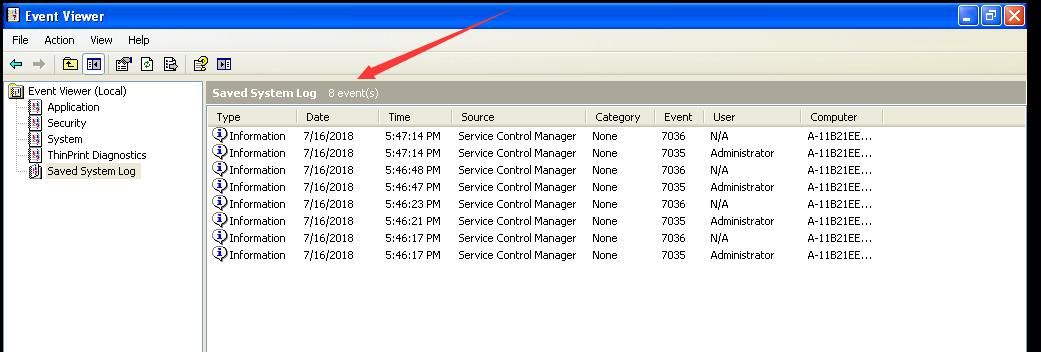
Successfully deleted the 5th log entry
As shown in the figure below
0x05 Summary
---
This article introduces the basics of evt log files and the implementation approach for deleting individual log entries, with a practical demonstration on how to modify evt files to hide a specific log.
The next article will follow the previous research approach to explain how to write a program for automatically deleting logs from a specified date.


