
0x00 Preface
---
In the previous article 'Powershell tricks::Hide Process by kd.exe', the technique of hiding processes via kd.exe was introduced, with the main drawback being the need to enable Local kernel debugging mode and wait for a system restart to take effect.
This time, another method for hiding processes is introduced—using global API hooks.
The advantage is that it takes effect immediately without waiting for a system restart.
0x01 Introduction
---
This article will refer to Sergey Podobry's work to introduce this method, analyze the details to note in practical testing, and supplement the specific parameter settings for 64-bit systems.
Reference links:
https://www.codeproject.com/articles/49319/easy-way-to-set-up-global-api-hooks?display=print
https://github.com/subTee/AppInitGlobalHooks-Mimikatz
0x02 Principle
---
At the user level, the test DLL is injected into all system processes via global API hooks to achieve the hiding of specified processes.
hook method
modify registry key AppInit_DLLs
location:
HKEY_LOCAL_MACHINE\SOFTWARE\Microsoft\Windows NT\CurrentVersion\Windows
parameter description:
LoadAppInit_DLLs:
(REG_DWORD) Value that globally enables or disables AppInit_DLLs.
- 0x0 – AppInit_DLLs are disabled.
- 0x1 – AppInit_DLLs are enabled.
AppInit_DLLs:
(REG_SZ)
Space - or comma -separated list of DLLs to load. The complete path to the DLL should be specified using short file names. C:\PROGRA~1\Test\Test.dll
RequireSignedAppInit_DLLs:
(REG_DWORD) Require code-signed DLLs.
- 0x0 – Load any DLLs.
- 0x1 – Load only code-signed DLLs.
Code Implementation
Implement API hooking via Mhook library
Advantages:
- Open source
- Supports x86 and x64
- Easy to use
Reference URL:
http://codefromthe70s.org/mhook22.aspx
0x03 Practical Testing
---
Testing Environment:
Win7x86
1. Set registry key AppInit_DLLs
Reference code:
https://github.com/subTee/AppInitGlobalHooks-Mimikatz/blob/master/AppInit.reg
The .reg file is as follows:
Windows Registry Editor Version 5.00 |
Indicates
- AppInit_DLLs are enabled
- Load any DLLs, do not need code-signed DLLs
- DLL path: C:\\Tools\\AppInitHookx64.dll,C:\\Tools\\AppInitHook.dll
Note:
The set path must not contain spaces, otherwise it will be invalid
2. Compile and generate AppInitHook.dll and place it under C:\Tools
Reference project:
https://github.com/subTee/AppInitGlobalHooks-Mimikatz
3. Run mimikatz.exe
Task Manager process list does not contain mimikatz.exe
Process Explorer does not show mimikatz.exe
Tasklist.exe does not display mimikatz.exe
Note:
The process is not completely hidden here; the process name is set to conhost.exe because mimikatz is a console application
If replaced with a Win32 project like putty.exe or calc.exe, this issue does not exist, and the process can be completely hidden
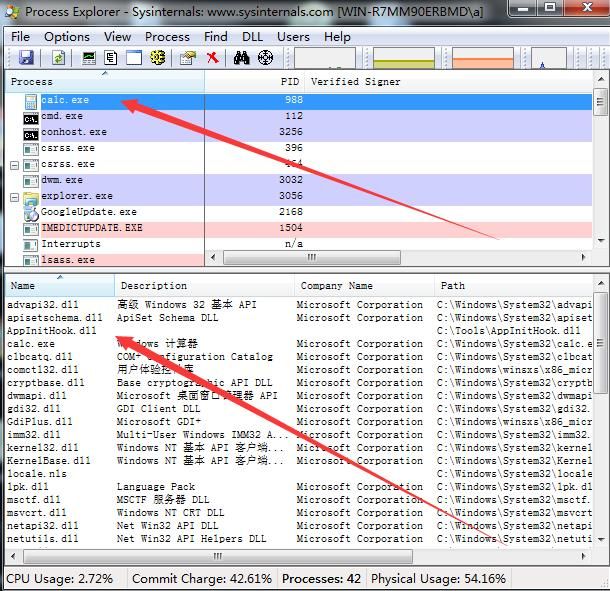
Using Process Explorer to view the newly created processes, all have loaded AppInitHook.dll, as shown in the figure
Note:
Run Process Explorer with administrator privileges to view DLLs loaded by high-privilege processes
4. Win7x64 Testing
The difference between 64-bit and 32-bit systems is also reflected in the registry
Note:
For details, please refer to the previous article 'Notes on Redirection Issues When Running 32-bit Programs on 64-bit Systems'.
Registry location for 64-bit programs:
HKEY_LOCAL_MACHINE\SOFTWARE\Microsoft\
Registry location for 32-bit programs:
HKEY_LOCAL_MACHINE\SOFTWARE\Wow6432Node\Microsoft\
Therefore, to hook all processes (both 32-bit and 64-bit) on a 64-bit system, two registry key values need to be modified.
Registry key location for 64-bit:
[HKEY_LOCAL_MACHINE\SOFTWARE\Microsoft\Windows NT\CurrentVersion\Windows]
Registry key location for 32-bit:
[HKEY_LOCAL_MACHINE\SOFTWARE\Wow6432Node\Microsoft\Windows NT\CurrentVersion\Windows]
The specific modification code has been uploaded to GitHub at the following address:
An open-source project
After modification, view using Process Explorer as shown in the figure.
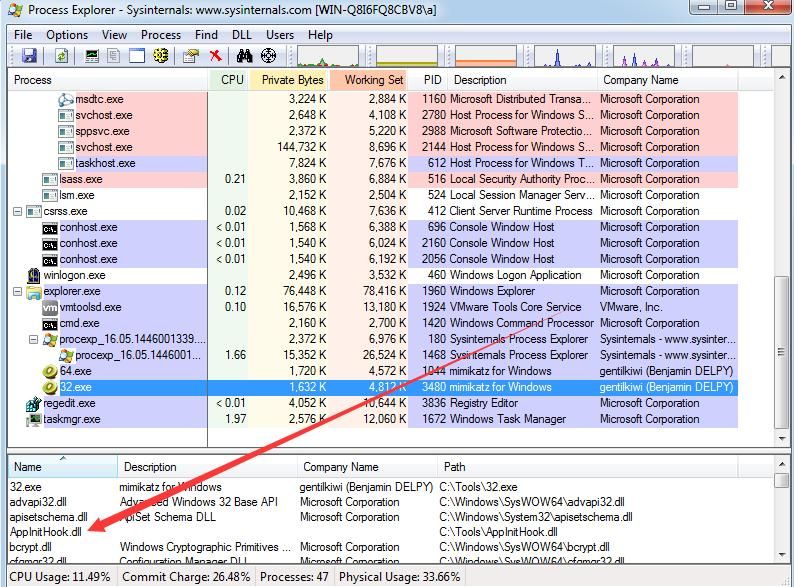
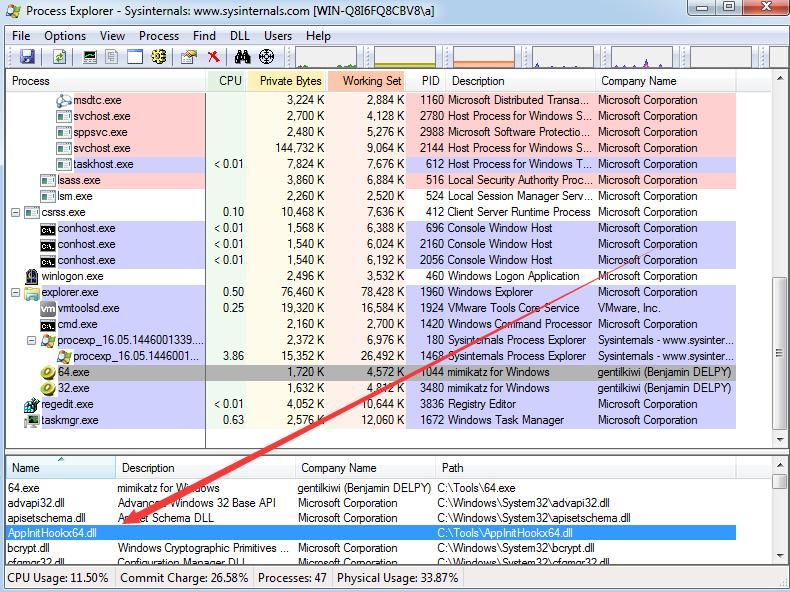
Successfully injected into 32-bit and 64-bit processes
0x04 Supplement
---
This method only supports Windows 7 and Windows Server 2008 R2, and does not support higher versions such as Windows 8 or Server 2012
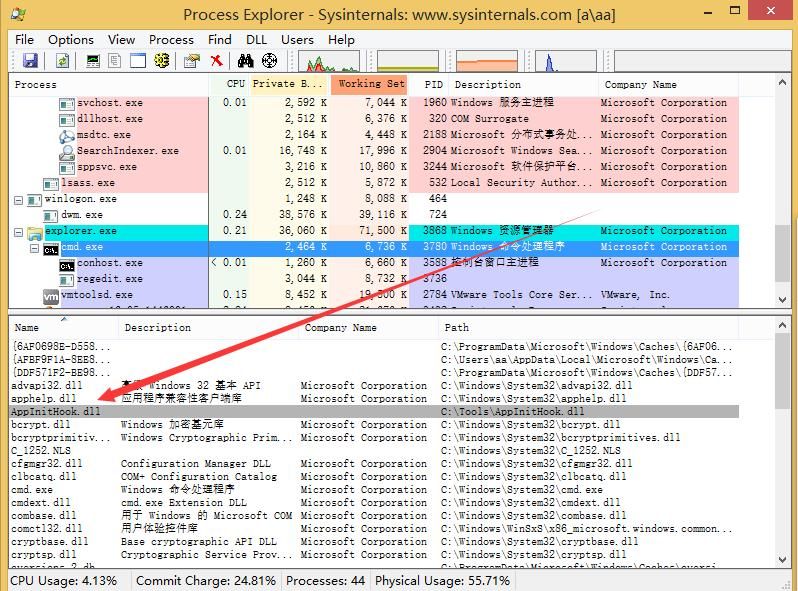
As shown in the figure above, on Windows 8 systems, although AppInitHook.dll is successfully loaded, the process cannot be hidden
Reasons are as follows:
Starting from Windows 8, Microsoft imposed restrictions on AppInit_DLLs: the secure boot enabled by default in the BIOS will disable AppInit_DLLs, rendering it ineffective
For details, refer to:
https://msdn.microsoft.com/en-us/library/windows/desktop/dn280412(v=vs.85).aspx
0x05 Defense
---
Only applicable to Windows 7, Windows Server 2008 R2, and earlier systems
1. Check the registry key value
[HKEY_LOCAL_MACHINE\SOFTWARE\Microsoft\WindowsNT\CurrentVersion\Windows]
[HKEY_LOCAL_MACHINE\SOFTWARE\Wow6432Node\Microsoft\Windows NT\CurrentVersion\Windows]
Check AppInit_DLLs for suspicious DLL paths
2. Use Process Explorer to check if processes have loaded suspicious DLLs
0x06 Summary
---
This article introduces the method of hiding processes using global API hooks in Windows 7 systems. Combined with exploitation concepts, it helps everyone better defend against this type of attack.
Of course, global API hooks can be used for much more than this.


