
0x00 Introduction
---
While researching "Use SCT to Bypass Application Whitelisting Protection," I once had an idea: during the execution of the regsvr32 command to register a COM component, corresponding key values for the COM component are simultaneously created under the registry path HKEY_CLASSES_ROOT\CLSID\, and the subkey InprocServer32 under the classid contains the absolute path to scrobj.dll. So, if the key value of the subkey InprocServer32 is modified, could it achieve hijacking of certain operations?
However, modifying key values under HKCR\CLSID\ actually requires administrator privileges, so I didn't delve deeper into this idea. Recently, Matt Nelson's (@enigma0x3) blog gave me a new perspective: it only requires standard user permissions to hijack high-privilege system registry key values, which gave me a new understanding of userland registry hijacking.
0x01 Overview
---
This article will introduce the principles of userland registry hijacking, analyze specific applications in Userland Persistence and BypassUAC through examples, and demonstrate a method for finding BypassUAC using Process Monitor.
0x02 Principles of Userland Registry Hijacking
---
1. Key Value Synchronization
Modifying the data of the default name in key values under HKCU:\Software\Classes\ can simultaneously modify the data of the corresponding key value's default name under HKCR:\ (provided that this registry entry already exists under HKCR:\)
For example:
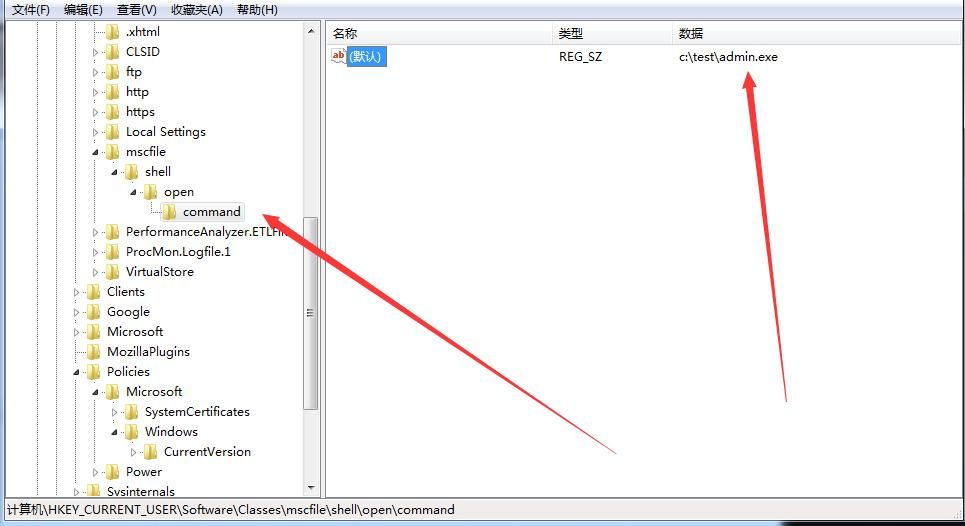
Editing the default value of HKEY_CURRENT_USER\Software\Classes\mscfile\shell\open\command to c:\test\admin.exe
As shown in the figure
Note:
By default, HKEY_CURRENT_USER\Software\Classes\ does not contain mscfile\shell\open\command; it needs to be created manually.
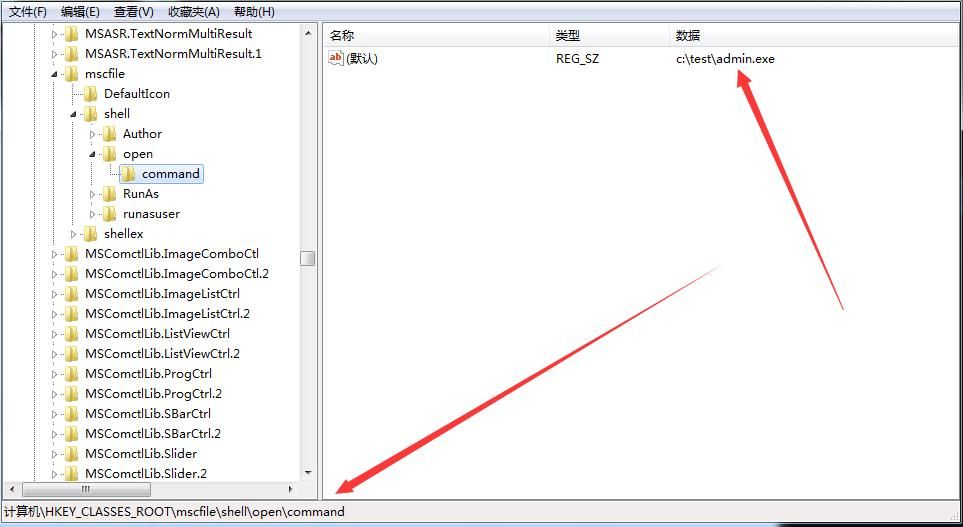
Navigating to HKEY_CLASSES_ROOT\mscfile\shell\open\command, it is found that the default value has been automatically changed to c:\test\admin.exe.
As shown in the figure.
Note:
Creating a new key under HKCU:\Software\Classes\CLSID that does not exist in HKCR:\CLSID will not update the data in HKCR:\CLSID.
As shown in the figure.
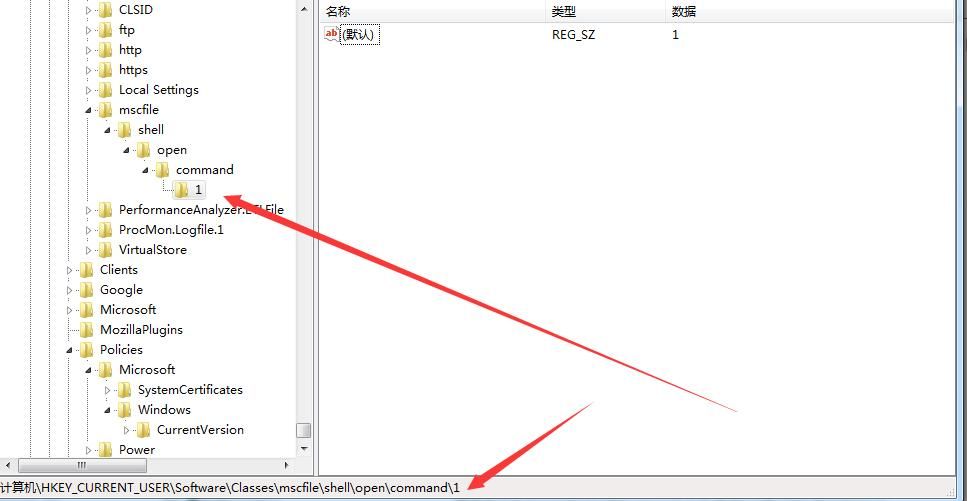
Creating HKEY_CURRENT_USER\Software\Classes\mscfile\shell\open\command\1 and setting the default value data to 1 will not create a subkey 1 under HKEY_CLASSES_ROOT\mscfile\shell\open\command.
2. Permissions
- Modifying keys under HKCU only requires standard user permissions.
- Modifying keys under HKCR requires administrator permissions.
In summary, editing keys under HKCU:\Software\Classes\ with standard user permissions can synchronize modifications to the corresponding keys under HKCR, which require administrator permissions.
Based on the principles introduced above, it can be specifically applied in two aspects: Userland Persistence and BypassUAC:
0x03 Userland Persistence With Scheduled Tasks
---
If the registry key corresponding to a system scheduled task is hijacked and the absolute path of the DLL to be launched is modified, then a backdoor can be achieved with only ordinary user permissions. The specific operations are as follows:
1. View the correspondence between scheduled tasks and the registry
There is a correspondence between scheduled tasks in the system and the key values under the registry HKCU:\Software\Classes\CLSID\. You can directly view this using the script shared by Matt Nelson@enigma0x3.
Download address:
https://github.com/enigma0x3/Misc-PowerShell-Stuff/blob/master/Get-ScheduledTaskComHandler.ps1
Note:
The information viewed through the scheduled task panel is incomplete. The scheduled task panel can be opened by: right-clicking on My Computer -> Manage, then finding Scheduled Tasks, as shown in the figure.
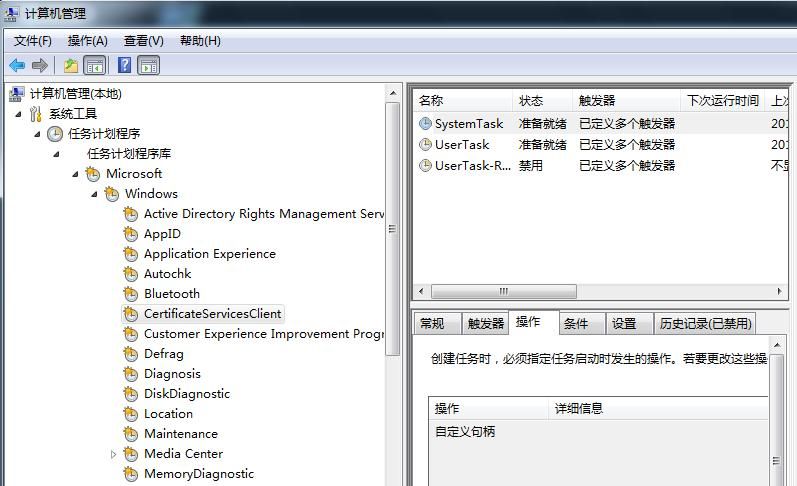
Some correspondences obtained by the PowerShell script are shown in the figure.
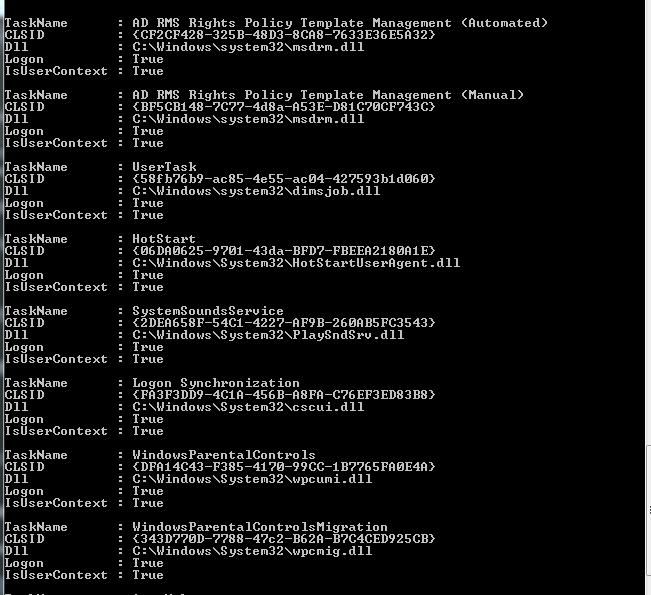
You can obtain the location of the registry key corresponding to each scheduled task and the DLL to be launched.
2. Modify the DLL location in the corresponding key value
After establishing the correspondence, it is necessary to locate the specific registry key location, namely HKEY_CURRENT_USER\Software\Classes\CLSID\{CLSID}. Typically, this key does not exist under HKCU and must be manually created. Set its default value to the absolute path of the test DLL that needs to be executed. Once the key is created, the corresponding key under HKCR will be updated synchronously, and the DLL launched by the scheduled task will consequently be modified.
Example:
1. Examine the correspondence between the scheduled task and the registry
Run Get-ScheduledTaskComHandler to find DLLs that can be hijacked. Select a common scheduled task—UserTask—with details as follows:
TaskName : UserTask
CLSID : {58fb76b9-ac85-4e55-ac04-427593b1d060}
Dll : C:\Windows\system32\dimsjob.dll
Logon : True
IsUserContext : True
Note:
This operation requires querying keys under HKCR, so administrator privileges are necessary to obtain them.
2. Modify the DLL location in the corresponding key
Under HKEY_CURRENT_USER\Software\Classes\CLSID\, create a new key named {58fb76b9-ac85-4e55-ac04-427593b1d060}.
Then create a new key named InprocServer32.
Set its value to c:\test\MessageBox32.dll
Note:
The registry key {58fb76b9-ac85-4e55-ac04-427593b1d060} is universal, with the same key value name across different systems
The download address for MessageBox32.dll is:
https://github.com/enigma0x3/MessageBox
Actual testing found that the dll from https://github.com/enigma0x3/MessageBox/tree/master/bin fails on Win7; recompiling the source code to generate a new dll works
At this point, check HKEY_CLASSES_ROOT\CLSID\{58fb76b9-ac85-4e55-ac04-427593b1d060}\InprocServer32, the default value is modified to c:\test\MessageBox32.dll, as shown in the figure
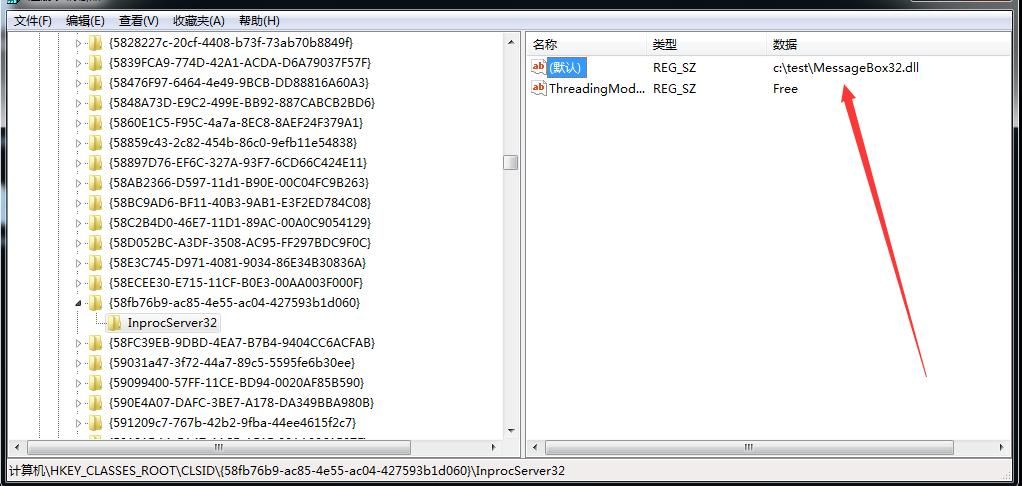
After logging off the user and logging back in, MessageBox32.dll is loaded and a dialog box pops up
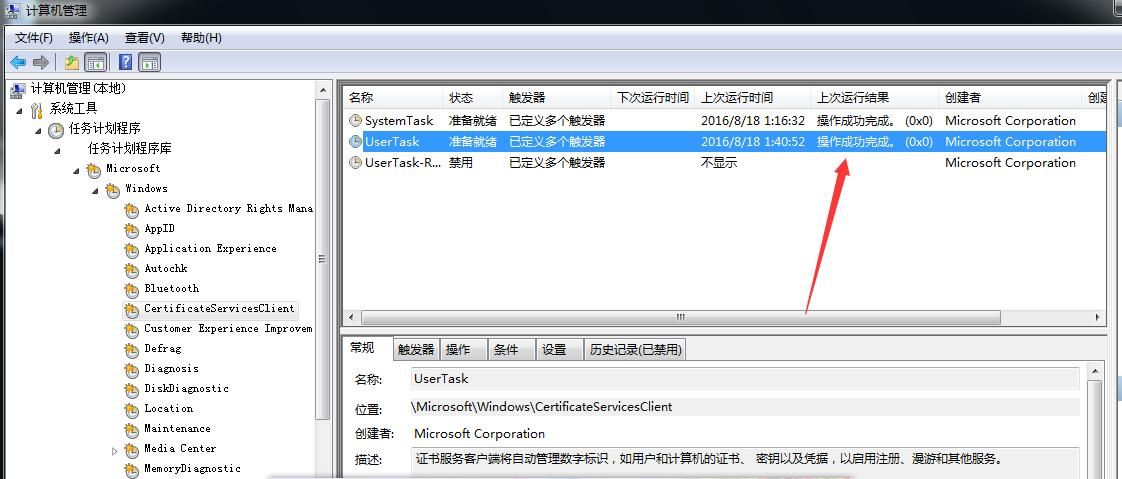
However, an error in the DLL (0x800401F9) is reported in the Scheduled Task panel log, as shown in the figure
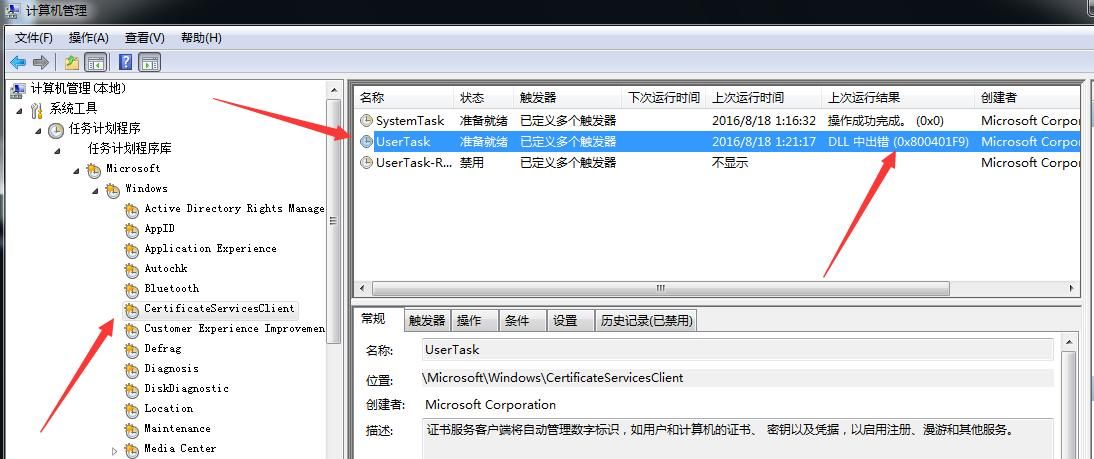
It is suspected that the issue with export functions causes the DLL loading error. Use dumpbin to view the export functions of the original DLL corresponding to the UserTask scheduled task, execute:
dumpbin /exports C:\Windows\system32\dimsjob.dll
Note:
The absolute path of the original DLL corresponding to UserTask is C:\Windows\system32\dimsjob.dll
Obtain the export function table of dimsjob.dll, as shown in the figure
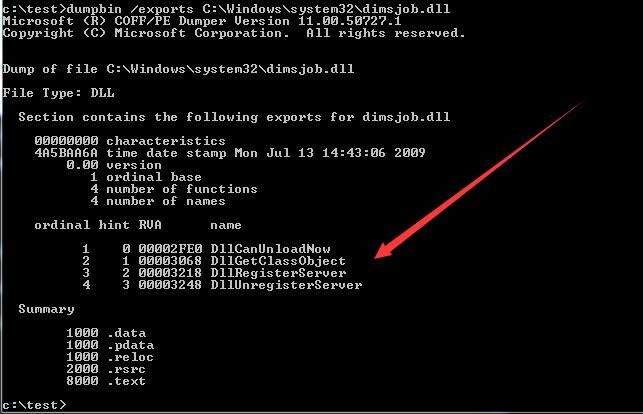
Therefore, it is necessary to add new export functions to the DLL:
- DllCanUnloadNow
- DllGetClassObject
- DllRegisterServer
- DllUnregisterServer
Note:
The specific method for adding export functions to the DLL is detailed in 'Code Execution of Regsvr32.exe' and is omitted here
After successful addition, use dumpbin to view the results as shown in the figure
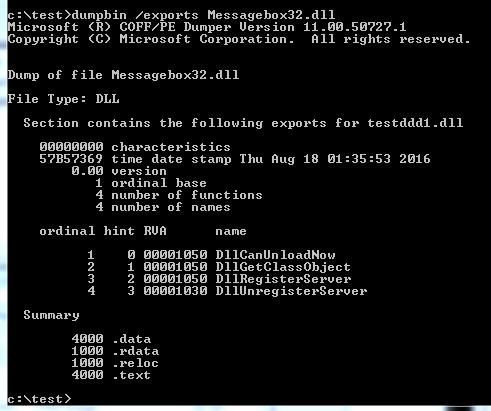
Replace the old MessageBox32.dll, log off the user, log back in, the new MessageBox32.dll is loaded, and a pop-up appears
Check the logs in the Scheduled Task panel, the issue is resolved, and the operation is successfully completed, as shown in the figure
The above operations can be automated via PowerShell. Modify the UserTask code as follows:
function Invoke-ScheduledTaskComHandlerUserTask |
Test system: Win7 x86
After execution, when the user logs back in, the DLL is loaded, actual demonstration as shown in the figure
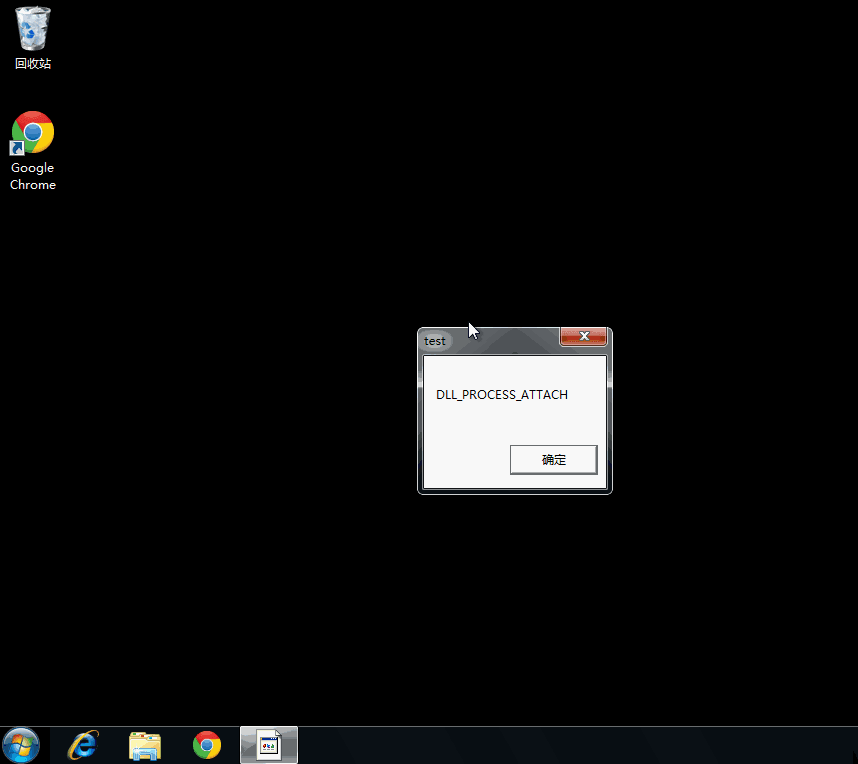
Execute DLL_PROCESS_ATTACH() and DllGetClassObject() sequentially. Since DllGetClassObject() only displays a pop-up, taskhost.exe will show an error afterwards
Note:
This is only a demonstration; specific solutions are not introduced here.
At this point, the UserTask scheduled task has been successfully hijacked to load testmsg.dll at system startup.
0x04 UACBypass
---
Scheduled tasks have corresponding relationships with key values under HKCR:\ in the registry. Similarly, some high-privilege programs also call key values under HKCR:\, which creates the possibility for Bypass UAC.
Using the same principle, by modifying key values under HKEY_CURRENT_USER\Software\Classes\, the key values under HKCR:\ are synchronously modified. If a high-privilege program calls the modified key values during its execution, Bypass UAC is naturally achieved, launching our specified program with high privileges.
The challenge here lies in finding this high-privilege program.
Method:
With the help of Process Monitor, you can view the registry, file, network, and inter-process call relationships during program execution.
Next, use Process Monitor to reproduce the process discovered by Matt Nelson@enigma0x3.
1. Find a high-privilege exe
Matt Nelson@enigma0x3's method involves using sigcheck to view the exe's manifest.
Parameters are as follows:
sigcheck.exe -m c:\windows\system32\eventvwr.exe
The result is shown in the figure
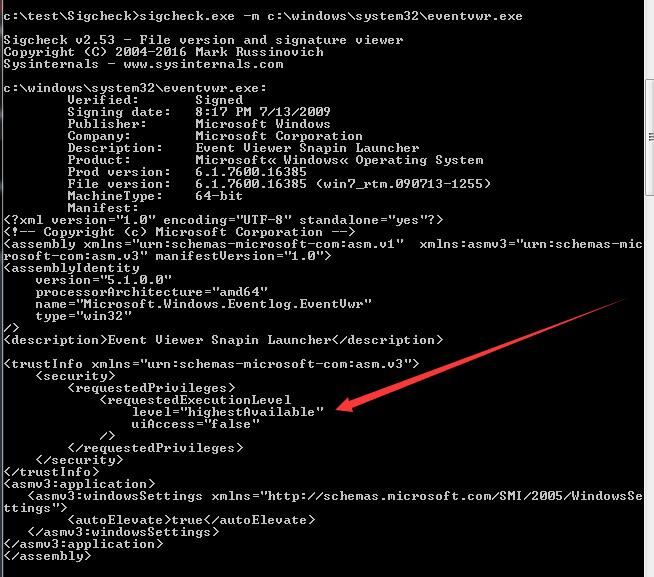
From level="highestAvailable", it is known that eventvwr.exe has high privileges
Note:
A more intuitive method for judgment is provided:
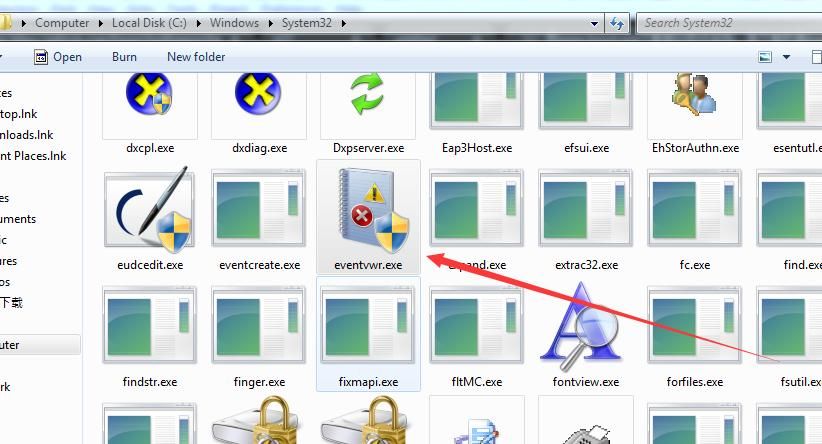
Check the file icon; if it has the UAC logo, it must be a high-privilege program, as shown in the figure
2. Use Process Monitor to view process call relationships
Start Process Monitor
Run eventvwr.exe
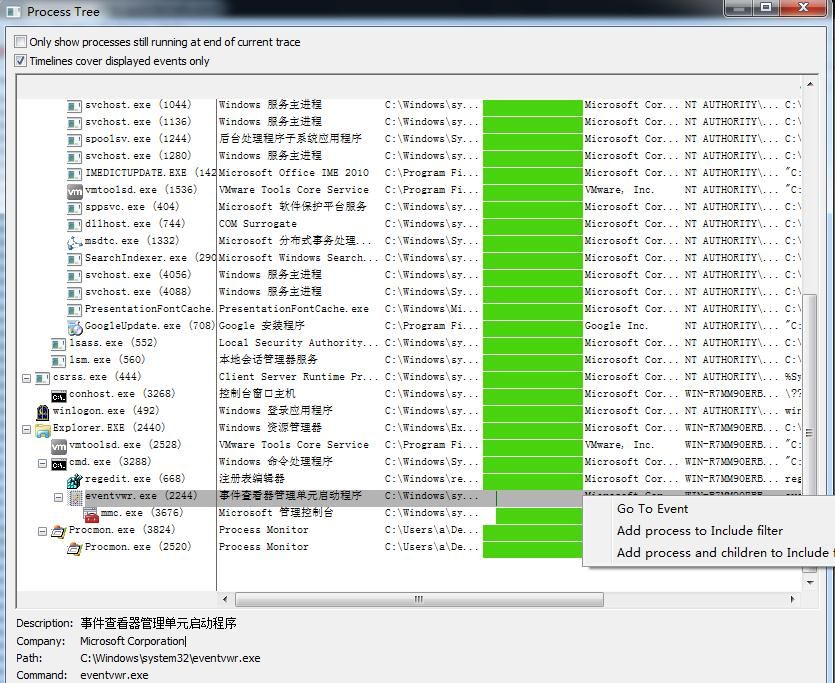
In Process Monitor, select Tools-Process Tree, find eventvwr.exe, right-click-Go To Event, as shown in the figure
Carefully examine the process call relationships, as shown in the figure
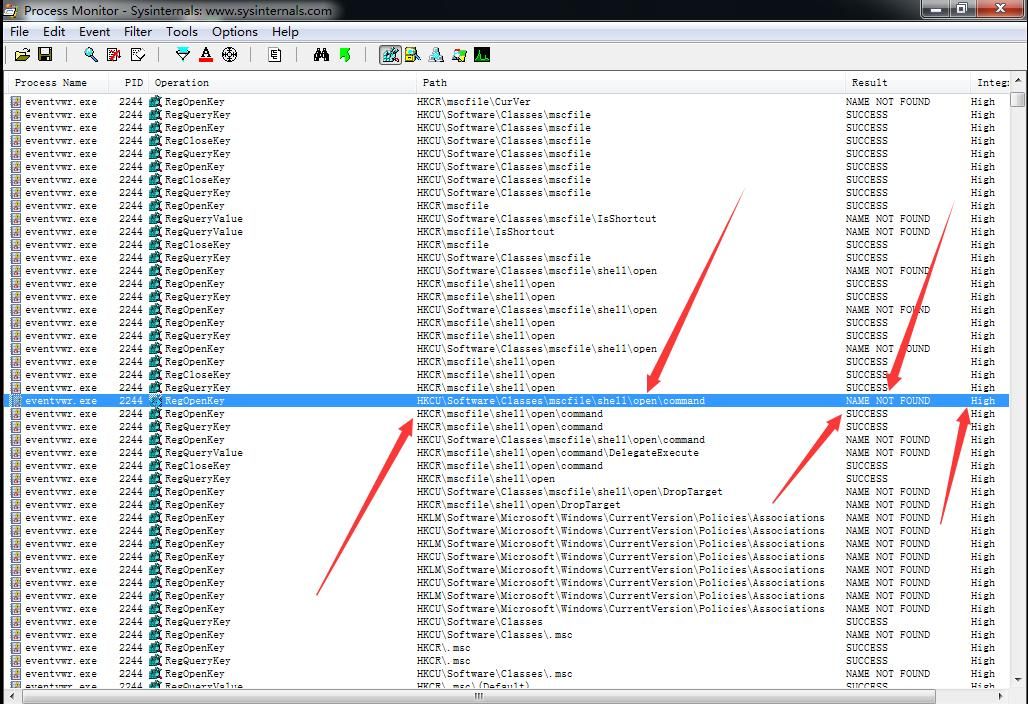
Find the following information:
- eventvwr.exe has high privileges
- eventvwr.exe first queries the key HKCU\Software\Classes\mscfile\shell\open\command, and the result is NAME NOT FOUND
- eventvwr.exe then queries the key HKCR\mscfile\shell\open\command, and the result is SUCCESS
3. Modification Test
What happens if we modify the key HKCU\Software\Classes\mscfile\shell\open\command so that the query result is SUCCESS?
First, modify the key HKCU\Software\Classes\mscfile\shell\open\command to have the value calc.exe
Run eventvwr.exe again and observe that calc.exe is launched
Use Process Monitor to view the process invocation relationship, as shown in the figure
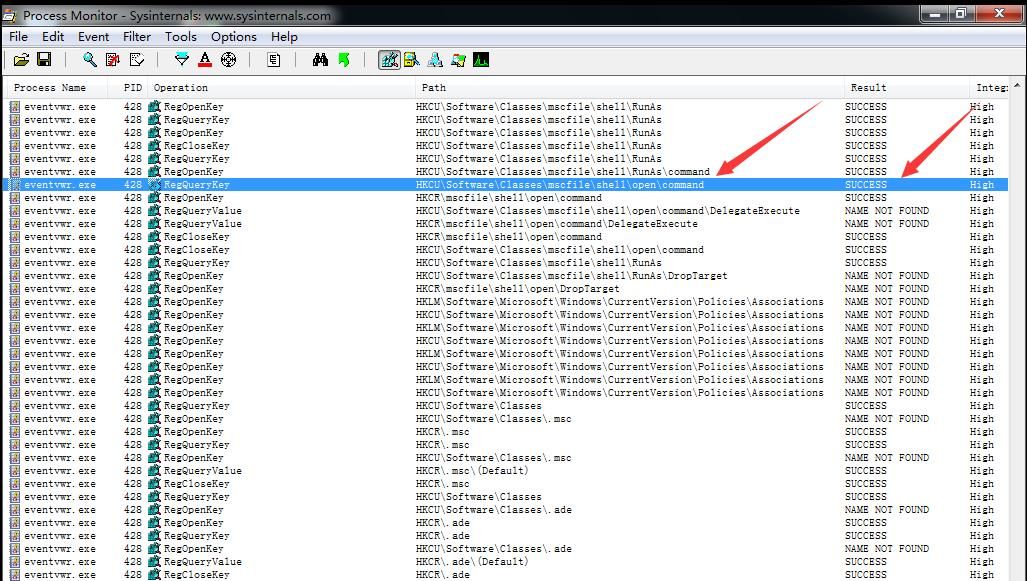
At this point, the query result for the key HKCU\Software\Classes\mscfile\shell\open\command is SUCCESS
Thus, by modifying HKCU\Software\Classes\mscfile\shell\open\command, BypassUAC is successfully achieved, obtaining high privileges
calc.exe has high privileges, as shown in the figure

4. Additional Conclusions
After modifying HKCU\Software\Classes\mscfile\shell\open\command, the execution of all .msc files will be hijacked, such as gpedit.msc, as shown in the figure
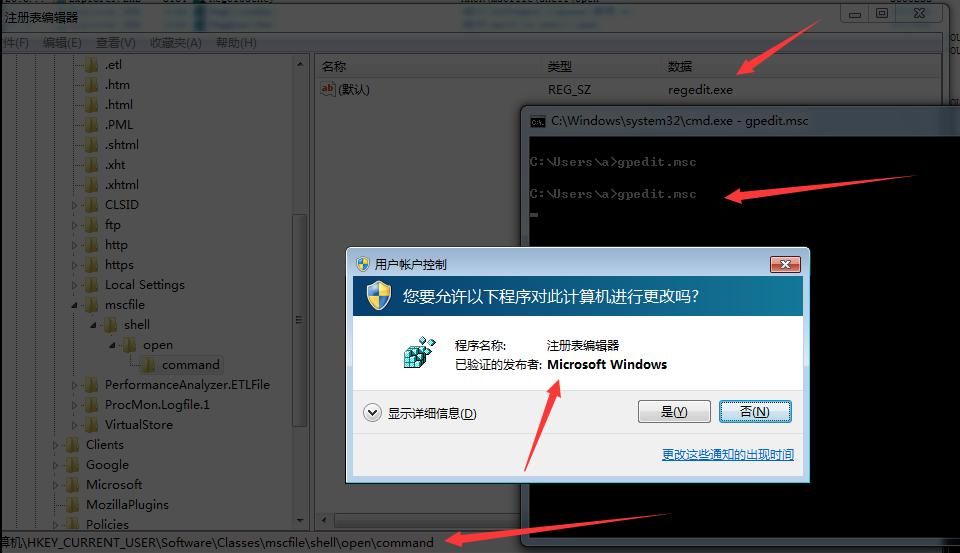
Following this method, I tested all high-privilege executables under system32 and have not yet discovered a UAC bypass using the same approach via the command key value, but other key values are still worth testing.
0x05 Defense
---
Windows 10 has patched this vulnerability, while older versions of Windows remain unpatched. Recommended defenses include:
- set the UAC level to “Always Notify”
- remove the current user from the Local Administrators group
- alert on new registry entries in HKCU\Software\Classes\
Quoted from https://enigma0x3.net/2016/08/15/fileless-uac-bypass-using-eventvwr-exe-and-registry-hijacking/
0x06 Summary
---
There are many DLLs in scheduled tasks that can be used for persistence; monitoring these is recommended for defense.
Using Process Monitor to find UAC bypass methods is worth further research, and new discoveries are certain to emerge.
Related learning materials:
https://enigma0x3.net/2016/08/15/fileless-uac-bypass-using-eventvwr-exe-and-registry-hijacking/
https://enigma0x3.net/2016/05/25/userland-persistence-with-scheduled-tasks-and-com-handler-hijacking/
https://blog.gdatasoftware.com/2014/10/23941-com-object-hijacking-the-discreet-way-of-persistence


