Use Logon Scripts to maintain persistence

Onedaysec
3 min read
1 views
docx image 1770016714386 0 81861fd612

0x00 Introduction

---

This article continues the series on backdoor exploitation methods, focusing on the use of Logon Scripts. During my research, I discovered a particular technique where scripts execute before antivirus software, allowing them to bypass antivirus interception of sensitive operations. This article will detail this technique.

Note:

Some antivirus software can start before Logon Scripts.

0x01 Overview

---

  • Usage of Logon Scripts
  • Bypassing 360's interception of WMI calls
  • Special Techniques

0x02 Usage of Logon Scripts

---

The idea originates from Adam@Hexacorn, with the following address:

http://www.hexacorn.com/blog/2014/11/14/beyond-good-ol-run-key-part-18/

Brief introduction to the usage of Logon Scripts

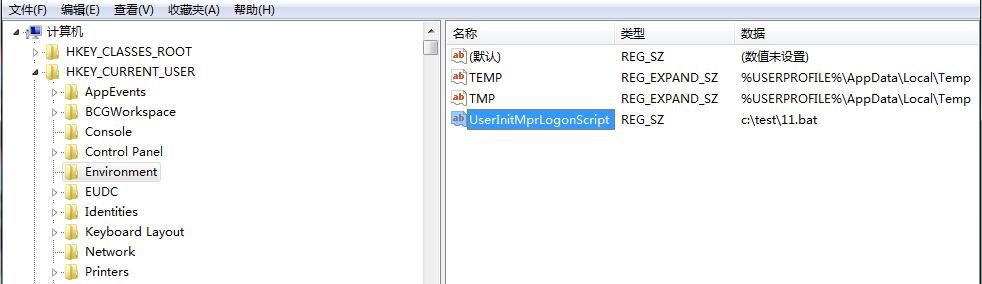
Registry path: HKCU\Environment\

Create string key value: UserInitMprLogonScript

Set key value to absolute path of bat: c:\test\11.bat

As shown in the figure below
Brief introduction to the usage of Logon Scripts — technical illustration 1

The content of the bat is as follows:

start calc.exe

Log off, log on

Execute script 11.bat, calculator pops up

0x03 Bypass 360's interception of modifying environment variables via WMI

---

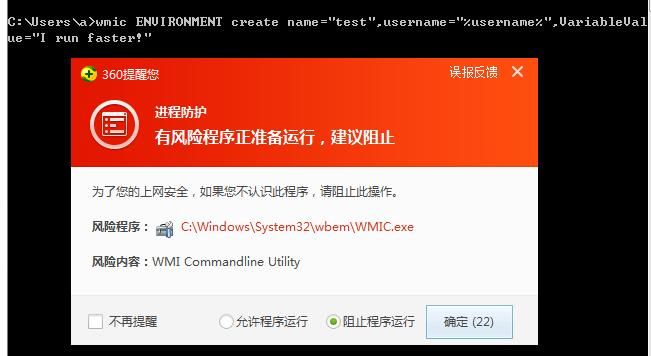
As mentioned in the previous article 'Use CLR to maintain persistence', the method of using wmic to modify environment variables

The command is as follows:

wmic ENVIRONMENT create name="COR_ENABLE_PROFILING",username="%username%",VariableValue="1"

wmic ENVIRONMENT create name="COR_PROFILER",username="%username%",VariableValue="{11111111-1111-1111-1111-111111111111}"

However, 360 will intercept WMI operations, as shown in the figure below
0x03 Bypass 360's interception of modifying environment variables via WMI — technical illustration 2

In fact, adding environment variables via WMI is equivalent to creating key-values in the registry HKCR\Environment\

Therefore, WMI operations can be replaced by writing to the registry

The above WMI command can be replaced with the following PowerShell code:

New-ItemProperty "HKCU:\Environment\" COR_ENABLE_PROFILING -value "1" -propertyType string | Out-Null

New-ItemProperty "HKCU:\Environment\" COR_PROFILER -value "{11111111-1111-1111-1111-111111111111}" -propertyType string | Out-Null

0x04 Special Usage

---

Originating from a unique idea of mine

During my research on this technique, I had an interesting thought: Do Logon Scripts start before other programs?

If so, do they also start before antivirus software?

Now, let's begin my test:

1. Enter the following code in cmd:

wmic ENVIRONMENT create name="test",username="%username%",VariableValue="I run faster!"

As expected, it was blocked

2. Setting Logon Scripts

The code for 11.bat is as follows:

wmic ENVIRONMENT create name="test",username="%username%",VariableValue="I run faster!"
reg query HKEY_CURRENT_USER\Environment /V test
pause

3. Enabling Logon Scripts

Registry path: HKCR\Environment\

Create a string key value: UserInitMprLogonScript

Set the key value to the absolute path of the bat file: c:\test\11.bat

Since calling WMI will be blocked, it can be implemented via PowerShell with the following code:

New-ItemProperty "HKCU:\Environment\" UserInitMprLogonScript -value "c:\test\11.bat" -propertyType string | Out-Null

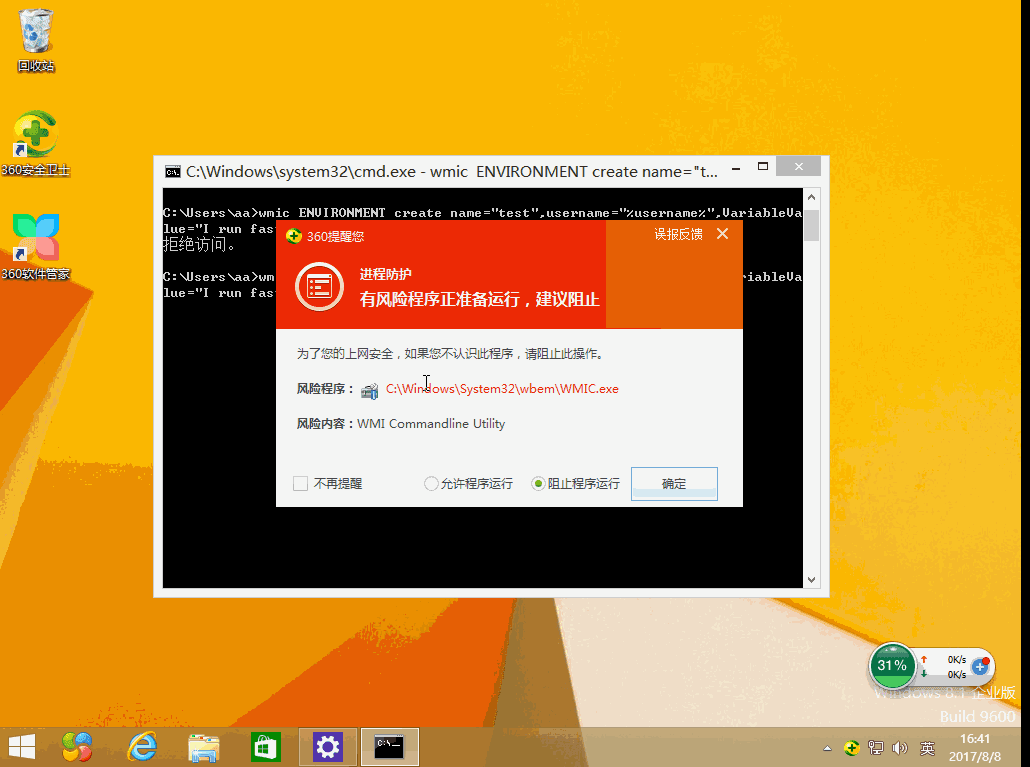
4. Log off, log back in, and test

If the registry HKCR\Environment\ is successfully written with the key value test REG_SZ I run faster!, it indicates that Logon Scripts execute before antivirus software, bypassing its restrictions

The complete operation is shown in the figure below
4. Log off, log back in, and test — technical illustration 3

Test successful, verifying our conclusion

0x05 Defense

---

Monitor registry key HKCR\Environment\UserInitMprLogonScript

0x06 Summary

---

This article tests the usage of Logon Scripts and introduces a special application: Logon Scripts can execute before antivirus software, bypassing its interception of sensitive operations.

From a defensive perspective, vigilance should be maintained against this.

Related Questions & Answers

Does the Logon Scripts technique allow execution before antivirus software starts?

Yes, the article demonstrates that Logon Scripts execute before certain antivirus software like 360, allowing malicious scripts to perform restricted operations (e.g., creating environment variables via WMI) without being blocked. This was tested by writing a value to the registry within the logon script and confirming it succeeded. For details, check the [Logon Scripts persistence article](/news/use-logon-scripts-to-maintain-persistence).

How can attackers bypass 360 antivirus's interception of WMI calls when setting environment variables for persistence?

360 antivirus intercepts WMI calls like `wmic ENVIRONMENT create`, but attackers can bypass this by writing directly to the registry using PowerShell. For example, `New-ItemProperty "HKCU:\Environment\" COR_ENABLE_PROFILING -value "1" -propertyType string` achieves the same effect as the WMI command without triggering antivirus alerts, as described in the [Logon Scripts article](/news/use-logon-scripts-to-maintain-persistence).

What is the Logon Scripts persistence technique and how is it configured?

The Logon Scripts persistence technique involves setting the `UserInitMprLogonScript` registry value under `HKCU\Environment` to point to a script (e.g., a .bat file). When the user logs on, the script executes automatically, providing a stealthy method for maintaining access. For a full walkthrough, see [Use Logon Scripts to maintain persistence](/news/use-logon-scripts-to-maintain-persistence).

Why might an attacker replace WMI commands with registry modifications when using Logon Scripts?

Antivirus software like 360 often intercepts WMI calls used to create environment variables. Since adding environment variables via WMI is equivalent to writing to the registry (specifically `HKCU\Environment`), an attacker can bypass the WMI interception by directly writing to the registry using PowerShell or similar tools. This makes the technique stealthier and more reliable. --- **Related reading:** - [Use Logon Scripts to maintain persistence](/news/use-logon-scripts-to-maintain-persistence) — original article - [Penetration Techniques - Obtaining Net-NTLM Hash via HTTP Protocol](/news/penetration-techniques-obtaining-net-ntlm-hash-via-http-protocol) - [Webmin<=1.920-Unauthenticated_RCE(CVE-2019-15107) Exploitation Test](/news/webmin-1-920-unauthenticated-rce-cve-2019-15107-exploitation-test) - [Pupy Exploitation Analysis - Features on Windows Platform](/news/pupy-exploitation-analysis-features-on-windows-platform)

How can Logon Scripts bypass antivirus software interception, such as 360?

Logon Scripts execute before many antivirus programs during the logon sequence. By placing sensitive operations (e.g., creating environment variables via WMI) inside the Logon Script batch file, the script runs before the antivirus can intercept those calls. This allows an attacker to bypass antivirus restrictions on operations like WMI calls. --- **Related reading:** - [Use Logon Scripts to maintain persistence](/news/use-logon-scripts-to-maintain-persistence) — original article - [Penetration Techniques - Obtaining Net-NTLM Hash via HTTP Protocol](/news/penetration-techniques-obtaining-net-ntlm-hash-via-http-protocol) - [Webmin<=1.920-Unauthenticated_RCE(CVE-2019-15107) Exploitation Test](/news/webmin-1-920-unauthenticated-rce-cve-2019-15107-exploitation-test) - [Pupy Exploitation Analysis - Features on Windows Platform](/news/pupy-exploitation-analysis-features-on-windows-platform)

What is the Logon Scripts persistence technique and where is it configured?

The Logon Scripts persistence technique involves creating a registry key `UserInitMprLogonScript` under `HKCU\Environment` and setting its value to the path of a batch file. This script will execute each time the user logs on. It is a well-known method for maintaining access on a Windows system. --- **Related reading:** - [Use Logon Scripts to maintain persistence](/news/use-logon-scripts-to-maintain-persistence) — original article - [Penetration Techniques - Obtaining Net-NTLM Hash via HTTP Protocol](/news/penetration-techniques-obtaining-net-ntlm-hash-via-http-protocol) - [Webmin<=1.920-Unauthenticated_RCE(CVE-2019-15107) Exploitation Test](/news/webmin-1-920-unauthenticated-rce-cve-2019-15107-exploitation-test) - [Pupy Exploitation Analysis - Features on Windows Platform](/news/pupy-exploitation-analysis-features-on-windows-platform)

What registry key should defenders monitor to detect Logon Script abuse?

Defenders should monitor the registry key HKCU\Environment\UserInitMprLogonScript. Unauthorized creation or modification of this value could indicate an attacker attempting to establish persistence via Logon Scripts. --- **Related reading:** - [Use Logon Scripts to maintain persistence](/news/use-logon-scripts-to-maintain-persistence) — original article - [Penetration Basics - Obfuscating Strings Using Unicode Encoding](/news/penetration-basics-obfuscating-strings-using-unicode-encoding) - [Sophos UTM Analysis - Clearing Last WebAdmin Sessions Records](/news/sophos-utm-analysis-clearing-last-webadmin-sessions-records) - [Penetration Basics - Methods to Continuously Obtain Exchange User Inbox Emails](/news/penetration-basics-methods-to-continuously-obtain-exchange-user-inbox-emails)

Why would an attacker replace WMI commands with direct registry edits?

WMI operations (e.g., wmic ENVIRONMENT create) are often monitored and blocked by security software like 360. Since WMI ultimately writes to the registry (HKCU\Environment), attackers can bypass detection by using PowerShell or reg commands to directly create the same registry entries, avoiding WMI-based alerts. --- **Related reading:** - [Use Logon Scripts to maintain persistence](/news/use-logon-scripts-to-maintain-persistence) — original article - [Penetration Basics - Obfuscating Strings Using Unicode Encoding](/news/penetration-basics-obfuscating-strings-using-unicode-encoding) - [Sophos UTM Analysis - Clearing Last WebAdmin Sessions Records](/news/sophos-utm-analysis-clearing-last-webadmin-sessions-records) - [Penetration Basics - Methods to Continuously Obtain Exchange User Inbox Emails](/news/penetration-basics-methods-to-continuously-obtain-exchange-user-inbox-emails)

Continue Reading
