
0x00 Preface
---
Previous articles introduced two backdoors implemented using COM object hijacking, with some differences in approach:
The first method: hijacking .Net programs via CLR
Normal usage of CLR:
Set the registry key value HKEY_CURRENT_USER\Software\Classes\CLSID\
Enter in cmd:
SET COR_ENABLE_PROFILING=1 |
CLR can hijack the startup of all .Net programs under the current cmd
Backdoor exploitation approach:
I attempted to modify environment variables via WMI to make CLR effective globally, thereby hijacking the startup of all .Net programs
Practical testing confirmed this method is effective; after system startup, .Net programs are called by default, loading CLR and triggering the backdoor
The second method: hijacking CAccPropServicesClass and MMDeviceEnumerator
This method was previously used by the COMpfun Trojan, so the approach was learned from COMpfun.
Setting the registry key HKEY_CURRENT_USER\Software\Classes\CLSID\ can specify the DLLs loaded by the instances CAccPropServicesClass and MMDeviceEnumerator.
When the IE browser process iexplore.exe starts, it calls the above two instances.
Therefore, by setting the DLLs loaded by CAccPropServicesClass and MMDeviceEnumerator via the registry, the startup of the IE browser can be hijacked to trigger the backdoor.
Of course, this method can only be considered a passive backdoor, as it only triggers when the user starts the IE browser.
However, among the many COM objects, the hijackable objects are not unique, and there are even methods to hijack the desktop process explorer.exe, which is equivalent to an active backdoor.
For example: hijacking MruPidlList.
Note:
This method has been used by multiple known malware.
Based on the principle of studying all publicly disclosed COM object backdoor exploitation methods to summarize defense strategies against COM hijacking, this article will introduce two other COM hijacking backdoor exploitation methods.
Previous articles:
"Use CLR to maintain persistence"
"Use COM Object hijacking to maintain persistence——Hijack CAccPropServicesClass and MMDeviceEnumerator"
0x01 Introduction
---
This article will cover the following content
- Backdoor approach via hijacking MruPidlList
- Malicious exploitation examples
- Summary of defense methods against COM hijacking
0x02 Backdoor approach via hijacking MruPidlList
---
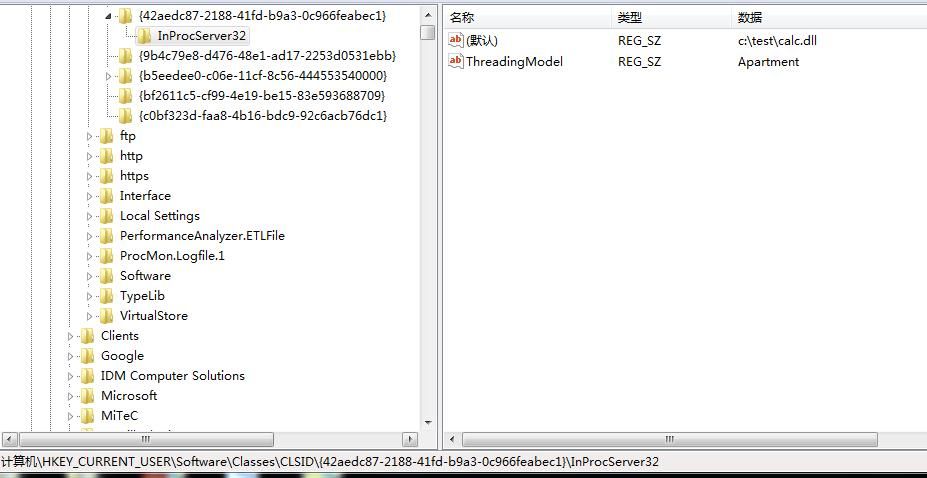
Registry location: HKCU\Software\Classes\CLSID\
Create key {42aedc87-2188-41fd-b9a3-0c966feabec1}
Create subkey InprocServer32
Default value is the absolute path of the test DLL: C:\test\calc.dll
Create value: ThreadingModel REG_SZ Apartment
As shown in the figure below
This registry location corresponds to the COM object MruPidlList, which operates on shell32.dll
And shell32.dll is a Windows 32-bit shell dynamic link library file, used for opening web pages and files, setting default filenames when creating files, and many other functions
Intuitively, explorer.exe calls shell32.dll to load the COM object MruPidlList.
The system launches the process explorer.exe by default at startup. If the COM object MruPidlList is hijacked, the process explorer.exe can be hijacked, enabling a backdoor to start with the system, effectively making it an active backdoor.
Of course, for testing convenience, there's no need to reboot the system; simply terminate the explorer.exe process and create a new one.
After creating the new process, load calc.dll to pop up the calculator, as shown in the figure below.

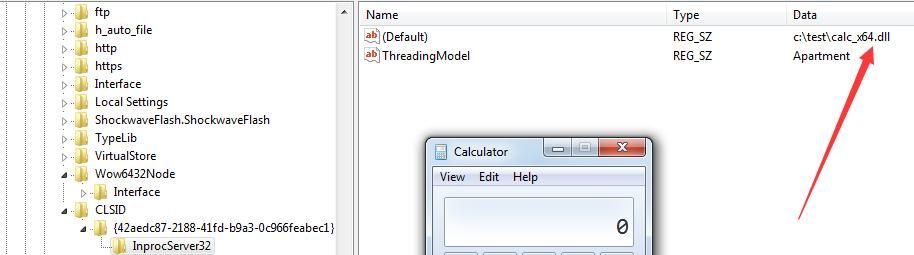
Testing on a 64-bit system, the registry location remains unchanged, but a 64-bit DLL must be used. The backdoor triggers upon reboot, launching calc.exe, as shown in the figure below.
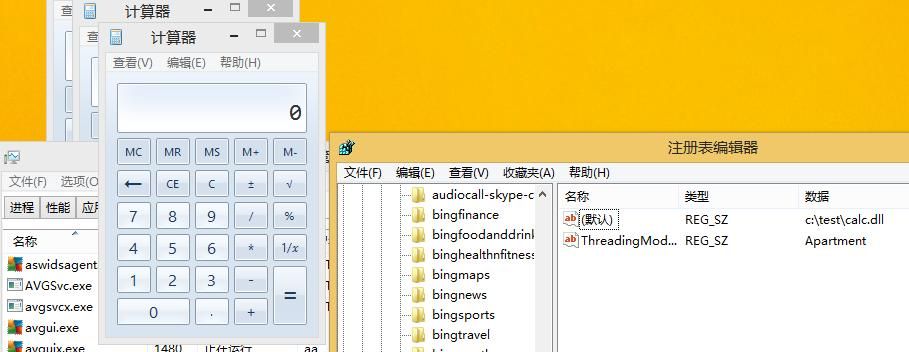
Also applicable to Win8 systems, as shown in the figure below.
0x03 Malicious Exploitation Examples
---
1. COMRAT
Suspected to share origins with Uroburos and Agent.BTZ.
Uroburos: One of the most advanced rootkit malware discovered to date.
Agent.BTZ: Malware used to infiltrate the Pentagon in 2008.
Detailed information:
https://www.nsec.io/wp-content/uploads/2015/05/uroburos-actors-tools-1.1.pdf
2. ZeroAccess rootkit
ZeroAccess rootkit: Infected approximately over 9 million computers
Detailed information:
https://nakedsecurity.sophos.com/2012/06/06/zeroaccess-rootkit-usermode/
https://www.sophos.com/en-us/threat-center/technical-papers/zeroaccess-botnet.aspx
Note:
ZeroAccess rootkit also utilized another COM hijacking location
Registry location: HKCU\Software\Classes\clsid\{fbeb8a05-beee-4442-804e-409d6c4515e9}
Using the same method, it can also hijack explorer.exe
3. BBSRAT
Detailed information:
https://researchcenter.paloaltonetworks.com/2015/12/bbsrat-attacks-targeting-russian-organizations-linked-to-roaming-tiger/
http://2014.zeronights.org/assets/files/slides/roaming_tiger_zeronights_2014.pdf
0x04 Defense
---
Since COM objects are normal functions of the operating system, disabling COM objects is not very practical
The DLL paths pointed to by the following key values should be given special attention:
- HKCU\Software\Classes\CLSID\{42aedc87-2188-41fd-b9a3-0c966feabec1}
- HKCU\Software\Classes\CLSID\{fbeb8a05-beee-4442-804e-409d6c4515e9}
- HKCU\Software\Classes\CLSID{b5f8350b-0548-48b1-a6ee-88bd00b4a5e7}
- HKCU\Software\Classes\Wow6432Node\CLSID{BCDE0395-E52F-467C-8E3D-C4579291692E}
Defense methods:
1. Use application whitelisting rules to prohibit loading third-party DLLs
2. Record and investigate write and modify operations to the registry HKCU\Software\Classes\CLSID\
For more information on COM object hijacking, refer to:
https://attack.mitre.org/wiki/Technique/T1122
0x05 Summary
---
This article introduces two backdoor methods achieved through COM hijacking, combined with the two exploitation methods from previous articles, to comprehensively analyze defense strategies against COM hijacking.
It is particularly noteworthy that COM hijacking backdoors can bypass Autoruns' detection of startup items, and this detail should be taken into account in practical defense.


