
0x00 Introduction
---
In the previous article "Use CLR to maintain persistence", a method to hijack all .Net programs via CLR was introduced, which does not require administrator privileges and can be used as a backdoor. The drawback is that adding environment variables via WMI requires a system restart.
This article will continue to introduce another method for backdoor exploitation. The principle is similar, but the advantage is that it does not require a system restart and also does not require administrator privileges.
Note:
The method introduced in this article was once used by the Trojan COMpfun
Detailed introduction address:
https://www.gdatasoftware.com/blog/2014/10/23941-com-object-hijacking-the-discreet-way-of-persistence
0x01 Introduction
---
This article will cover the following:
- Backdoor concept
- POC development
- Defense and detection
0x02 COM Components
---
- COM stands for Component Object Model
- COM components consist of executable code released in the form of DLLs and EXEs
- COM is language and platform independent
- COM components correspond to registry key values under CLSID in the registry
0x03 Backdoor Concept
---
Note:
The concept is derived from https://www.gdatasoftware.com/blog/2014/10/23941-com-object-hijacking-the-discreet-way-of-persistence
Similar to the method of hijacking .Net programs using CLR, this also involves modifying registry key values under CLSID to hijack CAccPropServicesClass and MMDeviceEnumerator. Since many normal system programs need to call these two instances upon startup, this can be used as a backdoor. Additionally, this method can bypass Autoruns detection of startup items.
Exploitation method for 32-bit systems:
1. Create a new file
Place the test DLL in %APPDATA%\Microsoft\Installer\{BCDE0395-E52F-467C-8E3D-C4579291692E}\ and rename it to api-ms-win-downlevel-[4char-random]-l1-1-0._dl
Note:
Test DLL download address: an open-source project
Rename to api-ms-win-downlevel-1x86-l1-1-0._dl
As shown in the figure below

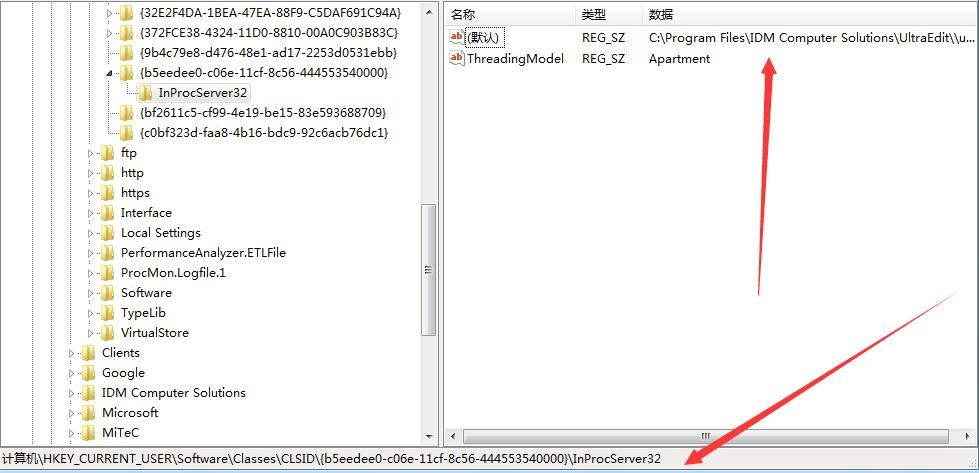
2. Modify the registry
Registry location: HKCU\Software\Classes\CLSID\
Create key {b5f8350b-0548-48b1-a6ee-88bd00b4a5e7}
Create subkey InprocServer32
Default key value is the absolute path of the test DLL:
C:\Users\a\AppData\Roaming\Microsoft\Installer\{BCDE0395-E52F-467C-8E3D-C4579291692E}\api-ms-win-downlevel-1x86-l1-1-0._dl
Create key value: ThreadingModel REG_SZ Apartment
Registry content as shown in the figure below
3. Test
Start iexplore.exe, trigger the backdoor, launch calc.exe multiple times, eventually causing system crash
Multiple calls to instance CAccPropServicesClass() during startup process result in launching multiple calc.exe instances, eventually causing system crash
4. Optimization
Add a mutex to the DLL to prevent repeated loading and ensure calc.exe is launched only once
C++ code:
#pragma comment(linker,"/OPT:nowin98") |
Optimization method reference: https://some-open-source-project/Use-Office-to-maintain-persistence
Compiled size 3k. If the DLL is loaded multiple times, it will only load once due to mutex, meaning calc.exe will only launch once.
Download link for compiled DLL:
some-open-source-project
Switch to the new DLL and test again. calc.exe only launches once, as shown in the figure below.

64-bit system exploitation method:
1. Create new file
Place 32-bit and 64-bit test DLLs in %APPDATA%\Microsoft\Installer\{BCDE0395-E52F-467C-8E3D-C4579291692E}\ respectively
32-bit DLL download link:
some-open-source-project
Rename to api-ms-win-downlevel-1x86-l1-1-0._dl
64-bit DLL download link:
An open-source project
Renamed to api-ms-win-downlevel-1x64-l1-1-0._dl
2. Modify the registry
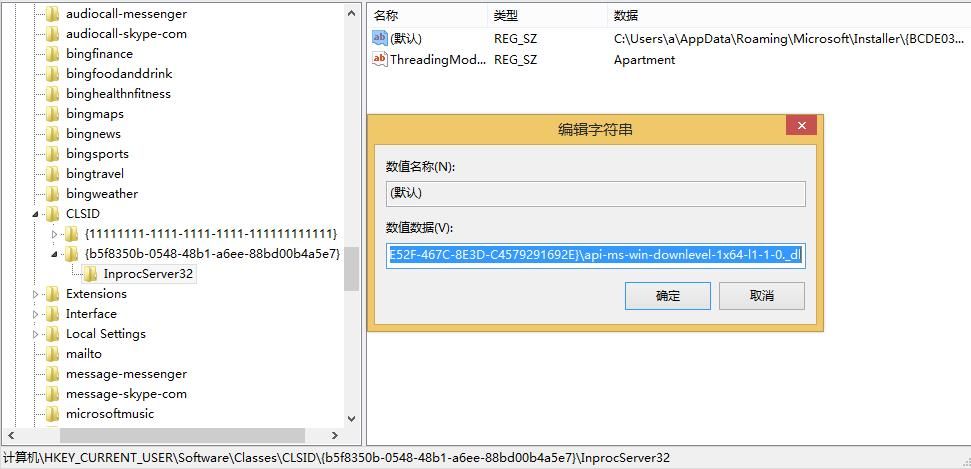
(1)
Registry location: HKCU\Software\Classes\CLSID\
Create key {b5f8350b-0548-48b1-a6ee-88bd00b4a5e7}
Create subkey InprocServer32
Default key value is the absolute path of the 64-bit dll:
C:\Users\a\AppData\Roaming\Microsoft\Installer\{BCDE0395-E52F-467C-8E3D-C4579291692E}\api-ms-win-downlevel-1x64-l1-1-0._dl
Create key value: ThreadingModel REG_SZ Apartment
Registry content as shown in the figure below
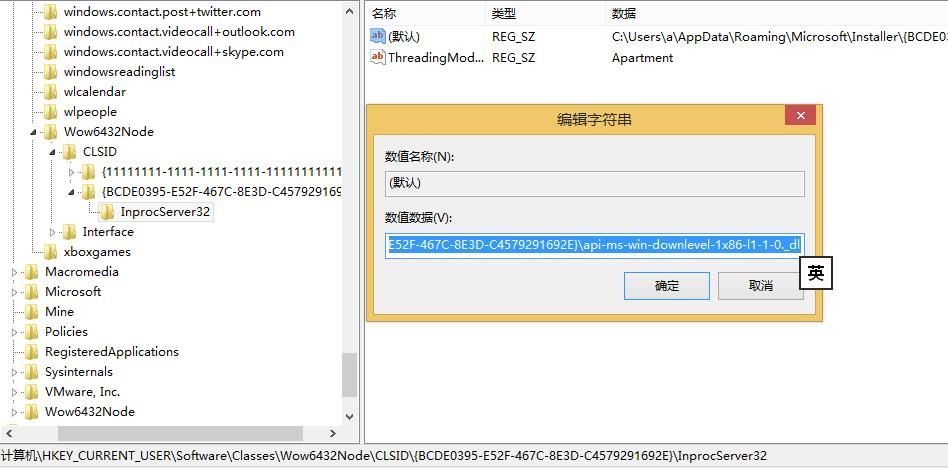
(2)
Registry location: HKCU\Software\Classes\Wow6432Node\CLSID\
Create key {BCDE0395-E52F-467C-8E3D-C4579291692E}
Create subkey InprocServer32
Default key value is 32-bit dll path:
C:\Users\a\AppData\Roaming\Microsoft\Installer\{BCDE0395-E52F-467C-8E3D-C4579291692E}\api-ms-win-downlevel-1x86-l1-1-0._dl
Create key value: ThreadingModel REG_SZ Apartment
Registry content as shown in the figure below
3、Testing
Launch both 32-bit and 64-bit iexplore.exe, both can trigger the backdoor, starting calc.exe once
Test successful
Note:
{b5f8350b-0548-48b1-a6ee-88bd00b4a5e7} corresponds to CAccPropServicesClass
Reference link:
https://msdn.microsoft.com/en-us/library/accessibility.caccpropservicesclass(v=vs.110).aspx?cs-save-lang=1&cs-lang=cpp#code-snippet-1
{BCDE0395-E52F-467C-8E3D-C4579291692E} corresponds to MMDeviceEnumerator
Reference link:
http://msdn.microsoft.com/en-us/library/windows/desktop/dd316556%28v=vs.85%29.aspx
0x04 POC Writing
---
Details to note in POC development:
1. Operations do not necessarily include folders by default
First, check if the folder %APPDATA%\Microsoft\Installer\ exists
If not, create the folder Installer under %APPDATA%\Microsoft\
if((Test-Path %APPDATA%\Microsoft\Installer\) -eq 0) |
2. Create the folder {BCDE0395-E52F-467C-8E3D-C4579291692E}
Since it contains special characters {}, the path must be enclosed in double quotes
if((Test-Path "%APPDATA%\Microsoft\Installer\{BCDE0395-E52F-467C-8E3D-C4579291692E}") -eq 0) |
3. Create payload file
First, determine the operating system
if ([Environment]::Is64BitOperatingSystem) |
Release different files for different systems
Files are still released using base64, refer to article: https://some-open-source-project/Use-Office-to-maintain-persistence
4. Create registry
Modify the default registry value, as shown below
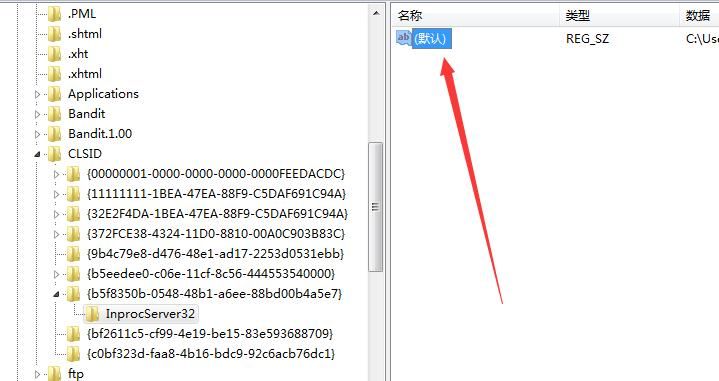
In PowerShell, the special variable "(default)" needs to be used
eg:
$RegPath="HKCU:Software\Classes\CLSID\" |
Complete POC has been uploaded to GitHub, address: some-open-source-project
0x05 Defense Detection
---
Based on exploitation methods, monitor the following locations:
1. Registry key values
- HKCU\Software\Classes\CLSID\{b5f8350b-0548-48b1-a6ee-88bd00b4a5e7}\
- HKCU\Software\Classes\Wow6432Node\CLSID\{BCDE0395-E52F-467C-8E3D-C4579291692E }
2. File Path
%APPDATA%\Roaming\Microsoft\Installer\{BCDE0395-E52F-467C-8E3D-C4579291692E}\
Naming convention: api-ms-win-downlevel-[4char-random]-l1-1-0._dl
0x06 Summary
---
This article introduces a backdoor exploitation method achieved through COM Object hijacking, uses PowerShell scripts to write a POC, shares details to note during POC development, and analyzes defense methods against this backdoor based on practical exploitation processes.


