
0x00 Introduction
---
In a previous article, 'Analysis of Invoke-WScriptBypassUAC Exploitation in Empire', a method for unauthorized file copying was introduced. Under standard user permissions, wusa could be used to extract cab files into administrator-privileged folders, enabling further filename hijacking and UAC bypass.
However, this functionality was removed in Windows 10. So, is there a more universal method?
This article will introduce a method applicable from Windows 7 to Windows 10—using the COM component IFileOperation.
0x01 Overview
---
- Exploitation Principle
- Three Implementation Approaches
- Example Code
- Practical Testing
- Exploitation Analysis
0x02 Exploitation Principle
---
Note:
This method was learned from the workshop at Defcon 25, Ruben Boonen's "UAC 0day, all day!"
PPT download link:
https://github.com/FuzzySecurity/DefCon25/blob/master/DefCon25_UAC-0day-All-Day_v1.2.pdf
Prerequisites for exploiting the COM component IFileOperation to copy files with elevated privileges:
- Systems after Windows 7
- Trusted files in trusted paths (e.g., explorer.exe, powershell.exe)
Therefore, there are three implementation approaches:
1. DLL hijacking or DLL injection
Since trusted files in trusted paths are generally located in directories requiring administrator privileges, DLL hijacking is essentially impossible under normal user permissions.
A feasible method is DLL injection.
For example, explorer.exe can be subjected to DLL injection under normal user permissions.
2. Modify the PEB structure to deceive PSAPI and invoke the COM component IFileOperation
The COM component uses the Process Status API (PSAPI) to read the Commandline in the process's PEB structure to identify the processes they are running.
If the process's Path is changed to a trusted file (e.g., explorer.exe), it can deceive PSAPI and invoke the COM component IFileOperation to achieve privileged file copying.
3. Directly calling COM component IFileOperation through trusted files
For example, powershell.exe is a trusted file and can directly call the COM component IFileOperation
0x03 Implementation Method 1: DLL injection into explorer.exe
---
The specific implementation is divided into the following two parts:
- Injecting the DLL into the process explorer.exe
- The DLL implements calling the COM component IFileOperation to copy files
There is already a complete implementation code on GitHub, so you can refer to this project for analysis. The project address is:
https://github.com/hjc4869/UacBypass
(1) The project UacBypassTest implements DLL injection into the process explorer.exe
Remove unnecessary functions and retain only the function of injecting UacBypass.dll into the process explorer.exe:
Delete Line 58
(2) The project UacBypass implements calling the COM component IFileOperation to copy files
After compiling this project, the file UacBypass.dll is generated, which implements copying ntwdblib.dll from the same directory to C:\windows\System32
Actual test:
Run UacBypassTest.exe to inject UacBypass.dll into the explorer.exe process, successfully achieving unauthorized file copying
0x04 Implementation Method 2: Modify PEB structure, deceive PSAPI, call COM component IFileOperation
---
Refer to the UacBypass project, convert dll to exe, add header files, fix bugs, complete code for reference:
An open-source project
Achieved copying c:\6\ntwdblib.dll to c:\windows\system32
Code analysis:
The prerequisite for success is specifying the properties of this COM component (requires elevated privileges)
Official documentation address:
https://msdn.microsoft.com/en-us/library/bb775799.aspx
Code location:
An open-source project
Property description:
- FOF_NOCONFIRMATION: No confirmation dialog pops up
- FOF_SILENT: No dialog pops up
- FOFX_SHOWELEVATIONPROMPT: Elevation prompt required
- FOFX_NOCOPYHOOKS: Do not use copy hooks
- FOFX_REQUIREELEVATION: Default elevation required
- FOF_NOERRORUI: No error dialog on failure
Actual test:
Running the exe directly triggers a UAC confirmation dialog indicating insufficient permissions; if allowed, file copying can proceed
Next, functionality to modify the PEB structure needs to be added to deceive PSAPI. The following locations must be modified:
- ImagePathName in _RTL_USER_PROCESS_PARAMETERS
- FullDllName in _LDR_DATA_TABLE_ENTRY
- BaseDllName in _LDR_DATA_TABLE_ENTRY
Note:
CommandLine in _RTL_USER_PROCESS_PARAMETERS does not need modification. This attribute can be viewed via Process Explorer; for greater deception, it can optionally be altered
Here, I referenced the implementation code of supMasqueradeProcess() in UACME at the following address:
https://github.com/hfiref0x/UACME/blob/143ead4db6b57a84478c9883023fbe5d64ac277b/Source/Akagi/sup.c#L947
I made the following modifications:
- Instead of using the ntdll.lib file (included after installing DDK), obtain NTAPI through ntdll
- Extract key code
- Fix bugs
- Add functionality to call the COM component IFileOperation for file copying
- ...
For more details, refer to the open-source code at the following address:
An open-source project
The code modifies the current process's PEB structure to deceive PSAPI into recognizing it as explorer.exe, then calls the COM component IFileOperation to achieve file copying
Actual testing:
The current process is modified to explorer.exe, as shown in the figure below
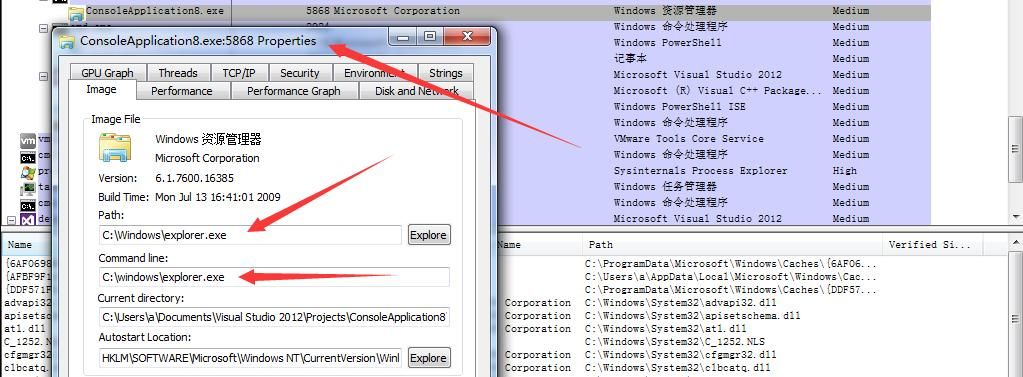
File copying succeeded without triggering the UAC confirmation dialog, achieving unauthorized file copying
0x05 Implementation Method 3: Calling the COM component IFileOperation via powershell.exe
---
First compile a COM component in C# to call IFileOperation for file copying, then invoke this COM component via PowerShell
1. Write COM component
Code reference address:
https://github.com/FuzzySecurity/PowerShell-Suite/tree/master/Bypass-UAC/FileOperations/FileOperations
After successful compilation, generate FileOperation.dll
Note:
Source project referenced by Ruben Boonen (b33f@FuzzySecurity):
https://github.com/mlaily/MSDNMagazine2007-.NET-Matters-IFileOperation-in-Windows-Vista
He made modifications (such as changing class names) based on this, enabling PowerShell to directly call the COM component, which is a great feature
2. Call this COM component via PowerShell
There are two methods:
(1) [System.Reflection.Assembly]::LoadFile($Path)
Load the file directly
(2) [Reflection.Assembly]::Load($bytes)
Compress the file into a string stored in an array. Refer to Matthew Graeber's method, address as follows:
http://www.exploit-monday.com/2012/12/in-memory-dll-loading.html
Can directly output usable PowerShell code
Note:
Comparison of the two methods was introduced in the previous article 'Analysis Summary of Bypassing Applocker Using Assembly Load & LoadFile'
Complete implementation code for Method 3 can be found at:
https://github.com/FuzzySecurity/PowerShell-Suite/blob/ebbb8991a8a051b48c05ce676524a1ba787dbf0c/Bypass-UAC/Bypass-UAC.ps1#L1082
Actual testing:
Executing PowerShell script, loading COM component IFileOperation. Since powershell.exe is a trusted process, no UAC confirmation dialog pops up, successfully achieving privilege escalation for file copying
0x06 Exploitation Analysis
---
COM component IFileOperation is applicable from Win7 to Win10, so the privilege escalation file copying method is also usable
For explorer.exe, loading high-privilege COM components does not trigger UAC dialog.
This article has already implemented the method to simulate explorer.exe. So, are there other usable COM components? And what 'privilege escalation operations' can they accomplish?
0x07 Summary
---
This article introduced three methods for privilege escalation file copying via COM component IFileOperation, organized and developed implementation code that can be used for direct testing
Finally, thanks to Ruben Boonen (b33f@FuzzySecurity) for his help in my research.


