
0x00 Preface
---
In a previous article titled 'Bypass Windows AppLocker', methods for bypassing AppLocker were studied. Recently, an article introduced a method using LUA scripts to bypass AppLocker. After studying it, the following questions arose: What is the bypass principle? Which AppLocker rules can be bypassed? And what are the applicable conditions?
Article link:
https://homjxi0e.wordpress.com/2018/03/02/whitelisting-bypassing-using-lua-lanuage-wlua-com/
0x01 Introduction
---
This article will cover the following topics:
- Introduction to LUA Scripts
- Bypass Testing
- Bypass Principle
- Applicable Conditions
- Defense Methods
0x02 Introduction to LUA Scripts
---
- Lightweight and compact scripting language
- Written in standard C language
- Can be called by C/C++ code
- Can call C/C++ functions
- Fastest among all current scripting engines
0x03 Executing LUA scripts on Windows system
---
1. Install Lua for Windows, download address:
http://files.luaforge.net/releases/luaforwindows/luaforwindows
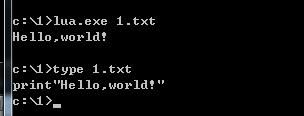
2. Output hello world
Script content:
print"Hello,world!" |
cmd:
lua.exe 1.txt |
As shown in the figure below
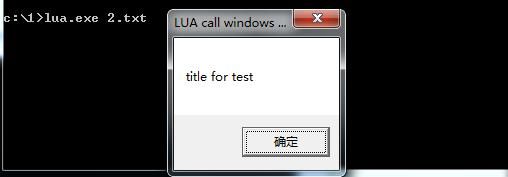
3. Calling Windows API
Script content:
require "alien" |
Execution as shown below
4. C++ executing LUA script
Reference code is as follows:
extern "C" { |
The project requires the following settings:
(1) Modify VC++ Directories
Include directories, add C:\Program Files\Lua\5.1\include
Library directories, add C:\Program Files\Lua\5.1\lib
(2) Linker - Input - Additional Dependencies, add
lua5.1.lib |
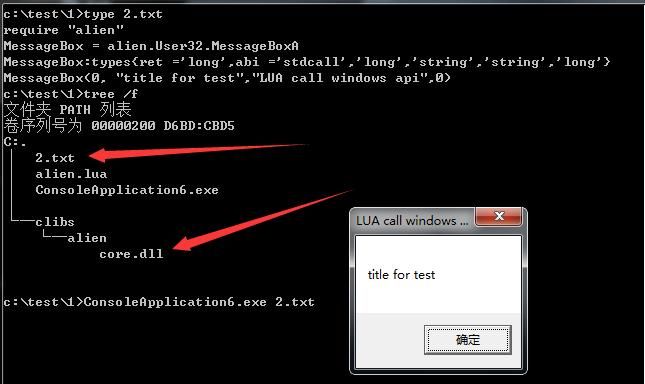
Execute as shown in the figure below

Execute C++ Lua script to call Windows API, requires adding support files in the same directory, execute as shown in the figure below
0x04 Testing Lua Script Bypass of Applocker
---
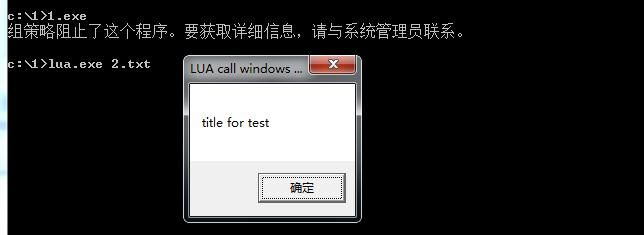
Test 1:
Test System: Win7x86
Install Lua for Windows
Enable Applocker, configure default rules
Execute script using lua.exe:
Successfully bypassed Applocker interception
As shown in the figure below
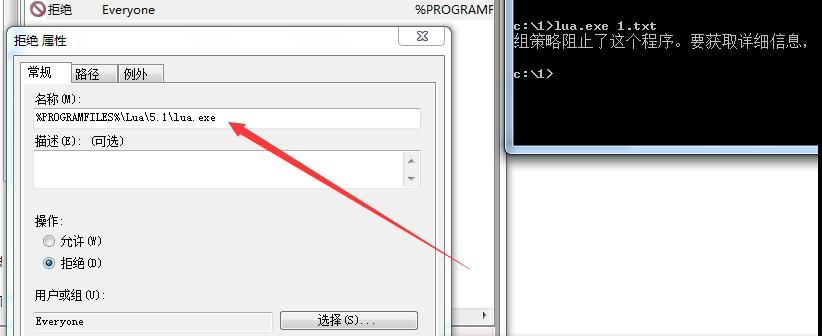
Test 2:
Test System: Win7x86
Install Lua for Windows
Enable Applocker, configure default rules, add rule: Block lua.exe
Failed to bypass Applocker block
As shown in the figure below
Note:
wlua.exe can also be used to execute Lua scripts
Test 3:
Test System: Win7x64
Lua for Windows not installed
Enable Applocker, configure default rules, system prohibits script execution
Place lua5.1.dll (from Lua for Windows installation path) in the same directory as lua.exe
Execute scripts using lua.exe:
Failed to bypass AppLocker interception
As shown in the figure below

Supplement:
Replace lua.exe with wlua.exe, modify script content to POC content, address as follows:
https://gist.githubusercontent.com/homjxi0e/fd023113bf8b1b6789afa05c3913157c/raw/6bf41cbd76e9df6d6d3edcc9e289191f898451dc/AppLockerBypassing.wlua
Test results are identical
0x05 Final Conclusion
---
Based on the above tests, the final conclusion is:
Using LUA scripts can bypass AppLocker to some extent, but the following conditions must be met:
- Lua for Windows is installed on the current system
- AppLocker rules do not prohibit lua.exe and wlua.exe
0x06 Summary
---
This article provides a brief introduction to the development of LUA scripts, tests the POC for bypassing Applocker using LUA scripts, and draws the final conclusion


