
0x00 Introduction
---
Continuing the study of image steganography techniques, this time focusing on learning and understanding the JPEG file format. Compared to PNG file formats, JPEG files are relatively simpler. The methods for extracting hidden payloads are largely similar, with the main difference lying in the file formats themselves, leading to variations in exploitable details.
Tools mentioned in this article:
- Hex Editor: Hex Editor
- Steganography Detection: Stegdetect
Download link:
https://github.com/abeluck/stegdetect
- Edit EXIF Information: MagicEXIF
Download link:
http://www.magicexif.com/
- Analyze JPEG Image Format: JPEGsnoop
Download link:
http://www.impulseadventure.com/photo/jpeg-snoop.html
0x01 Related Concepts
---
JPEG File
JPEG stands for Joint Photographic Experts Group
Supports lossy compression
Does not support transparency
Does not support animation
Non-vector
Difference between JPEG and JPG
JPEG can serve as both a file extension and represent the file format
JPG is an abbreviation of JPEG, representing the file extension
JPEG and JPG are essentially the same, and their formats are interchangeable
Color Model
Uses the YCrCb color model, which is more suitable for image compression than RGB
- Y represents luminance
- Cr represents the red component
- Cb represents the blue component
The human eye is far more sensitive to changes in luminance Y than to changes in chrominance C. If each point stores an 8-bit luminance value Y, and every 2x2 points store one CrCb value, the perceived visual quality of the image will not change significantly, while saving half the space.
The RGB model requires 4x3=12 bytes for 4 points
The YCrCb model requires 4+2=6 bytes for 4 points
[R G B] -> [Y Cb Cr] conversion:
Y = 0.299R + 0.587G + 0.114*B
Cb = -0.1687R - 0.3313G + 0.5*B + 128
Cr = 0.5R - 0.4187G - 0.0813*B + 128
[Y,Cb,Cr] -> [R,G,B] conversion:
R = Y + 1.402 *(Cr-128)
G = Y - 0.34414(Cb-128) - 0.71414(Cr-128)
B = Y + 1.772 *(Cb-128)
File format
JPEG files can generally be divided into two parts: markers and compressed data
Markers:
Consist of two bytes, the first byte is a fixed value 0xFF, and the second byte has different values depending on the meaning
Any number of meaningless 0xFF fillers can be added before each marker, multiple consecutive 0xFF bytes can be interpreted as one 0xFF, indicating the start of a marker
Common markers:
- SOI 0xD8 Start of Image
- APP0 0xE0 Application Reserved Marker 0
- APPn 0xE1 - 0xEF Application Reserved Marker n (n=1~15)
- DQT 0xDB Quantization Table (Define Quantization Table)
- SOF0 0xC0 Start of Frame (Start Of Frame)
- DHT 0xC4 Huffman Table (Define Huffman Table)
- DRI 0xDD Restart Interval (Define Restart Interval)
- SOS 0xDA Start of Scan (Start Of Scan)
- EOI 0xD9 End of Image
Compressed Data:
The first two bytes store the length of the entire segment, including these two bytes
Note:
This length representation method follows high-order first, low-order last, which differs from the length representation method in PNG files
For example, if the length is 0x12AB, the storage order is 0x12, 0xAB
Exif Information
Exif files are a type of JPEG file that comply with the JPEG standard, but include shooting information and thumbnail images in the file header information
JPEG files taken with a camera will have this information
Stored in the APP1 (0xFFE1) data area
The next two bytes store the size of the APP1 data area (i.e., the Exif data area).
Followed by the Exif Header, a fixed structure: 0x457869660000.
Then comes the Exif data.
Tool for viewing Exif information: exiftool.
Download address:
https://github.com/alchemy-fr/exiftool
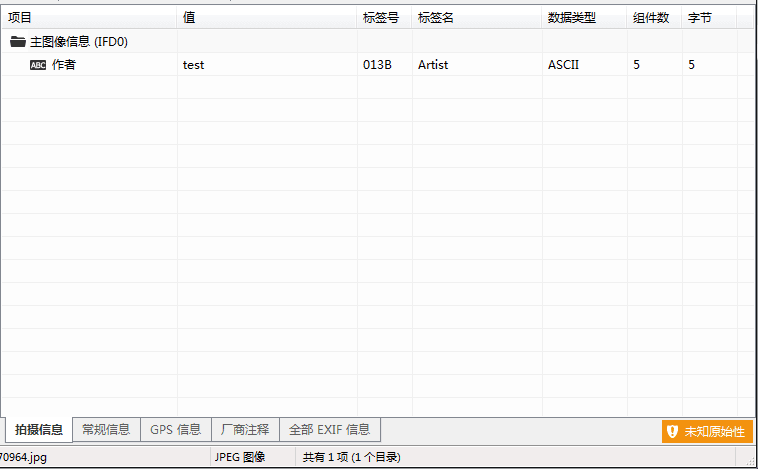
Tool for editing Exif information: MagicEXIF.
Download address:
http://www.magicexif.com/
The addition operation is as shown in the figure.
0x02 Common Steganography Methods
---
- DCT encryption
- LSB encryption
- DCT LSB
- Average DCT
- High Capacity DCT
- High Capacity DCT - Algorithm
The above steganography methods are referenced from:
https://www.blackhat.com/docs/asia-14/materials/Ortiz/Asia-14-Ortiz-Advanced-JPEG-Steganography-And-Detection.pdf
There are already many open-source tools capable of implementing the above advanced steganography methods
Common steganography tools:
- JSteg
- JPHide
- OutGuess
- Invisible Secrets
- F5
- appendX
- Camouflage
Of course, corresponding steganalysis tools have also existed for a long time
For example: Stegdetect
Download link:
https://github.com/abeluck/stegdetect
0x03 Hiding Payload Using JPEG File Format
---
Next, we introduce some hiding ideas generated after studying file formats:
1. Directly append data at the end
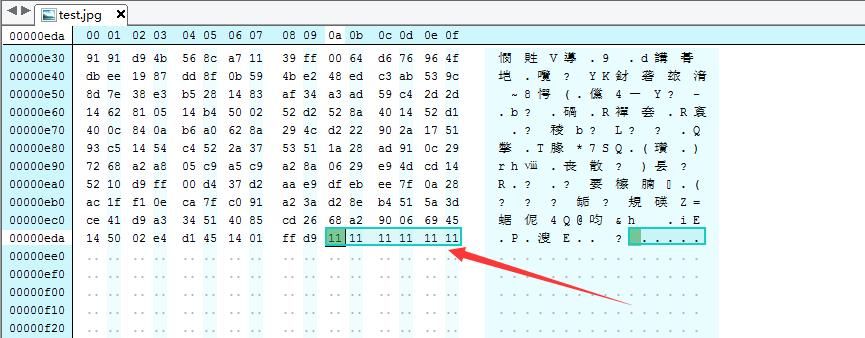
As shown, it does not affect normal image viewing
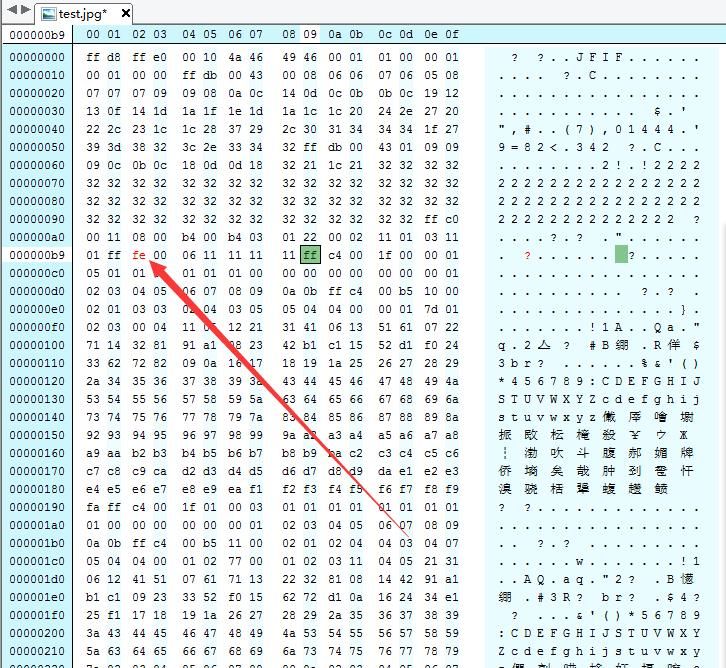
2. Insert custom COM comment
COM comment is 0xff and 0xfe
Insert data 0x11111111
Length is 0x04
Total length is 0x06
The complete hexadecimal format is 0xffff000611111111
Insert position is before DHT, as shown in the figure
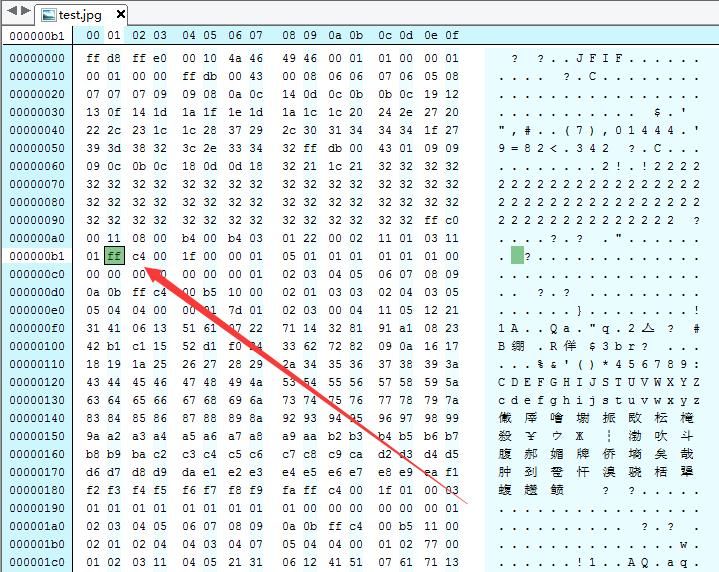
After insertion, as shown in the figure, it does not affect normal image viewing
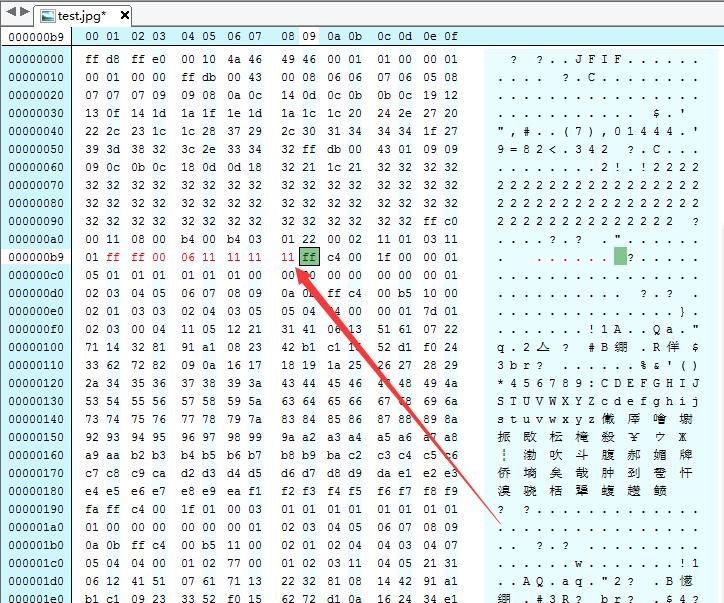
Change ff to fe, as shown in the figure, also does not affect normal image viewing
3. Insert ignorable marker codes
Same principle as above, replace marker codes with special values that can be ignored
For example:
- 00
- 01 *TEM
- d0 *RST0
- dc DNL
- ef APP15
Testing shows that the above identification codes do not affect normal image viewing
4. Modify DQT
DQT: Define Quantization Table
Identification code is 0xdb
The next two bytes indicate length
The next byte indicates QT configuration information
First 4 bits are QT number
Last 4 bits are QT precision, 0=8bit, otherwise 16bit
Finally, QT information with length being an integer multiple of 64
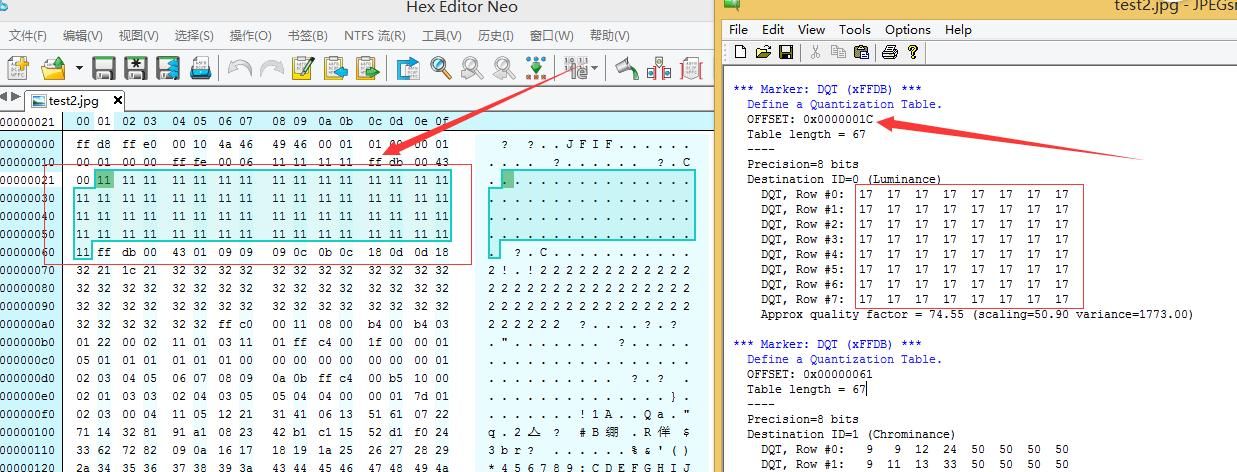
View DQT information of the test image, as shown
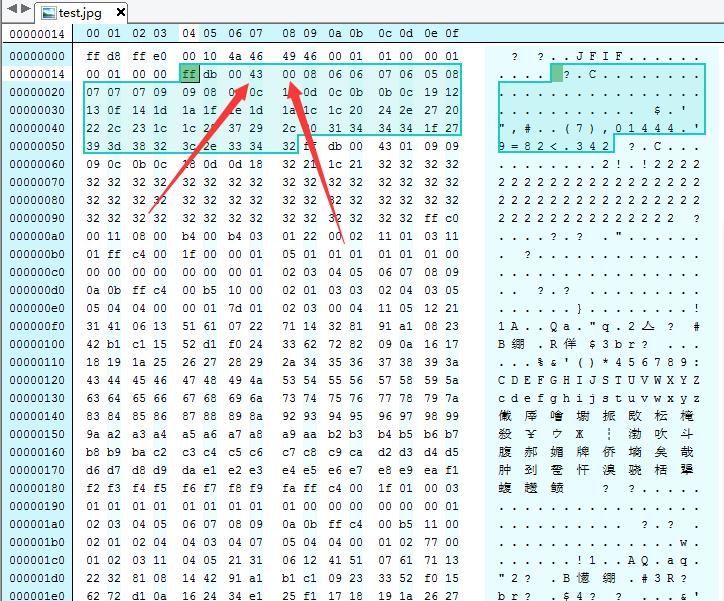
Length is 0x43, decimal 67
00 indicates QT number 0, precision 8bit
Next 64 bytes are QT information bytes
Note:
The DQT format here is referenced from http://www.opennet.ru/docs/formats/jpeg.txt
Try replacing these 64 bytes, as shown in the figure
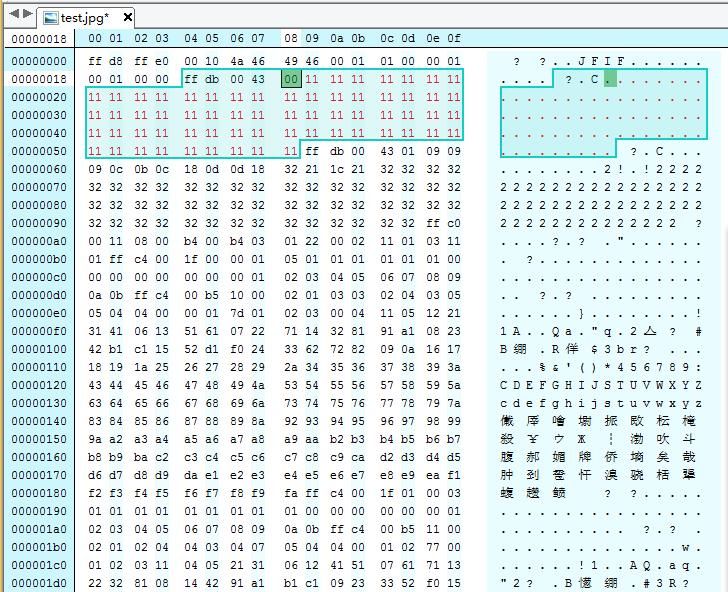
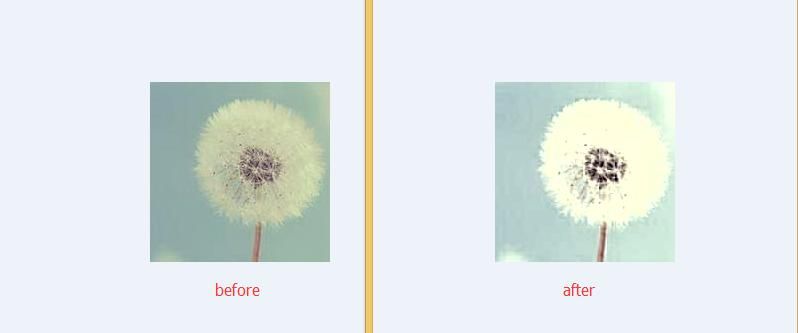
Comparison before and after as shown in the figure reveals changes in the image
If only adjusting some bytes to payload, how much difference can it make? Compare as shown in the figure
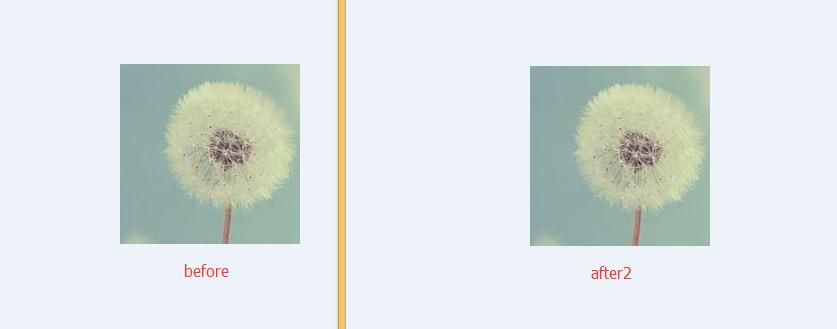
By analogy, there are many positions available for modification
0x04 Detection and Identification
---
For the above hiding methods, traces can be discovered using JPEG image format analysis tools
For example, JPEGsnoop
Download address:
http://www.impulseadventure.com/photo/jpeg-snoop.html
Supports format analysis for the following files:
- .JPG - JPEG Still Photo
- .THM - Thumbnail for RAW Photo / Movie Files
- .AVI* - AVI Movies
- .DNG - Digital Negative RAW Photo
- .PSD - Adobe Photoshop files
- .CRW, .CR2, .NEF, .ORF, .PEF - RAW Photo
- .MOV* - QuickTime Movies, QTVR (Virtual Reality / 360 Panoramic)
- .PDF - Adobe PDF Documents
Actual test:
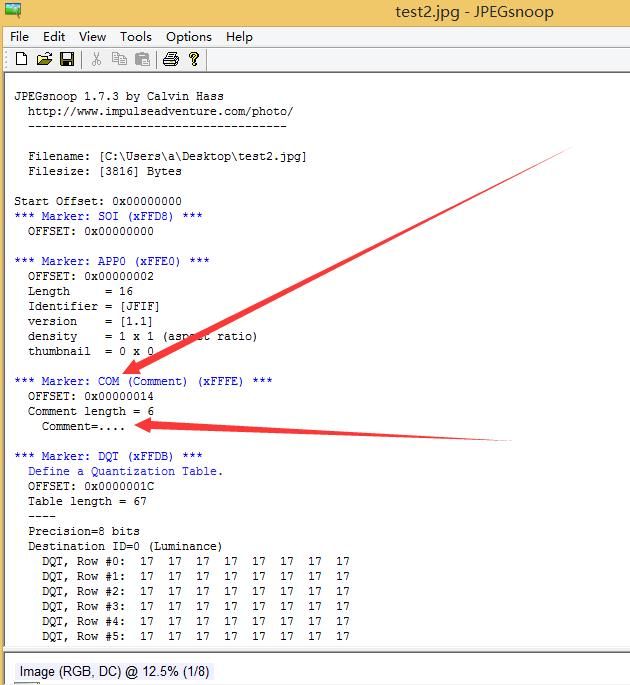
As shown below, the COM comment added to the image was discovered
As shown below, the added payload was identified by examining the DQT data, where 0x11 corresponds to decimal 17
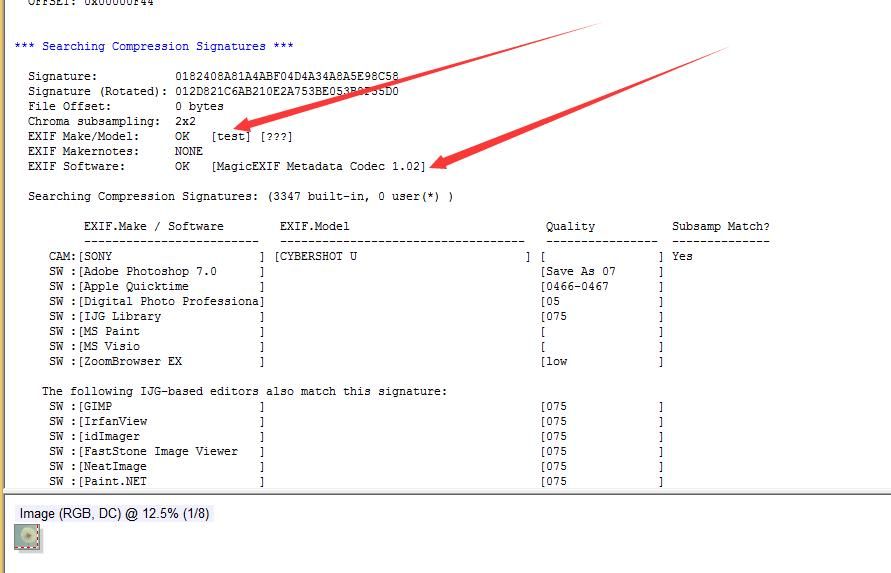
Similarly, JPEGsnoop can parse the EXIF information of JPEG images, as shown below
Note:
For testing purposes, the following values in the screenshot were manually added using MagicEXIF software:
EXIF Make/Model: OK [test] [???] |
0x05 Supplement
---
Compared to PNG files, adding payloads to JPEG files is much simpler because JPEG files lack checksums for image data.
The method of downloading JPEG images, parsing them, and executing payloads will not be discussed here.
(Refer to https://3gstudent.github.io/%E9%9A%90%E5%86%99%E6%8A%80%E5%B7%A7-%E5%88%A9%E7%94%A8PNG%E6%96%87%E4%BB%B6%E6%A0%BC%E5%BC%8F%E9%9A%90%E8%97%8FPayload
0x06 Summary
---
This article introduces the JPEG format, focusing on how to hide payloads using specific marker codes based on the JPEG file format. While this method does not affect normal image viewing, details can still be detected with format analysis software. There is much more to learn in the official documentation on the JPEG format; the deeper the understanding, the more techniques available for research.


