0x00 Preface
---
CVE-2022-1040 is an authentication bypass vulnerability in Sophos XG Firewall. For details on the vulnerability, refer to 'CVE-2022-1040 Sophos XG Firewall Authentication bypass'. This article only supplements the technical details not mentioned in that post.
0x01 Introduction
---
This article will cover the following topics:
- Restoring a vulnerable debugging environment locally
- Method for finding OpCode
- Exploitation ideas for WAN and VPN zones
- Enabling login disclaimer to break the exploitation chain
0x02 Restoring a vulnerable debugging environment locally
---
When setting up the vulnerability environment locally, if automatic updates have patched it, you can restore it to a vulnerable debugging environment by:
Editing the file /usr/share/webconsole/WEB-INF/web.xml
Locate the following content:
RequestCheckFilter
cyberoam.sessionmanagement.RequestCheckFilter
RequestCheckFilter
/*
|
Here, RequestCheckFilter is used to filter whether JSON parameters in request contain invisible characters
You can manually delete the above code to restore the vulnerable debugging environment
Cannot directly modify the file /usr/share/webconsole/WEB-INF/web.xml
Before modifying the file, remount is required: mount -o remount,rw /
Then modify the file again
0x03 OpCode search method
---
The original text mentions: There are approximately 1200 modes running on the CSC side, among which 161 modes have a response type of 2.
Here, by decompiling EventBean.class, the following code can be found:
select opcode,mode,waitforresponse,operationtype,responsetype,requesttype,opcodetype,responsetimeout,entityid,beanname,syncable,comprotocol,query,requestname from tblcrevent order by mode |
After analysis, the response type should correspond to requesttype, not responsetype.
Complete command to query data meeting the conditions:
psql -U pgrouser -d corporate -c "select opcode,mode,requesttype from tblcrevent where requesttype=2;" |
Output content:
opcode | mode | requesttype
---------------------------------------+------+-------------
set_system_date | 271 | 2
update_l2tp_connection | 227 | 2
update_pharming_protection | 259 | 2
export_connection | 238 | 2
migrate_group_to_cyberoam | 407 | 2
group_policy_mapping | 408 | 2
migrate_group_summary | 409 | 2
migrate_group_add | 410 | 2
change_gui_language | 127 | 2
tooltip | 454 | 2
wizardopmode | 156 | 2
wizardbridgemodezoneaction | 157 | 2
wizardinterface | 158 | 2
wizardinternetaccess | 159 | 2
wizardnotification | 160 | 2
wizardtimezoneconf | 161 | 2
wizardfinish | 162 | 2
sslvpn_liveuser_logout | 240 | 2
migrateuser_csvupload | 503 | 2
DownloadMyAccountQuarantineMail | 463 | 2
download_certificate | 250 | 2
load_new_firmware | 243 | 2
cancel_firmware_upload | 184 | 2
CUSTOMER_REGISTRATION_REQUEST | 176 | 2
APPLIANCE_REGISTRATION_REQUEST | 175 | 2
TRAIL_SUBSCRIPTION_REQUEST | 177 | 2
SUBSCRIPTION_REQUEST | 178 | 2
RELEASEQUARANTINEMAILFROMMAIL | 458 | 2
import_group | 406 | 2
download_ca_certificate | 361 | 2
theme_apply | 323 | 2
login | 151 | 2
myaccount_login | 451 | 2
Download_AV_MyACQuarantineMail | 472 | 2
Download_AV_MyACQuarantMailOld | 186 | 2
DownloadMyAccountQuarantMailOld | 192 | 2
release_quarantine_my_ac | 488 | 2
release_quarantine_my_ac_old | 489 | 2
checkForApplianceUpgrade | 602 | 2
Download_AV_QuarantineOldMail | 189 | 2
download_backup | 466 | 2
dryrun_new_firmware | 183 | 2
download_ctr | 704 | 2
REGISTRATION_SYNC_WITH_SERVER | 181 | 2
ccc_opcode_request | 1500 | 2
Download_AV_QuarantineMail | 471 | 2
download_old_spam | 493 | 2
ReleaseQuarantineMail | 460 | 2
ccc_compress_dir | 1502 | 2
ccc_appliance_login | 603 | 2
ccc_login | 1503 | 2
delete_file | 1505 | 2
add_protocol_group | 961 | 2
update_protocol_group | 962 | 2
add_application | 963 | 2
update_application | 964 | 2
add_protocol_identifier | 965 | 2
reset_to_default | 966 | 2
ccc_flush_sql_file | 1501 | 2
verify_manual_update_content | 139 | 2
login_disclaimer_action | 716 | 2
resend_crederntials | 952 | 2
sms_gw_test_connectivity | 954 | 2
generate_captcha_code | 958 | 2
ccc_opcode_pull_request | 605 | 2
renew_guest_user | 953 | 2
add_guest_user_log_msg | 956 | 2
failed_sms_log | 957 | 2
add_guest_user | 746 | 2
sms_status_log_msg | 955 | 2
dns_static_entry_add | 142 | 2
update_cisco_ipsec_connection | 344 | 2
dns_static_entry_update | 143 | 2
system_backup_for_CCC | 604 | 2
usbmodem_setting_gui | 185 | 2
download_crl_certificate | 350 | 2
web_cat_domain_import | 421 | 2
web_cat_keyword_import | 422 | 2
wDNSServerConfiguration | 522 | 2
getmodemdetail | 423 | 2
sslvpn_logout | 405 | 2
iview_login | 385 | 2
create_virtualhost_rules | 767 | 2
create_user_iphone_ipsecprofile | 345 | 2
CyberoamIPSAutoUpgrade | 1202 | 2
checkcert_key | 1203 | 2
update_ipsec_connection | 224 | 2
setAlertSettings | 1201 | 2
set_config_mmap | 1366 | 2
fwm:Set_BypassFirewall | 1262 | 2
networkd:set_interface_speed | 1263 | 2
set_mtu_mss | 1261 | 2
loginSecuritySettings | 1208 | 2
enable_appsignatures | 1368 | 2
set_config_mmapfilepath | 1369 | 2
br_vlan_setting | 1264 | 2
upload_list_as | 1729 | 2
add_list_as | 1727 | 2
guestUsersPrintLog | 1216 | 2
API_Interface | 1655 | 2
CCC_OPCODE_READ_REQUEST | 1551 | 2
ccc_xmlopstring_request | 1504 | 2
API_INTERFACE_TAR | 1656 | 2
activate_ami_image | 1627 | 2
API_Interface_Set | 1659 | 2
Import_Export_Set | 1657 | 2
DOWNLOAD_EXPORT_FILE | 1658 | 2
Create_Unbounded_Lag | 1220 | 2
reportHtmlFile | 684 | 2
download_ap_firmware | 822 | 2
mlm_method | 1271 | 2
monitorObject | 1733 | 2
downloadserverconfig | 1754 | 2
removeconfigfile | 1747 | 2
uploadserverconfig | 1748 | 2
systemHostName | 1211 | 2
print_voucher | 1415 | 2
export_csv | 1413 | 2
download_hotspot_template | 1420 | 2
u2d_validate | 1646 | 2
supportaccessglobalconfig | 1739 | 2
sslvpn_liveuser_insert | 501 | 2
download_cc_report | 1678 | 2
wizardsummaryconf | 520 | 2
red_provisioning_bundle | 1330 | 2
download_spx_addons | 1679 | 2
hb_event_req | 3102 | 2
ep_status | 3103 | 2
apiExport | 1187 | 2
mta_add_list | 848 | 2
view_mailfromspool | 4010 | 2
usbmodem_status | 425 | 2
ReleaseQuarantineMailOld | 191 | 2
DownloadQuarantineMail | 461 | 2
upload_list | 701 | 2
add_list | 81 | 2
get_four_eye_auth_status | 3104 | 2
update_web_user_notification_settings | 2811 | 2
apply_wizard_config | 2510 | 2
new_wizard_checkethernet | 1241 | 2
new_wizard_get_ipaddress | 1242 | 2
new_wizard_check_gatewayisreachable | 1243 | 2
new_wizard_check_dnsworking | 1244 | 2
new_wizard_get_values | 1245 | 2
get_iface_obj | 1281 | 2
wizard_get_unbounded_iface | 1250 | 2
ipaddress_validation | 1283 | 2
get_wizard_fstatus | 2520 | 2
change_admin_password_scm | 2530 | 2
allow_deny_unauth_traffic | 3116 | 2
download_backup_for_SFM | 515 | 2
send_feedback | 860 | 2
getuuid | 861 | 2
apply_NAT_wizard_config | 3215 | 2
add_custom_ccl | 2814 | 2
download_mib_file | 3715 | 2
update_custom_ccl | 2815 | 2
SophosCentralUnregister | 1324 | 2
SophosCentralRegistration | 1323 | 2
SetCentralPromotionPopupState | 8111 | 2
(160 rows) |
0x04 WAN and VPN Zone Exploitation Approach
---
Reference Materials:
https://support.sophos.com/support/s/article/KB-000039388?language=en_US
As an additional security measure, CAPTCHA has been added for administrators logging into the Sophos XG Firewall management page from WAN and VPN zones
The original POC returned {"redirectionURL":"/webpages/login.jsp","status":-1} during testing
The analysis process can be made more efficient by utilizing log debugging information. Method to enable log debugging:
Execute command:
csc custom debug
tail -f /log/csc.log |
Method to disable log debugging information:
Execute csc custom debug again
Use IDEA to trace and debug this process. The CAPTCHA verification functionality is located in the doFilter() function and validateCaptcha() function within CSRFCheckFilter.class, as well as the validateCaptchaChallenger() function in CaptchaHelper.class.
The code details are as follows:
private boolean validateCaptcha(HttpServletRequest httpRequest) throws JSONException {
boolean isCaptchaValid = false;
JSONObject jsonPayload = new JSONObject(httpRequest.getParameter("json"));
String captchaText = null;
if (jsonPayload.has("captcha")) {
captchaText = jsonPayload.getString("captcha");
CaptchaHelper ch = new CaptchaHelper();
CyberoamLogger.debug("CSRFCheckFilter", "Captcha code is: " + captchaText);
isCaptchaValid = ch.validateCaptchaChallenge(httpRequest, captchaText);
} else {
CyberoamLogger.info("CSRFCheckFilter", "Captcha empty");
}
return isCaptchaValid;
}
public boolean validateCaptchaChallenge(HttpServletRequest request, String captcha) {
try {
HttpSession session = request.getSession();
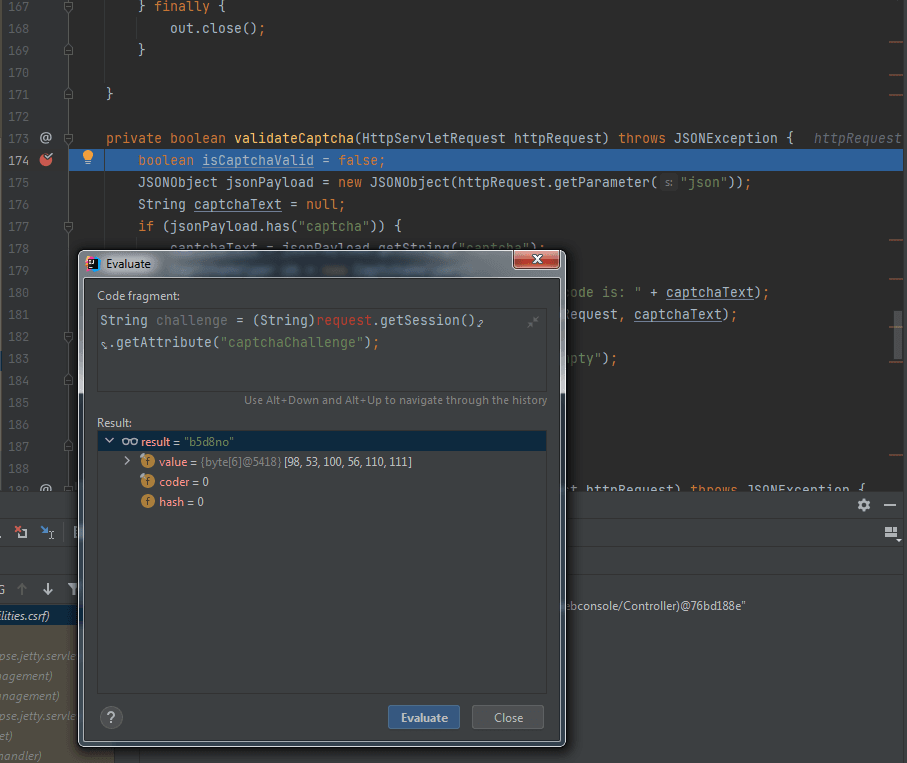
String challenge = (String)session.getAttribute("captchaChallenge");
if (challenge != null) {
session.removeAttribute("captchaChallenge");
}
if (challenge != null && captcha != null && challenge.equals(captcha)) {
CyberoamLogger.debug("Captcha Helper", "challenge:" + challenge + " captcha:" + captcha + " true");
return true;
}
CyberoamLogger.debug("Captcha Helper", "challenge:" + challenge + " captcha:" + captcha + " false");
} catch (Exception var5) {
CyberoamLogger.error("Captcha Helper", "Error in validateCaptchaChallenge :", var5);
}
return false;
} |
The above code compares whether two parts are equal: the content of "captcha" in the JSON data and the content of the "captchaChallenge" attribute in the session.
The content of "captcha" in the JSON data can be obtained by accessing the login page https:///webconsole/webpages/login.jsp.
The content of the "captchaChallenge" attribute in the session requires constructing a valid cookie data packet to obtain; otherwise, the result returned will be null. The test for constructing a valid cookie data packet is shown in the figure below.
0x05 Enable login disclaimer to break the exploitation chain
---
When the vulnerability is successfully exploited, a valid Cookie is generated in the Header of the response packet.
During testing, I found a simple and direct defense method: enabling the login disclaimer.
Details are as follows:
Log in to the web management page, navigate to Administration->Admin and user settings->Check Enable login disclaimer
After enabling login disclaimer, a disclaimer page will pop up during login, as shown in the figure below
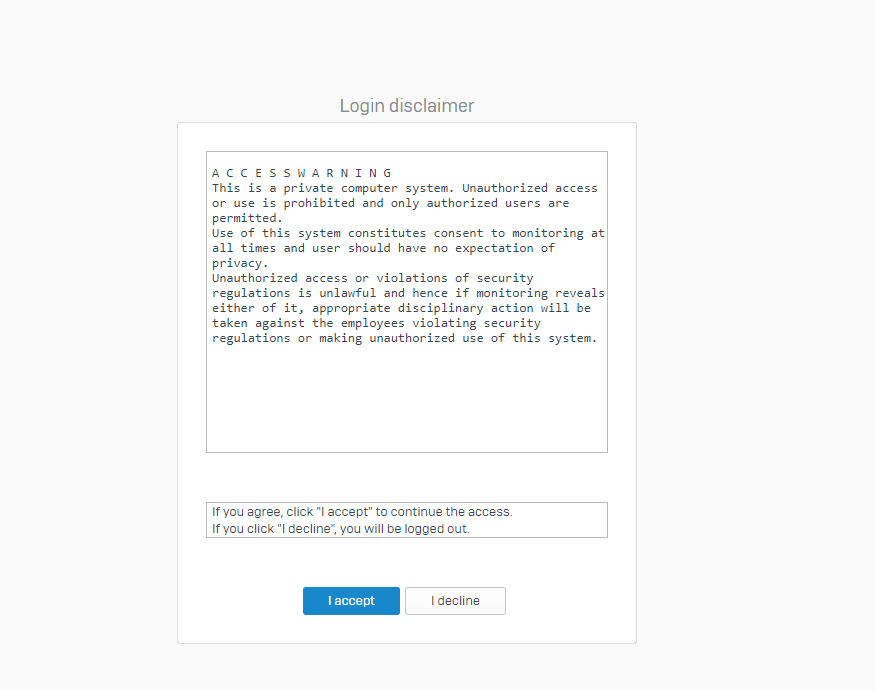
The cookie returned by the vulnerability exploit becomes invalid at this point
0x06 Summary
---
This article supplements the technical details not mentioned in 'CVE-2022-1040 Sophos XG Firewall Authentication bypass' from a technical research perspective.