
0x00 Preface
---
For Sophos UTM devices, the Last WebAdmin Sessions in the web management page records each user login. This article introduces methods to clear specific Last WebAdmin Sessions records solely from a technical research perspective, documenting research details.
0x01 Introduction
---
This article will cover the following:
- Research Process
- Implementation Methods
0x02 Introduction to Last WebAdmin Sessions
---
In the web management page, selecting Management displays the Last WebAdmin Sessions records, as shown in the figure below
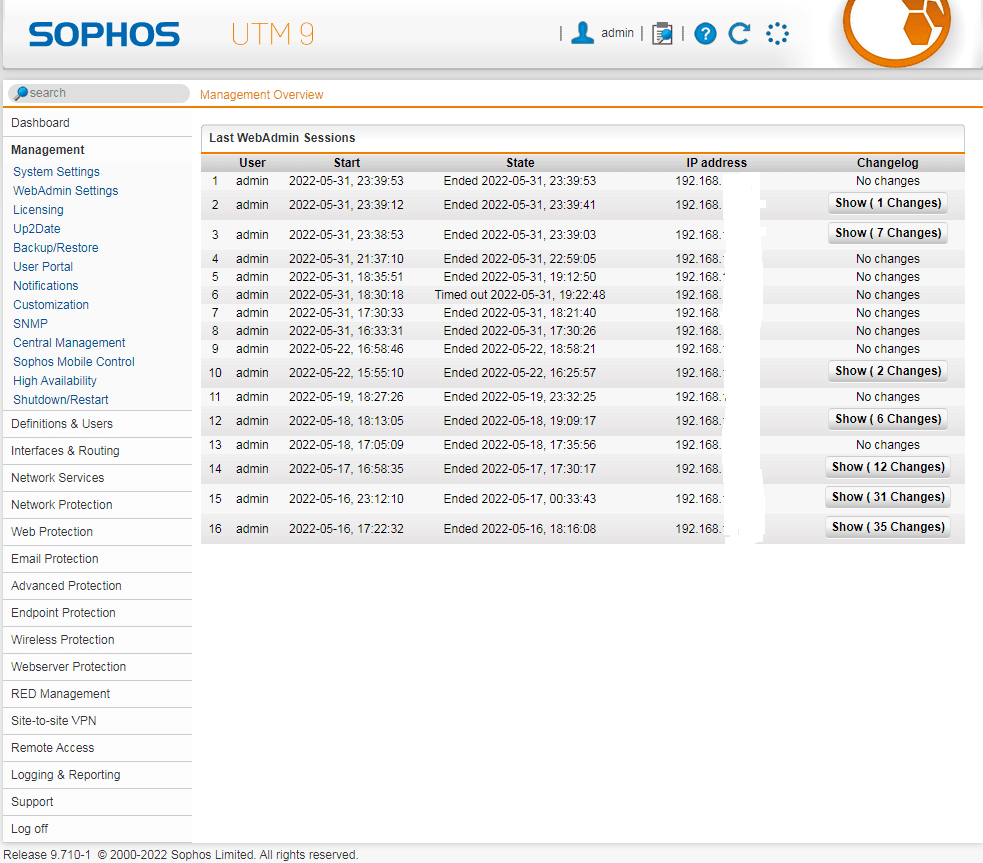
The records include the following:
- User: Login username
- Start: Login Time
- State: Logout Time
- IP address: Login IP
- Changelog: Modified Configuration
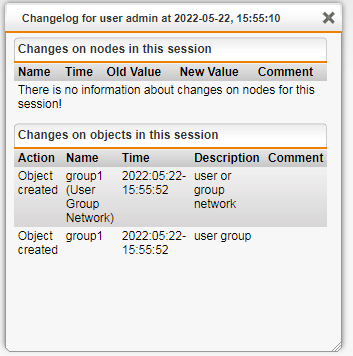
For Changelog, clicking Show will display the modified configuration, as shown in the figure below
Under default settings, Last WebAdmin Sessions will display the most recent 20 records
0x03 Research Process
---
1. Attempt to modify /var/confd/var/storage/cfg
As mentioned in the previous article 'Sophos UTM Exploitation Analysis—Exporting Configuration Files', /var/confd/var/storage/cfg stores the configuration information of Sophos UTM, so it is speculated that clearing Last WebAdmin Sessions records can be achieved by modifying the /var/confd/var/storage/cfg file
The file format of /var/confd/var/storage/cfg is Perl Storable files, and StorableEdit is used here to edit the file
Upload the file storableedit-1.5.pl to Sophos UTM and execute the command:
./storableedit-1.5.pl cfg |
The result is as shown in the figure below
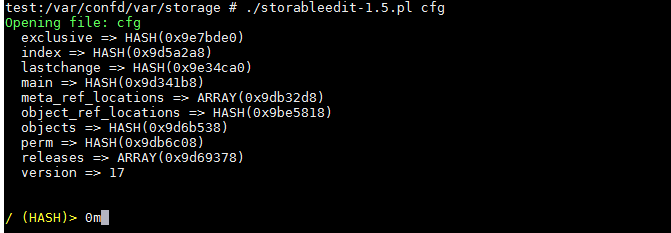
The parsed file structure is consistent with the results exported using SophosUTM_ConfigParser.py
To view configuration information, use the following commands:
cd lastchange |
To clear all attributes, use the following commands:
$cur->{'user'} = '',$cur->{'time'} = '',$cur->{'sid'} = '',$cur->{'srcip'} = '' |
To save the file, use the following command:
x |
However, modifying the cfg file will not affect the Last WebAdmin Sessions records
2. Decompile the source code of the web management page
Path to the web management page program file: /var/sec/chroot-httpd/var/webadmin/webadmin.plx
Use SophosUTM_plxDecrypter.py to decompile /var/sec/chroot-httpd/var/webadmin/webadmin.plx
Locate the key file: export-webadmin.plx\wfe\asg\modules\asg_dashboard.pm
Locate key content: my $userlog = $sys->userlog_read(max => 20, facility => 'webadmin,acc-agent,acc_sso') || [];
As shown in the figure below
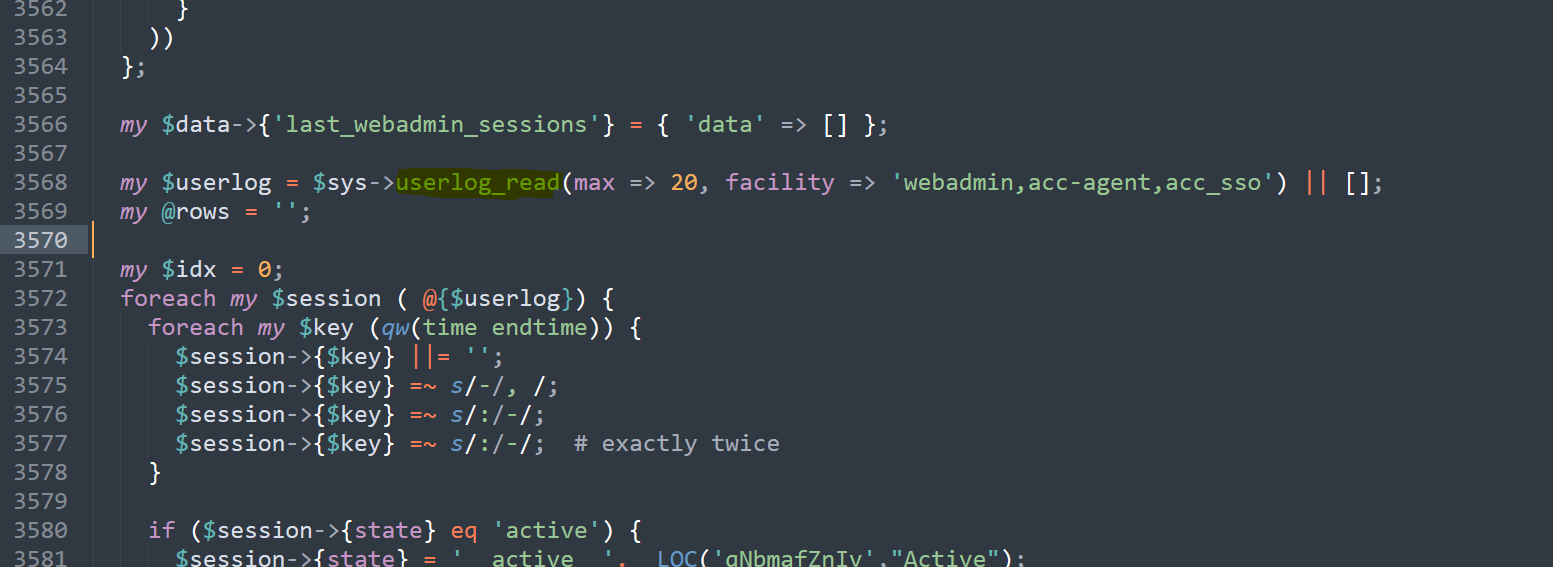
Locate the key function from the output: userlog_read
3. Locate the key function userlog_read
Google search $sys->userlog_read, find a reference document: https://community.sophos.com/utm-firewall/astaroorg/f/asg-v8-000-beta-closed/69661/7-920-bug-open-failed-smtp-relay-login-is-showing-up-on-last-webadmin-logins
The document contains some descriptions about userlog_read, as shown in the figure below
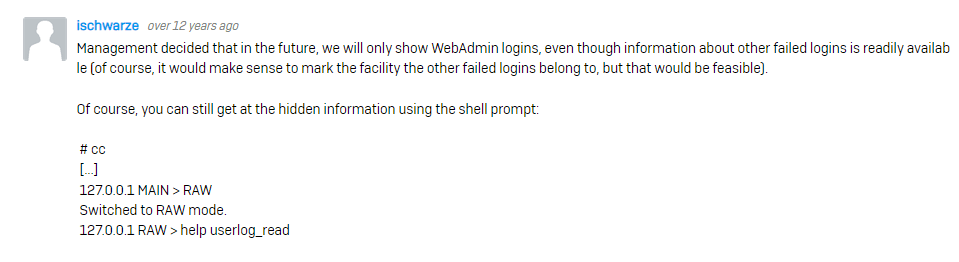
From the description, it is concluded that userlog_read is related to the cc command
4. Decompile the process corresponding to the cc command
The file corresponding to the cc command is /var/confd/confd.plx, use SophosUTM_plxDecrypter.py to decompile /var/confd/confd.plx
5. Obtain details of the function userlog_read
Search for content related to userlog_read, command as follows:
grep -iR "userlog_read" /home/kali/1/decrypt/Export-confd.plx |
The output result is as shown in the figure below

Locate key files from output results: Export-confd.plx/Info/webadmin/log.pm
Locate function definition:
sub userlog_read { |
6. Analysis of userlog_read function code
The code involves two operations: reading from the database and reading from a file, details as follows:
(1) Database operation
Key code:
sub _consult_db { |
Code Analysis:
The following operations are executed from the reporting database to achieve data reading:
sessions: SELECT sid,facility,srcip,username,time,endtime,state FROM confd_sessions; |
Through testing and analysis, confd_sessions stores Session information
CMD command to read Session information:
psql reporting -U postgres -c 'SELECT sid,facility,srcip,username,time,endtime,state FROM confd_sessions;' |
(2) File Operations
Key code:
sub _iterate_files { |
Code Analysis:
Read the file /var/log/confd.log. /var/log/confd.log only stores logs from the current time back to a certain period. Logs from earlier times are saved in /var/log/confd/%Y/%m/confd-%Y-%m-%d.log.gz. For example, logs from May 16, 2022, are located at /var/log/confd/2022/05/confd-2022-05-16.log.gz.
Through testing and analysis, /var/log/confd.log stores Session information.
7. Edit the Session information stored in the file.
View successful login information:
cat /var/log/confd.log | grep success |
Example of returned result:
2022:05:23-00:19:33 test confd[41177]: I Role::authenticate:185() => id="3106" severity="info" sys="System" sub="confd" name="authentication successful" user="admin" srcip="192.168.1.2" sid="8ad7bbf2781b006d99176eea9050694811e745e04acfab3dd0179620109a41ab" facility="webadmin" client="webadmin.plx" call="new"<31>May 23 00:19:33 confd[41177]: D sys::AUTOLOAD:307() => id="3100" severity="debug" sys="System" sub="confd" name="external call" user="admin" srcip="192.168.1.2" facility="webadmin" client="webadmin.plx" lock="none" method="get_SID" |
From the result, obtain the sid as 8ad7bbf2781b006d99176eea9050694811e745e04acfab3dd0179620109a41ab.
Filter information for the specified sid:
cat /var/log/confd.log | grep 8ad7bbf2781b006d99176eea9050694811e745e04acfab3dd0179620109a41ab |
Example of returned result:
2022:05:23-00:19:33 test confd[41177]: I Role::authenticate:185() => id="3106" severity="info" sys="System" sub="confd" name="authentication successful" user="admin" srcip="192.168.1.2" sid="8ad7bbf2781b006d99176eea9050694811e745e04acfab3dd0179620109a41ab" facility="webadmin" client="webadmin.plx" call="new"<31>May 23 00:19:33 confd[41177]: D sys::AUTOLOAD:307() => id="3100" severity="debug" sys="System" sub="confd" name="external call" user="admin" srcip="192.168.1.2" facility="webadmin" client="webadmin.plx" lock="none" method="get_SID" |
Extract from it:
- authentication successful: 2022:05:23-00:19:33
- User: admin
- srcip: 192.168.1.2
- closing session: 2022:05:23-00:50:24
Comparing the above information with the Last WebAdmin Sessions in the Web management page Management, it is found that the data is consistent
Delete the above information:
sed -i "/8ad7bbf2781b006d99176eea9050694811e745e04acfab3dd0179620109a41ab/d" /var/log/confd.log |
Refreshing the Web management page Management, it is found that this method cannot clear the Last WebAdmin Sessions records
8. Edit the Session information stored in the database
Query information for the specified sid:
psql reporting -U postgres -c "SELECT sid,facility,srcip,username,time,endtime,state FROM confd_sessions WHERE sid ='8ad7bbf2781b006d99176eea9050694811e745e04acfab3dd0179620109a41ab';" |
Delete information for the specified sid:
psql reporting -U postgres -c "DELETE FROM confd_sessions WHERE sid ='f7cce7739e98229816be6b186ada2e2942064cbf0093e329e98939fe65d8d3e3';" |
Refreshing the Web management page Management reveals that this method can clear the Last WebAdmin Sessions records (including Changelog)
0x04 Implementation Method
---
Based on the above content, the method to clear Last WebAdmin Sessions records is derived: delete the corresponding records in the reporting database
Specific steps are as follows:
1. Confirm the sid corresponding to the Last WebAdmin Sessions records
Read the file /var/log/confd.log, query command:
cat /var/log/confd.log| grep success |
From the returned results, confirm the sid of the Session records
2. Delete the Session records corresponding to the sid
Command example:
psql reporting -U postgres -c "DELETE FROM confd_sessions WHERE sid ='f7cce7739e98229816be6b186ada2e2942064cbf0093e329e98939fe65d8d3e3';" |
0x05 Summary
---
This article details the method for clearing Last WebAdmin Sessions records.


