Shodan API Usage Guide

Onedaysec
5 min read
0 views
docx image 1770017287204 0 d56de95fe7

0x00 Introduction

---

Shodan is a search engine for network devices. Using the Shodan API for searches not only provides richer data but also enables automated analysis by integrating with your own programs.

This article will introduce considerations when using the Shodan API, share usage insights, and script development techniques.

0x01 This article will cover the following topics

---

  • Basic usage of the Shodan API
  • Using Python to call the Shodan API to obtain search results
  • Further processing of search results
  • Differences between the three types of credits
  • Exporting search results from the Shodan website and further processing

0x02 Basic usage of the Shodan API

---

1. Register an account and obtain an API Key

Test API Key is: SkVS0RAbiTQpzzEsahqnq2Hv6SwjUfs3

2. Install Python package

pip install shodan

3. Obtain search results via Shodan CLI

Reference materials:

https://cli.shodan.io/

Note:

Only 100 search results are available without payment

CLI stands for command-line interface, which is Shodan's command-line mode

On Windows systems, using pip install generates the file Shodan.exe in the same directory

As shown in the figure below
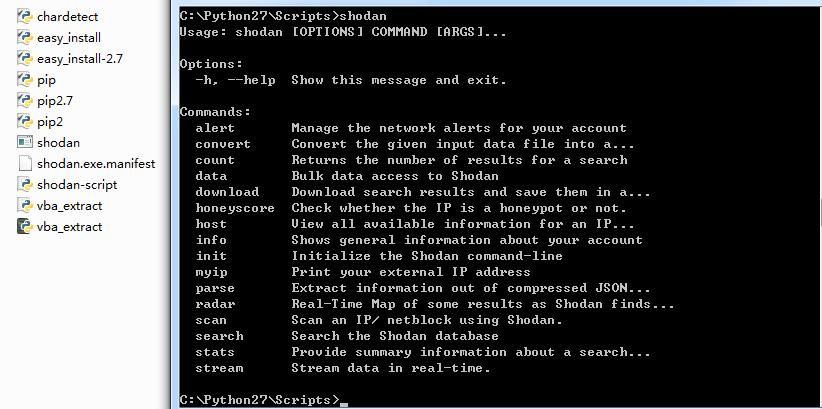
3. Obtain search results via Shodan CLI — technical illustration 1

(1) Initialization

shodan init

The actual command is:

shodan init SkVS0RAbiTQpzzEsahqnq2Hv6SwjUfs3

as shown in the figure below

(1) Initialization — technical illustration 2

(2) Search for the quantity of specified content (apache)

shodan count apache

as shown in the figure below

(2) Search for the quantity of specified content (apache) — technical illustration 3

Obtain result 23803090

(3) Search for information on specified content (apache)

shodan search --fields ip_str,port,org,hostnames apache

Search keyword: apache

Output: ip_str,port,org,hostnames

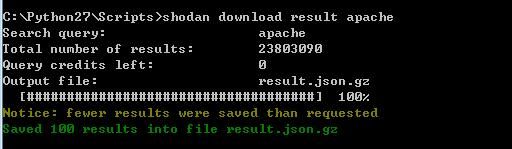
(4) Download search results for specified content (apache)

shodan download result apache

Search keyword: apache

Save file name: result.json.gz

As shown in the figure below
(4) Download search results for specified content (apache) — technical illustration 4

(5) Parse the file to obtain search results

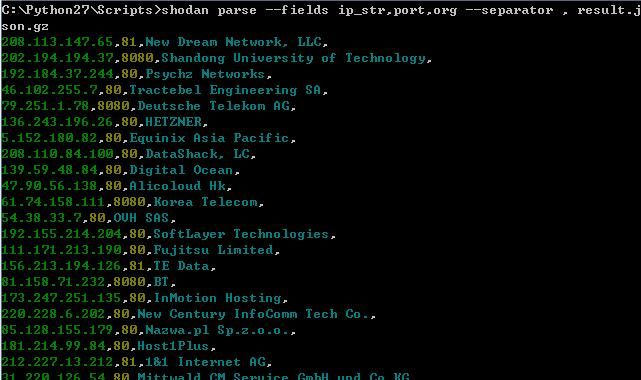
shodan parse --fields ip_str,port,org --separator , result.json.gz

As shown in the figure below

(5) Parse the file to obtain search results — technical illustration 5

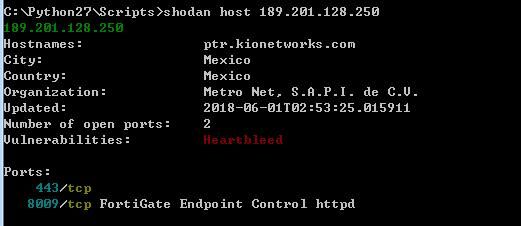
(6) Search for information on a specified IP

shodan host 189.201.128.250

As shown in the figure below

(6) Search for information on a specified IP — technical illustration 6

0x03 Differences between the three types of credits

---

Shodan has three types of credits:

  • Export credits
  • Query credits
  • Scan credits

Official documentation:

https://help.shodan.io/the-basics/credit-types-explained

Simple explanation:

Export Credits

Used when downloading data from the Shodan official website

1 export credit = 10,000 results

Note:

Exporting results consumes one credit per export, regardless of the number of results obtained, up to a maximum of 10,000 results

Does not renew at the beginning of the month

Query Credits

Used when calling the Shodan API

1 query credit = 100 results

Renews at the beginning of the month, meaning if you only purchase a one-month membership, it will reset to zero the following month

Scan Credits

Used when calling the Shodan API

1 scan credit = 1 IP

Updated at the beginning of the month

0x04 Obtaining search results by calling the Shodan API via Python

---

Note:

Without payment, not only are search filters unavailable, but only 100 search results can be obtained

(1) Search for information on specified content (Apache)

Python code is as follows:

import shodan
SHODAN_API_KEY = "SkVS0RAbiTQpzzEsahqnq2Hv6SwjUfs3"
api = shodan.Shodan(SHODAN_API_KEY)
try:
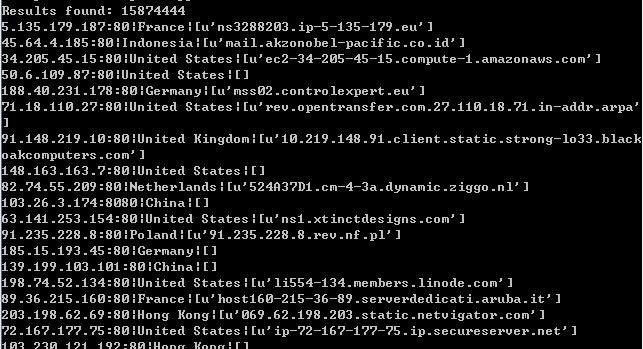
results = api.search('Apache')
print 'Results found: %s' % results['total']
for result in results['matches']:
print ("%s:%s|%s|%s"%(result['ip_str'],result['port'],result['location']['country_name'],result['hostnames']))
except shodan.APIError, e:
print 'Error: %s' % e

As shown in the figure below

(1) Search for information on specified content (Apache) — technical illustration 7

If not paid, search filters cannot be used, such as Apache country:"US"

(2) Search for specified content and write the obtained IPs to a file

Python code is as follows:

import shodan
SHODAN_API_KEY = "SkVS0RAbiTQpzzEsahqnq2Hv6SwjUfs3"
api = shodan.Shodan(SHODAN_API_KEY)
file_object = open('ip.txt', 'w')
try:
results = api.search('Apache')
print 'Results found: %s' % results['total']
for result in results['matches']:
# print result['ip_str']
file_object.writelines(result['ip_str']+'\n')
except shodan.APIError, e:
print 'Error: %s' % e
file_object.close()

(3) Specify search criteria via command line arguments and write the found IPs to a file

Python code is as follows:

import shodan
import sys
SHODAN_API_KEY = "SkVS0RAbiTQpzzEsahqnq2Hv6SwjUfs3"
api = shodan.Shodan(SHODAN_API_KEY)
if len(sys.argv)<2:
print '[!]Wrong parameter'
sys.exit(0)
print '[*]Search string: %s' % sys.argv[1]

file_object = open('ip.txt', 'w')
try:
results = api.search(sys.argv[1])
print '[+]Results found: %s' % results['total']
for result in results['matches']:
# print result['ip_str']
file_object.writelines(result['ip_str']+'\n')
except shodan.APIError, e:
print 'Error: %s' % e
file_object.close()

Command line parameters:

search.py apache

Note:

If searching for multiple keywords, enclose the search criteria in quotes, for example:

search.py "apache country:US"

(4) Read IP list from file and reverse lookup IP information

Python code is as follows:

import shodan
import sys
reload(sys)
sys.setdefaultencoding('utf8')
SHODAN_API_KEY = "SkVS0RAbiTQpzzEsahqnq2Hv6SwjUfs3"
api = shodan.Shodan(SHODAN_API_KEY)
def searchip(str):
try:
host = api.host(str)
except shodan.exception.APIError:
print "[!]No information available"
print "---------------------------------------------"
return
else:
# Print general info
try:
print "IP: %s\r\nOrganization: %s\r\nOperating System: %s" % (host['ip_str'], host.get('org', 'n/a'), host.get('os', 'n/a'))
except UnicodeEncodeError:
print "[!]UnicodeEncode Error\r\n"
else:
# Print all banners
for item in host['data']:
print "Port: %s\r\nBanner: %s" % (item['port'], item['data'])
print "---------------------------------------------"
return
file_object = open('ip.txt', 'r')
for line in file_object:
searchip(line)

0x05 Download search results via Shodan official website

---

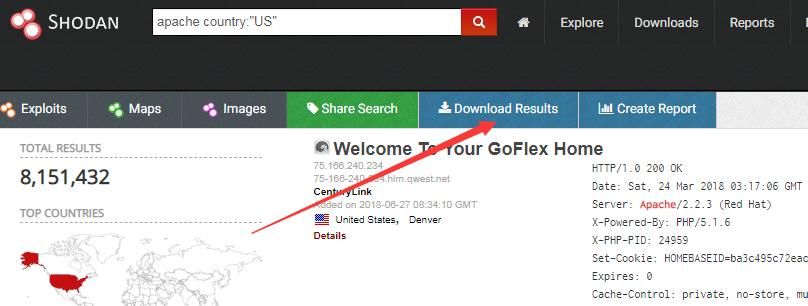
Export credits are used when downloading data via the Shodan official website, as shown in the figure below
0x05 Download search results via Shodan official website — technical illustration 8

Each query consumes one export credit, regardless of the number of results, with a maximum of 10,000

Select json as the export format

(1) Extract IPs from the downloaded json result file

Python code is as follows:

import json
file_object = open("shodan_data.json", 'r')
for line in file_object:
data = json.loads(line)
print (data["ip_str"])
file_object.close()

(2) Extract IP and port of specified country from downloaded json result file

Country code is in secondary element, corresponding structure: data["location"]["country_code"]

Python code:

import json
import sys
import re
def search(country):
file_object = open("shodan_data.json", 'r')
file_object2 = open(country+".txt", 'w')
for line in file_object:
data = json.loads(line)
if re.search(data["location"]["country_code"], country, re.IGNORECASE):
str1 = "%s:%s" % (data["ip_str"],data["port"])
print str1
file_object2.writelines(str1+'\n')
file_object.close()
file_object2.close()
if __name__ == "__main__":
if len(sys.argv)<2:
print ('[!]Wrong parameter')
sys.exit(0)
else:
print ('[*]Search country code: %s' % sys.argv[1])
search(sys.argv[1])
print ("[+]Done")

Command line arguments:

search.py US

Generate file US.txt, save IP and corresponding ports

0x06 Summary

---

This article introduces the usage of the Shodan API, sharing insights and Python script development techniques. When opting for a paid purchase, remember to distinguish between the three types of credits (credits).


Related Questions & Answers

How do I reverse-lookup IP information using the Shodan API in Python?

Use the `api.host(ip_address)` method to get details about a specific IP. The returned `host` object contains `ip_str`, `org`, `os`, and a list of `data` items each with `port` and `banner` fields. Wrap the call in a try-except to handle cases where no information is available. You can read IPs from a file and loop through them, as demonstrated in the [Penetration Tool Development article](/news/penetration-tool-development-command-line-implementation-of-xss-platform).

Can I export search results from the Shodan website and process them locally?

Yes. On the Shodan website, you can export results in JSON format using one Export credit per query (max 10,000 results). After downloading the JSON file, parse it with Python code such as `json.loads(line)` to extract fields like `ip_str` and `port`. For example, you can filter exports by country code using `data["location"]["country_code"]`, similar to techniques shown in the [Zimbra SOAP API Development Guide](/news/zimbra-soap-api-development-guide-5-email-forwarding).

How do I use Python to call the Shodan API and retrieve search results?

Install the `shodan` Python package (`pip install shodan`), then initialize with your API key: `api = shodan.Shodan('YOUR_API_KEY')`. Call `api.search('query')` to get results, which include a `total` count and a list of `matches`. Each match contains fields like `ip_str`, `port`, `location`, and `hostnames`. The free tier limits you to 100 results and disables filters like `country:`; for full access, purchase Query credits as explained in the [Shodan API Usage Guide](/news/shodan-api-usage-guide).

How can I search for devices using the Shodan command-line interface?

First initialize your API key with `shodan init YOUR_API_KEY`. Then use `shodan search --fields ip_str,port,org,hostnames <query>` to search and display specific fields. For example, `shodan search --fields ip_str,port,org,hostnames apache` returns IP, port, organization, and hostnames for Apache servers. You can also count results with `shodan count <query>` or download them with `shodan download <filename> <query>`, then parse the downloaded file using `shodan parse`.

What are the three types of Shodan credits, and how do they differ?

Shodan has **Export credits**, **Query credits**, and **Scan credits**. Export credits are used when downloading data from the Shodan website (1 credit = up to 10,000 results). Query credits apply when calling the [Shodan API](/news/shodan-api-usage-guide) (1 credit = 100 results). Scan credits are for scanning IPs (1 credit = 1 IP). Both Query and Scan credits reset at the beginning of each month, but Export credits do not.

Continue Reading