
0x00 Preface
---
This article uses CVE-2023-27532 as an example to introduce the method for setting up a Veeam Backup & Replication vulnerability debugging environment.
0x01 Introduction
---
This article will cover the following topics:
- Environment Setup
- Debugging Environment Setup
- Database Credential Extraction
- Brief Analysis of CVE-2023-27532
0x02 Environment Setup
---
1. Software Installation
Installation Documentation: https://helpcenter.veeam.com/archive/backup/110/vsphere/install_vbr.html
Software download address: https://www.veeam.com/download-version.html
License application address: https://www.veeam.com/smb-vmware-hyper-v-essentials-download.html
Download the ISO file; the license file obtained via email is required during installation.
2. Default directories
Installation directory: C:\Program Files\Veeam\
Log path: C:\ProgramData\Veeam\Backup
3. Default ports
- Veeam.Backup.Service ports: 9392, 9401 (SSL)
- Veeam.Backup.ConfigurationService port: 9380
- Veeam.Backup.CatalogDataService port: 9393
- Veeam.Backup.EnterpriseService port: 9394
- Web UI ports: 9080, 9443 (SSL)
- RESTful API ports: 9399, 9398 (SSL)
0x03 Debug environment setup
---
1. Locate Process
Execute command: netstat -ano | findstr 9401
Return result:
TCP 0.0.0.0:9401 0.0.0.0:0 LISTENING 7132 |
Located process PID is 7132, process name is Veeam.Backup.Service.exe
Use dnSpy to attach to process Veeam.Backup.Service.exe
2. Debug Settings
To view variable contents during debugging, create the following files:
- C:\Program Files\Veeam\Backup and Replication\Backup\Veeam.Backup.Service.ini
- C:\Program Files\Veeam\Backup and Replication\Backup\Veeam.Backup.DBManager.ini
- C:\Program Files\Veeam\Backup and Replication\Backup\Veeam.Backup.ServiceLib.ini
- C:\Program Files\Veeam\Backup and Replication\Backup\Veeam.Backup.Interaction.MountService.ini
Content is:
[.NET Framework Debugging Control] |
Restart Service
0x04 Database Credential Extraction
---
1. Obtain Database Connection Configuration
(1) Obtain Database Connection Port
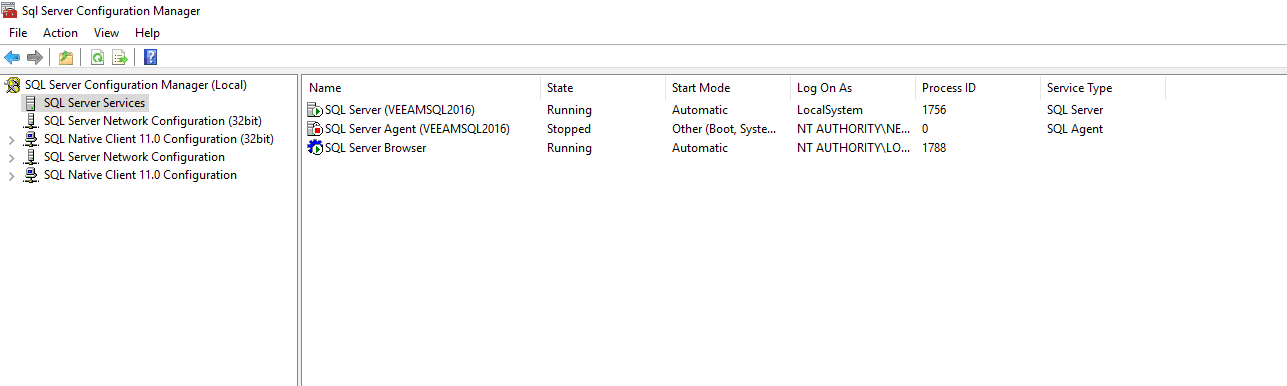
Open SQL Server 2016 Configuration Manager, select SQL Server Services, you can see that the Process ID corresponding to SQL Server (VEEAMSQL2016) is 1756, as shown in the figure below
Check the port corresponding to the process: netstat -ano|findstr 1756
Return result:
TCP 0.0.0.0:49720 0.0.0.0:0 LISTENING 1756 |
Obtain connection port 49720
(2) Obtain Database Name
Method 1:
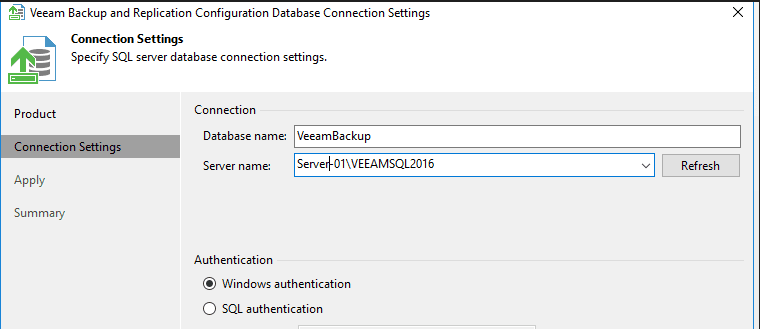
Enter the Configuration Database Connection Settings page, where you can see the Database name as VeeamBackup and the authentication method as Windows Authentication, as shown in the figure below.
Method 2:
Read the registry key value: REG QUERY "HKEY_LOCAL_MACHINE\SOFTWARE\Veeam\Veeam Backup and Replication" /v SqlDatabaseName
2. Database Connection
(1) Using the Interface Program
Here, DbSchema is used.
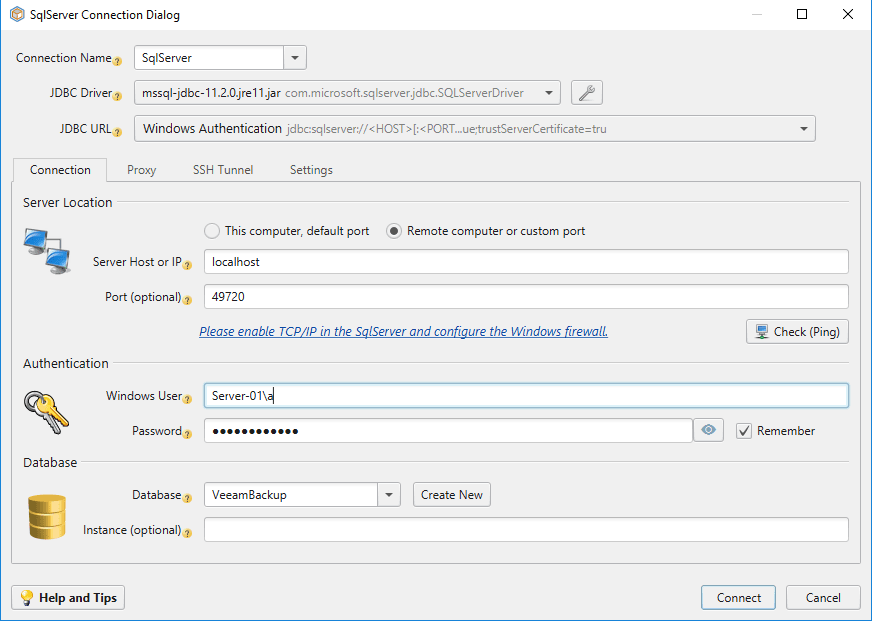
Select SqlServer and configure as shown in the figure below.
Successfully connected as shown in the figure below.
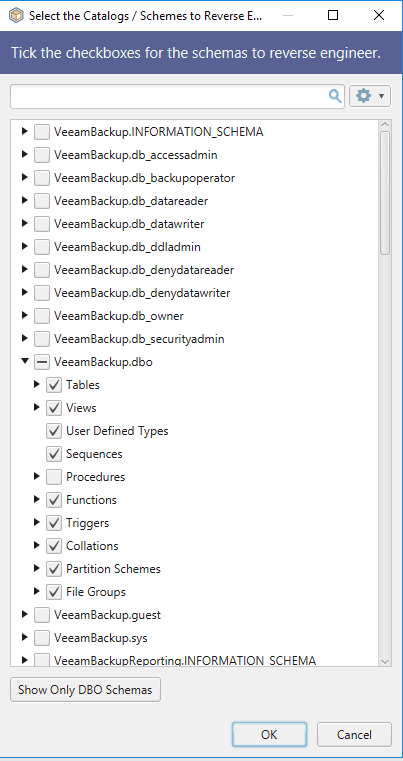
Select the database VeeamBackup.dbo, enter the database page, and globally search for the keyword 'password' to obtain the relevant query statement:
SELECT |
After execution, obtain the credential information stored in the database, as shown in the figure below
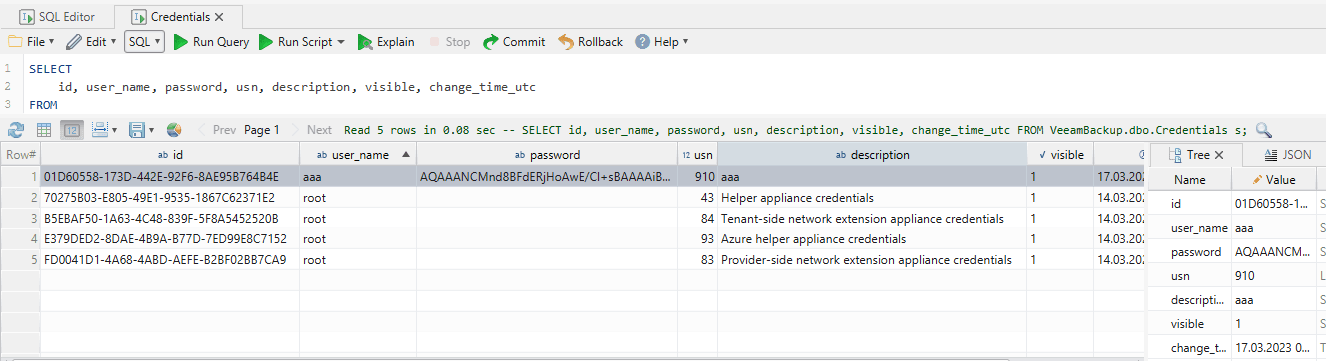
(2) Using Powershell
Reference: https://github.com/sadshade/veeam-creds
veeam-creds will report an error when tested on Veeam Backup and Replication 11 and later versions, with the prompt:
Exception calling "Fill" with "1" argument(s): "[DBNETLIB][ConnectionOpen (SECDoClientHandshake()).]SSL Security error." |
This is because https://github.com/sadshade/veeam-creds/blob/main/Veeam-Get-Creds.ps1#L32 uses sqloledb, and the sqloledb on the current system has expired
Here you can choose to use MSOLEDBSQL or MSOLEDBSQL19 to resolve the issue
PowerShell command to check if MSOLEDBSQL or MSOLEDBSQL19 is installed on the current system: (New-Object System.Data.OleDb.OleDbEnumerator).GetElements() | select SOURCES_NAME, SOURCES_DESCRIPTION
Example of returned results:
SOURCES_NAME SOURCES_DESCRIPTION |
The above results show that MSOLEDBSQL19 is installed on the current system, so simply replace sqloledb with MSOLEDBSQL19.
Note: Method for installing MSOLEDBSQL or MSOLEDBSQL19.
Download address: https://learn.microsoft.com/en-us/sql/connect/oledb/download-oledb-driver-for-sql-server?source=recommendations&view=sql-server-ver16
Command line installation method: msiexec /i msoledbsql.msi /qn IACCEPTMSOLEDBSQLLICENSETERMS=YES
Microsoft Visual C++ Redistributable version must be at least 14.34 before installation
Simple method to check Microsoft Visual C++ Redistributable version:
Obtain via folder name: dir /o:-d "C:\ProgramData\Package Cache"
Example return results:
{88a5e14d-0f76-42fd-a259-a53b8fde6c73} |
From this, it can be concluded that the Microsoft Visual C++ Redistributable version is 14.29.30037. A higher version of Microsoft Visual C++ Redistributable needs to be installed. Download link: https://learn.microsoft.com/en-us/cpp/windows/latest-supported-vc-redist?view=msvc-170
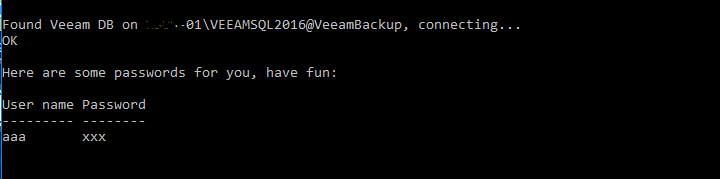
Both x86 and x64 need to be installed. veeam-creds runs successfully as shown in the figure below
0x05 Brief Analysis of CVE-2023-27532
---
Y4er published a POC that calls CredentialsDbScopeGetAllCreds to obtain plaintext credentials: https://y4er.com/posts/cve-2023-27532-veeam-backup-replication-leaked-credentials/
1. Credential Location
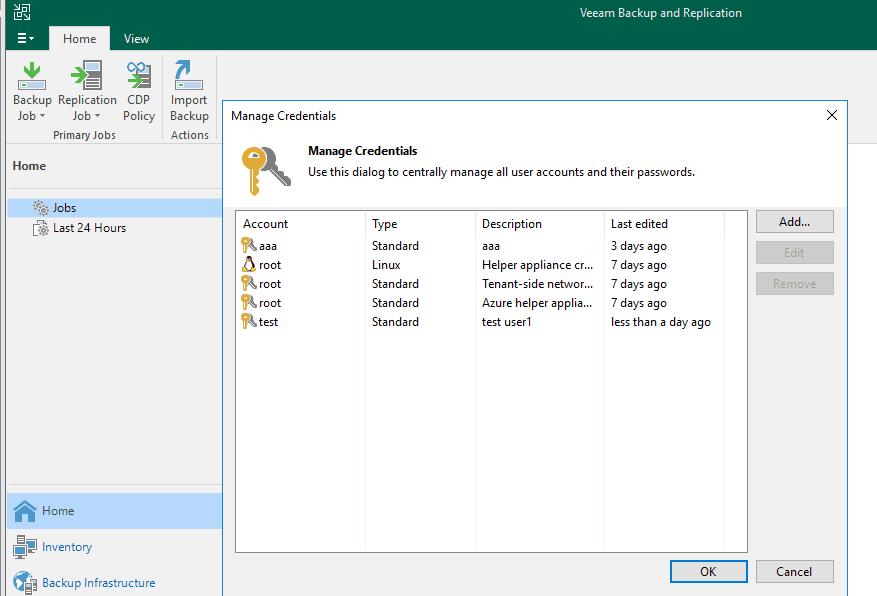
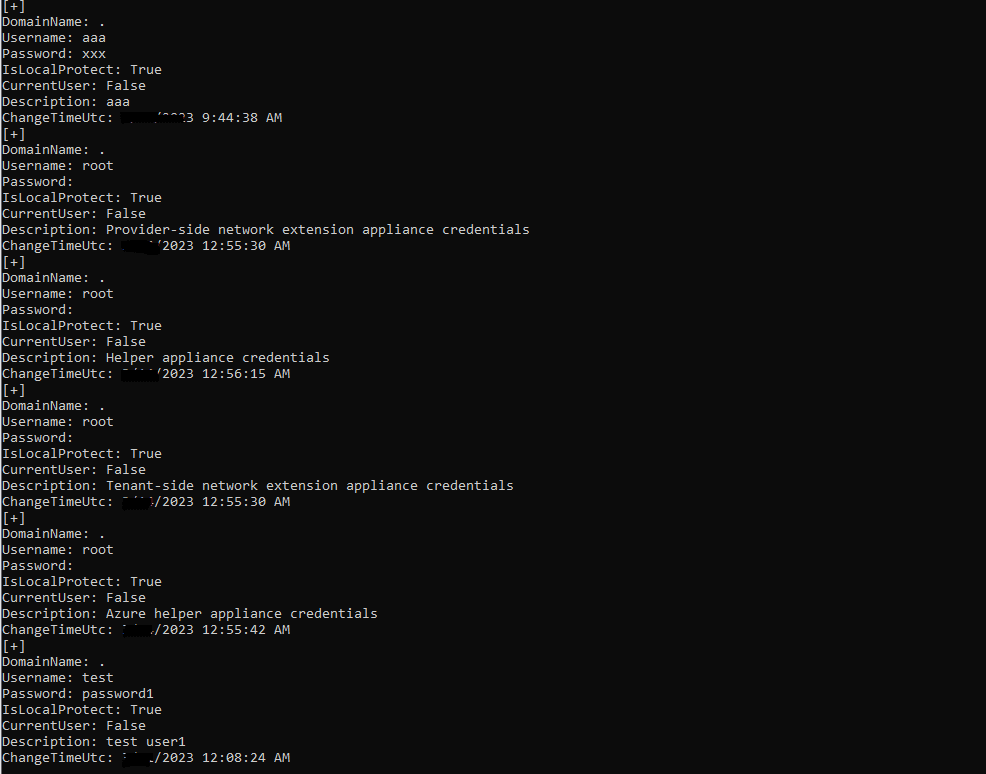
The plaintext credentials here correspond to the location: Veeam Backup & Replication Console -> Manage Credentials. The default plaintext password is empty, as shown in the figure below
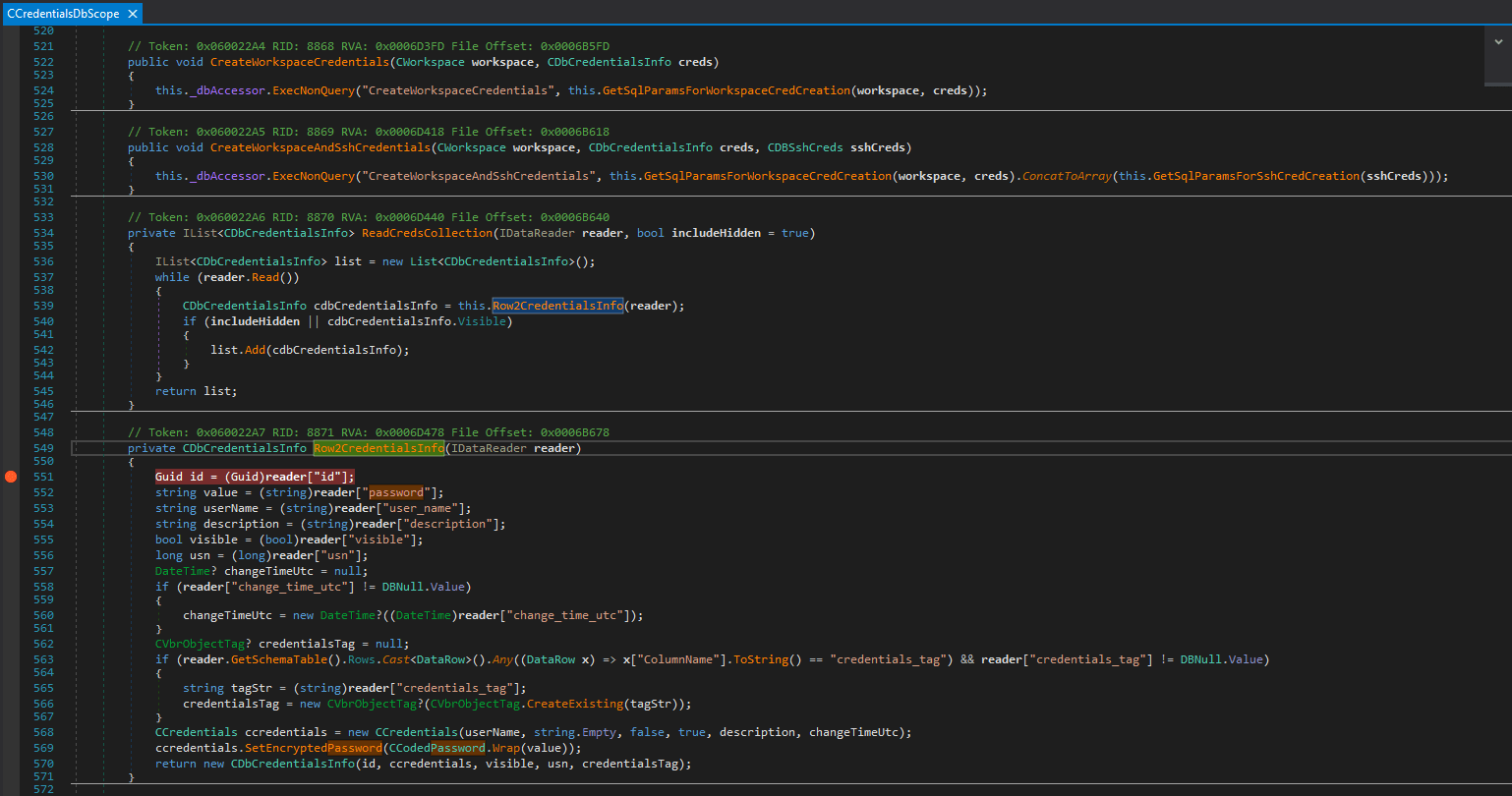
The debugging breakpoint location is Veeam.Backup.DBManager.dll -> CCredentialsDbScope, as shown in the figure below
2. Data Parsing
The final return result of the POC is serialized XML. After Base64 decoding ParamValue, plaintext data can be seen, but the format is incorrect and contains garbled characters
Here you can call Veeam's built-in DLL to deserialize data and obtain the correct format.
Code example for formatting output strings:
int pos1 = v.IndexOf("ParamValue=\""); |
Need to reference DLL files:
- Veeam.Backup.Common.dll
- Veeam.Backup.Configuration.dll
- Veeam.Backup.Interaction.MountService.dll
- Veeam.Backup.Logging.dll
- Veeam.Backup.Model.dll
- Veeam.Backup.Serialization.dll
- Veeam.TimeMachine.Tool.dll
The compiled executable must be run on a local system with Veeam installed, otherwise it will error with:
Unhandled Exception: System.ArgumentNullException: Value cannot be null. |
The result of successful program execution is shown in the following figure
0x06 Summary
---
This article uses CVE-2023-27532 as an example to introduce the related issues and solutions for setting up a Veeam Backup & Replication vulnerability debugging environment.


