
0x00 Preface
---
Server Backup Manager (SBM) is a fast, cost-effective, and high-performance backup software suitable for Linux and Windows servers in both physical and virtual environments. This article will introduce the method for setting up a vulnerability debugging environment for Server Backup Manager.
0x01 Introduction
---
This article will cover the following topics:
- Environment Setup
- Debugging Environment Setup
- User Database File Extraction
- Brief Introduction to CVE-2022-36537
0x02 Environment Setup
---
Installation Reference: http://wiki.r1soft.com/display/ServerBackupManager/Install+and+Upgrade+Server+Backup+Manager+on+Debian+and+Ubuntu.html
The reference provides two installation methods, but during my testing, I encountered the error of missing the file /etc/init.d/cdp-server in both cases.
Here, we switch to installing an older version of Server Backup Manager, and the installation is successfully completed. The specific steps are as follows:
1. Download the installation package
http://r1soft.mirror.iweb.ca/repo.r1soft.com/release/6.2.2/78/trials/R1soft-ServerBackup-Manager-SE-linux64-6-2-2.zip
2. Install
unzip R1soft-ServerBackup-Manager-SE-linux64-6-2-2.zip |
3. Configure
serverbackup-setup --user admin --pass 123456 |
4. Start the service
/etc/init.d/cdp-server restart |
The web management pages are as follows:
http://127.0.0.1:8080
https://127.0.0.1:8443
0x03 Debugging Environment Setup
---
The research process is as follows:
(1)
Examining the file /etc/init.d/cdp-server reveals it is a text file. From its content, the default installation path is identified as /usr/sbin/r1soft, with the main program located at /usr/sbin/r1soft/bin/cdpserver.
The web path is: /usr/sbin/r1soft/webapps, which contains the following two default files:
- r1soft-api.war
- zk-web.war
(2)
Checking process information: ps aux |grep cdp
Returns:
root 2250 0.3 0.1 20836 2488 ? Sl 22:18 0:01 ./cdpserver /usr/sbin/r1soft/conf/server.conf |
Obtaining the configuration file path: /usr/sbin/r1soft/conf/server.conf
(3)
Adding Java debugging parameters by modifying the file /usr/sbin/r1soft/conf/server.conf, with the following content added:
additional.19=-agentlib:jdwp=transport=dt_socket,server=y,suspend=n,address=8000 |
Note:
Here, use the parameter address=8000 corresponding to JDK5-8; do not use the parameter address=*:8000 corresponding to JDK9 and higher versions.
(4)
Restart the service: /etc/init.d/cdp-server restart
(5)
Download the source code from the server
Source code location 1: JAR files in /usr/sbin/r1soft/lib
Source code location 2: Extract the class files from the folder \WEB-INF\classes\ in /usr/sbin/r1soft/webapps/zk-web.war
(6)
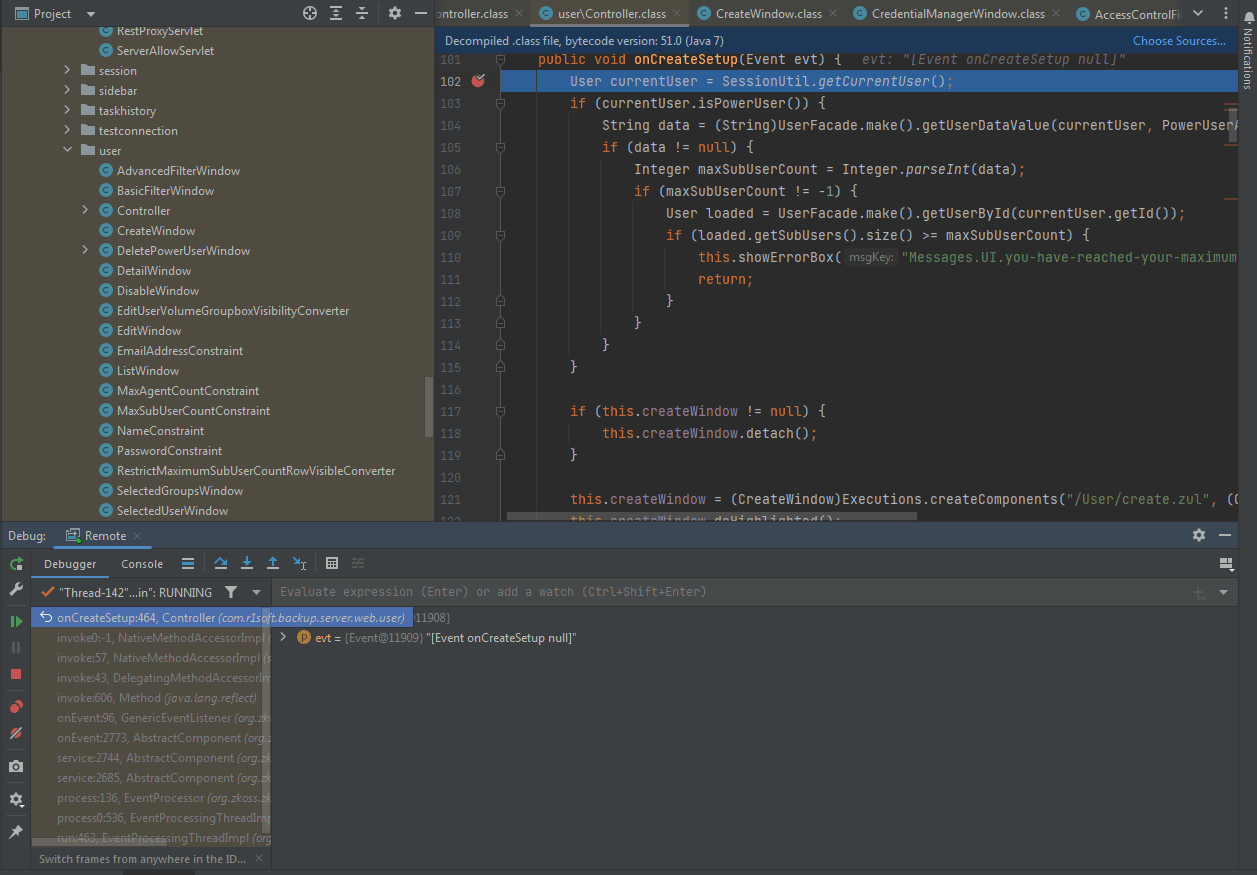
Set breakpoints in IDEA and configure remote debugging; successful remote debugging is shown in the figure below
0x04 User Database File Extraction
---
The research process is as follows:
(1) Locating the user creation operation
The file is located at /usr/sbin/r1soft/webapps/zk-web.war\WEB-INF\classes\com\r1soft\backup\server\web\user\Controller.class, with the core code as follows:
public void onDoCreate(Event evt) { |
Follow up on (new PasswordEncoder()).encodePassword(this.createWindow.getPassword(), (Object)null), specific location is /usr/sbin/r1soft/lib/cdpserver.jar->com.r1soft.backup.server.facade->PasswordEncoder.class, core code as follows:
public String encodePassword(String var1, Object var2) throws DataAccessException { |
From the above code, the encryption algorithm for user passwords can be derived
(2) Locate the specific code implementation for user creation
Follow up on UserFacade.make().createUser(SessionUtil.buildActivitySource(), user, volumes, attributes);, the specific location is /usr/sbin/r1soft/lib/cdpserver.jar->com.r1soft.backup.server.facade->UserFacade.class, the core code is as follows:
public User createUser(ActivitySource var1, User var2, List |
Follow up on (User)EntityManagerFacade.persistPOJO(var2), located at /usr/sbin/r1soft/lib/cdpserver.jar->com.r1soft.backup.server.om.entity->EntityManagerFacade.class. The core code is as follows:
private static EntityManagerFactory emf = null; |
From the above code, it can be seen that the JDBC H2 database is used here to store data. The configuration file is "com/r1soft/backup/server/om/hibernate.cfg.xml", and the actual corresponding file location is /usr/sbin/r1soft/lib/cdpserver.jar->com.r1soft.backup.server.om.hibernate.cfg.xml. Its core content is as follows:
|
Based on the above content, we can obtain the complete database connection parameters, and the actual database file location is /usr/sbin/r1soft/data/h2/r1backup.h2.db.
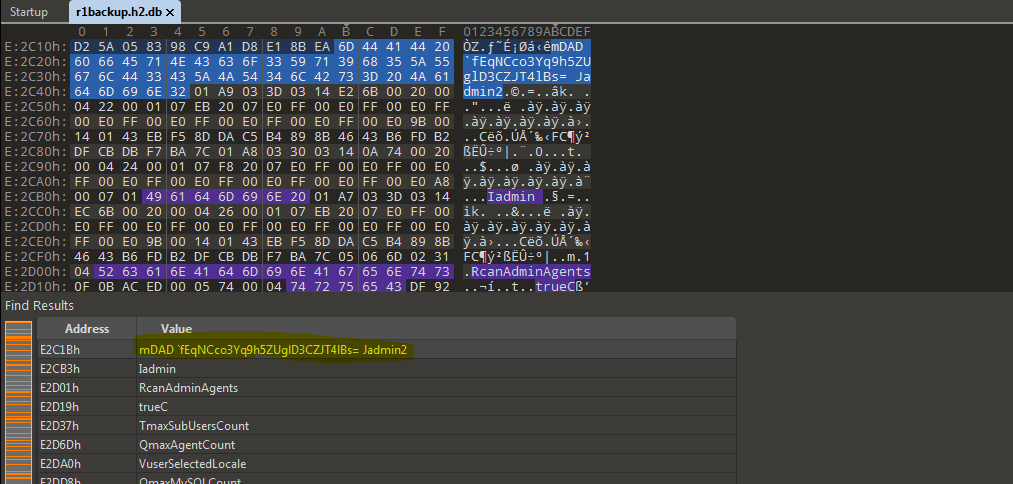
Data validation test is performed here: manually create a user admin2 with the password set to 123456. Through dynamic debugging, the encrypted password content is derived as fEqNCco3Yq9h5ZUglD3CZJT4lBs=. Then, open the file /usr/sbin/r1soft/data/h2/r1backup.h2.db in binary mode. The username and encrypted password content can be obtained from the file content, as shown in the figure below.
0x05 CVE-2022-36537 Brief Introduction
---
Vulnerability analysis article: https://medium.com/numen-cyber-labs/cve-2022-36537-vulnerability-technical-analysis-with-exp-667401766746
The article mentions that triggering RCE requires uploading a com.mysql.jdbc.Driver file containing a Payload.
This operation can only be exploited once, for the following reasons:
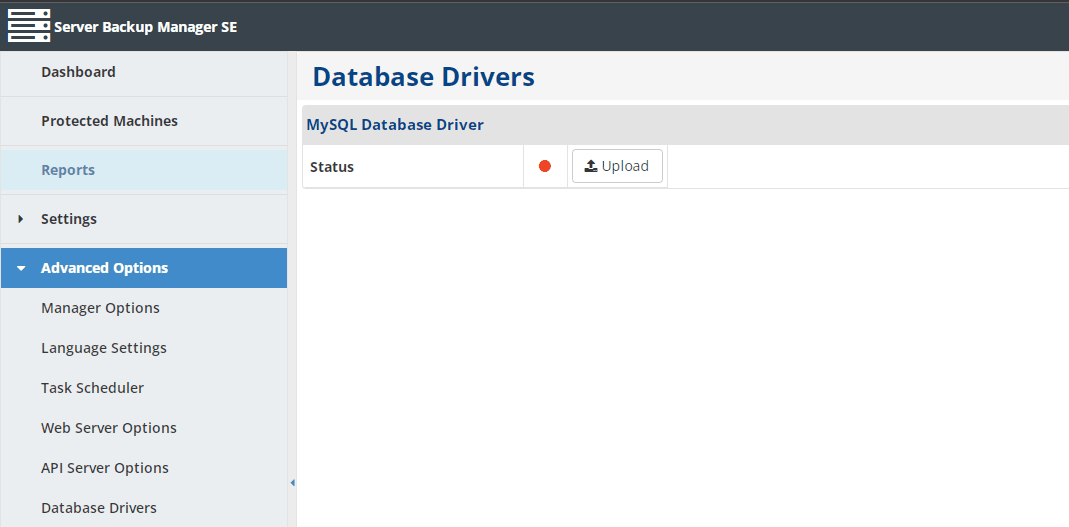
By default, there is an uploadable icon on the Database Driver page of the management backend, as shown in the figure below.
After uploading, the uploadable icon will no longer be displayed, as shown in the figure below
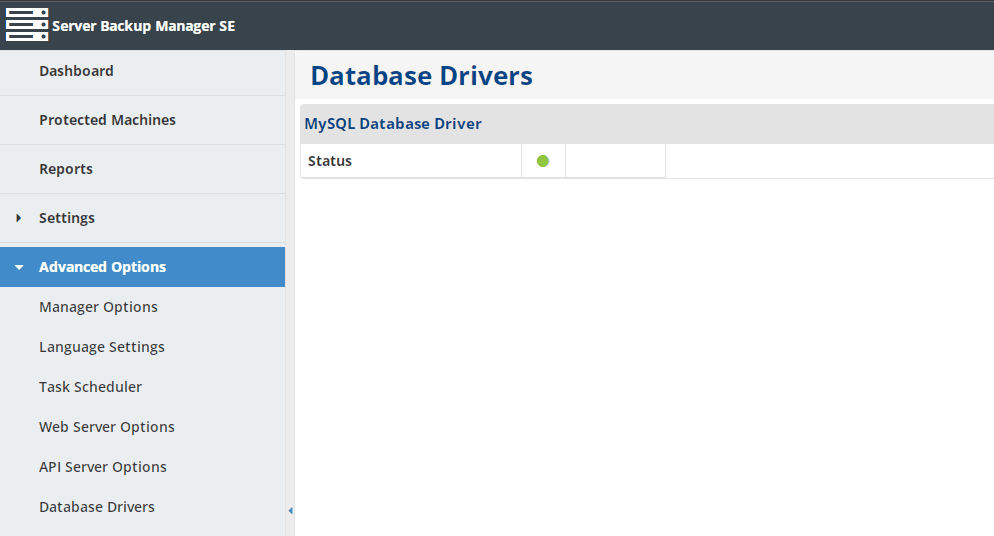
Triggering RCE is achieved by uploading the MySQL DataBase Driver through the program, so this function becomes unavailable after one attack and cannot be reused
Attack detection: After triggering RCE, a file /usr/sbin/r1soft/conf/database-drivers/mysql-connector.jar will be uploaded to the system, where com\mysql\jdbc\Driver.class is the payload used by the attacker
0x06 Summary
---
This article introduces solutions to some issues encountered during the setup of the Server Backup Manager debugging environment, analyzes methods for extracting user database files, and provides recommendations for detecting CVE-2022-36537.


