
0x00 Preface
---
This article will introduce the details of the second vulnerability in ProxyShell and analyze the exploitation approach.
0x01 Introduction
---
This article will cover the following topics:
- CommonAccessToken
- Exchange PowerShell Remoting
- Exploitation Analysis
0x02 CommonAccessToken
---
As mentioned in the previous article "ProxyShell Exploitation Analysis 1 - CVE-2021-34473", I did not find a method to specify the EWS authentication user through parameters. However, for Exchange PowerShell Remoting, the authentication user can be specified by passing in CommonAccessToken to access Exchange PowerShell Remoting.
1. Locating the parameter passing method
Use dnSpy to open the file C:\Program Files\Microsoft\Exchange Server\V15\Bin\Microsoft.Exchange.Configuration.RemotePowershellBackendCmdletProxyModule.dll
Navigate sequentially to Microsoft.Exchange.Configuration.RemotePowershellBackendCmdletProxy -> RemotePowershellBackendCmdletProxyModule -> CommonAccessToken CommonAccessTokenFromUrl(string user, Uri requestURI, out Exception ex)
As shown in the figure below
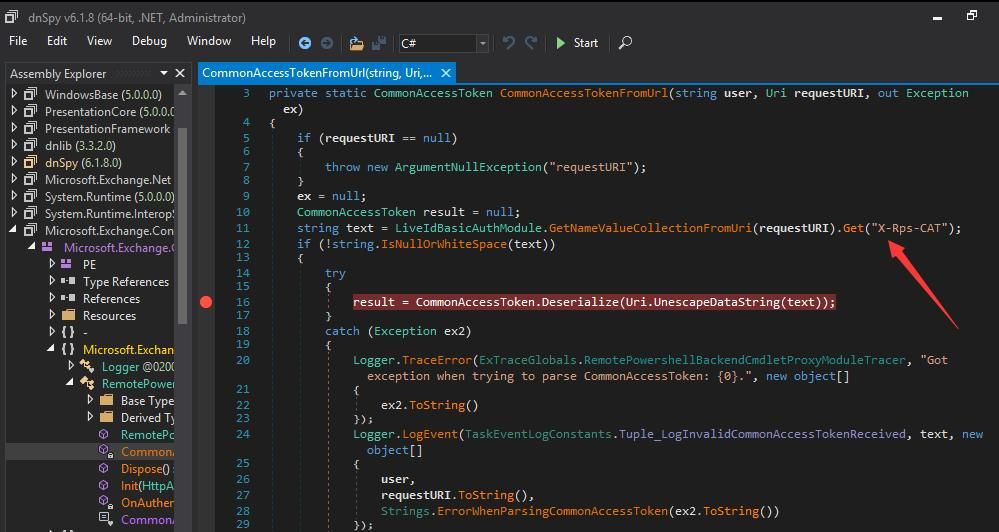
It can be seen that CommonAccessToken is passed as a parameter via X-Rps-CAT
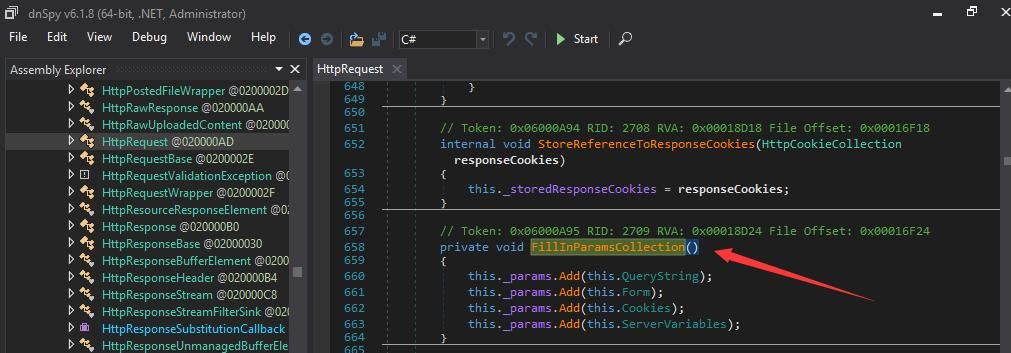
The method of passing parameters can be referenced in the figure below
2. Generation of CommonAccessToken
Open the file C:\Program Files\Microsoft\Exchange Server\V15\Bin\Microsoft.Exchange.Net.dll using dnSpy
Navigate sequentially to Microsoft.Exchange.Security.Authorization -> CommonAccessToken -> Deserialize(Stream stream)
As shown in the figure below
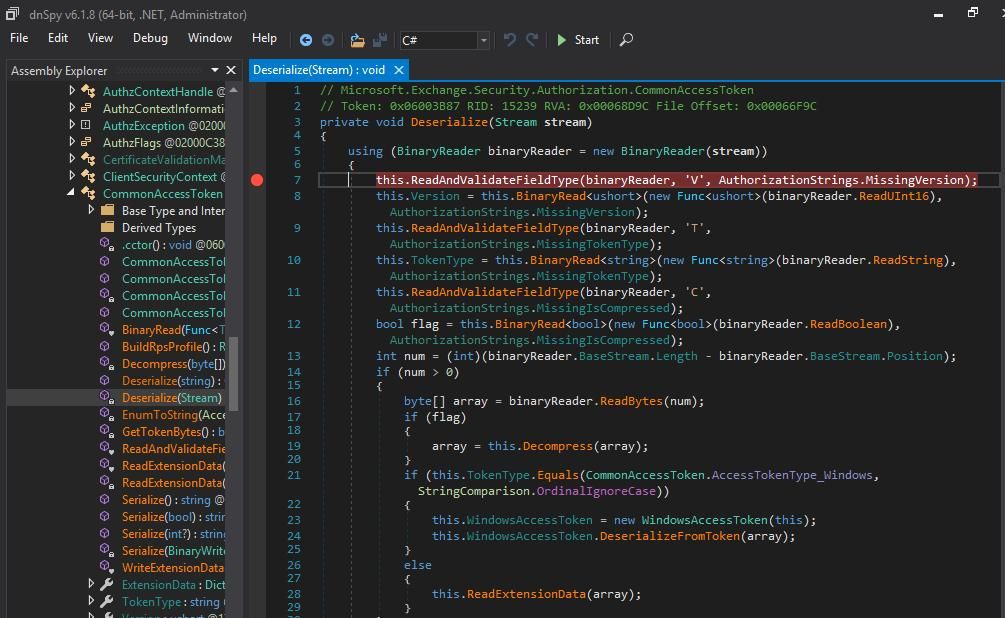
Set a breakpoint at the starting position
Execute the command:
C:\Windows\System32\inetsrv\appcmd list wp |
Find the process pid corresponding to applicationPool:MSExchangePowerShellAppPool
Attach to the process, wait for a period, and the correct format can be captured.
At this point, select binaryReader in Locals, right-click -> choose Show in Memory Window -> Memory 1, as shown below.
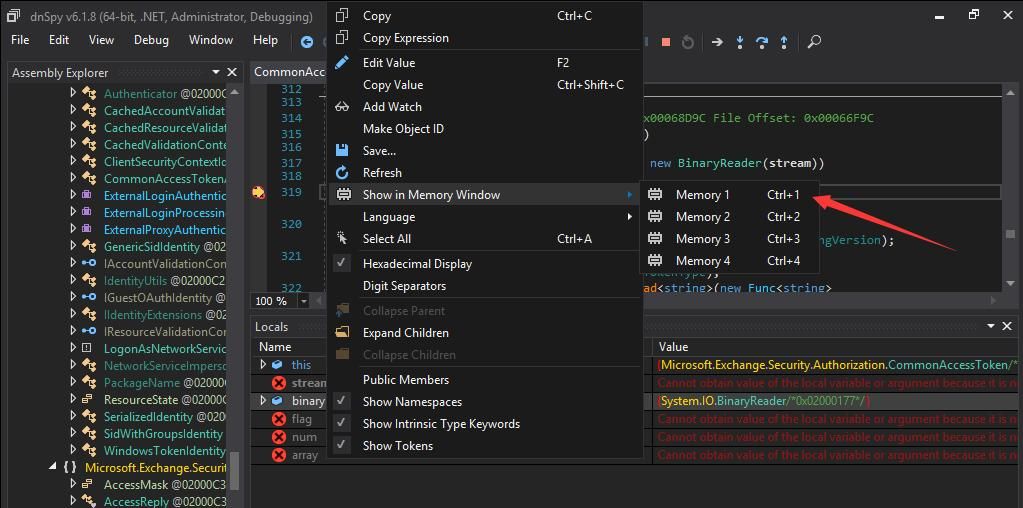
Examine the content near this memory region, the correct format has been captured, as shown below.
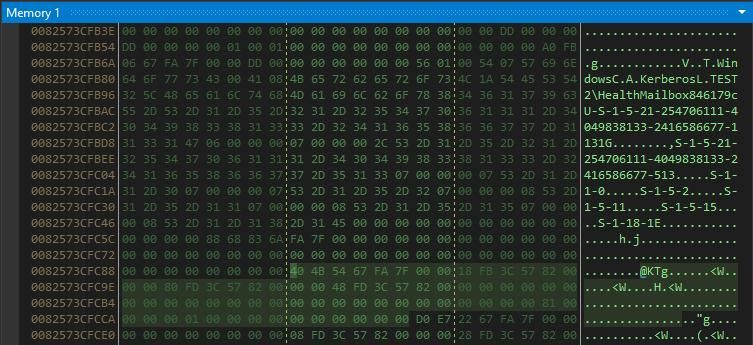
After analysis, the captured content structure is as follows:
V + Version(\x01\x00) + T + Type Length(\x07) + Type(Windows) + C + \x00 + A + Authentication Type Length(\x08) + Authentication Type(kerberos) + L + Username Length + Username + U + sid Length + sid + G + Group Count(4 bytes, little endian, \x06\x00\x00\x00) + Separator\x07\x00\x00\x00 + Group1 Length + Group1 + Separator\x07\x00\x00\x00 + Group2 Length + Group2 + Separator\x07\x00\x00\x00 + Group3 Length + Group3 + Separator\x07\x00\x00\x00 + Group4 Length + Group4 + Separator\x07\x00\x00\x00 + Group5 Length + Group5 + Separator\x07\x00\x00\x00 + Group6 Length + Group6 + E + \x00\x00\x00\x00 |
For the authentication type length, it is 1 byte, in little endian byte order, containing the string length of the authentication type. For example, if the authentication type is basic, then the length is \x05.
In Python code implementation, the authentication type length can be calculated using the following code:
authtype = "kerberos" |
Through practical testing, when constructing the CommonAccessToken, there are the following techniques:
- The username can be any valid user; the default email can be used.
- The sid is the key content, representing the permissions of the authenticated user. If authenticating as the administrator user Administrator, the format here is S-1-5-domain-500.
- If the domain environment has disabled the administrator user administrator, authentication can still succeed.
- Any available group SID can be used, for example, arbitrarily specifying S-1-1-0
For SID format reference:
https://docs.microsoft.com/en-US/windows/security/identity-protection/access-control/security-identifiers
3. CommonAccessToken Verification
When the parameter X-Rps-CAT is passed correctly and the CommonAccessToken is also valid, accessing /Powershell will return status code 200
0x03 Exchange PowerShell Remoting
---
References:
https://docs.microsoft.com/en-us/powershell/module/exchange/?view=exchange-ps
The previous article 'Penetration Basics - Searching and Exporting Emails from Exchange Servers' introduced the usage of Exchange PowerShell Remoting; here are some additions
1. By default, all domain users can connect to remote PowerShell
Common commands:
Check if a user has permission to access remote PowerShell:
Get-User -Identity |
List whether all users have permission to access remote PowerShell:
Get-User -ResultSize unlimited | Format-Table -Auto Name,DisplayName,RemotePowerShellEnabled |
List users with remote PowerShell access permissions:
Get-User -ResultSize unlimited -Filter 'RemotePowerShellEnabled -eq $true' |
Remove remote PowerShell access permissions for specified user:
Set-User -Identity |
Enable remote PowerShell access permissions for specified user:
Set-User -Identity |
To execute Exchange server management commands, users need to be members of the Organization Management group
Command to view Organization Management group members is as follows:
Get-RoleGroupMember "Organization Management" |
2. Built-in methods for connecting to remote PowerShell
PowerShell example commands are as follows:
$User = "test\user1" |
This method by default can only initiate connections from within the domain and does not support connections from outside the domain
0x04 Exploitation Analysis
---
1. CommonAccessToken Format
The user SID needs to be set to Administrator, default is S-1-5-domain-500
Other user SIDs can be selected here, but the user must be a member of the "Organization Management" group
2. An Issue with Using PyPSRP to Connect to Remote PowerShell
When using PyPSRP to execute PowerShell commands, adding users cannot be performed
This is because when passing the Password value, the PowerShell command convertto-securestring needs to be executed, and convertto-securestring is not a command supported by Exchange PowerShell Remoting
If executing PowerShell scripts is chosen, due to default PowerShell policy restrictions, an error will be prompted indicating that PowerShell scripts cannot be executed
0x05 Summary
---
For the second vulnerability in ProxyShell, CVE-2021-34523, considering the exploitation approach, it is not difficult to guess the simplest and most straightforward defense method: by emptying the users in the "Organization Management" group, attackers can be prevented from executing high-privilege Exchange PowerShell commands.


