
0x00 Preface
---
In the previous article 'Penetration Techniques - Obtaining Net-NTLM Hash via HTTP Protocol', methods for obtaining the Net-NTLM hash of the client's currently logged-in user through the HTTP protocol were introduced, focusing on principles and approaches. This article will provide a specific implementation method, using PHP scripts to simulate the Net-NTLM authentication process and extract the client's Net-NTLM hash.
0x01 Introduction
---
This article will cover the following topics:
- Net-NTLM Authentication Process
- Using PHP Scripts to Simulate the Authentication Process
- Script Writing Details
- Practical Testing
0x02 Net-NTLM Authentication Process
---
References:
https://www.innovation.ch/personal/ronald/ntlm.html
Still using this diagram, as shown below
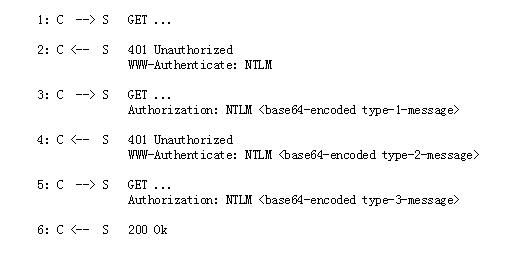
Note:
Image captured from https://www.innovation.ch/personal/ronald/ntlm.html
0x03 Simulating the Authentication Process with PHP Script
---
To simulate the Net-NTLM authentication process using a PHP script, the main consideration is the implementation on the Server side
1. Send WWW-Authenticate: NTLM
Receive the Client's GET request, respond with 401 Unauthorized WWW-Authenticate: NTLM, indicating that the Client requires NTLM authentication
2. Send WWW-Authenticate: NTLM
Receive the Client's Type-1-Message, respond with Type-2-message
The structure of the Type 2 Message is as follows:
|Offset|Description|Content|
| - | :-: | -: |
|0|NTLMSSP Signature|Null-terminated ASCII "NTLMSSP" (0x4e544c4d53535000)|
|8|NTLM Message Type|long (0x02000000)|
|12|Target Name|security buffer|
|20|Flags|long|
|24|Challenge|8 bytes|
|(32)|Context (optional)|8 bytes (two consecutive longs)|
|(40)|Target Information (optional)|security buffer|
|(48)|OS Version Structure (Optional)|8 bytes|
For detailed parameter descriptions, refer to:
http://davenport.sourceforge.net/ntlm.html#theType2Message
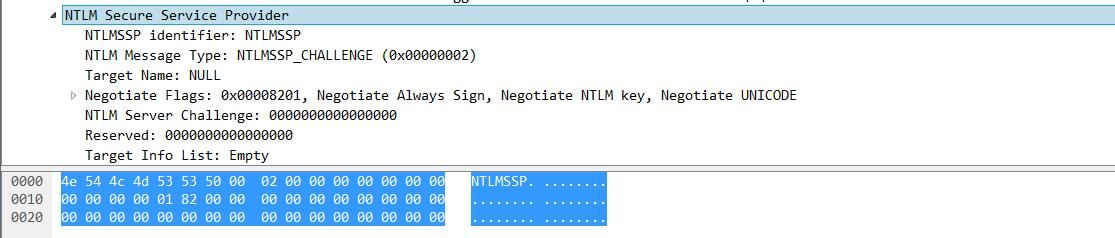
Notable parameters are Flags and Challenge
Challenge is a required parameter for cracking Net-NTLM hash using hashcat
Flags contain various types; a simple example of Flags is shown in the figure below
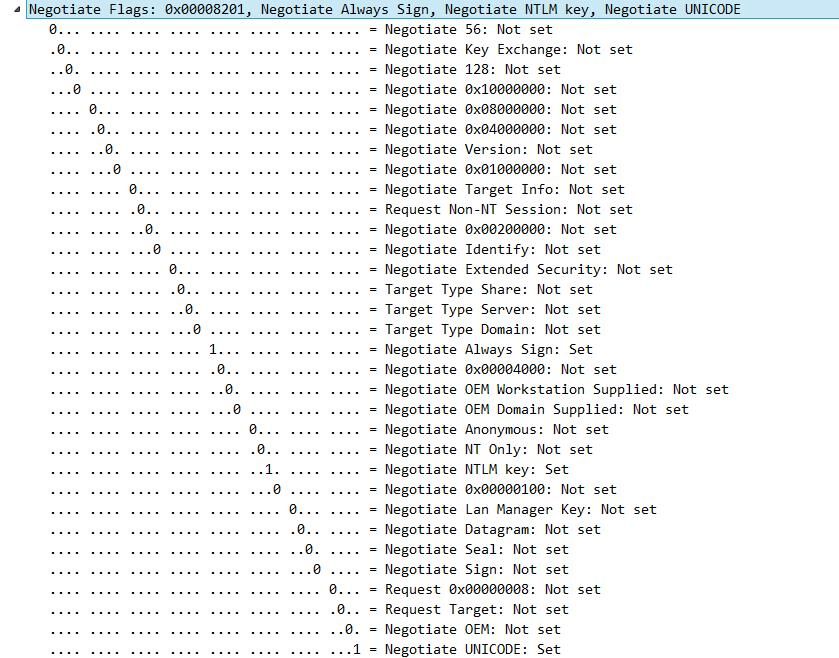
The corresponding data format is shown in the figure below
3. Parse Type-3-message
Type-3-message contains the client-encrypted Net-NTLM hash message; extracting data in the corresponding format can be used for cracking
An example of Type-3-message is shown in the figure below
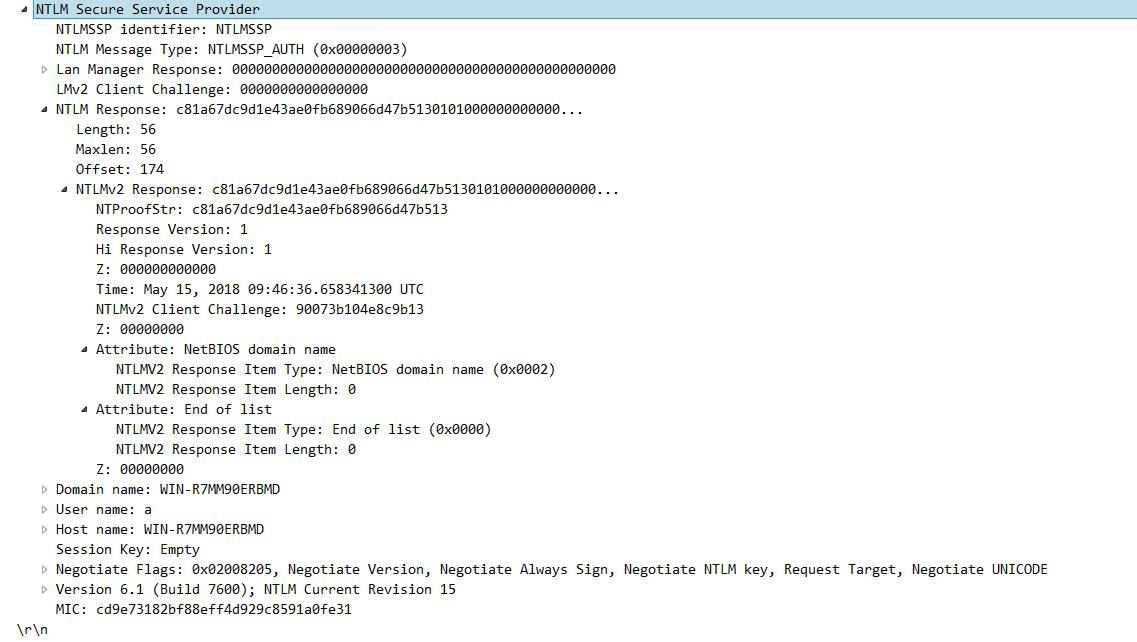
Note the storage format of each parameter here
short Length; |
Offset corresponds to the offset address of the specific content of the parameter
4. Send webpage content
The server provides the final requested content to the client
0x04 Script writing details
---
For testing convenience, user-submitted credentials will not be validated; the user's authentication credentials are directly returned in the HTTP response content
The complete POC code has been open-sourced, and the address is as follows:
https://raw.githubusercontent.com/some-open-source-project.php
The POC code is based on https://loune.net/2007/10/simple-lightweight-ntlm-in-php/
The following optimizations have been made:
1. No longer limited to Apache module
The original script could only be used under Apache
2. Extracts Net-NTLM hash
The original script outputs three client attributes: $user $domain $workstation
The new script adds file format parsing functionality to extract HMAC-MD5 and blob
Script details:
In the original POC, the function get_msg_str($msg, $start, $unicode = true)
When calling $user = get_msg_str($msg, 36);, since the previous Flags specified unicode, the following code is executed by default:
if ($unicode) |
Automatically removes 0x00 from the string
When extracting HMAC-MD5 and blob, it is necessary to retain 0x00, so we need to pass the parameter false to avoid filtering the character 0x00
The specific code is:
$Response = get_msg_str($msg, 20, false); |
As for the challenge, it is specified as 0x0000000000000000 in the script, so when concatenating the hashcat format, simply set it to 0x0000000000000000.
0x05 Actual Testing
---
1. Local Testing
Server:
Install Apache environment
Simple configuration method: Install phpstudy
Upload the script catchyournetntlm.php
Client:
Modify IE configuration file to change the login method to Automatic logon with current user name and password
The corresponding command is as follows:
REG ADD "HKEY_CURRENT_USER\Software\Microsoft\Windows\CurrentVersion\Internet Settings\Zones\3" /v 1A00 /t REG_DWORD /d 00000000 /f |
Note:
This setting is not required in a domain environment
Client accesses catchyournetntlm.php on the server, the server obtains the user's Net-NTLM hash, extracts it in a fixed format, and returns it to the Client
Client displays as shown in the figure below
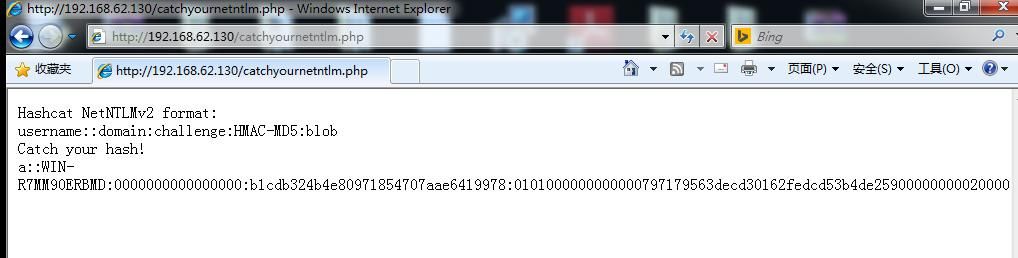
Data can be directly used for hashcat cracking
2. Online testing
https://evi1cg.me/test.php
The server uses nginx, not apache
Note:
Optimization of the script under nginx was completed by evilcg
Client uses the default login method; accessing the URL prompts a dialog for password input, as shown in the figure below
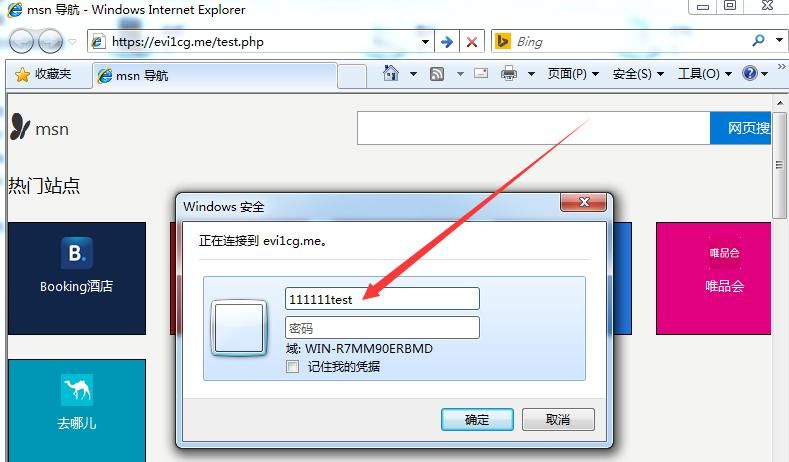
Enter any content to obtain the Net-NTLM hash of the input, as shown in the figure below
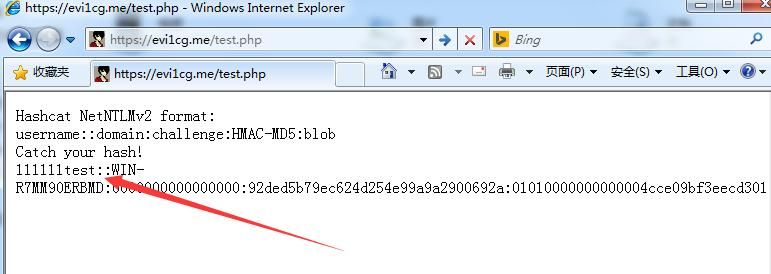
Modify the Client's login method to Automatic logon with current user name and password; accessing the URL automatically obtains the Net-NTLM hash of the Client's current user, as shown in the figure below
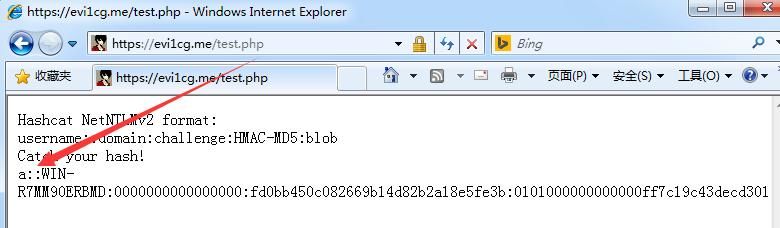
0x06 Summary
---
This article introduces a method to obtain Net-NTLM hash from a browser using PHP scripts, shares details of script writing, and tests the effectiveness of this method.


