
0x00 Preface
---
During penetration testing, if files need to be deployed on the target system, the time attributes of the parent directory (AccessTime, LastWriteTime, MFTChangeTime) will be altered. If existing files on the target system need to be overwritten, the time attributes of the original files (CreateTime, AccessTime, LastWriteTime, MFTChangeTime) will also be changed.
From a penetration perspective, methods to modify file time attributes are needed to eliminate traces.
From a forensics perspective, anomalies in file attributes can reveal traces of an attacker's intrusion.
This article will introduce methods and details for modifying file attributes, share implementation code, and provide forensic recommendations based on exploitation approaches.
0x01 Introduction
---
This article will cover the following topics:
- Basic Concepts
- Methods for Reading File Attributes
- Methods for Modifying File Attributes
- Code Sharing
- Exploitation Approaches
- Forensic Recommendations
0x02 Basic Concepts
---
1. Time Attributes in the NTFS File System
Include the following four:
- CreateTime (Created)
- AccessTime (Accessed)
- LastWriteTime (Modified)
- MFTChangeTime
The first three can be obtained via right-click -> Properties, as shown below
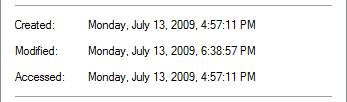
MFTChangeTime cannot be viewed directly
MFTChangeTime records the modification time of the MFT (Master File Table); if file attributes change, MFTChangeTime is updated
2. Methods to Read MFTChangeTime
(1) Read via NtQueryInformationFile
Note:
Cannot be obtained via WinAPI GetFileTime
(2) Parsing NTFS file format
The $STANDARD_INFORMATION (offset 0x10) and $FILE_NAME (offset 0x30) in the Master File Table contain complete file attributes
3. In Windows 7 system, CreateTime and AccessTime are consistent by default
Under default settings in Windows 7 (and later versions), AccessTime updates are disabled
That is, operations that only read files will not change the file attribute AccessTime, and AccessTime remains consistent with CreateTime, which is to reduce hard disk read/write operations
Corresponding registry location HKEY_LOCAL_MACHINE\SYSTEM\CurrentControlSet\Control\FileSystem, key value NtfsDisableLastAccessUpdate
Value 1 represents disabled, which is the default configuration; value 0 represents enabled. The system must be restarted after modifying the registry for changes to take effect
4. Patterns of file attribute changes
Reading files:
Does not change file attributes
Overwriting files:
Changes all 4 attributes
5. Patterns of folder attribute changes
Create/Delete/Rename File:
Changes parent folder's AccessTime, LastWriteTime, and MFTChangeTime
Read File:
Does not change file attributes
Overwrite File:
Does not change file attributes
Note:
Can be tested using SetMace, download at:
https://github.com/jschicht/SetMace
0x03 Methods for Reading and Modifying File Attributes
---
1. Using WinAPI GetFileTime and SetFileTime
Can manipulate three file attributes:
- CreateTime (Created)
- AccessTime (Accessed)
- LastWriteTime(Modified)
Cannot operate on MFTChangeTime
(1) Usage of GetFileTime
Obtain FileTime via GetFileTime()
Convert FileTime to SystemTime via FileTimeToSystemTime(), i.e., UTC, same standard
Convert SystemTime to LocalTime via SystemTimeToTzSpecificLocalTime(), i.e., UTC plus time zone, considering time zone impact, consistent with current system display time
(2) Usage of SetFileTime
Convert input time data to SystemTime via sscanf()
Convert SystemTime to FileTime via SystemTimeToFileTime()
Convert FileTime to corresponding UTC FILETIME via LocalFileTimeToFileTime(), i.e., FILETIME plus time zone, considering time zone impact, consistent with current system display time
Implementation code is open source, download address:
An open-source project
The code implements the following functions:
- View file/folder time (CreateTime, AccessTime, LastWriteTime)
- Modify file/folder time
- Copy the timestamp from file A to file B
2. Using NtQueryInformationFile and NtSetInformationFile
Can manipulate four file attributes:
- CreateTime (Created)
- AccessTime (Accessed)
- LastWriteTime (Modified)
- MFTChangeTime
In my implementation, I directly referenced the timestomp code from Metasploit, the address is as follows:
https://github.com/rapid7/meterpreter/blob/master/source/extensions/priv/server/timestomp.c
Added some features, download address:
An open-source project
The code implements the following functions:
- View file timestamps (CreateTime, AccessTime, LastWriteTime, MFTChangeTime)
- Modify file timestamps
- Copy the timestamp from file A to file B
- Set time to minimum value (1601-01-01 00:00:00)
Note:
Folder operations are temporarily not supported
3. Use driver files
(1) SetMace
Reference download address:
https://github.com/jschicht/SetMace
SetMace can normally read file and folder time information (including MFTChangeTime)
But cannot modify time information, because since nt6.x, Windows prohibits loading unsigned driver files. If driver protection can be bypassed, time information can be modified
(2) WinHex
Paid version of WinHex supports write operations on hard disk files, which can be used to modify time information
Supplement, file resource cloning
Automate calls to Resource Hacker via PowerShell to clone resource information of executable files (exe, dll, scr, etc.)
Download address:
https://github.com/threatexpress/metatwin
Note:
This tool does not modify file attributes
0x04 Exploitation Approach
---
1. Release files on the target system
Will change the time attributes of the parent directory (AccessTime, LastWriteTime, MFTChangeTime)
You can use SetMace to view attribute changes
To modify folder time attributes, use FileTimeControl_WinAPI from 0x03, which can modify the following three items:
- CreateTime (Created)
- AccessTime (Accessed)
- LastWriteTime (Modified)
To further clear operational traces, use WinHex to modify $STANDARD_INFORMATION (offset 0x10) and $FILE_NAME (offset 0x30) in the Master File Table
2. Overwrite existing files on the target system
Will change the time attributes of the original file (CreateTime, AccessTime, LastWriteTime, MFTChangeTime)
You can use FileTimeControl_NTAPI to read and modify time attributes
To further eliminate operational traces, it is necessary to use WinHex to modify the $STANDARD_INFORMATION (offset 0x10) and $FILE_NAME (offset 0x30) in the Master File Table.
0x05 Forensic Recommendations
---
1. Examine the MFTChangeTime attribute of files/folders, located in two positions:
- $STANDARD_INFORMATION (offset 0x10) in the Master File Table
- $FILE_NAME (offset 0x30) in the Master File Table
If the MFTChangeTime is abnormal (later than the other three timestamps), it can generally be considered that the file has been illegally modified.
The tool SetMace can be used.
0x06 Summary
---
This article introduces methods and details for modifying file attributes, shares two implementation codes (FileTimeControl_WinAPI and FileTimeControl_NTAPI), and provides forensic recommendations based on exploitation approaches.


