
0x00 Preface
---
In penetration testing, there are situations where System privileges are required, such as when manipulating the registry key HKEY_LOCAL_MACHINE\SAM\SAM.
Coincidentally, I recently came across an article introducing several methods to obtain System privileges, so I decided to systematically organize these techniques based on my own experience.
Of course, the prerequisite is that you have already obtained administrator privileges on the system.
Reference link:
https://blog.xpnsec.com/becoming-system/
0x01 Introduction
---
This article will cover the following:
- Method to obtain System privileges by creating a service
- Method to obtain System privileges using MSIExec
- Method to obtain System privileges using token duplication
- Method to obtain System privileges using Capcom.sys
0x02 Obtain System Privileges by Creating a Service
---
1. Using the sc Command
sc Create TestService1 binPath= "cmd /c start" type= own type= interact |
This method works on XP systems.
On Win7, the console displays:
Warning: The TestService1 service is configured as an interactive service, and its support is being deprecated. The service may not function properly.
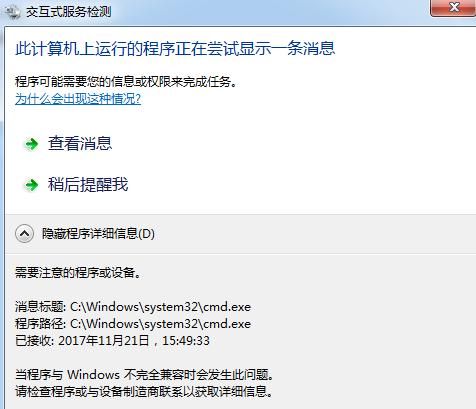
A dialog box appears when the service starts; you need to click 'View Message' to execute the code, as shown below.
On Win8, the console displays an error, and this method cannot be used.
2. Using Scheduled Tasks
Using the at command:
at 7:50 notepad.exe
Starts with System privileges by default, applicable to Win7.
Starting from Windows 8, the at command is no longer supported
Use the schtasks command:
Create a service to start with system privileges:
schtasks /Create /TN TestService2 /SC DAILY /ST 00:36 /TR notepad.exe /RU SYSTEM
Check service status:
schtasks /Query /TN TestService2
Delete service:
schtasks /Delete /TN TestService2 /F
Note:
Remember to manually delete services created with schtasks
The schtasks command supports Windows 7 to Windows 10
3. Using psexec
Using psexec creates the PSEXESVC service, generating logs Event 4697, Event 7045, Event 4624, and Event 4652
Start with system privileges:
psexec.exe -accepteula -s -d notepad.exe
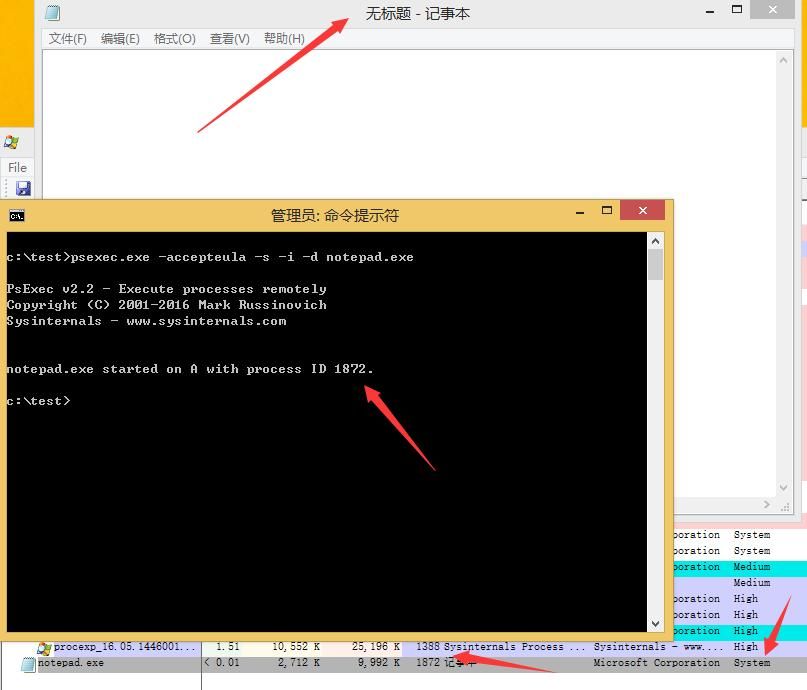
By default, processes with system privileges do not display on the user desktop. If you need to display the process interface, you can add the /i parameter. The command is as follows:
psexec.exe -accepteula -s -i -d notepad.exe
As shown in the figure below
4. Meterpreter
Refer to the Meterpreter method:
- Create a service with system privileges and provide a named pipe
- Create a process and connect to that named pipe
Reference code:
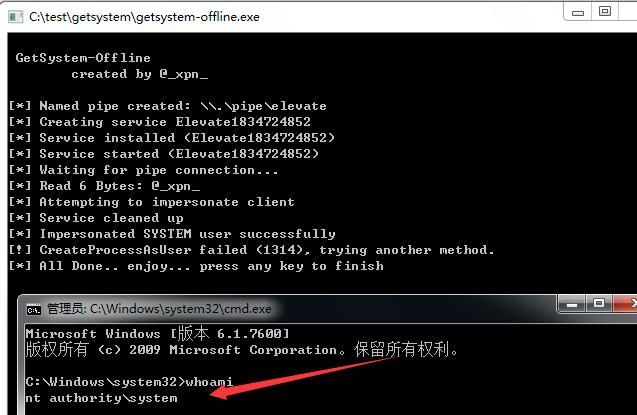
https://github.com/xpn/getsystem-offline
Requires getsystem-offline.exe and getsystem_service.exe
Test as shown in the figure below
Note:
Direct compilation in vs2012 has a bug; you can replace the function snprintf with _snprintf.
0x03 Gaining System Privileges via MSIExec
---
I previously introduced the method of creating msi files using Advanced Installer in the article "MSIExec in Penetration Testing", which won't be reiterated here.
This section reproduces the method mentioned by XPN, using wix3 to create msi files.
wix3 download address:
https://github.com/wixtoolset/wix3
The code for msigen.wix can be referenced at the following address:
https://gist.github.com/xpn/d1ef20dfd266053227d3e992ae84c64e
The compilation commands are as follows:
candle.exe msigen.wix |
I modified XPN's code by replacing the payload with the execution of calc.exe, with some detailed modifications. The code is as follows:
|
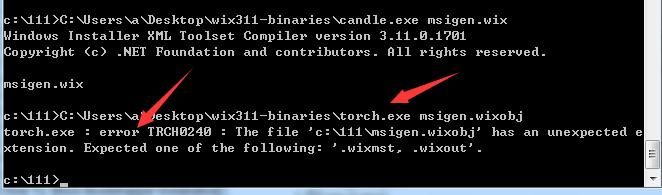
Based on my testing, using torch.exe to compile msigen.wixobj into msigen.msi file will result in an error, as shown in the figure below
Using light.exe can successfully generate msigen.msi, as shown in the figure below
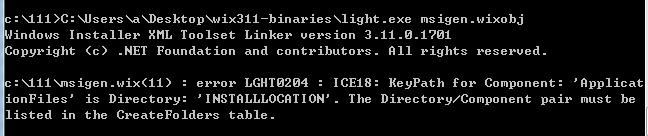
Although an error is reported, it does not affect file generation and function execution
That is to say, the complete compilation commands are as follows:
candle.exe msigen.wix |
Double-clicking msigen.msi directly will pop up a dialog, and the launched calc.exe runs with system privileges
Execute from the command line:
msiexec /q /i msigen.msi
The launched calc.exe runs with high privileges
0x04 Exploiting Token Duplication to Obtain System Privileges
---
You can refer to the previous article: "Penetration Techniques – Token Theft and Exploitation"
By duplicating a system-privileged token, the process gains system privileges. Commonly used tools are as follows:
1、incognito
incognito.exe execute -c "NT AUTHORITY\SYSTEM" cmd.exe
Download link:
https://labs.mwrinfosecurity.com/assets/BlogFiles/incognito2.zip
2、Invoke-TokenManipulation.ps1
Invoke-TokenManipulation -CreateProcess "cmd.exe" -Username "nt authority\system"
Download link:
https://github.com/PowerShellMafia/PowerSploit/blob/master/Exfiltration/Invoke-TokenManipulation.ps1
3、SelectMyParent
SelectMyParent.exe cmd.exe 504
Reference link:
An open-source project
Author: Didier Stevens
Note:
The principle of SelectMyParent is the same as the code open-sourced by xpn (PROC_THREAD_ATTRIBUTE_PARENT_PROCESS method), link as follows:
https://gist.github.com/xpn/a057a26ec81e736518ee50848b9c2cd6
0x05 Method to obtain System privileges using Capcom.sys
---
Capcom.sys is an anti-cheat driver from Capcom's game 'Street Fighter V', bearing Capcom's signature, containing vulnerabilities that allow kernel code execution
Download link:
An open-source project
SHA1: c1d5cf8c43e7679b782630e93f5e6420ca1749a7
Compatible with Win7x64
1. Create a service in the current system
Administrator privileges required
sc create Capcom type= kernel binPath= C:\test\Capcom.sys |
2. Execute the exploit program
Regular user privileges suffice
Reference code:
https://github.com/tandasat/ExploitCapcom
0x06 Summary
---
This article compiles common methods for obtaining System privileges, and finally, thanks to xpn's blog and his open-source code.


