
0x00 Preface
---
In the previous article "Penetration Techniques - Account Hiding in Windows Systems", we introduced the technique of creating hidden accounts through account cloning by copying the F key value from the target account's corresponding registry entry, allowing the hidden account to gain identical permissions.
If we consider an alternative approach—overwriting part of the content of the F key in the target account's corresponding registry entry onto an existing account—can the existing account then acquire the target account's permissions?
This is the method to be introduced in this article—RID Hijacking.
Note:
This method was first publicly disclosed in December 2017 at the following address:
http://csl.com.co/rid-hijacking/
0x01 Introduction
---
This article will cover the following:
- Methods of RID Hijacking
- Implementation approach for script writing
- Exploitation analysis
- Defense Detection
0x02 Related Concepts
---
SID
Full name: Security Identifiers, a variable-length structure used by the Windows system to uniquely identify users or groups
Official documentation address:
https://msdn.microsoft.com/en-us//library/windows/desktop/aa379594(v=vs.85).aspx
SID contains the following information:
- The revision level of the SID structure
- 48-bit identifier authority value
- relative identifier (RID)
Example
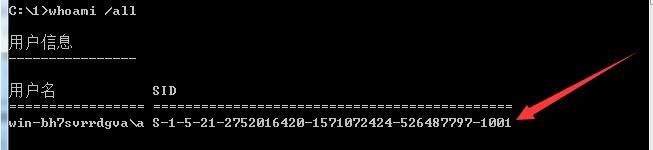
Execute 'whoami /all' in the Windows command line to obtain the current user's SID, as shown in the figure below
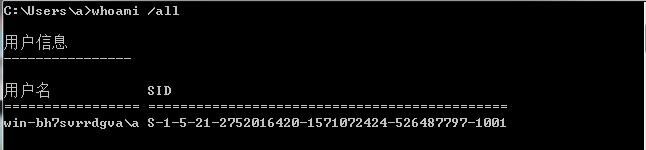
SID is: S-1-5-21-2752016420-1571072424-526487797-1001
S indicates that the string is an SID
1 indicates the version number of the SID
5-21-2752016420-1571072424-526487797 corresponds to the ID authority
1001 indicates the RID
RID
Windows system accounts correspond to fixed RIDs:
- 500: ADMINISTRATOR
- 501: GUEST
- 502: krbtgt (domain environment)
- 512: Domain Admins (domain environment)
- 513: Domain Users (domain environment)
- 514: Domain Guests (domain environment)
- 515: Domain Computers (domain environment)
- 516: Domain Controllers (domain environment)
0x03 RID hijacking method
---
For Windows systems, the registry key HKEY_LOCAL_MACHINE\SAM\SAM\Domains\Account\Users\Names contains a list of all accounts in the current system. The default value of each account corresponds to the registry location of that account's detailed information (i.e., the hexadecimal representation of the RID).
Note:
System privileges are required to read this information.
Example as shown in the figure:
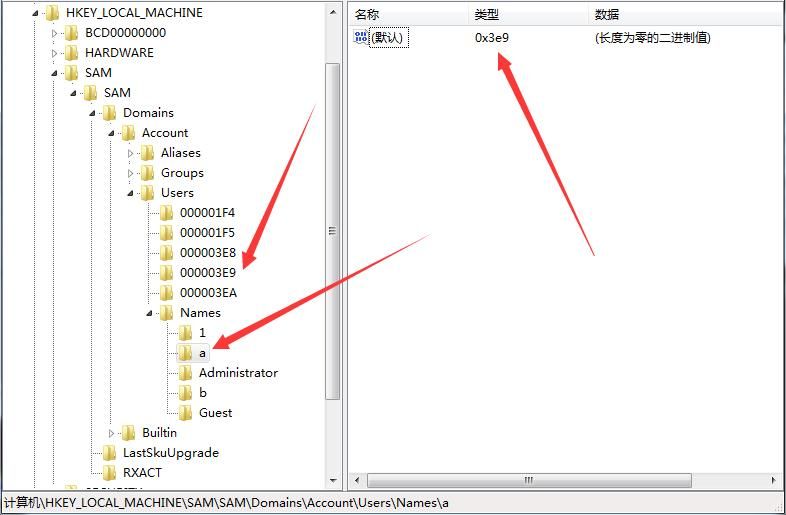
The default registry value for account a is 0x3e9.
Note:
Account a has standard user privileges.
The registry location for detailed information is HKEY_LOCAL_MACHINE\SAM\SAM\Domains\Account\Users\000003E9.
Detailed information is shown in the figure below:
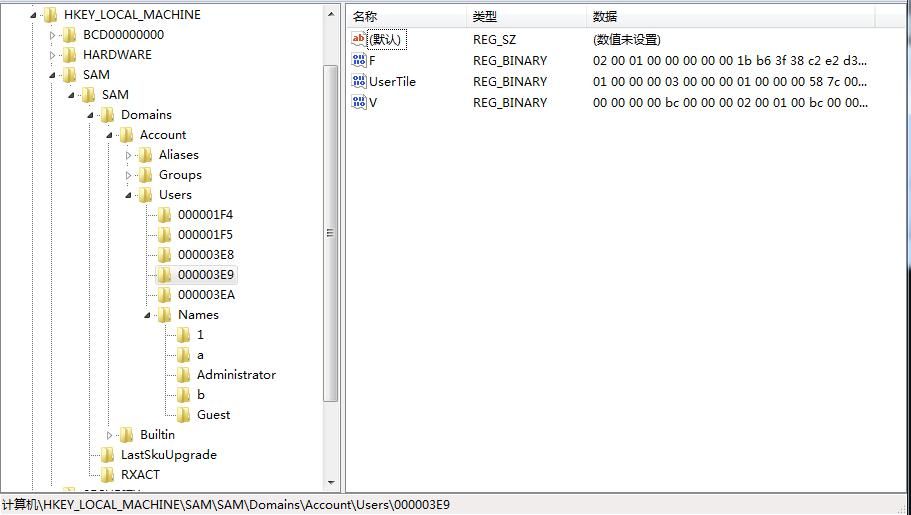
The content of the F key is shown in the figure below:
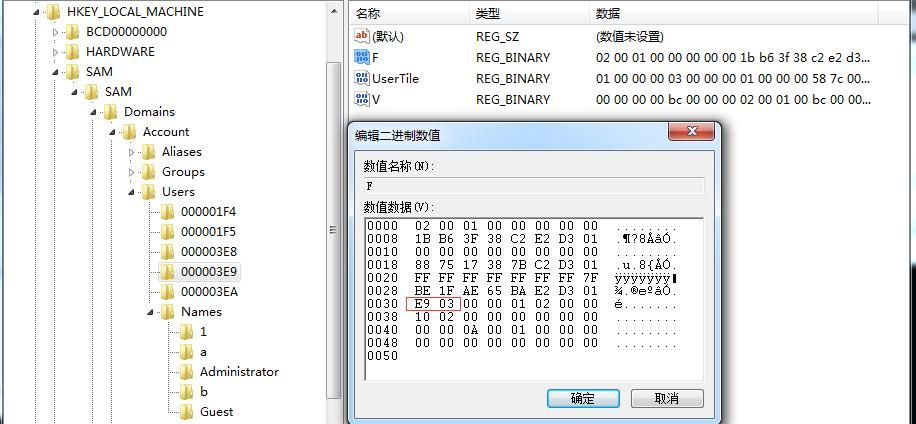
Offset positions 0x30f and 0x31f correspond to the RID.
Due to little-endian byte storage, the RID value obtained from the F key in the above figure is 0x03E9, which converts to decimal 1001.
Log in with account a, execute whoami /all to obtain the SID of account a, as shown below.
Same content
Test 1: Impersonating the built-in administrator account ADMINISTRATOR
Modify the RID of account a to 500 (fixed value, representing the Windows system built-in administrator ADMINISTRATOR), corresponding to hexadecimal 01F4, as shown below.
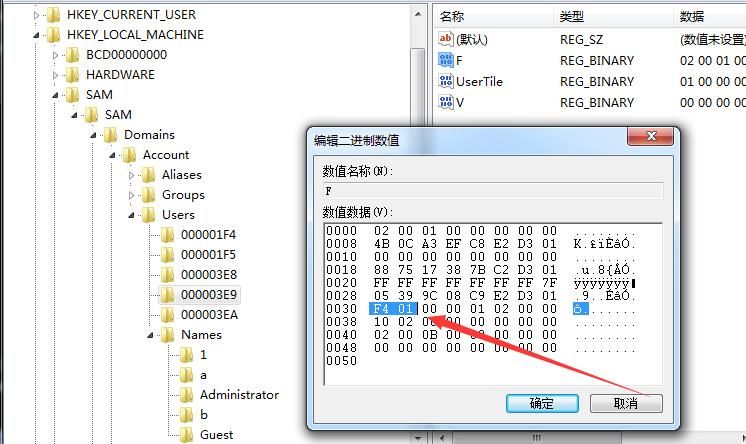
Note:
Account a needs to log in again to take effect.
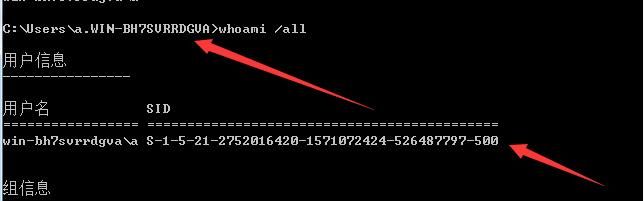
Log in to account a, account a inherits the permissions of ADMINISTRATOR and becomes an administrator.
The login username is: original username.machine name, as shown below.
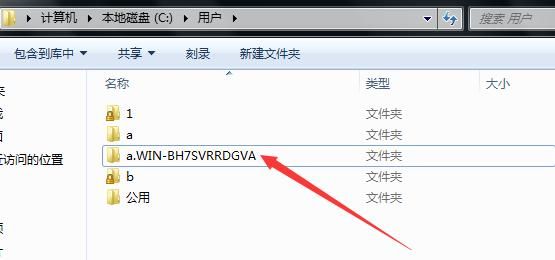
The user folder also changes accordingly, as shown below.
Intuitive understanding:
Account a changed to new account a.WIN-BH7SVRRDGVA, inheriting ADMINISTRATOR privileges
Test 2: Impersonating administrator account 1
Created new administrator account 1 with RID 1000 (0x03e8), as shown below
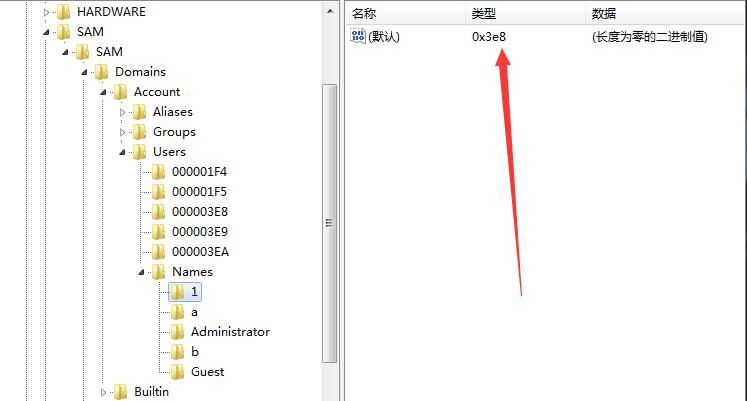
Modified the RID of account a to 1000 (0x03e8)
After modification, as shown below
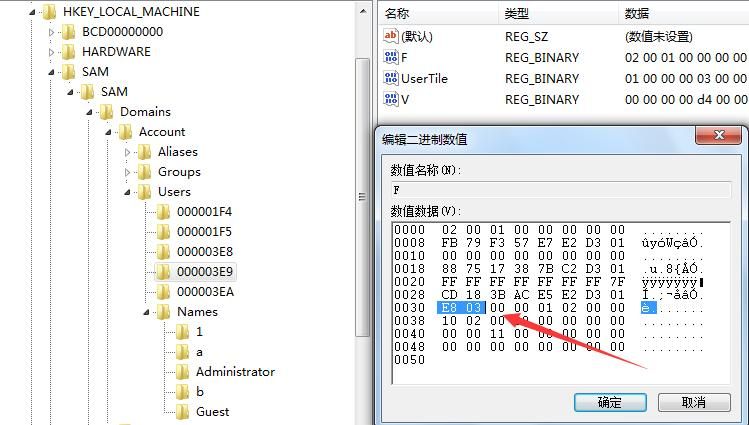
Logged back into account a
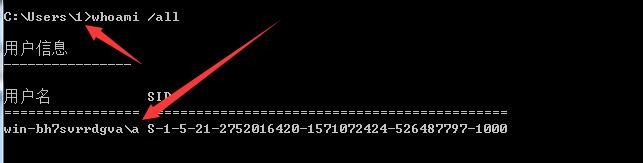
Account a inherited the privileges of account 1 and became an administrator
The login username changed to 1, while executing whoami /all shows the username as a, but with RID 1000 (account 1's RID), as shown below
Environment variables correspond to user 1, as shown below
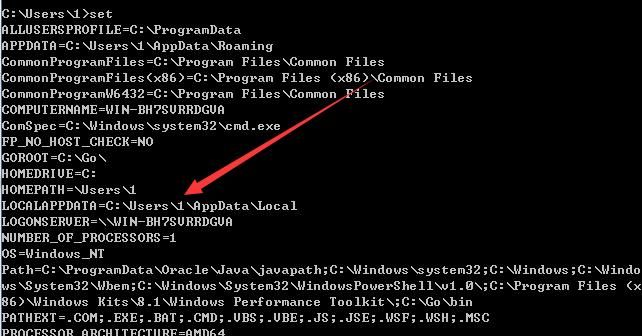
Intuitive understanding:
Account a transformed into the original account 1, inheriting its privileges, but retains the display of account a in some functions
0x04 Implementation Approach for Script Writing
---
Implementation Approach
- Obtain SYSTEM privileges
- Read registry information of the specified account
- Modify the fixed offset address, specifying it as the new RID
- Import the registry to complete the modification
For specific implementation details, refer to the instructions in the article 'Penetration Techniques – Account Hiding in Windows Systems'
Reference code:
An open-source project
Since the functionality is relatively simple, the implementation code is left for the reader to complete
Corresponding Metasploit module: windows/manage/rid_hijack
0x05 Exploitation Analysis
---
For RID Hijacking, the implementation principle is straightforward:Locate the registry file of the account and modify the location representing the RID information.
However, the following shortcomings exist in its exploitation:
- The account must be logged in again to take effect.
- Environment variables are modified, affecting normal usage.
- The display of the username has issues and is easily detectable.
- Simulating ADMINISTRATOR privileges will create a new user folder.
Exploitation Scenarios
- Enable the guest account, modify the RID, log in to the guest account to obtain high privileges.
- Modify the RID of a low-privilege user and log in to gain high privileges.
0x06 Defense and Detection
---
From a defensive perspective, the attacker first needs to obtain system privileges on the current system.
Detection Approach:
- Check if there are any anomalies in the information under the registry key HKEY_LOCAL_MACHINE\SAM\SAM\Domains\Account\.
- Check if the guest account has been enabled.
0x07 Summary
---
This article introduces the implementation method of RID Hijacking, analyzes the exploitation conditions, and provides defense recommendations


