
0x00 Introduction
---
In the previous article "Penetration Techniques - Pass the Hash with Remote Desktop Protocol," we introduced the method of using hash to log into RDP. This article will continue to introduce the method of using hash to log into EWS.
We know that using mimikatz's over pass the hash and EWS's login with current credentials can achieve hash-based login to EWS. For related details, refer to "Exchange Web Service (EWS) Development Guide"%E5%BC%80%E5%8F%91%E6%8C%87%E5%8D%97)
However, the drawback is that it requires administrator privileges and operations on the lsass process, making it impossible to authenticate multiple users simultaneously.
Therefore, this article will introduce a more universal method, an open-source implementation script, and document the thought process and development procedure.
0x01 Overview
---
This article will cover the following topics:
- Decrypting Exchange communication data
- The idea of using hash to log into EWS
- Open-source code
0x02 Decrypting Exchange Communication Data
---
Exchange uses the TLS protocol by default to encrypt data, and we can only capture encrypted content through Wireshark packet capture, which requires decryption.
Here, we introduce methods for capturing plaintext communication data on both Exchange Server and Exchange Client.
1. Method for capturing plaintext communication data on Exchange Server
(1) Exporting certificate files on Exchange Server
Using mimikatz, the command is as follows:
mimikatz.exe crypto::capi "crypto::certificates /systemstore:local_machine /store:my /export" |
Note:
Without using the command crypto::capi, it is not possible to export certificate files with private keys (pfx files).
This command will export multiple certificate files, as shown in the figure below.
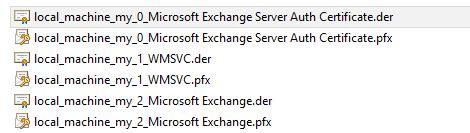
To find the certificate file used for Exchange communication data, we can use the following method:
Access the Exchange login page and locate the corresponding certificate file by checking the certificate's validity period, as shown in the figure below.
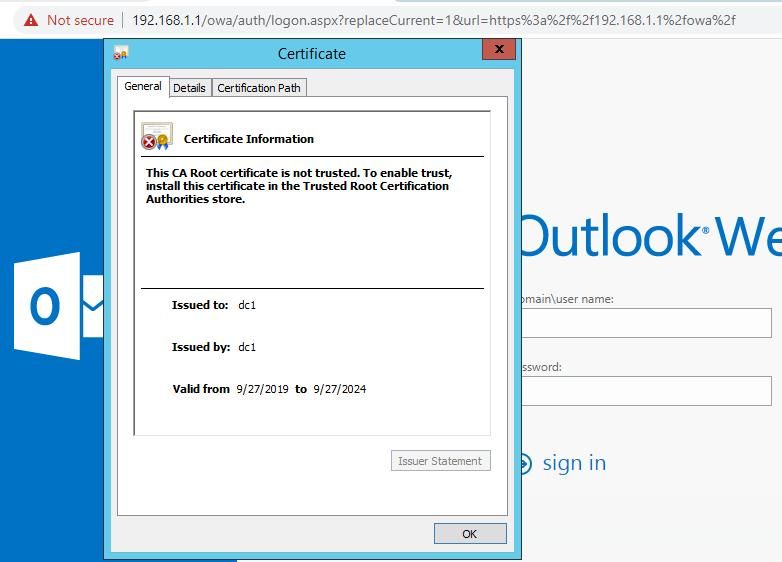
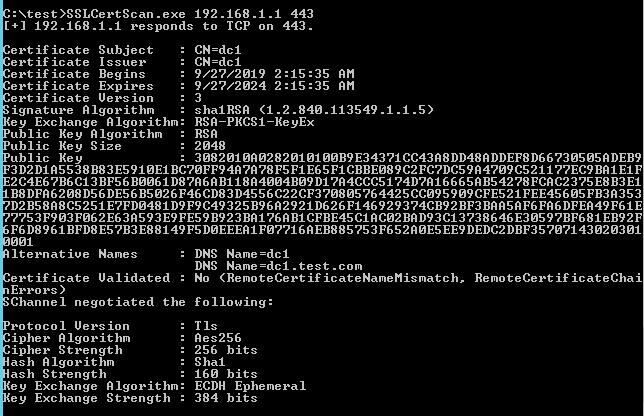
Certificate information can also be obtained via command line, with code available for reference in an open-source project.
Test as shown in the figure below.
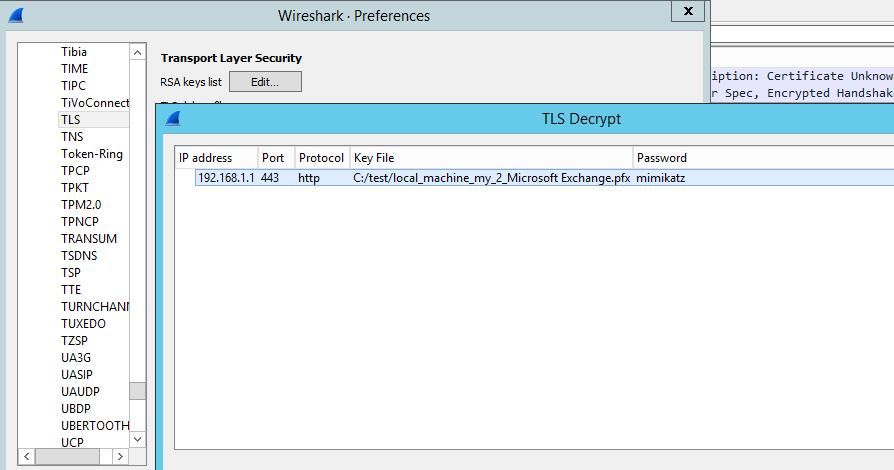
(2) Configure Wireshark
Edit -> Preferences...
Protocols -> TLS
Select RSA keys list
Fill in configuration information, as shown below
(3) Disable ECDH key exchange algorithm
Reference:
https://techcommunity.microsoft.com/t5/core-infrastructure-and-security/demystifying-schannel/ba-p/259233#
CMD command to disable ECDH via registry:
reg add hklm\SYSTEM\CurrentControlSet\Control\SecurityProviders\SCHANNEL\KeyExchangeAlgorithms\ECDH /v Enabled /t REG_DWORD /d 0 /f |
After disabling, use SSLCertScan again to obtain certificate information, Key Exchange Algorithm changes from ECDH Ephemeral to RsaKeyX
As shown below
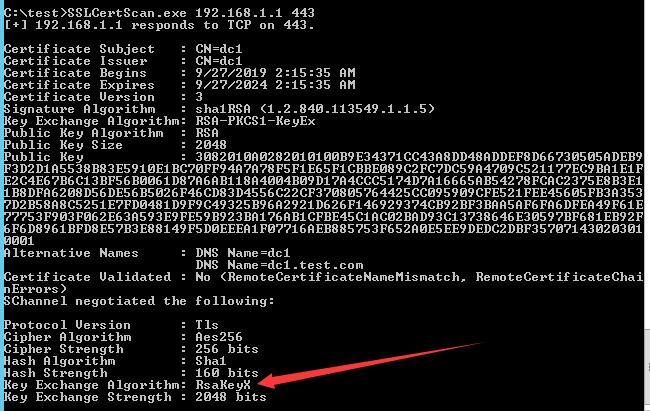
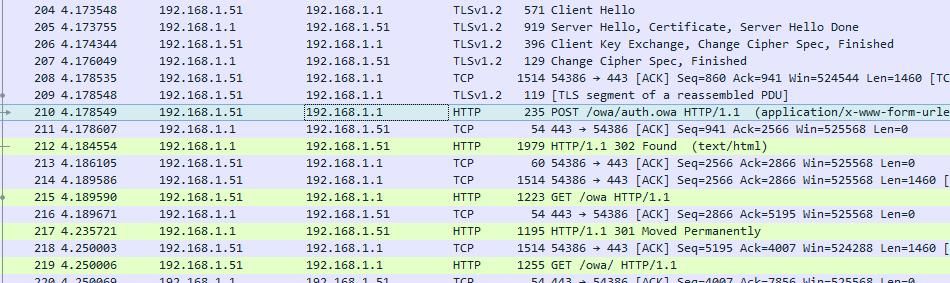
At this point, the Exchange Server configuration is complete. Capture the data again to obtain plaintext communication data, as shown in the figure below.
2. Method for Capturing Plaintext Communication Data from Exchange Client
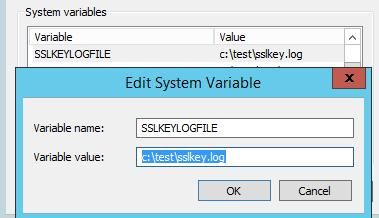
(1) Add environment variable
Variable name SSLKEYLOGFILE, value is the file path
As shown in the figure below
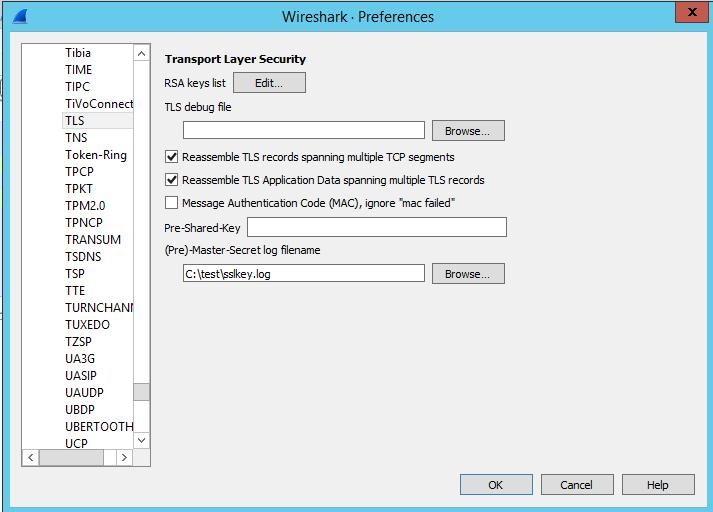
(2) Configure Wireshark
Edit -> Preferences...
Protocols -> TLS
Set (Pre)-Master-Secret log filename to C:\test\sslkey.log
As shown in the figure below
At this point, the Exchange Client configuration is complete
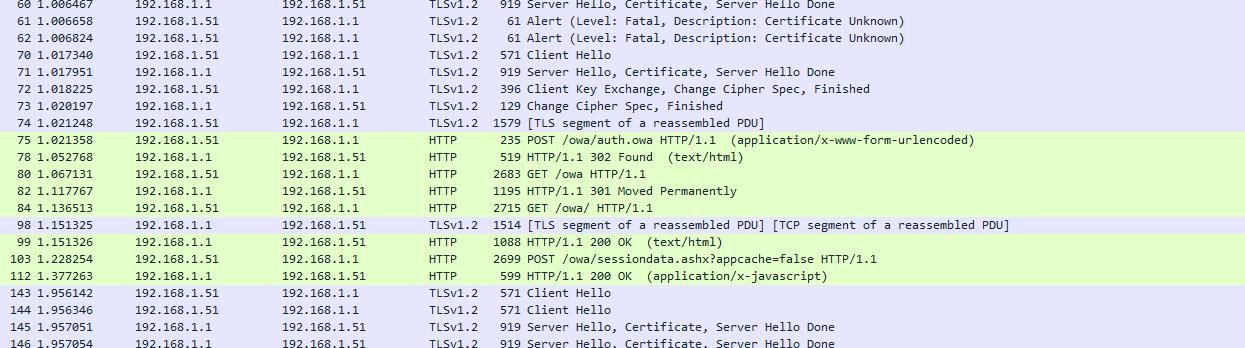
Open the Chrome browser, access Exchange, and use Wireshark to obtain plaintext data, as shown in the figure below
0x03 Approach to Logging into EWS Using Hash
---
Using Mimikatz's over pass the hash and EWS's login with current credentials enables hash-based login to EWS. We captured data on both Exchange Server and Exchange Client, as shown below
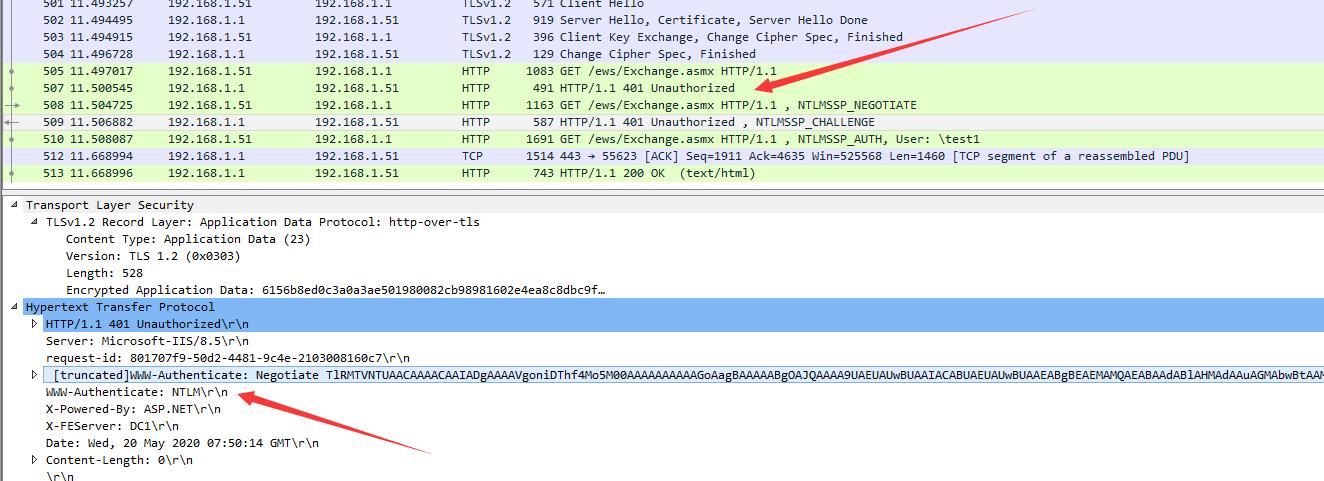
It can be seen that the authentication process here uses NTLM Over HTTP Protocol
For details on NTLM Over HTTP Protocol, refer to the previous article 'Penetration Techniques - Obtaining Net-NTLM Hash via HTTP Protocol'
Authentication Process:
1. The client sends a GET request to the server to obtain webpage content
2. Since NTLM authentication is enabled on the server, it returns 401, indicating NTLM authentication is required
3. The client initiates NTLM authentication and sends a negotiation message to the server
4. Upon receiving the message, the server generates a 16-bit random number (known as Challenge) and sends it back to the client in plaintext
5. After receiving the Challenge, the client encrypts it using the input password hash to generate a response, which is then sent to the server
6. The server receives the encrypted response from the client, performs the same computation, and compares the results. If they match, subsequent services are provided; otherwise, authentication fails
Regarding step 5: 'Encrypt the Challenge using the input password hash'
If we directly pass the hash and encrypt the Challenge, we can achieve the same functionality.
At this point, we have derived the implementation approach for using hash to log into ews:
Simulate NTLM Over HTTP Protocol, directly pass the hash, encrypt the Challenge to generate a response, and send the response to the server.
0x04 Program Implementation
---
Here, Python is chosen for implementation, with the advantage of directly calling Impacket to implement NTLM Over HTTP Protocol.
Reference code:
https://github.com/dirkjanm/PrivExchange/blob/master/privexchange.py
Before running the script, Impacket needs to be installed.
Installation method: pip install Impacket
My implementation code has been uploaded to GitHub, with the address as follows:
An open-source project
The code supports verification for both plaintext and NTLM hash.
Verifying plaintext, as shown in the figure below

Verify hash, as shown in the figure below

After successful verification, my code will proceed to send a SOAP command to retrieve inbox information
For SOAP command format reference, please see:
https://docs.microsoft.com/en-us/exchange/client-developer/web-service-reference/ews-operations-in-exchange
Note that the SOAP command in the documentation needs format adjustment, otherwise it returns error 500 with the message: An internal server error occurred. The operation failed.
Format adjustment example:
The SOAP format in https://docs.microsoft.com/en-us/exchange/client-developer/web-service-reference/getfolder-operation is as follows:
|
The formatted content is as follows:
|
0x05 Summary
---
This article introduces the method of decrypting Exchange communication data using Wireshark, describes the approach of logging into EWS using hash, open-source implementation scripts, and records the thought process and development journey.


