
0x00 Preface
---
In previous articles such as 'Introduction to Password Hashes in Windows - NTLM Hash and Net-NTLM Hash', 'Penetration Techniques - Capturing NTLMv2 Hash of File Server Connections Using netsh', and 'Penetration Techniques - Obtaining NTLMv2 Hash of File Server Connections via Icon Files', methods for obtaining the Net-NTLM hash of logged-in users through the SMB protocol were introduced. The premise of these methods is that when a client connects to a server via the SMB protocol through the interface, it defaults to attempting login using the local machine's username and password hash.
The HTTP protocol also supports NTLM authentication. So, can the Net-NTLM hash of the currently logged-in user be similarly obtained via the HTTP protocol? What are the constraints? How can it be defended against? This article will address these questions one by one.
0x01 Introduction
---
This article will cover the following topics:
- Introduction to NTLM Over HTTP Protocol
- Identifying the Prerequisites for Exploitation
- How to Specifically Exploit
- Defense Strategies
0x02 Introduction to NTLM Over HTTP Protocol
---
Official Documentation:
https://msdn.microsoft.com/en-us/library/cc237488.aspx
References:
https://www.innovation.ch/personal/ronald/ntlm.html
NTLM Authentication Process Using HTTP Protocol:
- The client sends a GET request to the server to obtain webpage content.
- Since NTLM authentication is enabled, the server returns a 401 status, indicating that NTLM authentication is required.
- The client initiates NTLM authentication by sending a negotiation message to the server.
- Upon receiving the message, the server generates a 16-bit random number (known as the Challenge) and sends it back to the client in plaintext.
- After receiving the Challenge, the client encrypts it using the input password hash to generate a response, which is then sent to the server.
- The server receives the encrypted response from the client, performs the same computation, and compares the results. If they match, subsequent services are provided; otherwise, authentication fails.
An intuitive flowchart is shown in the figure below.
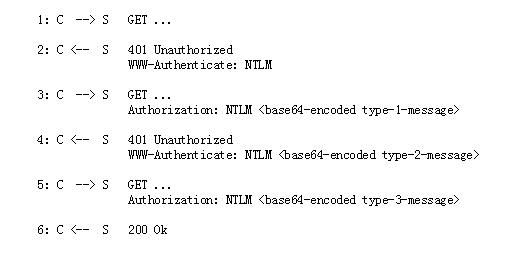
Note:
The image is captured from https://www.innovation.ch/personal/ronald/ntlm.html. For specific message formats, refer to the introduction in the link.
Actual testing
Server:
- OS: Server2012 R2
- IP: 192.168.62.136
- Install IIS service
Client:
- OS: Win7 x86
- IP: 192.168.62.134
1. Enable NTLM authentication on the server
Access the IIS management page, as shown below
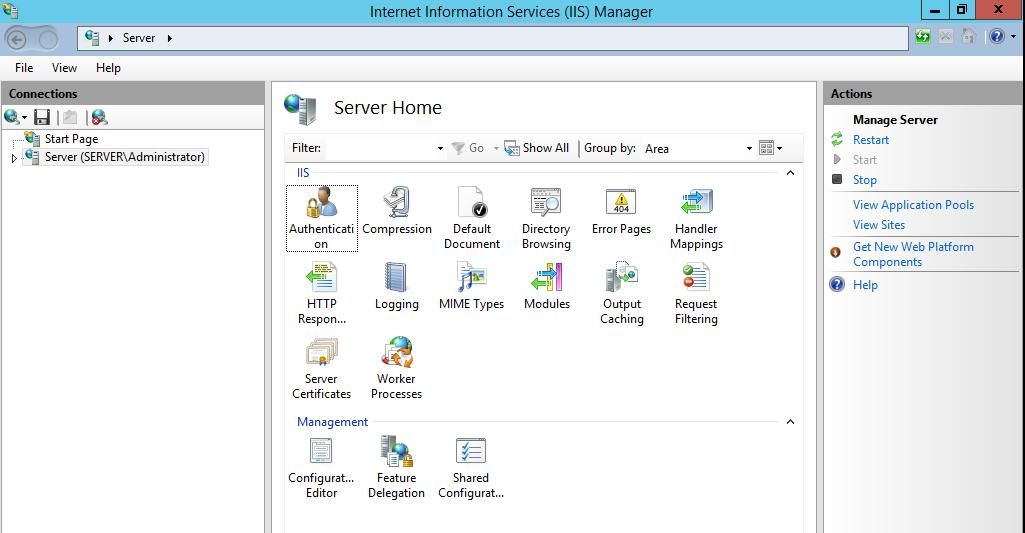
Select Authentication
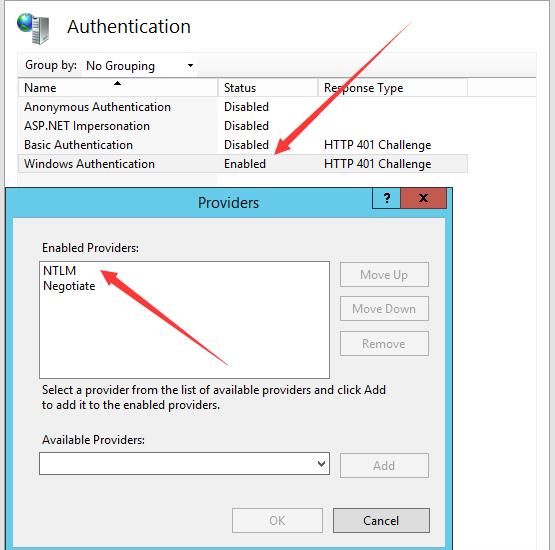
Disable other authentication methods, enable only Windows Authentication
Add Provider: NTLM
Configure as shown below
2. The server runs Wireshark to capture packets
Extract only HTTP
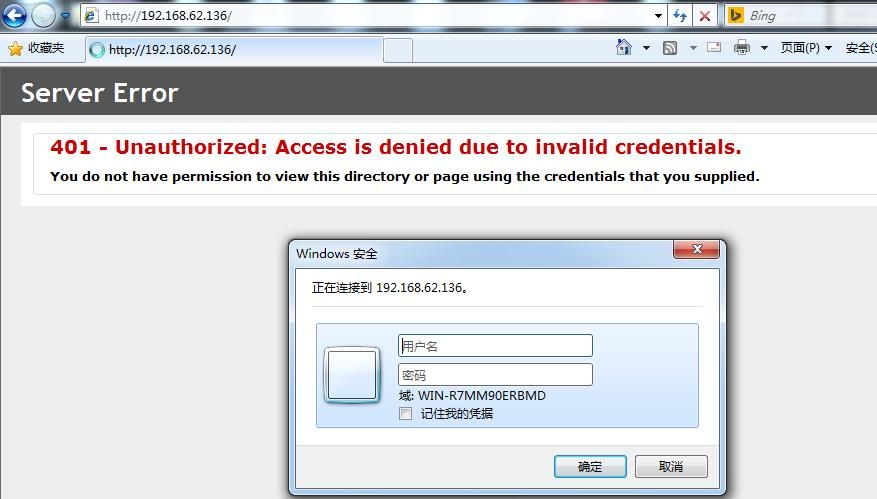
3. The client accesses the server
A dialog box prompts for username and password, as shown below
The HTTP packets captured by the server at this point are shown below

Corresponding to steps 1 and 2
4. The client enters the correct username and password
The HTTP packets captured by the server at this point are shown below

Corresponding to steps 3-6
5. Use Hashcat to crack this Net-NTLM hash
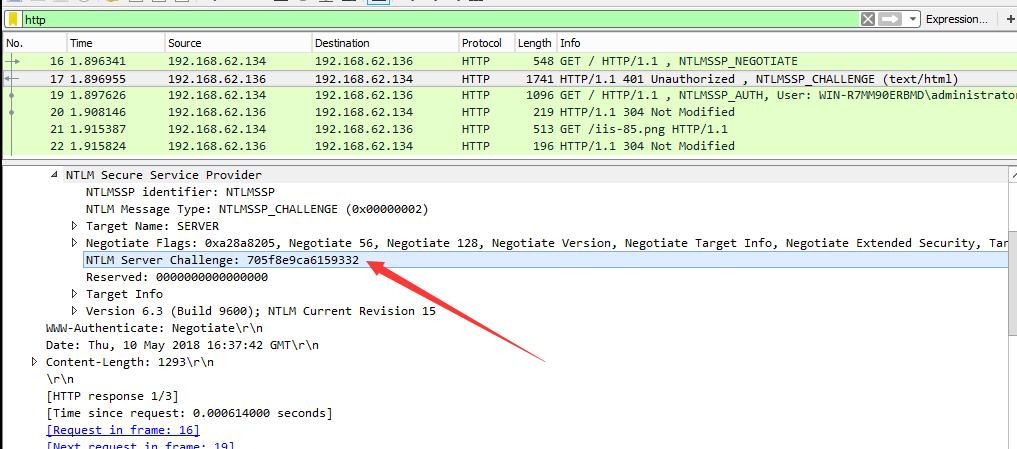
The format of NTLMv2 is:
username::domain:challenge:HMAC-MD5:blob
Obtain the challenge from the data packet, as shown in the figure below
Obtain username, domain, HMAC-MD5, and blob from the data packet
As shown in the figure below
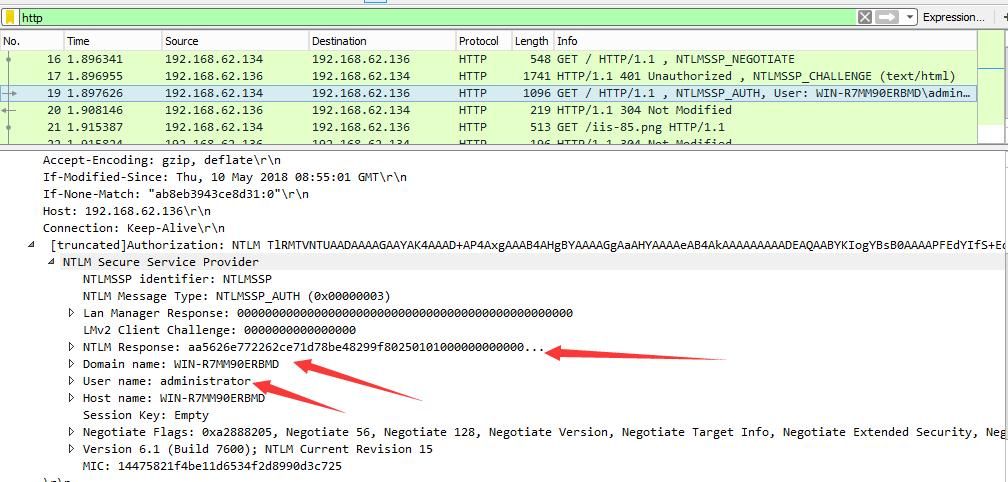
Concatenate in the specified format and crack using hash
For detailed information, refer to:
Section 0x03 in 'Introduction to Windows Password Hashes – NTLM Hash and Net-NTLM Hash'
0x03 Exploitation Analysis
---
From the above tests, it can be seen that cracking the HTTP protocol is similar to the SMB protocol. But are the exploitation methods the same?
We know that when connecting to a server via the SMB protocol through the interface, the local username and password hash are used by default for login attempts. However, the previous tests did not reveal that the HTTP protocol shares this characteristic.
This means that as long as the user does not enter the correct password, the server cannot obtain the correct Net-NTLM hash, making further exploitation impossible.
Additionally, the HTTP authentication interception features of Responder and Inveigh mention the ability to obtain user hashes. The addresses are as follows:
https://github.com/SpiderLabs/Responder#features
https://github.com/Kevin-Robertson/Inveigh
How do I use this feature? What kind of hash can be obtained? Can I get the hash of the currently logged-in user on the client?
I found the answer in the IE browser configuration
Open the IE browser and navigate to the following location:
Tools -> Internet Options -> Security -> Custom Level -> User Authentication
As shown in the figure below
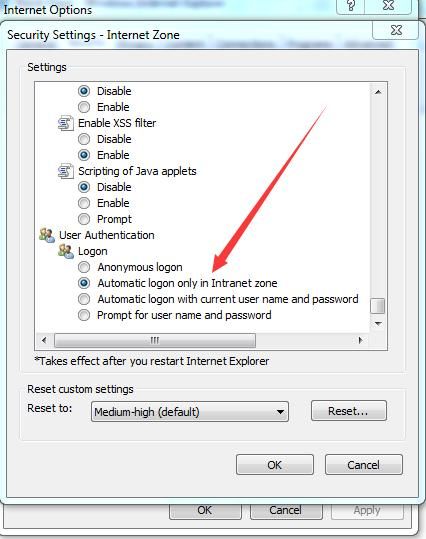
By default, the login method for user authentication is 'Automatic logon only in Intranet zone'
So, two tests need to be performed next
Test one
Change the login method to 'Automatic logon with current user name and password'
Restart the IE browser and test again
The client accesses the server via IE, a login verification dialog pops up, then check the server's packet capture
As shown in the figure below
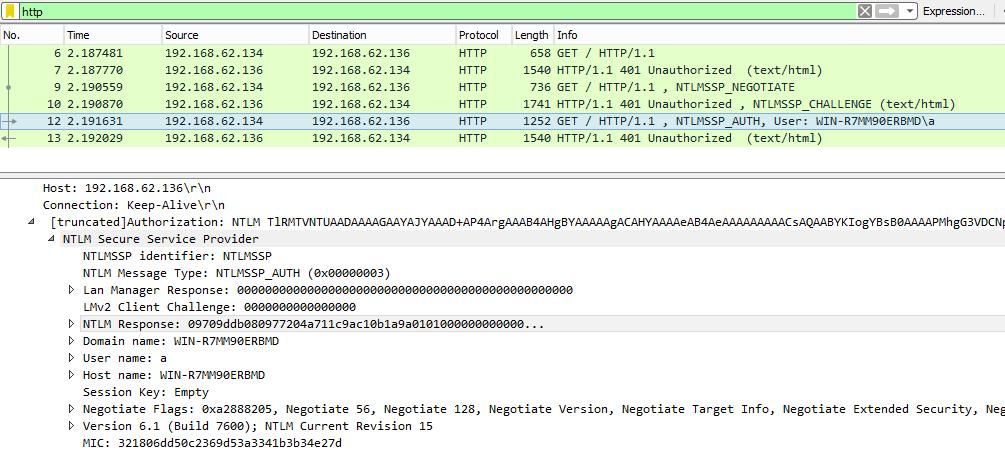
It was discovered that the client automatically attempts to log in using the local machine's username and password hash first, allowing us to further crack and recover the user's password, similar to the exploitation approach for SMB.
Test Two
Switch to a domain environment, with all other settings unchanged
The client will also first attempt to log in using the local machine's username and password hash
Thus, we have identified the limiting conditions: obtaining the current logged-in user's Net-NTLM hash via the HTTP protocol is applicable in the following two scenarios:
- The client user authentication method is set to 'Automatic logon with current user name and password'
- The user authentication method remains unchanged by default, and the client and server must be within the same Intranet zone
Similarly, this is also the prerequisite for tools like Responder and Inveigh to exploit HTTP protocol user hash acquisition
0x04 Specific Exploitation Methods
---
1. Using Responder and Inveigh within the Intranet zone
If in a workgroup environment, obtaining the current logged-in user's Net-NTLM hash is not possible; it can be used in a domain environment
2. After gaining client permissions, modify the user authentication method
Corresponds to the registry key 1A00 under HKEY_CURRENT_USER\Software\Microsoft\Windows\CurrentVersion\Internet Settings\Zones\3
- A value of 0 indicates automatic logon with the current username and password
- 10000 indicates username and password prompt
- 20000 indicates automatic logon only in Intranet zone, default value
- 30000 indicates anonymous logon
If the client user authentication logon method is changed to Automatic logon with current user name and password, then the client will first attempt to log in using the local username and password hash when accessing any website requiring login authentication
0x05 Defense
---
Based on exploitation approaches, defense recommendations are proposed here:
User authentication method should be prohibited from being set to Automatic logon with current user name and password, and the corresponding registry key value should be prevented from being modified to 0
The query command is as follows:
REG QUERY "HKEY_CURRENT_USER\Software\Microsoft\Windows\CurrentVersion\Internet Settings\Zones\3" /v 1A00 |
Otherwise, there is a high possibility that the password of the client's currently logged-in user could be cracked
0x06 Summary
---
This article introduces methods to obtain the client's currently logged-in user Net-NTLM hash through HTTP protocol, identifies constraints (under Intranet zone or when user authentication method is modified to Automatic logon with current user name and password), which also apply to Responder and Inveigh's HTTP authentication interception functions, and finally provides defense recommendations: User authentication method should be prohibited from being set to Automatic logon with current user name and password


