
0x00 Preface
---
The previous article 'Penetration Techniques - Creation of "Hidden" Registry' introduced the registry hiding technique used by Poweliks, analyzed its principles, and implemented the functionality through a C program.
This article will conduct further testing and share a more "stealthy" method (this method has not been found in public materials yet, pending confirmation).
0x01 Introduction
---
This article will cover the following topics:
- Errors when reading with Win32 API
- The case of placing "\0" in the middle of a string
- Application of other Native APIs (such as NtCreateFile)
- More covert exploitation methods
- Defense and detection
0x02 Hiding Principle
---
For Windows systems, "\0" (i.e., 0x0000) is recognized as the string terminator.
Therefore, during the reading of such a string, encountering a leading "\0" will be interpreted as the terminator, causing premature truncation and leading to a read error.
When using Native API to set the registry, the structure OBJECT_ATTRIBUTES is required as a parameter to specify the length of the string to be read.
As long as the length is set correctly, the correct string can be read, avoiding this bug.
The key to exploitation:
Using Native API provides an additional parameter that allows specifying the length of the string to be read.
Further consideration of this issue leads to the following test:
0x03 What exactly is the error when reading with Win32 API?
---
Using HiddenNtRegistry to create a test registry key-value, the C++ calling code is as follows:
printf("=================Normal Key=================\n"); |
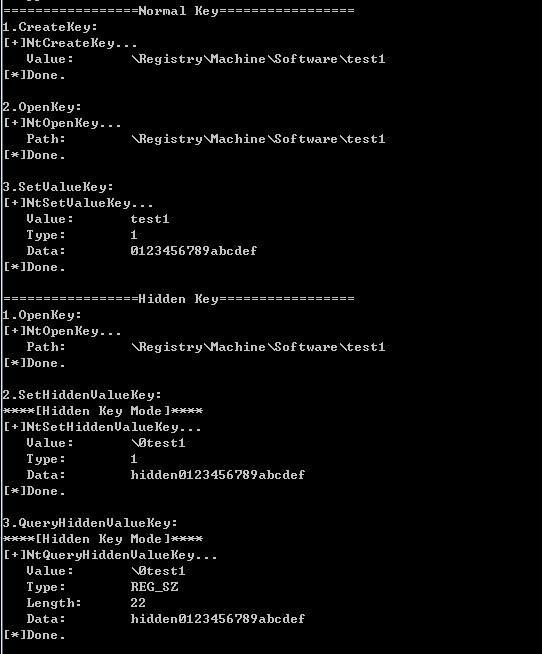
The program implements the following functions:
- Create registry key value test1 with content 0123456789abcdef
- Create registry key value \0test1 with content hidden0123456789abcdef
Run as shown in the figure below
Use Win32 API RegQueryValueEx to attempt reading the above two registry key values
The key code is as follows:
LONG lReturnCode = 0; |
Read registry key value test1, successfully obtained content
Read registry key value \0test1, modified code as follows:
lReturnCode = ::RegQueryValueEx(hkey, _T("\0test1"), 0, &dwSzType, (LPBYTE)&dwValue, &dwSize); |
Read failed, returned ERROR_FILE_NOT_FOUND
Verify the principle above: Due to the effect of "\0", the string is truncated early, recognized as a null character, resulting in inability to obtain the name
Then proceed with further attempts
0x04 What happens when "\0" is placed in the middle of a string?
---
The code for HiddenNtRegistry is:
printf("1.OpenKey:\n"); |
Note:
The MySetHiddenValueKey and MyQueryHiddenValueKeyString functions in the original HiddenNtRegistry project need to be appropriately modified to recalculate string lengths. The new functions are named MySetHiddenValueKey2 and MyQueryHiddenValueKeyString2.
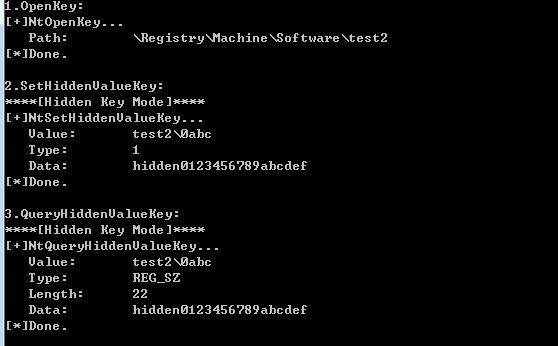
The program implements the following functions:
- Create a registry key value test2\0abc with content hidden0123456789abcdef
- Read the content of the registry key value test2\0abc
The runtime is as shown in the figure below
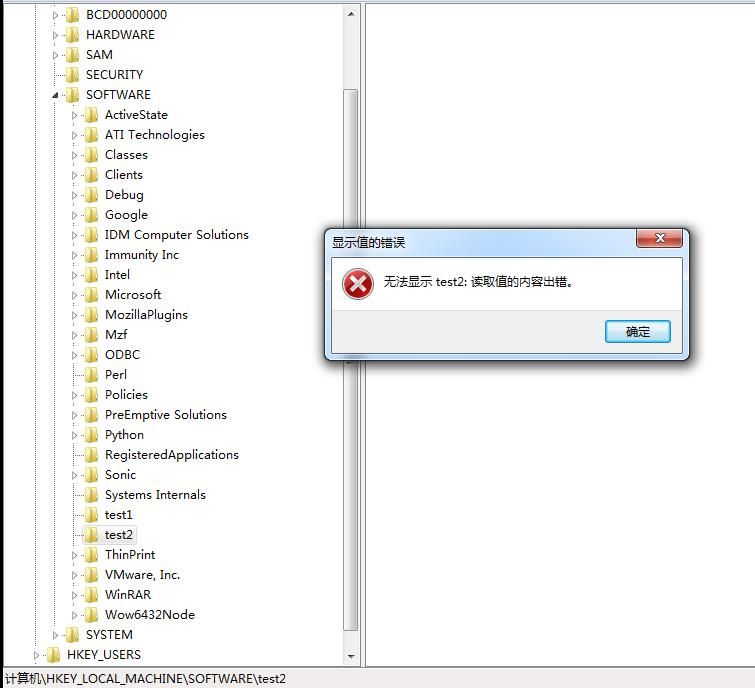
Using regedit.exe to query this key value, a pop-up prompts that it cannot be obtained, as shown in the figure below
Here we can make a bold attempt:
Since the "\0" in test2\0abc truncates the string, what happens if we create another key value named test2?
Create the registry key value test2 with content 0123456789abcdef, the key code is as follows:
hKey = MyOpenKey("\\Registry\\Machine\\Software\\test2"); |
Using regedit.exe to view the registry again, something interesting happens, as shown in the figure below
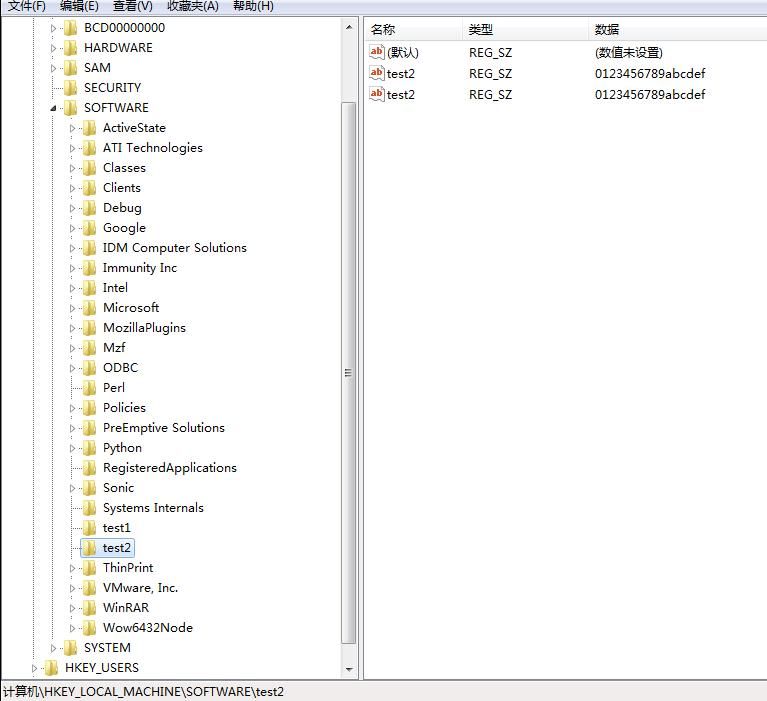
Querying the registry key value \\Registry\\Machine\\Software\\test2 no longer pops up an error, but displays two key values named test2, both with content 0123456789abcdef
We know that the registry does not allow creating two key values with the same name. The two key values with the same name generated in the above test are actually because one of them is incorrectly truncated, resulting in the same displayed key name and content, both being 0123456789abcdef (actually the content is hidden0123456789abcdef)
Thus, we have another method to "hide" registry entries. Compared to the previous method of filling "\0" at the beginning, the biggest advantage of this hiding method is that using regedit.exe to view this key value does not pop up an error, providing better concealment and deception, while having the same content as a normal key value
Comparison as shown in the figure below
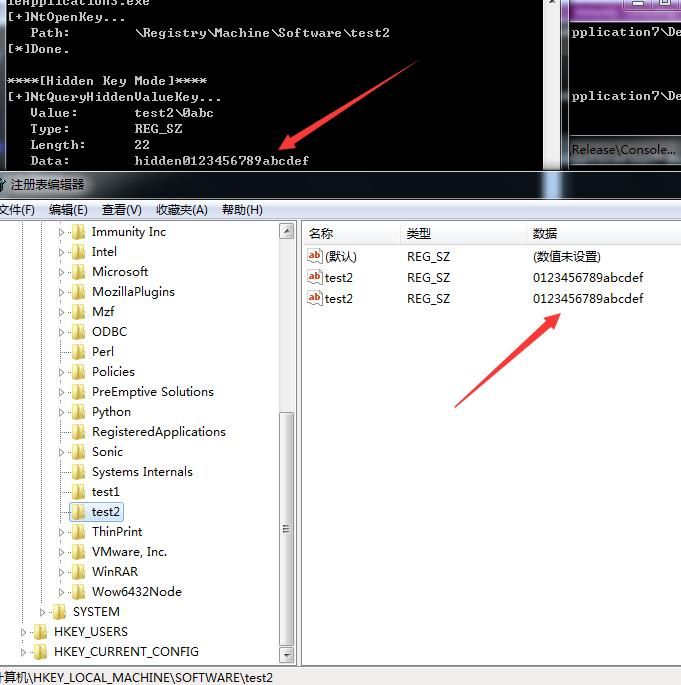
The displayed key value content is 0123456789abcdef, but the actual content is hidden0123456789abcdef
0x05 Can other Native APIs (such as NtCreateFile) be applied?
---
Referencing the implementation approach of NtCreateKey, test other Native APIs, such as NtCreateFile, to see if the same issue exists when creating files?
Using NtCreateFile to create a special file: \0c:\1\test.txt, key code is as follows:
HMODULE hModule = NULL; |
Return error c000003b, indicating STATUS_OBJECT_PATH_SYNTAX_BAD
Debug the program, trace to InitializeObjectAttributes, and examine the parameters of the ObjectAttributes structure, as shown in the figure below
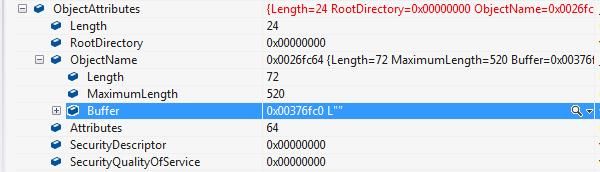
Examine the content of Buffer in memory, as shown in the figure below
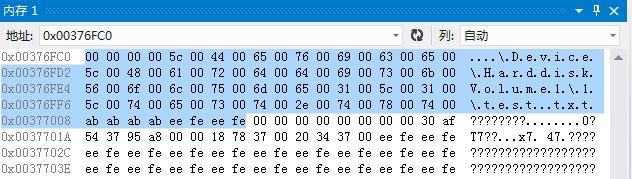
Same parameter structure as used in NtCreateKey implementation
For NtCreateFile, currently not applicable
0x06 Exploitation Ideas and Detection
---
The registry hiding technique used by Poweliks has a major issue: it triggers an error pop-up when opened with regedit.exe. Inserting \0 in the middle of a string and creating a key with the same name as the substring before \0 can avoid this problem
The detection approach is to identify such unusual registry keys and check if two keys with the same name exist under a registry key
If this method is used to create registry keys in startup locations, Autoruns can detect them
0x07 Summary
---
This article further tests the registry hiding techniques used by Poweliks, shares a more covert exploitation method, and provides ideas for defense and detection. More testing is needed for the application of other Native APIs.


