
0x00 Preface
---
In penetration testing, fileless techniques such as code injection, memory execution, registry manipulation, PowerShell, or WMI are often used to increase the difficulty of detection and analysis.
From a penetration perspective, under certain conditions, achieving a completely 'fileless' process may not be possible, requiring files to be written to the hard disk, which can easily be forensically examined and analyzed.
Recently, I came across an article introducing a method using virtual disks, which precisely addresses this issue.
From a defensive standpoint, how can such methods be detected and intercepted?
Reference article address:
https://diablohorn.com/2018/08/06/creating-a-ram-disk-through-meterpreter/
This article will test it, introduce implementation details, resolve unresolved issues from the original text, combine exploitation ideas, and analyze detection and interception methods.
0x01 Introduction
---
This article will cover the following:
- Implementation Principles
- Method Reproduction
- Remove residual hard drive icons
- Support for folder operations
- Forensic analysis
- Detection and interception
0x02 Implementation Principle
---
In Windows systems, deleting a file on a hard drive only modifies the file's MFT. If the file content has not been overwritten, the file can be recovered.
For detailed information on deletion and recovery, refer to the previous article 'Penetration Techniques—File Recovery and Deletion in Windows Systems'.
If a virtual disk is used to map memory locally and create a RAM disk, its usage is no different from a real hard drive, and it offers the following two advantages:
- No write operations are performed on the hard drive, eliminating the possibility of hard drive file recovery.
- Files in the RAM disk are automatically deleted after a system reboot.
0x03 Method Reproduction
---
Reproduce the implementation method described in the article at:
https://diablohorn.com/2018/08/06/creating-a-ram-disk-through-meterpreter/
ImDisk
Open-source tool capable of creating virtual disks, introduction and download address:
http://www.ltr-data.se/opencode.html/
A prompt dialog will appear during installation, as shown in the figure below
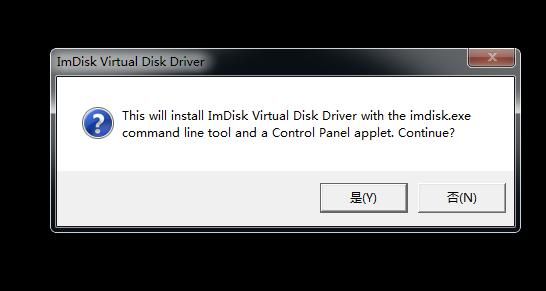
After successful installation, the driver file imdisk.sys is released under C:\Windows\System32\drivers\, and the startup program imdisk.exe along with its support files are released under C:\Windows\System32\
After successful installation, enter imdisk in the command line to start ImDisk, and the command description will be echoed
Secondary utilization
Author DiabloHorn leverages the open-source tool ImDisk for secondary utilization, enabling command-line installation, loading, and creation/deletion of virtual disks
Preparation work:
1. Write code to implement driver installation, loading, and creation/deletion of virtual disks
Code address:
https://github.com/DiabloHorn/cliramdisk
My test compilation environment is VS2015. Save the contents included in the header file stdafx.h in the project to cliramdisk.cpp, compile directly to pass, and generate the file cliramdisk.exe
2. Install ImDisk on the test system to obtain the driver file imdisk.sys
After installation, copy the driver file imdisk.sys to the location `C:\Windows\System32\drivers\`
It is worth noting that the driver file imdisk.sys contains a digital signature
3. Write a registry file to add driver file information
The content is as follows:
Windows Registry Editor Version 5.00 |
Save as imdiskdriver.reg
Actual testing
1. Import registry, add driver file information
reg import imdiskdriver.reg |
2. Upload driver file
copy imdisk.sys C:\Windows\System32\drivers\ |
3. Load driver file
cliramdisk.exe i |
4. Create virtual disk (size 200MB)
cliramdisk.exe c 209715200 R: 0 |
5. Format as NTFS
format R: /FS:NTFS /Q /y |
Afterwards, files can be uploaded to drive R, and they will be automatically deleted after system reboot
6. View virtual disk
cliramdisk.exe l |
7. Delete virtual disk
cliramdisk.exe d 0 |
Incomplete deletion, disk icon still displayed
As shown in the figure below
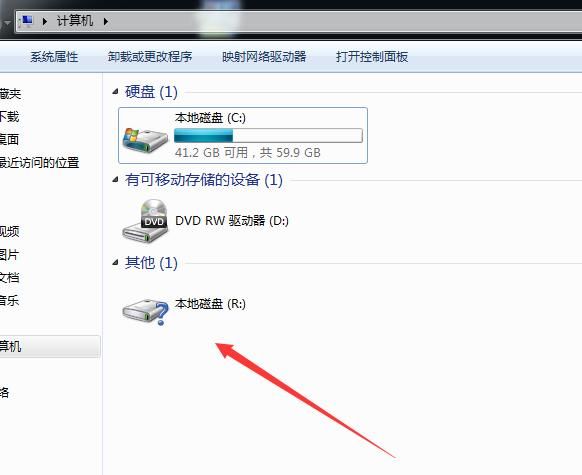
Note:
This bug does not exist when using ImDisk to delete virtual disks
Shortcomings
- Incomplete deletion, disk icon still displayed
- Does not support creating virtual disks for folders
0x04 Optimization
---
To address the two shortcomings mentioned in the previous section, consider using ImDisk directly, but command-line installation and usage of ImDisk need to be implemented
This presents one solution
Preparation Work
1. Install ImDisk on the test system to obtain support files
- C:\Windows\System32\drivers\imdisk.sys
- C:\Windows\System32\imdisk.exe
- C:\Windows\System32\imdisk.cpl
2. Write code to implement driver installation
Code repository:
https://github.com/DiabloHorn/cliramdisk
The driver loading functionality in the code can be used directly here
Note:
All files required for testing have been uploaded to GitHub. Download link:
An open-source project
Actual Testing
1. Add registry entries to include driver file information
reg add hklm\SYSTEM\CurrentControlSet\Services\ImDisk /v DisplayName /t REG_SZ /d "ImDisk Virtual Disk Driver" |
2. Upload driver file
copy imdisk.sys C:\Windows\System32\drivers\ |
3. Load driver file
cliramdisk.exe i |
4. Create virtual disk Z: with size 10MB, automatically format as NTFS
imdisk -a -s 10M -m Z: -p "/FS:NTFS /Y /Q" |
5. Delete virtual disk Z:
imdisk -d -m Z: |
Note:
No bug of hard disk icon remaining
6. Folder Operations
(1) Creation
md C:\Windows\Temp\test |
Note:
Requires an empty folder, otherwise creation will fail
(2) Deletion
Unmount virtual disk:
imdisk -d -m C:\Windows\Temp\test |
Or directly delete the folder:
rd C:\Windows\Temp\test |
7. Uninstall Driver File
cliramdisk.exe u |
0x05 Forensic Analysis
---
1. Create a virtual disk for the folder
md C:\Windows\Temp\test |
2. Write test file
echo AAAAAAAAAAAAAAAAA>C:\Windows\Temp\test\1.txt |
3. Use WinHex to view file content
Download link:
http://www.x-ways.net/winhex/
Select Tools -> Open Disk, choose drive letter c:
Locate the folder C:\Windows\Temp\test
Unable to find test file 1.txt
Proving the file was not written to the hard disk
0x06 Detection and Interception
---
Cannot retrieve attacker-uploaded files by recovering hard disk files
Considering the exploitation approach, monitoring driver files and intercepting the loading of the driver file imdisk.sys can be considered
0x07 Summary
---
This article tested the method of using virtual hard disks to achieve 'fileless' execution, addressing two issues (incomplete deletion and lack of folder support). The conclusion is verified: files in virtual hard disks cannot be retrieved by restoring hard disk files.
Finally, combining the exploitation approach, methods for detection and interception are analyzed.


