
0x00 Preface
---
In penetration testing, file recovery and deletion are like spear and shield.
File recovery refers to restoring deleted files on the target system, while file deletion means removing tools used on the target system to prevent recovery.
0x01 Introduction
---
This article will cover the following topics:
- Principles of file deletion
- Principles of file recovery
- Using PowerForensics for file recovery
- Using SDelete for file deletion
- Can PowerForensics recover files after deletion with SDelete?
- Preventing file recovery through file overwriting
- Enumerate all processes, search for handles to specific files, release those handles to free file locks, and achieve file deletion
- Program implementation details and open-source code
0x02 Principles of File Deletion and Recovery
---
References:
http://www.ntfs.com/ntfs_basics.htm
Basic Concepts
Most Windows file systems use NTFS (New Technology File System) technology
Each file in NTFS corresponds to a Master File Table (MFT)
The MFT serves as a file index, storing file attributes
Intuitive understanding of file deletion:
Only modifies the MFT (i.e., file attributes), without altering the deleted file's content
Intuitive understanding of file recovery:
Restoring the file's MFT is sufficient
Simple Test
Create a new file test.txt and write the content 0123456789
Using tool: WinHex
Download link:
http://www.x-ways.net/winhex/
Select Tools -> Open Disk, choose the drive letter
Locate the file test.txt, right-click -> Navigation -> Seek FILE Record
View the MFT information of test.txt, as shown below

The structure of MFT is as follows
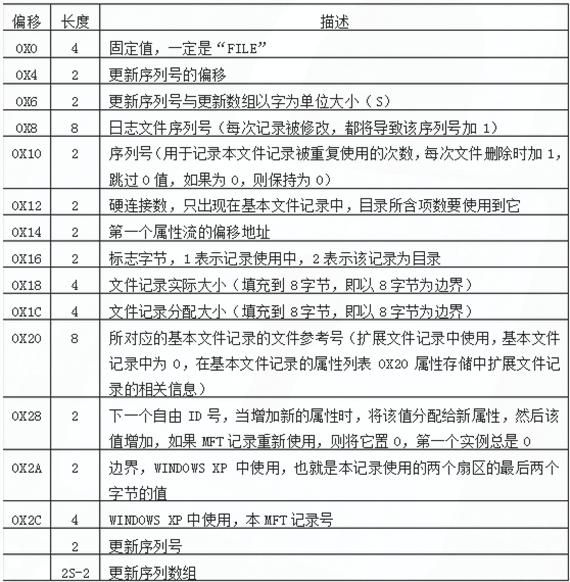
Note:
Screenshot taken from http://www.blogfshare.com/detail-ntfs-filesys.html
Next, delete the file test.txt and empty the files in the Recycle Bin
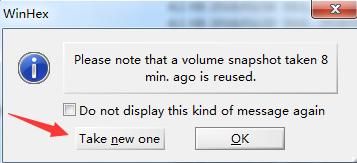
Use WinHex to view the hard disk content again, close the current drive, reselect Tools -> Open Disk, choose the drive letter
A dialog box prompts, select to update the snapshot, as shown below
Review the MFT structure again, as shown in the figure below

Comparison reveals the following differences:
- Offset 0x08
- Offset 0x10, value increased by 1
- Offset 0x16, changed from 1 to 0
Select 'Recover File' in the WinHex interface to successfully restore the file
Note:
Successful recovery depends on the file not being overwritten
In summary, the principle of file recovery can be simply understood as follows:
File deletion only modifies the file's MFT; if the file content has not been overwritten, the file can be recovered
0x03 Using PowerForensics for File Recovery
---
There are various file recovery software tools; here is one that uses PowerShell for file recovery: PowerForensics
Project address:
https://github.com/Invoke-IR/PowerForensics/
Download URL:
https://github.com/Invoke-IR/PowerForensics/releases
Note:
PowerForensicsv2.zip corresponds to PowerShell v2, the default version for Win7 and Server 2008
For tool usage, refer directly to xpn's blog:
https://blog.xpnsec.com/offensive-forensics/
To obtain a list of all recoverable files, use the following PowerShell command:
powershell -executionpolicy bypass |
To recover a specific file C:\test.txt and save it as recovered.txt:
$file = Get-ForensicFileRecord | Where {$_.FullName -eq "C:\test.txt"} |
0x04 Preventing File Recovery
---
1. Using the tool SDelete
Download link:
https://docs.microsoft.com/en-us/sysinternals/downloads/sdelete
The deletion command is as follows:
sdelete64.exe -accepteula C:\test.txt |
2. Implementation via C++
Based on the principle analysis in 0x01, we know that overwriting the original file can prevent its recovery.
The simplest implementation approach:
Modify the content of the original file by filling it with random strings, then delete the file.
I wrote a simple test code that first fills the file to be deleted with zeros, then deletes the file. Even if the file is recovered, its content will be all zeros. The reference C code is as follows:
#include |
0x05 Release File Lock
---
When actually deleting files, it's common to encounter situations where files cannot be deleted because they are in use.
Here we need to find the process occupying the file, obtain the file handle, and release the handle before deleting the file.
The implementation approach is as follows:
- Elevate program to debug privileges
- Enumerate all processes
- Obtain handles to specified files
- Release those handles
When mapping this to actual program implementation, the following issues require attention:
1. Elevate to debug privilege
BOOL EnableDebugPrivilege(BOOL fEnable) |
2. Enumerate all processes to obtain handles to the specified file
Use the kernel API NtQuerySystemInformation to query SystemHandleInformation and obtain handles from all processes
Filter out handles of type file: ObjectTypeNumber = 0x1e
If the process corresponding to a handle cannot be opened, set a flag and avoid repeatedly attempting to open that process
Filter out handles that may cause hangs, using the API WaitForSingleObject for judgment
3. Release handles
Handles obtained via the kernel API NtQuerySystemInformation querying SystemHandleInformation are pseudo-handles and cannot be directly released
Use the API DuplicateHandle to convert pseudo-handles into real handles
Function prototype as follows:
BOOL WINAPI DuplicateHandle( |
The 7th parameter is set to DUPLICATE_CLOSE_SOURCE, indicating that the handle in the source process will be released
Specific parameters are as follows:
DuplicateHandle(processHandle, (HANDLE)handle.Handle, GetCurrentProcess(), &dupHandle, 0, 0, DUPLICATE_CLOSE_SOURCE) |
The complete code has been open-sourced, address as follows:
An open-source project
The code implements enumerating all processes in the current system, finding handles to specified files, and releasing them
It can not only be used to release file locks but also to disable certain logging functions
For example, if the handle to system.evtx is released, the logging service cannot write logs to system.evtx, causing logs under system.evtx to become invalid
0x06 Summary
---
This article briefly introduces the principles of file deletion and recovery, testing tools, writing programs to prevent file recovery through file overwriting, addresses file occupancy issues, and provides open-source code.
From a penetration perspective, one approach is to attempt to recover files from the target system, while the other is to securely delete one's own tools to prevent recovery.
From a defensive standpoint, important files can be securely deleted using the tool SDelete.


